Evgeny Shvarov · Oct 9, 2020 go to post

Rob! Correct me if I'm wrong, QEWD-conduit uses InterSystems node.js driver to talk to IRIS, right?  And QEWD-conduit gets Native API bonus for this.

The REST API description requests the usage of InterSystems REST API to have IRIS be a REST API server.

As for the iris docker bonus - we didn't manage yet to run QEWD-conduit with any iris-docker image available according to the QEWD  instruction.

Evgeny Shvarov · Oct 7, 2020 go to post

Here is the set of updated ZPM images with ZPM 0.2.7:

intersystemsdc/iris-community:2020.3.0.221.0-zpm

intersystemsdc/iris-community:2020.2.0.204.0-zpm

intersystemsdc/irishealth-community:2020.3.0.221.0-zpm

intersystemsdc/irishealth-community:2020.2.0.204.0-zpm

And to launch IRIS do:

docker run --rm --name my-iris -d --publish 9091:1972 --publish 9092:52773 intersystemsdc/iris-community:2020.3.0.221.0-zpm

docker run --rm --name my-iris -d --publish 9091:51773 --publish 9092:52773 intersystemsdc/iris-community:2020.2.0.204.0-zpm

docker run --rm --name my-iris -d --publish 9091:1972 --publish 9092:52773 intersystemsdc/irishealth-community:2020.3.0.221.0-zpm

docker run --rm --name my-iris -d --publish 9091:51773 --publish 9092:52773 intersystemsdc/irishealth-community:2020.2.0.204.0-zpm

And for terminal do:

docker exec -it my-iris iris session IRIS

and to start the control panel:

http://localhost:9092/csp/sys/UtilHome.csp

To stop and destroy container do:

docker stop my-iris
Evgeny Shvarov · Oct 6, 2020 go to post

Hi Rob!

Is there a way to run QEWD-Conduit using IRIS Community Edition docker image?

Evgeny Shvarov · Oct 2, 2020 go to post

Another "Realworld" ) That's funny )

Looking forward to seeing how two "realworlds" will compete with each other) 

Evgeny Shvarov · Sep 30, 2020 go to post

Thanks for the reply, Alexey.

my topic is an attempt to find the value in %Status why people use it even for their own methods.

IMHO it steals the option of return values from methods and code looks dirty with “mandatory” $$$TOE or $$$ISERR for every call of the method with %Status

Evgeny Shvarov · Sep 30, 2020 go to post

AFAIK Try/catch indeed slows a bit the execution (@Dan.Pasco is it true?)

And try/catch shouldn’t be presented in every method - it could be somewhere on top and in the places where you need to catch errors.

I like your answer but for better understanding it deserves a sample code to see how do you manage error scenarios.

we really lack of good templates for beginners on how to better handle errors in serious project.

Evgeny Shvarov · Sep 29, 2020 go to post

Thanks for the insights, @Herman Slagman!

$ZT + Label is better than try/catch

%Status is better than try/catch too.

why %Status is better than throw ("something went wrong") approach?

But, how to do you track errors of your solutions happen on a customer side? There is an elegant way to manage this with try/catch:

catch e {

 do e.log() // store the error and stack in Application Errors

// handle error

} 

How could you manage this with %Status and $ZT approach?

Evgeny Shvarov · Sep 28, 2020 go to post

Thanks, Jon!

Why try-catch doesn't work well without finally? I think finally is only for the cases when you need to free resources taken, isn't it?

Evgeny Shvarov · Sep 28, 2020 go to post

Thanks for the answer, Gertjan!

May I ask you, why don't you like try/catch? Is it slow?

Imho it has all the error and stack information, what's wrong with try/catch?

Evgeny Shvarov · Sep 28, 2020 go to post

I think if the method should return something else, it should return not %Status but the value.

Evgeny Shvarov · Sep 27, 2020 go to post

Thanks, Ben!

This is another good topic for discussion on should the test code be included in the production

Evgeny Shvarov · Sep 25, 2020 go to post

What is the easy way to add such snippets to my VSCode?

Should it be a yet-another VSCode extension? 

Evgeny Shvarov · Sep 25, 2020 go to post

I agree on VSCode as a tool to use it. But what are the ideas on advertising and making improvements? A git repository then?

Evgeny Shvarov · Sep 24, 2020 go to post

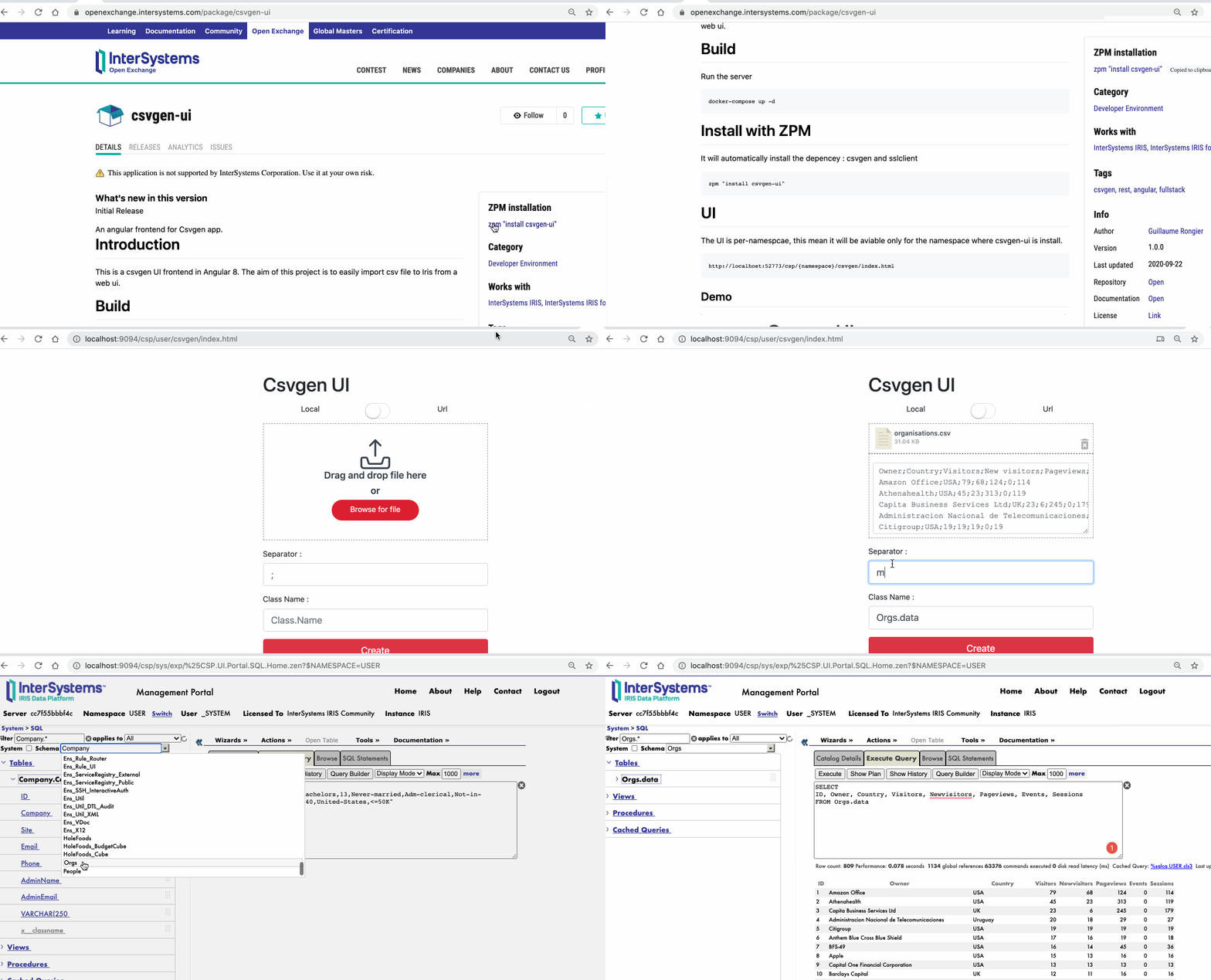
BTW, @Guillaume Rongier recently published an amazing example of a full-stack app: csvgen-ui.

You can install it with zpm "install csvgen-ui" and it gives you the option to import any csv to IRIS just with drag-n-drop.  Here is the demo: