
Your may not realize it, but your InterSystems Login Account can be used to access a very wide array of InterSystems services to help you learn and use InterSystems IRIS and other InterSystems technologies more effectively. Continue reading to learn more about how to unlock new technical knowledge and tools using your InterSystems Login account. Also - after reading, please participate in the Poll at the bottom, so we can see how this article was useful to you!
What is an InterSystems Login Account?
.png)
An InterSystems Login account is used to access various online services which serve InterSystems prospects, partners, and customers. It is a single set of credentials used across 15+ externally facing applications. Some applications (like the WRC, or iService) require specific activation for access to be granted by the account. Chances are there is are resources which will help you but you didn't know about - make sure to read about all of the options and try out a new tool to help up your technical game!!
Application Catalog
You can view all services available to you with your InterSystems Login account by visiting that InterSystems Application Catalog, located at: https://Login.InterSystems.com. This will list only those applications or services to which you currently have access. It remembers your most frequently used applications and lists them at the top for your convenience.
.png)
Make sure to Bookmark the page for easy access to all of these tools in your InterSystems Login Account toolbox!
Application Details
Now it's time to get into the details of the individual applications and how they can help you as a developer working with InterSystems technologies! Read on and try to find a new application to leverage for the first time in order to improve your efficiency and skills as a developer....
.png) Getting Started - gettingstarted.intersystems.com
Getting Started - gettingstarted.intersystems.com
Audience
- Anyone wishing to explore using InterSystems IRIS® data platform
Description
- Learn how to build data-intensive, mission-critical applications fast with InterSystems IRIS.
- Work through videos and tutorials leveraging SQL, Java, C#/.Net, Node.js, Python, or InterSystems ObjectScript.
- Use a free, cloud-based, in-browser Sandbox -- IRIS+IDE+Web Terminal—to work through tutorials.
How it helps Up Your Technical Game
- Quickly get oriented with InterSystems technology and see it in action with real working code and examples!
- Explore the use of other popular programming languages with InterSystems IRIS.
.png) Online Learning - learning.intersystems.com
Online Learning - learning.intersystems.com
Audience
- All users and potential users of InterSystems products
Description
- Self-paced materials to help you build and support the world's most important applications:
- Hands-on exercises
- Videos
- Online Courses
- Learning Paths
How it helps Up Your Technical Game
- Learn, learn, learn!!
- Nothing will help you become a more effective developer faster than following a skilled technical trainer as they walk you through new concepts to use in your InterSystems IRIS projects!
.png) Documentation - docs.intersystems.com
Documentation - docs.intersystems.com
Audience
- All users and potential users of InterSystems products
Description
- Documentation for all versions of our products
- Links where needed to external documentation
- All recent content, is fed through our new search engine.
- Search page lets you filter by product, version, and other facets.
- Certain docs require authorization (via InterSystems Login account):
- AtScale docs available to Adaptive Analytics customers
- HealthShare docs are available to HealthShare users
- Make sure to make use of the new dynamic Upgrade Impact Checklist within the Docs server!
How it helps Up Your Technical Game
- Quickly make use of class reference material and API documentation.
- Find example code.
- Read detailed usage documentation for parts of InterSystems IRIS into which you need a deeper dive.
- Request additional detail or report issues direct from within the documentation pages via the "Feedback" feature.
.png) Evaluation - evaluation.intersystems.com
Evaluation - evaluation.intersystems.com
Audience
- Those wishing to download InterSystems software or licenses for evaluation or development use
Description
- Downloads of InterSystems IRIS and InterSystems IRIS for Health.
- Anybody can download Community Edition kits.
- Existing customers can also request a powerful license to evaluate enterprise features.
- Preview versions are available pre-release.
- Early Access Program packages allow people to provide feedback on future products and features.
How it helps Up Your Technical Game
- Try out Preview versions of software to see how new features can help to accelerate your development.
- Test run Enterprise features by requesting an evaluation license.
- Make sure all developers in your organization have the latest version of InterSystems IRIS installed on their machines.
- Provide feedback to InterSystems Product Management about Early Access Features to ensure that they will meet your team's needs once they are fully released.
.png) Developer Community - community.intersystems.com
Developer Community - community.intersystems.com
Audience
- Anyone working with InterSystems technology (InterSystems employees, customers, partners, and prospects)
Description
- Monitor announcements related to InterSystems products and services.
- Find articles on a variety of technical topics.
- Ask questions and get answers from the community.
- Explore job postings or developers available for hire.
- Participate in competitions featuring $1000’s in cash prizes.
- Stay up to date concerning all things InterSystems!
How it helps Up Your Technical Game
- With access to the leading global experts on InterSystems technology, you can learn from the best and stay engaged with the hottest questions, trends and topics.
- Automatically get updates in your inbox on new products, releases, and Early Access Program opportunities.
- Get help from peers to answer your questions and move past blockers.
- Have enriching discussions with InterSystems Product Managers and Product Developers - learn from the source!
- Push your skills to the next level by sharing technical solutions and sharing code and gaining from feedback from others.
.png) InterSystems Ideas - ideas.intersystems.com
InterSystems Ideas - ideas.intersystems.com
Audience
- Those looking to share ideas for improving InterSystems technology.
Description
- Post ideas on how to make InterSystems technology better.
- Read existing reviews and up-vote or engage in discussions.
- InterSystems will take the most popular ideas into account for future product roadmaps.
How it helps Up Your Technical Game
- See your ideas and needs turned into a reality within InterSystems products or open source libraries.
- Become familiar with the ideas of your peers and learn to use InterSystems products in new ways.
- Implement ideas suggested by others, new exploring parts of InterSystems technology.
.png) Global Masters - globalmasters.intersystems.com
Global Masters - globalmasters.intersystems.com
Audience
- Those wishing to advocate for InterSystems technology and earn badges and swag
Description
- Gamification platform designed for developers to learn, stay up-to-date and get recognition for contributions via interactive content.
- Users receive points and badges for:
- Engagement on the Developer Community
- Engagement on the Open Exchange
- Publishing posts to social media about InterSystems products and technologies
- Trade in points for InterSystems swag or free training
How it helps Up Your Technical Game
- Challenges bring to your attention articles or videos which you may have missed on the Developer Community, Learning site or YouTube channel - constantly learning new things to apply to your projects!
.png) Open Exchange - openexchange.intersystems.com
Open Exchange - openexchange.intersystems.com
Audience
- Developers seeking to publish or make use of reusable software packages and tools
Description
- Developer tools and packages built with InterSystems data platforms and products.
- Packages are published under a variety of software licenses (mostly open source).
- Integrated with GitHub for package versioning, discussions, and bug tracking.
- Read and submit reviews and find the most popular packages.
- Developers can submit issues and make improvements to packages via GitHub pull requests to help push community software forward.
- Developers can see statistics of traffic and downloads of the packages they published
How it helps Up Your Technical Game
- Don't reinvent the wheel! Use open source packages created and maintained by the InterSystems Community to solve generic problems, leaving you to focus on developing solutions needed specifically by your business.
- Contributing to open source packages is a great way to receive constructive feedback on your work and refine your development patterns.
- Becoming a respected contributor to open source projects is a great way to see demand increase for your skills and insights.
.png) WRC - wrc.intersystems.com
WRC - wrc.intersystems.com
Audience
- Issue tracking system for all customer reported problems on InterSystems IRIS and InterSystems HealthShare. Customers with SUTA can work directly with the application.
Description
- Worldwide Response Center application (aka “WRC Direct”).
- Issue tracking system for all customer reported problems.
- Open new requests.
- See all investigative actions and add information and comments about a request.
- See statistical information about your support call history.
- Close requests and provide feedback about the support process.
- Review ad-hoc patch files.
- Monitor software change requests.
- Download current product and client software releases.
How it helps Up Your Technical Game
- InterSystems Support Engineers can help you get past any technical blocker you have concerning development or systems management with InterSystems products.
- Report bugs to ensure that issues are fixed in future releases.
.png) iService - iservice.intersystems.com
iService - iservice.intersystems.com
Audience
- Customers requiring support under an SLA agreement
Description
- A support ticketing platform for our healthcare, cloud and hosted customers.
- Allows for rule driven service-level agreement (SLA) compliance calculation and reporting.
- Provides advanced facet search and export functionality.
- Incorporates a full Clinical Safety management system.
How it helps Up Your Technical Game
- InterSystems Support Engineers can help you get past any technical blocker you have concerning development or systems management with InterSystems healthcare or cloud products.
- Report bugs to ensure that issues are fixed in future releases.
.png) ICR - containers.intersystems.com
ICR - containers.intersystems.com
Audience
- Anyone who wants to use InterSystems containers
Description
- InterSystems Container Registry
- A programmatically accessible container registry and web UI for browsing.
- Community Edition containers available to everyone.
- Commercial versions of InterSystems IRIS and InterSystems IRIS for Health available for supported customers.
- Generate tokens to use in CICD pipelines for automatically fetching containers.
How it helps Up Your Technical Game
- Increase the maturity of your SDLC by moving to container-based CICD pipelines for your development, testing and deployment!
.png) Partner Directory - partner.intersystems.com
Partner Directory - partner.intersystems.com
Audience
- Those looking to find an InterSystems partner or partner’s product
- Partners looking to advertise their software and services
Description
- Search for all types of InterSystems partners:
- Implementation Partners
- Solution Partners
- Technology Partners
- Cloud Partner
- Existing partners can manage their service and software listings.
How it helps Up Your Technical Game
- Bring in certified experts on a contract basis to learn from them on your projects.
- License enterprise solutions based on InterSystems technology so you don't have to build everything from scratch.
- Bring your products and services to a wider audience, increasing demand and requiring you to increase your ability to deliver!
.png) CCR - ccr.intersystems.com
CCR - ccr.intersystems.com
Audience
- Select organizations managing changes made to an InterSystems implementation (employees, partners and end users)
Description
- Change Control Record
- Custom workflow application built on our own technology to track all customizations to InterSystems healthcare products installed around the world.
- Versioning and deployment of onsite custom code and configuration changes.
- Multiple Tiers and workflow configuration options.
- Very adaptable to meet the specific needs of the phase of the project
How it helps Up Your Technical Game
- For teams authorized for its use, find and reuse code or implementation plans within your organization, preventing having to solve the same problem multiple times.
- Resolve issues in production much more quickly, leaving more time for development work.
.png) Client Connection - client.intersystems.com
Client Connection - client.intersystems.com
Audience
- Available to any TrakCare clients
Description
- InterSystems Client Connection is a collaboration and knowledge-sharing platform for TrakCare clients.
- Online community for TrakCare clients to build more, better, closer connections.
- On Client Connection you will find the following:
- TrakCare news and events
- TrakCare release materials, e.g. release documentation and preview videos
- Access to the most up-to-date product guides.
- Support materials to grow personal knowledge.
- Discussion forums to leverage peer expertise.
How it helps Up Your Technical Game
- Technical and Application Specialists at TrakCare sites can share questions and knowledge quickly - connecting with other users worldwide. Faster answers means more time to build solutions!
.png) Online Ordering - store.intersystems.com
Online Ordering - store.intersystems.com
Audience
- Operations users at selected Application partners/end-users
Description
- Allow customers to pick different products according to their contracts and create new orders.
- Allow customers to upgrade/trade-in existing orders.
- Submit orders to InterSystems Customer Operations to process them for delivery and invoicing.
- Allow customers to migrate existing licenses to InterSystems IRIS.
How it helps Up Your Technical Game
- Honestly, it doesn't! It's a tool used by operations personnel and not technical users, but it is listed here for completeness since access is controlled via the InterSystems Login Account ;)
Other Things to Know About your InterSystems Login Account
Here are a few more useful facts about InterSystems Login Accounts...
How to Create a Login Account
Users can make their own account by clicking "Create Account" on any InterSystems public-facing application, including:
- https://evaluation.intersystems.com
- https://community.intersystems.com
- https://learning.intersystems.com
Alternatively, the InterSystems FRC (First Response Center) will create a Login Account for supported customers the first time they need to access the Worldwide Response Center (WRC) or iService (or supported customers can also create accounts for their colleagues).
Before using an account, a user must accept the Terms and Conditions, either during the self-registration process or the first time they log in.
Alternative Login Options
.png)
Certain applications allow login with Google or GitHub:
This is the same InterSystems Login Account, but with authentication by Google or GitHub.
Account Profile
If you go to https://Login.InterSystems.com and authenticate, you will be able to access Options > Profile and make basic changes to your account. Email can be changed via Options > Change Email.
Resolving Login Account Issues
Issues with InterSystems Login Accounts should be directed to Support@InterSystems.com. Please include:
- Username used for attempted login
- Browser type and version
- Specific error messages and/or screenshots
- Time and date the error was received
 Open Exchange
.png)
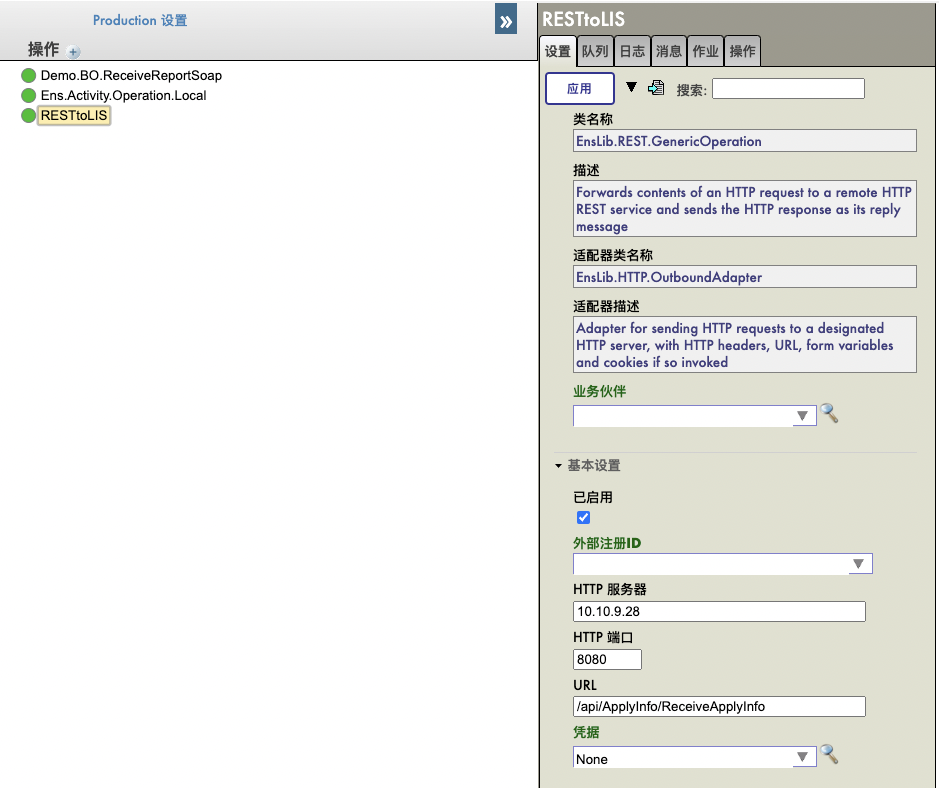
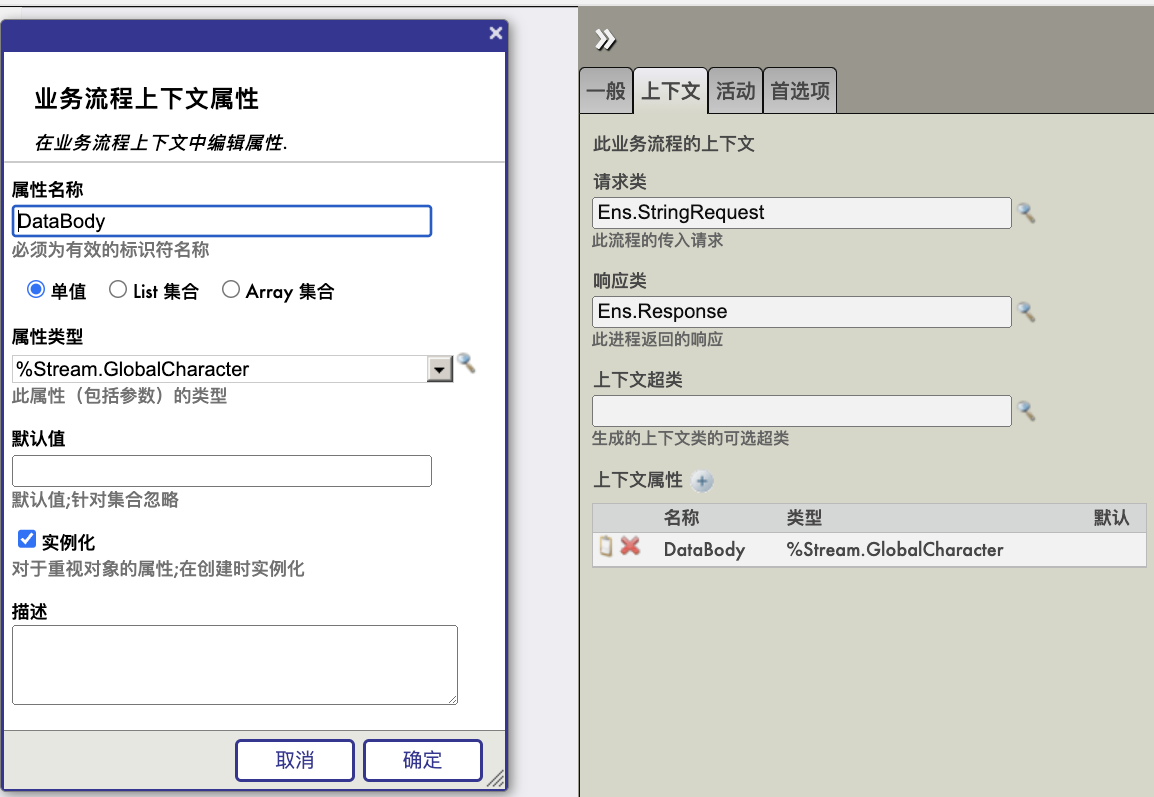 2. 在业务流程中增加一个代码流程(<code>),将请求消息的字符串数据写入上下文的DataBody字符流:
.png)
.png)
.png)
.png)
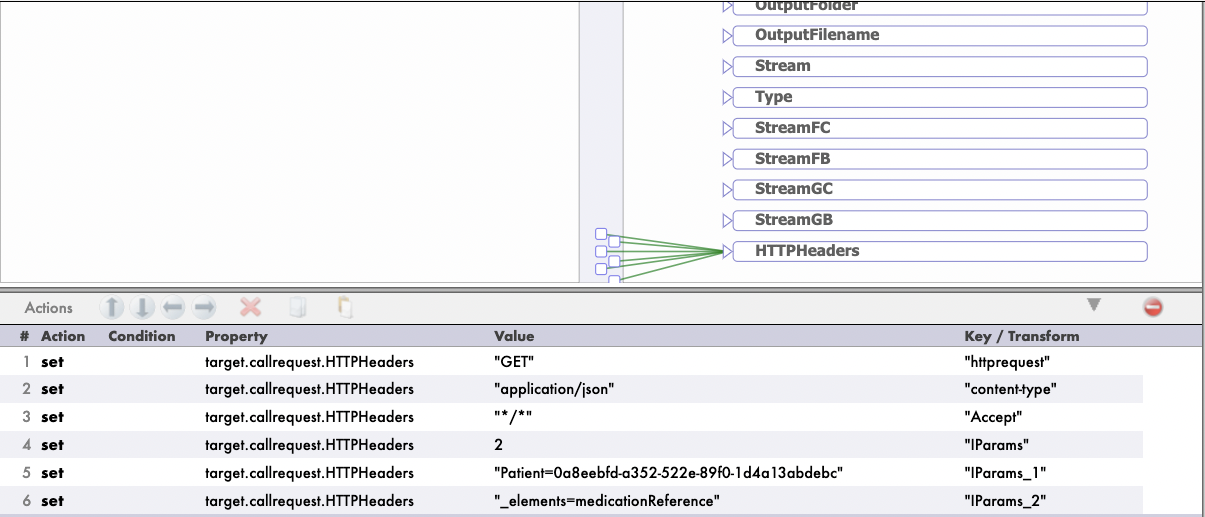
.png)
.png)
.png)
.png)
.png)
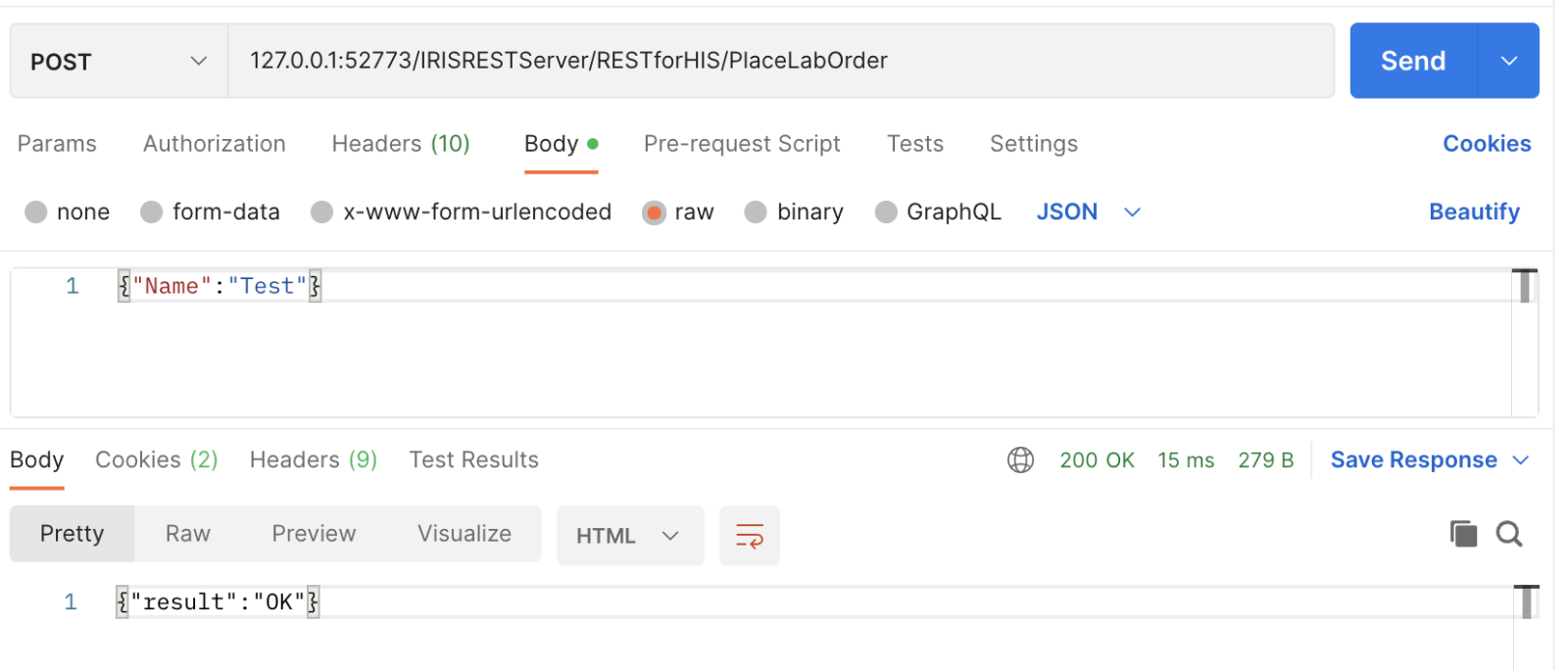
.png)
.png)
.png)
.png)