Perfect!
Thanks @Evgeny Shvarov
- Log in to post comments
Perfect!
Thanks @Evgeny Shvarov
Hi @Evgeny Shvarov
I'm creating a module.xml for iris-history-monitor, and during the process, a question came up.
When you run docker-compose up in my project, the Installer has an invoke tag to execute a class method.
But how can I make this works in the ZPM?
Thanks @Evgeny Shvarov
I'm working on an update in the IRIS History Monitor, using the new IRIS API and WebService in version 2019.4
Besides that, I include the module.xml file, making the ZPM installation possible.
Hi @Evgeny Shvarov
Thanks for the link to the updated article.
I found out the error using the Google Chrome DevTools.
I was trying to upload an image in a Published App.
In the DevTools console I got the error:
POST https://openexchange.intersystems.com/mpapi/packages/image/446 500 (Internal Server Error)
Using the Network tab, I could see the details in the Response:
{
    "errors":[ {
            "code":5001,
            "domain":"%ObjectErrors",
            "error":"ERROR #5001: You can't to change title image of the published package. Please, unpublish package or create draft.",
            "id":"GeneralError",
            "params":["You can't to change title image of the published package. Please, unpublish package or create draft."
            ]
        }
    ],
    "summary":"ERROR #5001: You can't to change title image of the published package. Please, unpublish package or create draft."
}
As a suggestion, this response could be shown in a toast message?
Hi @Evgeny Shvarov
The "Image URL" has some default dimension?
I would like to change my application icon.
Hi,
Jasper Reports will work just like Crystal Reports. It will generate PDF reports on demand.
But, you can take a look here:
https://www.jaspersoft.com/download
Maybe what you need it's more than the Jasper Studio.
If you want to develop/design reports. Jasper Studios is what you looking for.
Free and simple
Hi @Joao Palma
To add new widget to the dashboard page, edit the dashboard.csp
The CSP page use bootstrap, javascript, and just a few tags of <script language="Cache" runat="server">
To retrieve the information, the ClassMethod ##(VAR.infra.dashboard.dashboard). getMetrics() is called by the javascript function:
function getSamples() {
  $.getJSON(urlPreparacao, {
  method: "getMetrics"
}
The ClassMethod give to you the following properties:
In case none of the properties helps you, create a new ClassMethod with the information that you want and modify the dashboard.csp
Adding a new javascript function, it will retrieve the information that fits your needs.
I hope that helps.
Best Regards,
Henrique
Hi,
If you want to try J-Report, here is a link for the trial version:
https://www.jinfonet.com/product/download-jreport/
For an OpenSource alternative, you can take a look at Jasper Reports Community Edition
https://community.jaspersoft.com/
I used to work with Jasper Reports to generate PDF reports for my customers. To connect to InterSystems IRIS, use the ODBC and voilá.
As mentioned by @Carmen Logue , if you tell us your reporting requirements, that should be easier to discuss alternatives.
Hi,
All links are broken. They are pointing to the URL
https://intersystems.test/post/ ....
Hi Raj,
Just like others in the community, I use different IDE's.
I like the Caché Studio; it's fast, reliable, and useful for debugging.
My favorite IDE right now it's VSCode with the vscode-objectscript extension from Dmitry Maslennikov. To work with Docker, Github, and other extensions that make my workflow faster.
I tried to use Atelier, but comparing with others that I mentioned above, it's the last IDE for me.
Do you expect to be writing code in a web-based editor five years from now?
No, I agree with @Eduard Lebedyuk answer.
Regards,
Henrique
Hi Neerav,
Answering your question:
1. Yes, the only connection to Caché is the REST Services. The exception in IRIS History Monitor is the following line to show the Server Name | Instance Name :
#($piece($SYSTEM,":",1))# | #($piece($SYSTEM,":",2))#
2. If you don't want a docker environment, you can follow these steps :
https://community.intersystems.com/post/dashboard-iris-history-monitor#comment-73721I
3. The project IRIS History Dashboard was created using CSP files, but if you change, than to .html should work just fine. The only consideration is answer #1 above
4. Yes, there is no Angular or Node.js envolved.
Hi Neerav,
It's free for developing Non-commercial applications
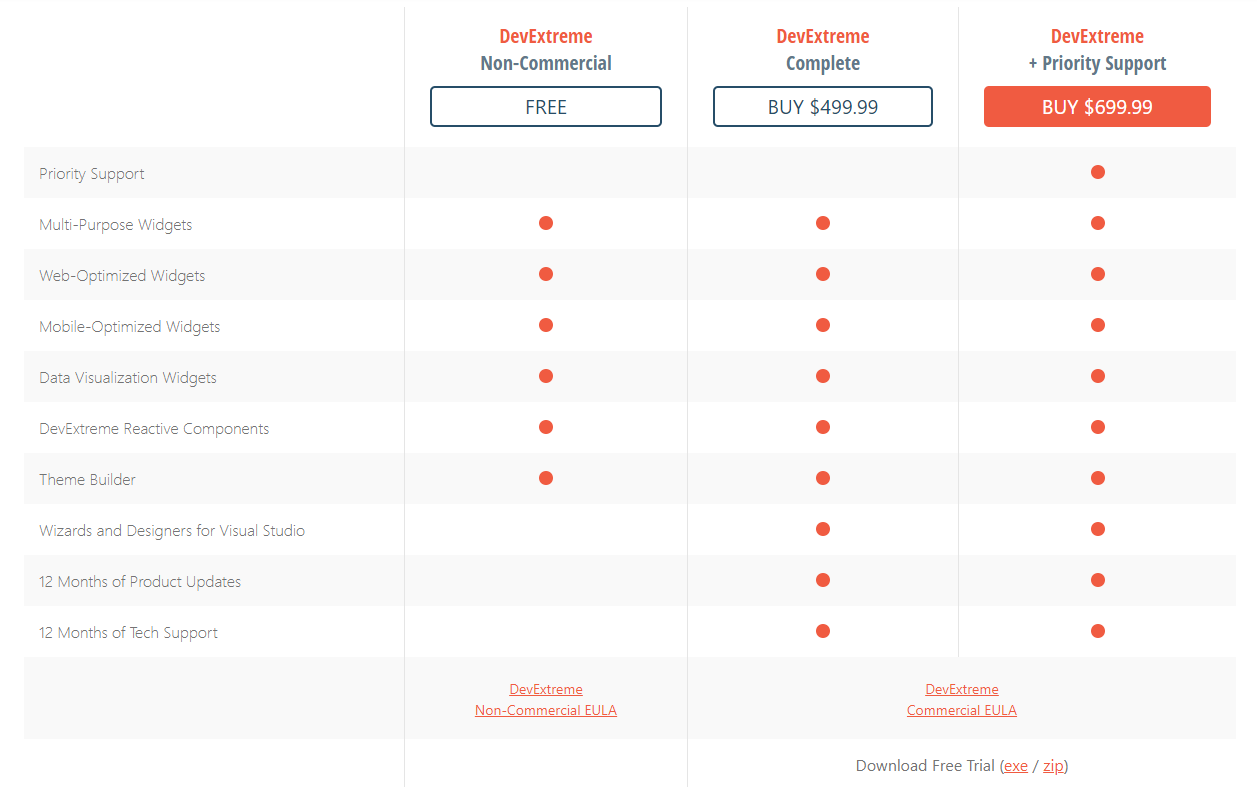
Neerav,
For my projects, I've been using this framework https://js.devexpress.com/; good HTML5 JavaScript Components with excellent features.
I'm developing using a more simple approach with:
- Simple HTML + jQuery
- REST services from Caché/InterSystems IRIS
DevExpress components are perfect for dealing with large datasets.
If you take a look at this project, you can see what the components are capable of:
https://community.intersystems.com/post/dashboard-iris-history-monitor
Best Regards,
Henrique
Excelente material! Parabéns
Hi @Evgeny Shvarov
Thanks for the news about the new API
I'm more than happy to create something using the new API.
@Andre Wessels thank you very much.
A friend of mine @VICTOR GALVAO used your approach and modified a little bit:
Using the parameters "1,8,3,2" you can get SERVER:INSTANCE:NAMESPACE>
Wow!
@Kyle Baxter simple and awesome trick! I'm working with InterSystems technologies since Caché 5.0 in 2003 and never figure this out!
This trick is helpful
Discussing the system monitoring with @Renan Lourenco He gave me the idea for a new Message Viewer.
So I decided to try in a different Namespace using Interoperability to use Manifest features a little more :)
Should I make it simpler to avoid people getting confused?
@Flávio Lúcio Naves Júnior maybe this article can help you:
https://community.intersystems.com/post/light-weight-excel-download
That's great!
@Julian Matthews the original project was in a non-docker environment.
But my suggestion is to put the folder Csp in the same path that you choose in: <Default Name="APPPATH" Dir="/opt/app/" />
Change the /opt/app/ to whatever directory you want.
Next, you can use the class Installer.cls to create the Database, Namespace, and Web Application.
So, run the following lines of the Dockerfile in the Caché Terminal:
Do $system.OBJ.Load("/opt/app/Installer.cls","ck")
Set sc = ##class(App.Installer).setup(,3)
Or you can also go totally Old School and create everything manually and import all classes and CSP files 
Let me know if you want a Studio Project in an XML format. So you can import CLS and CSP files easily using the Studio.
Thanks, @Evgeny Shvarov !
The community feedback it's very important, hoping to help and have opportunities to improve this project
I tried DataGrip in the past, and the software is outstanding.
Nowadays I'm using DBeaver Community Edition. It's an alternative to DataGrip, and it's free. 
DBeaver also has code completion for table/field names and standard SQL syntax.
.png)
Thanks Dmitry !
Hi,
Excellent extension ! My personal preference VSCode over Eclipse Atelier.
Just one thing. Anyone is editing CSP files using VSCode? How do you deal with syntax highlight for CSP ?
Hi Sivan,
Take a look at this video:
https://community.intersystems.com/post/developer-video-week-building-modern-web-applications
The video shows how you can create a web application using angular and Caché.
I would like a join code.
Thanks