GitHub does not offer CI functionality but can be integrated with CI engine.
- Log in to post comments
GitHub does not offer CI functionality but can be integrated with CI engine.
what do I need to have on a production host initially?
First of all you need to have:
They could be anywhere as long as they are accessible from production host.
After that on a production host (and on every separate host you want to use), you need to have:
After all these conditions are met you can create Continuous Delivery configuration in GitLab and it would build and deploy your container to production host.
In that case how Durable %SYS and Application data (USER NAMESPACE) appear on the production host for the first time?
When InterSystems IRIS container is started in Durable %SYS mode, it checks directory for durable data, if it does not exist InterSystems IRIS creates it and copies the data from inside the container. If directory already exists and contains databases/config/etc then it's used.
By default InterSystems IRIS has all configs inside.
Are you using JTDS driver?
If so, check out the FAQ.
First of all, you seem to pass user=domain\username (in your case user=osumc\CPD.Intr.Service), but FAQ offers domain parameter. Other parameter that seems promising is useNTLMv2.
Try to pass:
user=osumc;domain=CPD.Intr.Service;useNTLMv2=true
Try:
set st = ##class(%ZEN.Auxiliary.jsonProvider).%ConvertJSONToObject(responseStream,,.obj,1)
obj would become %ZEN.proxyObject. You can also create a class and parse json into object of that class.
In my opinion schema-less data (NoSQL, dynamic objects, globals) does not particularly exist. All that happens when you create schema-less data structures is that data validation and enforcing schema becomes someone else problem. Usually that means application programmer. That's why if possible, consider using strict schemas - the more assumptions about the data you can guarantee, the less validation client application need to do. Also process of data cleansing, reporting and so on become much easier.
That said there are some use cases where using schema-less data is the way to go:
To sum up, don't use schema if creating it and maintaining it would be a considerably more time-consuming affair than creating and maintaining application/reporting level data validation.
That said I see dynamic objects available in Caché mainly as a means to convert data from/to JSON.
With InterSystems IRIS we introduced DocDB - document database, based on dynamic objects, check it out.
Also mentioning @Stefan.Wittmann.
Is
1POST /test/ HTTP/1.1
actually a part of the request body?
If so, it's invalid json and you need to remove it from request body. What does
do httpRequest.EntityBody.OutputToDevice()
shows right before sending the request?
Other thought, iin property should be passed as string, not as number. To do that:
1. Create a class
Class MyApp.Request Extends %RegisteredObject {

Property iin As %String;

... other properties ...

}
2. After that instead of %ZEN.proxyObject use this object as a request body.
Note that %ZEN.Auxiliary.jsonProvider:%WriteJSONStreamFromObject method has a pFormat argument, which defaults to aceloqtw in %ObjectToJSON method. One of the flags, q means output numeric values unquoted even when they come from a non-numeric property and you don't need that.
So your code should look something like this:
Set Object = ##class(MyApp.Request).%New()
Set Object.iin="123132132"
Set Object.firstName=name
Set Object.lastName=surname
Set Object.middleName=middlename
Set Object.birthDate=birthDate
Set Object.contractType="Z001"
Set sc = ##class(%ZEN.Auxiliary.jsonProvider).%WriteJSONStreamFromObject(httpRequest.EntityBody, Object, , , , "aelotw")
Set sc = httpRequest.Post("", 2)Can you show the request itself via:
Set sc = httpRequest.Post("", 1)
Minor note, you don't need this line, remove it (it may be causing your error):
set sc = ##class(%ZEN.Auxiliary.jsonProvider).%ObjectToJSON(Object)
"Corrupt body: json: cannot unmarshal number into Go struct field CheckContractRequest.iin of type string".
Where you get this error? This looks like an error you get from the server you send your request to.
Can you get output from
Set sc = httpRequest.Post("", 1)

Set sc = httpRequest.Post("", 2)
And post it here.
I believe it's enough to have [Final] keyword set in deployed mode to give a developer a hint that this class should not be extended.
Well, it's mainly for developers who can't take a hint.
If you want to enforce this behaviour, I would add a check into each method as a first line , something like
if $this.%ClassName(1)'="My.Class" quit $$$ERROR(50000,"don't extend this class")
Good idea.
You can also try to add a method-generator, I believe when you have a deployed class with method generator it will not be able to compile a subclass without method generator's source (though I'm not sure).
At first it didn't work - method generator by default works while deployed. Then I added a class check to generator. Compilation was now failing, but other methods were actually compiled so I was able to call them. Finally I worked out this solution:
Class Package.Final [ Final ]
{

ClassMethod ANoExtend() [ CodeMode = objectgenerator, Final, ForceGenerate, Private ]
{
    quit:%class.Name="Package.Final" $$$OK
    quit $$$ERROR($$$GeneralError, "No extending")
}

ClassMethod ProtectedMethod() As %Status [ Private, ForceGenerate, GenerateAfter = ANoExtend ]
{
        // code
    quit $$$OK
}
}
This way each protected method should be recompiled but only after method-generator which always fails in subclasses. This way no code gets generated.
ReadOnly database could be made Read-Write. I assume developer has complete access to Cache and underlying OS.
meta data of class definition is included in the read only database
It is.
I don't have a %request.
Checked again and my suggested approach only works on production start, not host start, sorry.
I have a function which actually run "write $USERNAME" and if I run it from Studio returns the username!
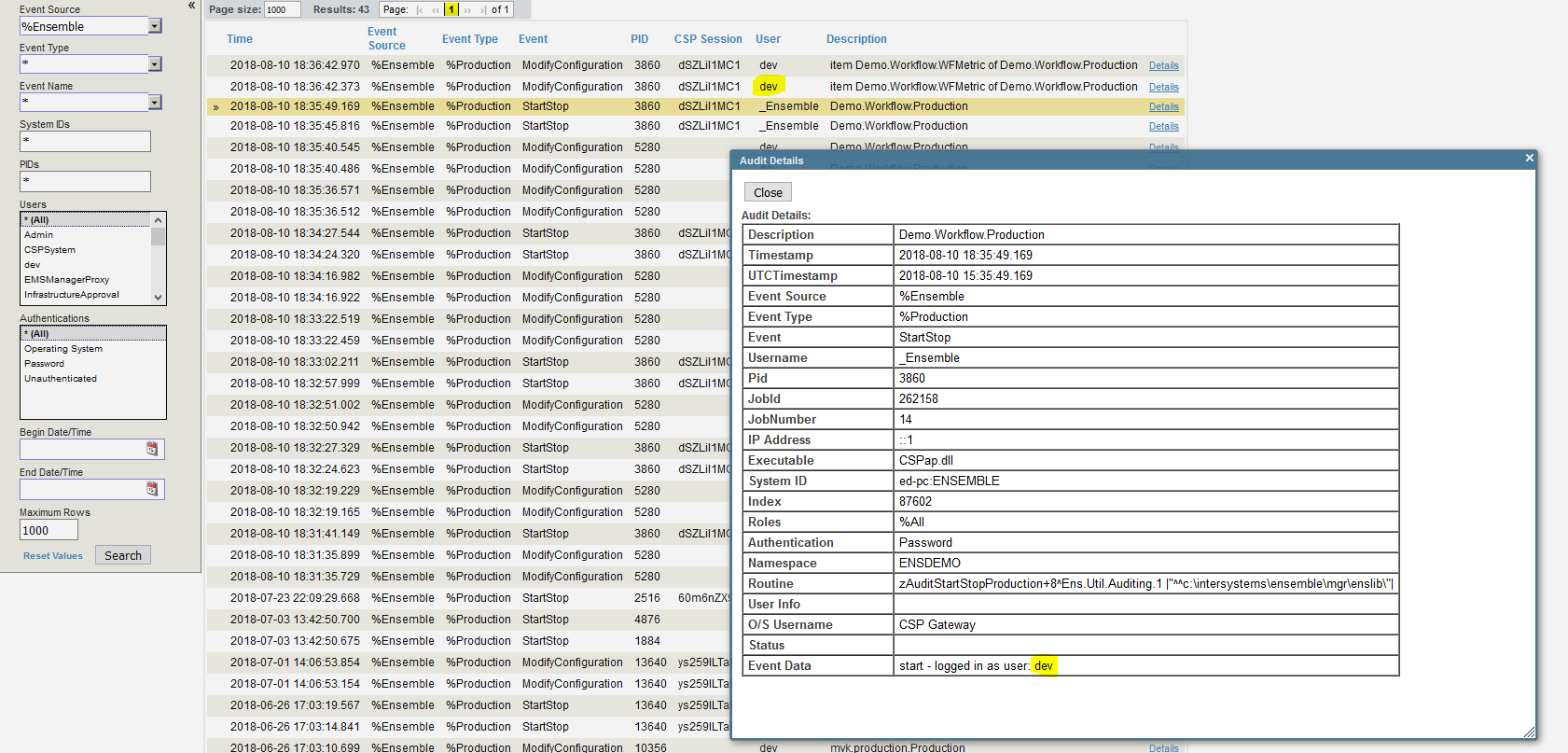
$username returns current user, which for Ensemble job is correctly _Ensemble. You can try to query audit database for that info I guess.
Username would be _Ensemble because Ensemble switches users.
Tried OnInit, available context is not enough there:
Method OnInit() As %Status
{
    break
}
And here's the break:
break
 ^
<BREAK>zOnInit+1^Demo.Workflow.WFMetric.1
ENSDEMO 7e1>zw

%Ensemble("ArchiveFlags")=""
%Ensemble("ArchiveFlags","Demo.Workflow.WFMetric")=""
%Ensemble("ArchiveFlags","Demo.Workflow.WFMetric","iCfg")=0
%Ensemble("Config","%ModIndexFlag")=1
%Ensemble("ConfigName")="Demo.Workflow.WFMetric"
%Ensemble("Debug","TraceCat","My Terminal Output")=0
%Ensemble("Debug","TraceCat","My Terminal Output","user")=1
%Ensemble("Debug","TraceCat","user")=1
%Ensemble("DoTrace")=2
%Ensemble("JobKey")=10548
%Ensemble("LogSystemTrace")=0
<Private variables>
Thought about $zparent but it didn't help too:
ENSDEMO 7e1>w $system.Process.UserName($zparent)
CSP Gateway
Yes.
Not without modifying system classes.
set c=##class(%Dictionary.ClassDefinition).%OpenId("Deployed.Class")
set c.Final=0
write c.%Save()
And after that compiling subclasses would be possible.
Deploying does not prevent user from removing Final keyword.
Deploying only prevents user from easily modifying source code.
Final keyword can be removed and the class extended.
To clarify, I want to deploy a class that the user would be unable to extend while having access to the system.
As I said
they are not as reliable as audit database.
First one may not work at all, try safe get: $g(^CacheTemp.EnsUsername($job)).
Second one wouldn't work outside of CSP/ZEN context. Check that %request exists and is an object before calling GetCookie method.
Audit database contains correct username:
You can also get Username by these two ways:
But they are not as reliable as audit database.
$get works as fast as global could be read. Some ideas:
You can to change default file I/O from GB18030 to UTF8.
To do that, execute do ^NLS and choose:
2) Select defaults
2) I/O tables
4) File
And choose UTF8 there. After that, your I/O table should look like that:
I/O table              Current default
---------------------  --------------------
....
4) File                UTF8 (*)
After that, restart Cache and delete/reimport faulty files in Atelier
Note that this action (changing NLS defaults) can be disruptive to existing Cache applications.
Let's see Cache locale.
Open Cache terminal and execute:
zn "%SYS"
do ^NLS
There, choose 1) Display current locale and copy the output (should be two screens) here.
What's the server locale?
If you're sure that your id bigger ids are generated later, you can only get the first id from index and after that iterate the data global directly:
set FromDateH = (+$h-1)
set id = ^TestI("StartDateIDX",FromDateH,id)
for {
    set id=$order(^TestD(id),1,dat)
    quit:id=""
    //dat=$lb("a","b","c","d","e")
}
Also you can use three-argument form of $order to iterate and get data in one command.
Finally, consider checking work-heavy system with %SYS.MONLBL to verify what lines consume more time.
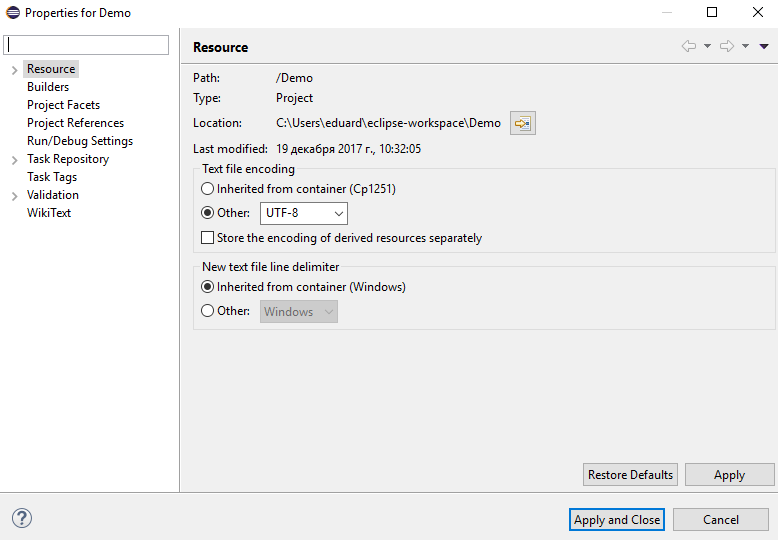
Open Atelier project Properties and check encoding there. Set to UTF8 if it's not.
I just don't know which Azure product.
For Azure it would be Virtual Machines as you need to specify these parameters.
Article would be great.
InterSystems Cloud Manager can deploy to Azure. First Look for ICM is a step by step guide to run InterSystems IRIS in a cloud.
Generally you need to run ICM locally (or on some preexisting server) and then specify a configuration of what you want. ICM would then provision the servers, install InterSystems IRIS, etc.
There are many ways to launch InterSystems IRIS.
If you want to launch it on AWS you can do it one of the following ways.
What to choose?