Develop client part (angular, etc) in your favorite editor, build it there and set build directory as a CSP Files Physical Path for CSP application.
Additionally set Serve Files to Always and Serve Files Timeout to 0.
- Log in to post comments
Develop client part (angular, etc) in your favorite editor, build it there and set build directory as a CSP Files Physical Path for CSP application.
Additionally set Serve Files to Always and Serve Files Timeout to 0.
Terminal works under your own OS user.
Studio pseudo-terminal works under Cache system account.
They may have different access levels.
From windows error codes
2 (0x2)
The system cannot find the file specified.
ERROR_PATH_NOT_FOUND
Check your path, also Caché may not have access to the directory or file.
Cache private web server is configured and available by default.
If System Management Portal opens then private server works.
Here's a good tutorial on developing Angular applications on Caché.
Please check the output:
set result = ##Class(%File).Delete(fileNamewithPath, .status)
zw result
zw status
The object of com.intersys.jdbc.CacheListBuilder class is returned.
Well, updating to a newer version is definetly recommended.
This feature (SSLCheckServerIdentity) appeared in 2013.2.
That said, comments to the feature state that the new default is to check the name where as before we did not perform this check.
So on older version request should be working by default. What error are you getting on old version?
There are several ways to do that. Let's say you have a persistent property
Property Problem As %String;
That you don't want anyone to see.
1. Make it private:
Property Problem As %String [ Private ];
It would not be displayed altogether
2. Add accessor methods:
Property Problem As %String;

Method ProblemGet() As %String [ ServerOnly = 1 ]
{
    Quit "****"
}

Method ProblemRealGet()
{
    Quit i%Problem2
}

Method ProblemSet(Arg As %String) As %Status [ ServerOnly = 1 ]
{
    Set i%Problem2 = Arg
    Quit $$$OK
}
This way default callers would get **** and only your app code can access the real value.
3. Do not project property to XML
Property Problem As %String(XMLPROJECTION = "none");
As ensemble message viewer is XML-based it would hide property from it.
4. Create a special datatype. For example MyApp.Datatype.Password datatype returns **** as Display and ODBC values:
Class MyApp.Datatype.Password Extends %String
{

ClassMethod LogicalToDisplay(%val As %String) As %String [ Internal ]
{
    q $case(%val,"":"",:"*****")
}

ClassMethod LogicalToOdbc(%val As %String) As %String [ Internal ]
{
    q $case(%val,"":"",:"*****")
}

}
To use it:
Property Problem As MyApp.Datatypes.Password;
5. Extract the property into a separate class and reference the object of that class.
These approaches could be combined.
#dim are easier to notice, as they are different from the usual set.
Check point 2 in this article by @Sean.Connelly.
I do not think that it's possible.
If display values are unique, you can build a unique index and use it to translate display value into id.
You can subclass Ens.ContextSearch to provide dynamic settings lists. Docs.
Here's a sample class that adds ability to select XData in Ensemble setting.
/// Ensemble settings interface implementation
Class Package.EnsSearchUtils Extends %ZEN.Portal.ContextSearch
{

///Get class Xdata list.
ClassMethod GetXDatas(Output pCaption As %String, Output pTopResults, Output pResults, ByRef pParms As %String, pSearchKey As %String = "") As %Status
{
    Set tStatus = $$$OK
    Kill pResults, pTopResults
    Set pCaption = ""

    Set tClass = $get(pParms("class"))
    If tClass '= "" {
        Set tClassObj = ##class(%Dictionary.CompiledClass).%OpenId(tClass)

        For i=1:1:tClassObj.XDatas.Count() {
            Set pResults($i(pResults)) = tClassObj.XDatas.GetAt(i).Name
        }
    }
    Quit tStatus
}

}
For example to add a setting XSLTTransformation to BH that would allow me to choose on XData from my Package.XSLT class, I can specify SETTINGS parameter like this:
Parameter SETTINGS = "XSLTTransformation:Basic:selector?context={Package.EnsSearchUtils/GetXDatas?class=Package.XSLT}";Do you want to get a list of possible values at runtime?
If so consider making your property object-valued:
Property PrdType As Demo.Data.PrdType;
If you do want to build a list once at compile time, then it is probably possible using method generators, but I would not recommend this approach.
Not an answer, but you can use LIST function to remove cursors and simplify code.
ClassMethod GetTypeDisplay() As %String
{
    &sql(SELECT LIST(DISTINCT TypeName) INTO :result FROM Demo_Data.PrdType)
    q result
}

ClassMethod GetTypeValue() As %String
{
    &sql(SELECT LIST(DISTINCT TypeId) INTO :result FROM Demo_Data.PrdType)
    q result
}You should not modify system classes.
So without
Set httpRequest.SSLCheckServerIdentity=0
it doesn't work?
I use
set var1 = "value1"
set var2 = "value1"
set var3 = "value1"
set var4 = "value2"
set var5 = "value2"
set var6 = "value3"
set var7 = "value3"
set var8 = "value3"
as it's the most readable. Or
#dim var1 As Type = "value1"
Time spent on local sets is usually a pittance of all CPU time spent.
Please describe your use case.
You seem to receive empty response.
What does
set resp = httpRequest.HttpResponse
zwrite resp
write !,!,!
do resp.OutputToDevice()
Output?
What's the output on:
zwrite httpResponse
Check that stream is an object and contains relevant data:
write $isObject(httpResponse)
what data does it contain:
do httpResponse.OutputToDevice()
if it's not an object - what is it?
zwrite httpResponse
If everything is okay - stream contains what you expect it to contain, then what is the status of convert operation:
Set sc = ##class(%ZEN.Auxiliary.jsonProvider).%ConvertJSONToObject(httpResponse,,.Object,1)

write $System.Status.GetErrorText(sc)
zwrite Object
parent for index means class.
1.
SELECT
parent As Class,
Properties
FROM %Dictionary.CompiledIndex
WHERE IdKey=1
2.
SELECT
parent As Class, Name, Type
FROM %Dictionary.CompiledProperty
WHERE Type='%Library.Integer' -- Name='Property' AND parent='Class'
3.
SELECT 1 As "Exists"
FROM %Dictionary.CompiledIndex
WHERE _Unique=1 AND parent = :Class AND Properties = :Property
You can map ^DeepSee.Folder and ^DeepSee.FolderItem globals, but it would map all dashboards from one NS to another.
Have you checked ProComm+ alternatives?
ZOC advertises as one, maybe there're others.
Generally speaking, inside Caché you must have two functions
InternalToExternal(name) As %String

ExternalToInternal(path) As %String
That translate Cache names (/app/index.csp) into filenames (i.e. C:\Temp\MyRepo\CSP\app\index.csp) and vice versa.
Your CI system should:
Here's a series of articles on building a CI/CD pipeline for InterSystems Cache.
What effect do you want to achieve with that?
I ran InterSystems IRIS containers via Rancher and Portainer it's all the same stuff. GUI over docker run.
can I deploy a container manually
Sure, to deploy a container manually it's enough to execute this command:
docker run -d
  --expose 52773
  --volume /InterSystems/durable/master:/data
  --env ISC_DATA_DIRECTORY=/data/sys
  --name iris-master
  docker.eduard.win/test/docker:master
  --log $ISC_PACKAGE_INSTALLDIR/mgr/messages.log
Alternatively, you can use GUI container management tools to configure a container you want to deploy. For example, here's Portainer web interface, you can define volumes, variables, etc there:
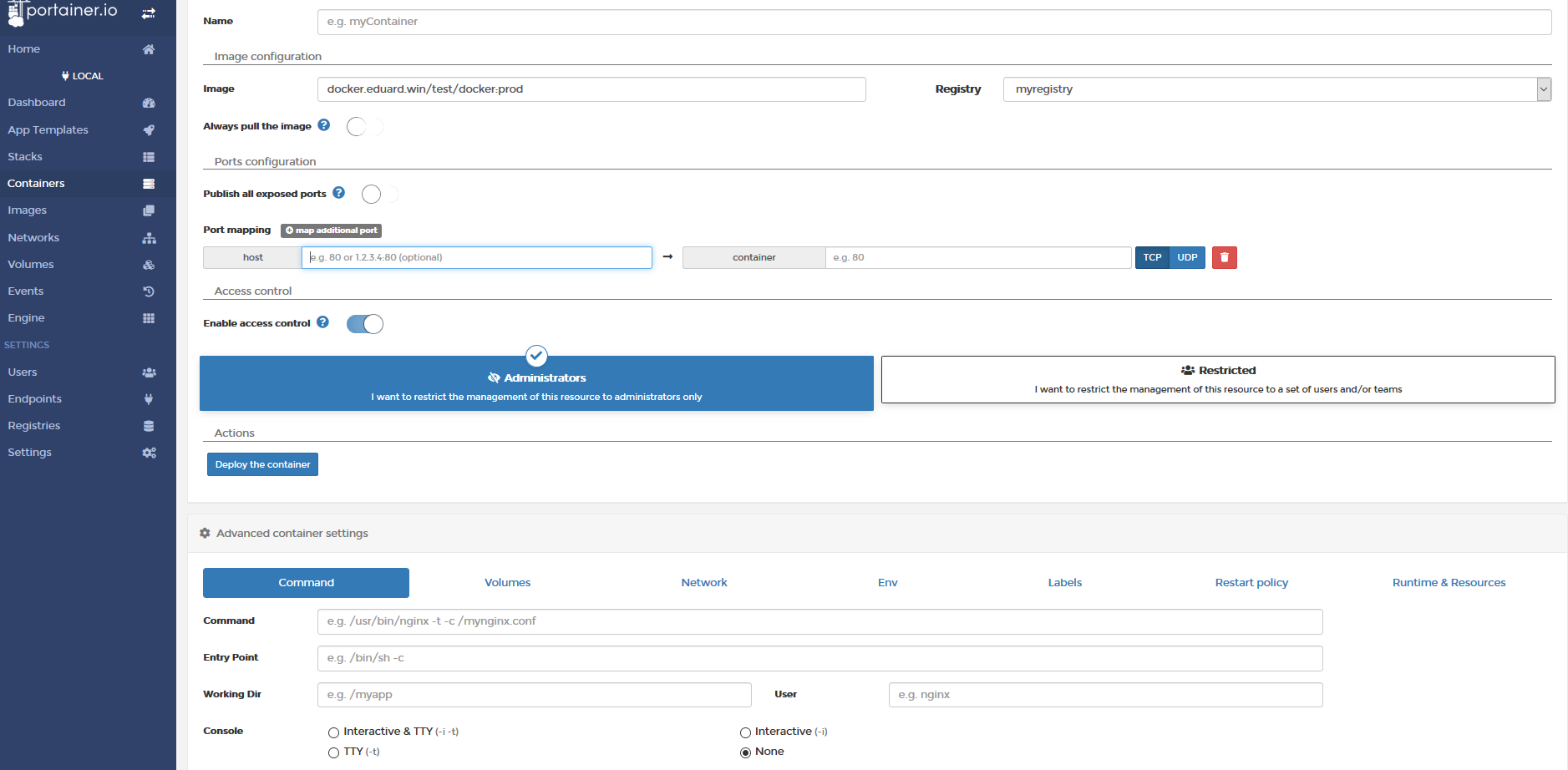
it also allows browsing registry and inspecting your running containers among other things:
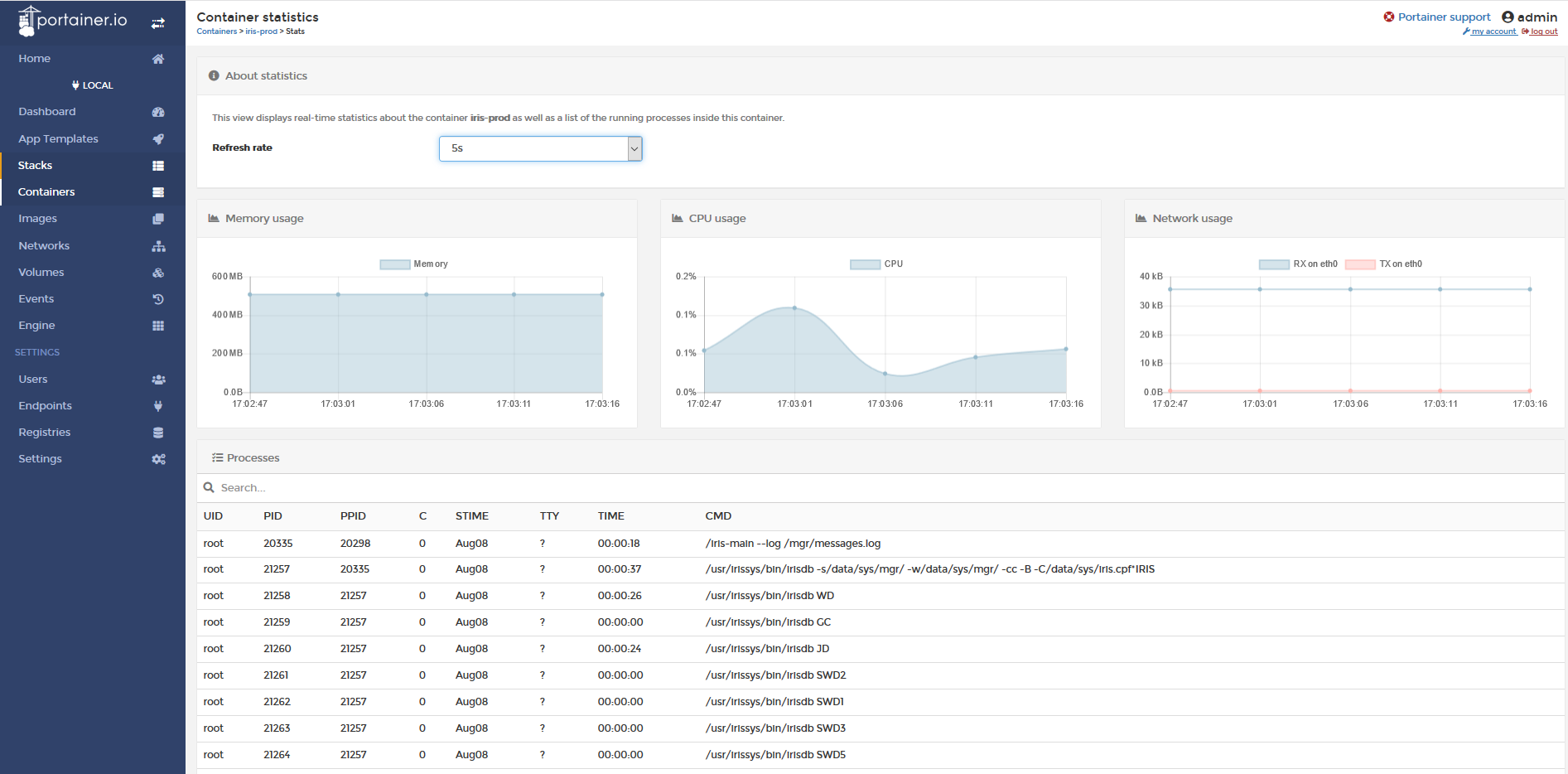
This info does not seem to be available by default.
You can define JOB^%ZSTART that would set global:
Set ^TimeStarted($job) = $h
And JOB^%ZSTOP:
Kill ^TimeStarted($job)
And reference this global to get process start time.