What about output file size?
- Log in to post comments
What about output file size?
Sample integration with Moscow Exchange.
You can use %Stream.FileBinary and %Stream.GlobalBinary classes.
Try to replace %XML.String with %String(MAXLEN="");
4. Didn't found how to do that automatically, but adding <br/> to text value adds a new line, i.e.:
Set var(0,1) = "!!!!!!!!!!!!!!!!<br/>!!!!!!!!!!!!!!!!!!!!!"
Thank you, Marc!
Set body to Arial and it works:
<body foStyle="font-family='Arial'">
So far I got:
Class Test.Zen Extends %ZEN.Report.reportPage
{

Parameter DEFAULTMODE = "pdf";

/// ReportDefinition is a placeholder.
XData ReportDefinition [ XMLNamespace = "http://www.intersystems.com/zen/report/definition" ]
{
<report xmlns="http://www.intersystems.com/zen/report/definition"
    name="MyReport" runonce="true">
  </report>
}

XData ReportDisplay [ XMLNamespace = "http://www.intersystems.com/zen/report/display" ]
{
<report xmlns="http://www.intersystems.com/zen/report/display"
name="MyReport">
<body>
<table ongetData="GetCount">
<table orient="row" ongetData="NamesAndAddresses" style="border:1pt solid black">
<parameter fieldnum="1"/>
<item fieldnum="1" >
<caption value="Name"/>
</item>
<item fieldnum="2" >
<caption value="Title" />
</item>
<item fieldnum="3" >
<caption value="Pages" />
</item>
</table>
<parameter value="test" />
</table>
</body>
</report>
}

ClassMethod GetCount(ByRef var As %String, ByRef params)
{
    set count=3
    for i=0:1:count-1 {
        set var(i, 0) = i
    }
}

Method NamesAndAddresses(ByRef var As %String, ByRef params)
{
    if (params(1) = 0) {
       Set var(0,0) = "Alice"
       Set var(0,1) = "Hello"
       Set var(0,2) = 123
    } elseif (params(1) = 1) {
       Set var(0,0) = "Bob"
       Set var(0,1) = "World"
       Set var(0,2) = 456
    } elseif (params(1) = 2) {
       Set var(0,0) = "Charlie"
       Set var(0,1) = "!!!!!!!!!!!!!!!!!!!!!!!!!!!!!!!!!!!!!!!!!!!!!!!!!!!! !!!!!!!!!!!!!!!!!!!!!!!!!!!!!!!!!!!!!!!!!!!!!!!!!!"
       Set var(0,2) = 789
    }
}

}
Which produces this output:
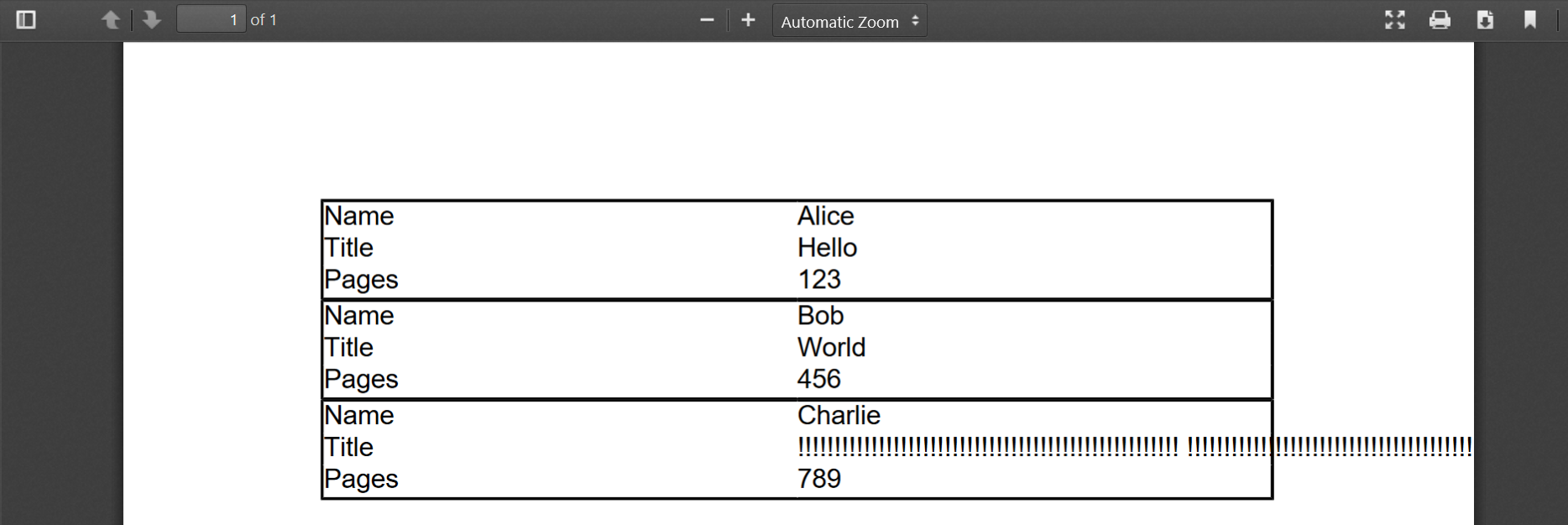
The questions I have:
And what about pdf?
Is it empty too?
Please try to send 1.txt through the pipeline with contents like 123.
Are the hexdumps the same for that case?
Rename method there to move the file.
Awesome, thank you for that information!
Try setting Charset to Binary in your BO, and check that file is Binary in your source BH.
I'd try sending txt file through the pipeline and compare the results.
You may need to either use Selenium or extend production ZEN page.
The ZEN page is EnsPortal.ProductionConfig and host diagram is defined in:
<ownerDraw id="svgDiagram" onrender="zenPage.drawDiagram(zenThis);"/>
And drawn in these methods:
Please post it as a new question with expanded explanation. Code sample would help.
There is no such attribute in <Database> tag, unfortunately.
You can call code from %Installer via Invoke tag (more on that).
To change journaling programmatically execute:
/// Change database journaling state.
/// dbDir - database Directory (can be passed relative to the current working dir)
/// journal - 1 or 0. 1 enables journaling, 0 disables it.
/// zw ##class(util.Test).JournalDB("USER", 1)
ClassMethod JournalDB(dbDir As %String, journal As %Boolean = {$$$YES}) As %Status
{
    quit:((journal<0) || (journal>3)) $$$ERROR($$$GeneralError, "Invalid journal value. 0 or 2 for No, 1 or 3 for Yes")
    set:journal=$$$YES journal=3
    set:journal=$$$NO journal=2

    new $namespace
    set $namespace = "%SYS"
    set db=##Class(SYS.Database).%OpenId(dbDir)
    set db.GlobalJournalState = journal
    quit db.%Save()
}
That said, any particular reason you want unjournaled databases?
Thank you, Danny!
You already have a value of SessionId, so concatenate the rest?
To get port and host call:
set sc=##class(%Studio.General).GetWebServerPort(.port, .server)
Do you catch exceptions?
If not try this:
Try {
 Kill %objlasterror
 Set conn = ##class(%Net.Remote.Gateway).%New()  // No error here
 Set tSC = conn.%Connect("127.0.0.1", "55000", "NETTEST") // No error here
 Write:$$$ISERR(tSC) $System.Status.GetErrorText(tSC),!
 ZWrite %objlasterror
 Set api = ##class(writetofile.WriteFile).%New(conn) //Here comes the error
 ZWrite %objlasterror
 Set strFile = "d:\temp\example.txt"
 Set strInput = "Hello world"
 Set ret = api.FilePut(strFile,strInput)
 Set tSC = conn.%Disconnect()
 Write:$$$ISERR(tSC) $System.Status.GetErrorText(tSC)
} Catch ex {
 ZWrite %objlasterror
 Do ex.Log()
 Write ex.DisplayString(),!
}
%objlasterror can contain more error information. Also check application error log.
Are you on 32 or 64 bits? Check Cache with:
Write $system.Version.Is64Bits()
.Net library should be compiled with the same architecture.
Some ideas:
What other data do you need?
Also, please post your code as text.
First create the request and assign the property one by one?
Yes.
Thank you, Benjamin fixing 1 and 2 helped.
About 3, $$$YES and $$$NO are system-supplied macros with values 1 and 0 respectively.
The problem with HTML is creating templates. Users have LibreOffice or MS Word, so they can easily edit doc, docx, odt, rtf templates but not HTML.
Also HTML does not have pages, so printing is not as simple.
How did you create HTML templates?
Agree with you on placeholders - % example is very simplistic.
You can reference it as a normal property (which it essentially is).
If it's a BO, BS or simple BP:
set a = .."name_BO"
If it's a BPL process:
<trace value='process."name_BO"'/>
You need first to convert JSON into dynamic object and then create Ens.Request from that. Well, probably a subclass of Ens.Request as it can't hold any data.
You can access all settings of your BP by just calling them directly, in your case:
set a=process."Name_BO"
UPD. Let's continue this discussion in your separate question.
So you want to know the name of a current host from inside of it?
Business host has a %ConfigName property which you can access.
For example in BPL process you can trace the HostName like this:
<trace value="process.%ConfigName"/>
And here's the result:

In simple BP, BS and BO you can access current HostName with:
write ..%CinfigName
That said, why do you need to get the name of a current host from inside of it?
My bad,
do %SYSTEM.Process:Terminate(pid)
is invalid, only this form is correct:
do $SYSTEM.Process.Terminate(pid)
Fixed in original comment.
Solution from @Vitaliy Serdtsev is simpler and can be called from any namespace
do $SYSTEM.Process.Terminate()
Additionally user may not have access to %SYS namespace due to security reasons.
While working, this solution has a drawback of working only in %SYS namespace.