Hi @Sean Connelly!
How to display the Kozy page without an editor? E.g. I have it ready and want to send it to a customer?
- Log in to post comments
Hi @Sean Connelly!
How to display the Kozy page without an editor? E.g. I have it ready and want to send it to a customer?
Yes, this is how you create Interoperability-enabled namespace using %Installer
Hi Michael! Probably the account you use doesn’t have WRC support. Nevertheless you should be able to pull community images from containers.InterSystems.com.
We delete "old" images from the registry. I'd advise using official container images from containers.intersystems.com.
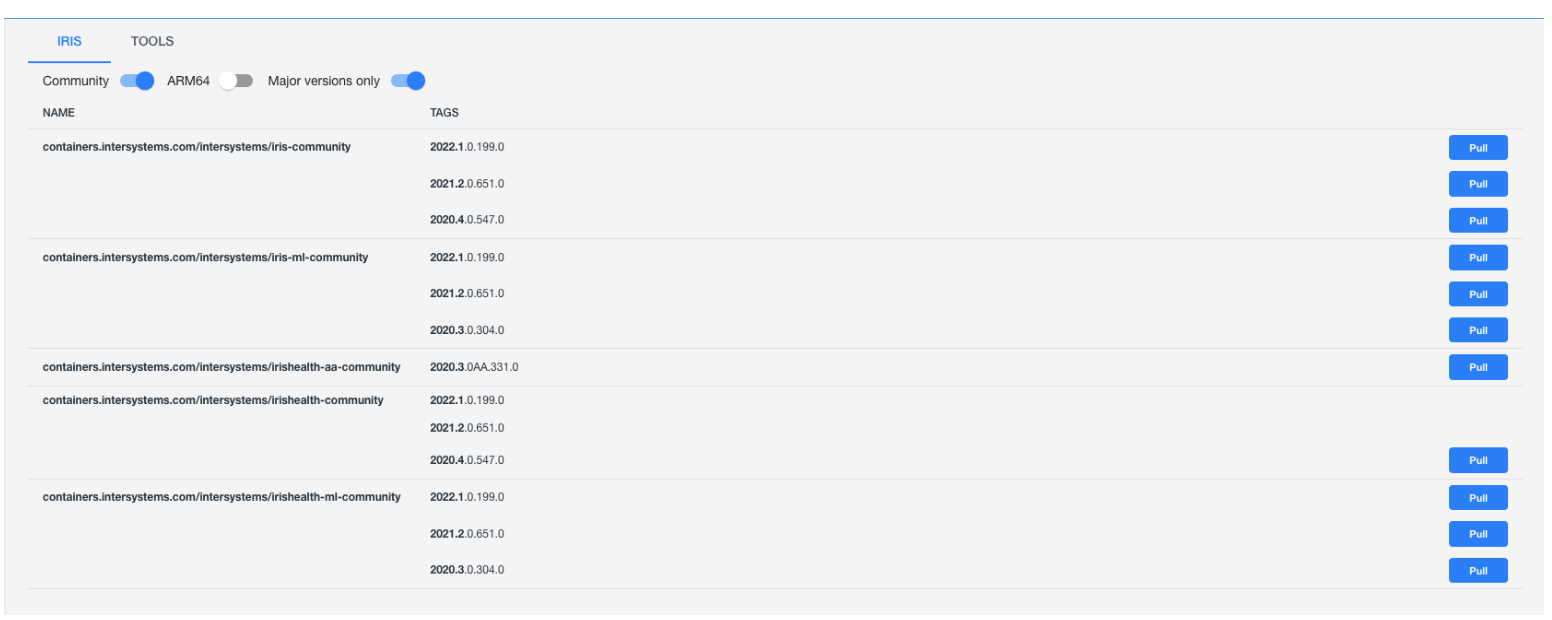
The actual set of available images can be easily got with this powerful extension to Docker Desktop, which shows you the up-to-date list and has a nice UI to copy image names.
Hi Michael!
I guess the Namespace you deploy to doesn't have Interoperability enabled. You can simply check this by deploying your solution e.g. into the USER namespace, which is Interoperability enabled by default.
What is the ZPM client version?
You should have a production, receive data in services and send it to operations via messages and transmit further via operations.
so BPL/DTL usage is not mandatory, but will give you a bonus points
Hi @Ben Spead! Discord gives the pleasure of instant conversation and audio/video calls. It can save hours of time for developers, helps to learn faster and gives extra experience and knowledge.
So, yes, Discord is not a requirement and it doesn’t ideally suite as a knowledge base but it shows itself as a helpful tool for the developer community as a perfect tool for communication.
You can also use IRIS scheduled tasks.
I recommend to take a look at this project, that gives you ability to schedule a class-method execution via cron expression.
BTW, this project could help you schedule a task programmatically via cron expression.
I second @Dmitry Maslennikov on suggesting ObjectScriptQuality. You can check how it works with 400+ open source projects from Open Exchange being scanned with ObjectScriptQuality. The rules can be adjusted, of course.
wow. Well done, @Yuri Marx ! In bookmarks!
Hi Mike!
You can check this or that example, the simplest dockerfiles with IRIS.
The command with check-caps false can be found e.g. here in Docker-compose
Hi Scott!
If you don't have docker you can install apps with ZPM Package Manager. There is a good amount (about 240) of apps on Open Exchange that are installable with ZPM.
Aasir! Welcome to the InterSystems Community!
Thank you @Lucas Enard! Thanks for a great contribution to the community!
Hi @Lucas Enard ! Please publish the Github repo on Open Exchange? This will broaden the audience greatly!
Preview docker images on 2022.2.0.293.0 build with ZPM onboard are updated too and can be pulled as:
docker pull intersystemsdc/iris-community:preview

docker pull intersystemsdc/irishealth-community:preview

docker pull intersystemsdc/iris-community-arm64:preview

docker pull intersystemsdc/irishealth-community-arm64:preview
Great! for that you need ZPM installed, or take any community docker-image with ZPM onboard, e.g. the latest image via:
FROM intersystemsdc/iris-community
and run the command usual iris terminal:
USER>zpm "install git-source-control"
Also calling @Timothy Leavitt as an author of git-source-control
What apps do you want to install?
Great initiative, @Aasir Waseer ! Please submit your idea in ideas portal! if it gets a lot of votes that'll be introduced, thanks!
Here are also the docker images of InterSystems IRIS 2022.2 prevew with ZPM package manager 0.3.2 inside.
From clause could look like:
FROM intersystemsdc/iris-community:2022.2.0.270.0-zpmavailable images:
intersystemsdc/iris-community:2022.2.0.270.0-zpm
intersystemsdc/irishealth-community:2022.2.0.270.0-zpm
intersystemsdc/irishealth-ml-community:2022.2.0.270.0-zpm
intersystemsdc/irishealth-community:2022.2.0.270.0-zpm
intersystemsdc/iris-community:2022.2.0.270.0-zpm
intersystemsdc/iris-ml-community:2022.2.0.270.0-zpm
intersystemsdc/irishealth-community:2022.2.0.270.0-zpm
intersystemsdc/irishealth-ml-community:2022.2.0.270.0-zpm
Or you can use preview clause:
FROM intersystemsdc/iris-community:previewAnd to launch IRIS do:
docker run --rm --name my-iris -d --publish 9091:1972 --publish 9092:52773 intersystemsdc/iris-community:2022.2.0.270.0-zpm

docker run --rm --name my-iris -d --publish 9091:1972 --publish 9092:52773 intersystemsdc/iris-ml-community:2022.2.0.270.0-zpm

docker run --rm --name my-iris -d --publish 9091:1972 --publish 9092:52773 intersystemsdc/iris-community:2022.2.0.270.0-zpm

docker run --rm --name my-iris -d --publish 9091:1972 --publish 9092:52773 intersystemsdc/irishealth-community:2022.2.0.270.0-zpm

docker run --rm --name my-iris -d --publish 9091:1972 --publish 9092:52773 intersystemsdc/irishealth-ml-community:2022.2.0.270.0-zpm

docker run --rm --name my-iris -d --publish 9091:1972 --publish 9092:52773 intersystemsdc/irishealth-community:2022.2.0.270.0-zpm
To open a terminal:
docker exec -it my-iris iris session IRIS
and to start the control panel:
http://localhost:9092/csp/sys/UtilHome.cspTo stop and destroy container:
docker stop my-irisThis is very helpful, thanks!
Got it! It was listed in the previous GA announcement, that's why I'm asking.
Thanks, Bob!
Hi @Craig Regester! This is great!
Please submit the app with the ZPM option on OEx to make it available for everyone!
Also to stay up-to-date with InterSystems containers repository images I recommend taking a look at this remarkable free extension to Docker Desktop by @Dmitry Maslennikov he contributed to the community:

And images with ZPM package manager 0.3.2 are available accordingly:
intersystemsdc/iris-community:2022.1.0.209.0-zpm
intersystemsdc/irishealth-community:2022.1.0.209.0-zpm
intersystemsdc/irishealth-ml-community:2022.1.0.209.0-zpm
intersystemsdc/irishealth-community:2022.1.0.209.0-zpm

intersystemsdc/iris-community:2021.2.0.651.0-zpm
intersystemsdc/iris-ml-community:2021.2.0.651.0-zpm
intersystemsdc/irishealth-community:2021.2.0.651.0-zpm
intersystemsdc/irishealth-ml-community:2021.2.0.651.0-zpm
And to launch IRIS do:
docker run --rm --name my-iris -d --publish 9091:1972 --publish 9092:52773 intersystemsdc/iris-community:2022.1.0.209.0-zpm

docker run --rm --name my-iris -d --publish 9091:1972 --publish 9092:52773 intersystemsdc/iris-ml-community:2022.1.0.209.0-zpm

docker run --rm --name my-iris -d --publish 9091:1972 --publish 9092:52773 intersystemsdc/iris-community:2022.1.0.209.0-zpm

docker run --rm --name my-iris -d --publish 9091:1972 --publish 9092:52773 intersystemsdc/irishealth-community:2022.1.0.209.0-zpm
And for terminal do:
docker exec -it my-iris iris session IRIS
and to start the control panel:
http://localhost:9092/csp/sys/UtilHome.cspTo stop and destroy container do:
docker stop my-irisAnd the FROM clause in dockerfile can look like this:
FROM intersystemsdc/iris-community:2022.1.0.209.0-zpmOr to take the latest image:
FROM intersystemsdc/iris-communitySo if you are on the latest image already just rebuild the repository to get the latest IRIS production image with ZPM onboard.