@Robert Cemper, @Brett Saviano, thank you! Indeed, this is the thing!
But even without macro it is a very powerful feature!
- Log in to post comments
@Robert Cemper, @Brett Saviano, thank you! Indeed, this is the thing!
But even without macro it is a very powerful feature!
In fact I'm having a weird issue in docker: it looks like terminal doesn't read the last symbol from alias string. e.g. if I have the following alias (one liner to turn on IRISBI in a current namespace):
:alias enablebi do EnableDeepSee^%SYS.cspServer("/csp/"_$$$LOWER($namespace))
It results with following:
IRISAPP>:enablebi
do EnableDeepSee^%SYS.cspServer("/csp/"_$$$LOWER($namespace)

DO EnableDeepSee^%SYS.cspServer("/csp/"_$$$LOWER($namespace)
^
<SYNTAX>
IRISAPP>
Any thoughts @Robert Cemper @Dan Pasco ?
I confirm It works for docker as well! Exciting!
Thank you! Will give it a try!
Community docker images with IPM on board are also available with 2024.1 preview. The tags are:
intersystemsdc/iris-community:preview

intersystemsdc/irishealth-community:preview
Thanks a lot, @Chris Stewart !
Hi @Dan Pasco ! Thanks for sharing! How did you make ":pp" terminal alias?
Turned out I created SSLConfig.properties file in wrong place. I put it in a proper place (as adviced in the article) and all started working.
BTW, in the latest DBeaver version 23.3.2, the issue with cumbersome Database/Schema is not an issue anymore - Database/Schema can be just USER.
Amazing, @Chris Stewart ! Thanks a lot!
And for Open Exchange too, please!
I'm getting this error while trying to connect to IRIS Cloud SQL instance to 443 port:
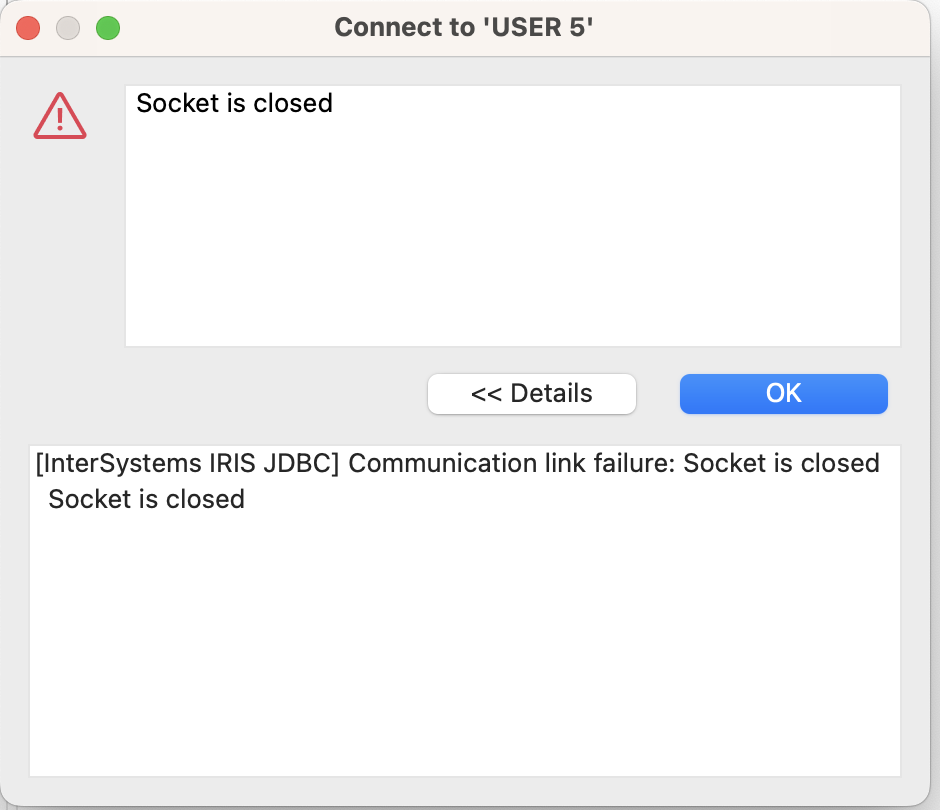
All the requirements listed in the article are satisfied. This is M2 Macbook. Any advice?
Patient viewer if possible.
Oh, that'd be amazing!
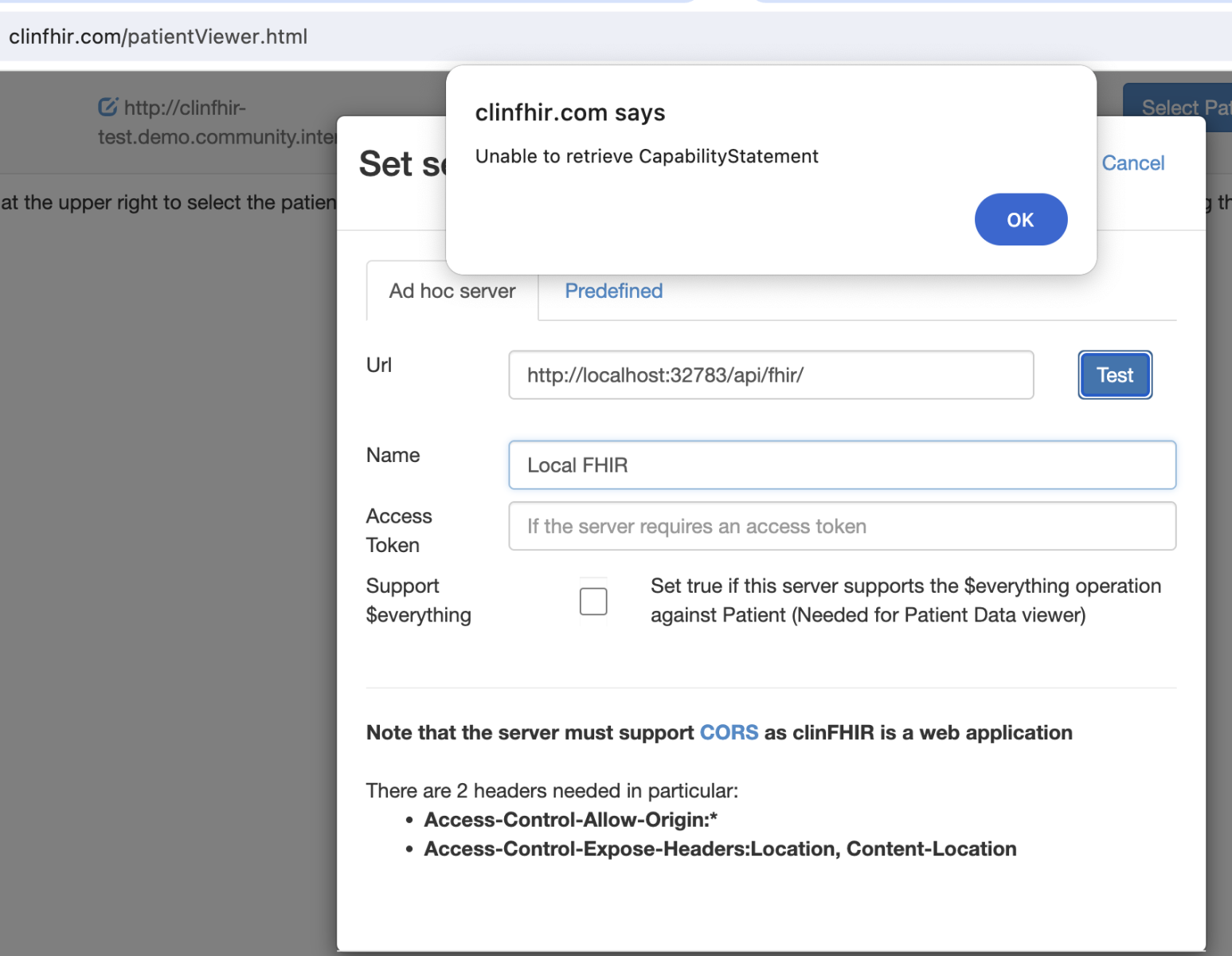
Just've tried it - doesn't work for me:
Hi @Momeena Ali !
Yes, you can, for sure! Don't forget to publish your application on Open Exchange in a form of GitHub or Gitlab repository as an open source.
Great staff, @Chris Stewart !
Could you please share the related GitHub repo?
Hi @David hay !
Thanks for sharing the info on such a profound tool for FHIR developers!
BTW, is there any local version of ClinFHIR that can be installed on a laptop? E.g. if I have the FHIR server locally for development purposes to be able to vusualise the data in local FHIR repository?
Hi @Guillaume Rongier !
Please consider the PR to make it an IPM module?
If I'm not mistaken, iFind is a part of 'Basic' text search which and according to documentation it is not deprecated
Hi @Ali Chaib !
1. Yes, it can work with POST, GET and PUT out of the box.
2. The data is stored in IRIS database, in global arrays - as any data other stored via InterSystems data products.
3. FHIR server exposes standard FHIR R4 REST API which you can access via HTTP requests.
4. These classes help with development Digital Health Interoperability scenarios, e.g. if you have to establish perpetual processes to read from FHIR server and/or transform the data into other formats (e.g. HL7) and/or send it into different consuming applications.
5. This can be implemented via Digital Health interoperability framework. See the example.
I request @Patrick Jamieson and @Daniel Franco to provide more information.
300 ideas! Wow! Congratulations @Vadim Aniskin and the community itself!
Nice "hack" in using ObjectScript Code Generator! ObjectScript is a powerful tool!
An update in a bonuses list: 2 points for answering the questions of the survey about the interactive InterSystems IRIS Digital Health Interoperability Instruqt Course.
The author and developer of the tool @David hay published an article about it! Thank you, David!
UPDATE
Recently we introduced a yet another Instruqt interactive foundation course on Digital Health Interoperability with IRIS for Health - please give it a try here! It will help everyone who is new to InterSystems Digital Health Interoperability productions to go through several simple but illustrating scenarios and get a great foundation for building your ones!
Great video!
Also, instead of using login-password for GitLab repository I'd recommend use SSH-key. It is more secure and will not demand providing password with every git push.
Check GitLab documentation on ssh-key setup.
In addition to what @Ben Spead suggested there are several more hands-on labs on this site: REST+ Angular, Machine Learning and Interoperability.
Also, there are several Developer Learning Paths on the Online Learning platform that will help you to start with ObjectScript Development.
Once you’ve got the basics I recommend to start coding using Docker enabled templates on Open Exchange - you can find templates with the Template filter on.
For example I recommend a basic ObjectScript template or basic REST API with ObjectScript template.
HTH
@Jose Ruperez ! Your article is in top-5 most viewed through the whole history of Developer Community with 29K reads! Thank you very much! And, please, write more! :)
Also, here is the set of videos on Dev Community Youtube 100% related to IPM.
Technically tarball downloading feature refers to ZPM Registry package, which is intended to host IPM packages. And as folks mentioned above you can use it as the private registry hosting in your organization with the option to proxy some public packages.
I filed the ticket to update the documentation on tarballs.
And I think it makes sense to add the link to tarball download in Open Exchange for IPM packages.
