Take a look at the $system.OBJ.Load() and $system.OBJ.LoadDir() methods. This is the most common way to take source from your source control system and load them into your namespace.
- Log in to post comments
Take a look at the $system.OBJ.Load() and $system.OBJ.LoadDir() methods. This is the most common way to take source from your source control system and load them into your namespace.
Scott,
xDBC clients connect with Caché over the SuperServer port. This is 1972 on your working system. On the one that isn't working, to find the port do the following navigation in the System Management Portal:
Menu -> Configure Memory
Look at the SuperServer port number and see what that is if it is not 1972
Sankar,
For a version of Caché this old (circa 2002) I strongly suggest that you contact the WRC directly for assistance (http://www.intersystems.com/services-support/product-support/). That will be your best bet to getting your system back online as quickly as possible.
Please feel free to report back here as to the root cause and resolution for what you're seeing.
Ben
you are most welcome!!
Mike,
I am not sure about the "access denied" message you are seeing - perhaps Paul could comment on that. However, to manage all of your subscriptions:
1) Log in
2) Click on My Account (top icon bar)
3) Click on the Subscriptions tab
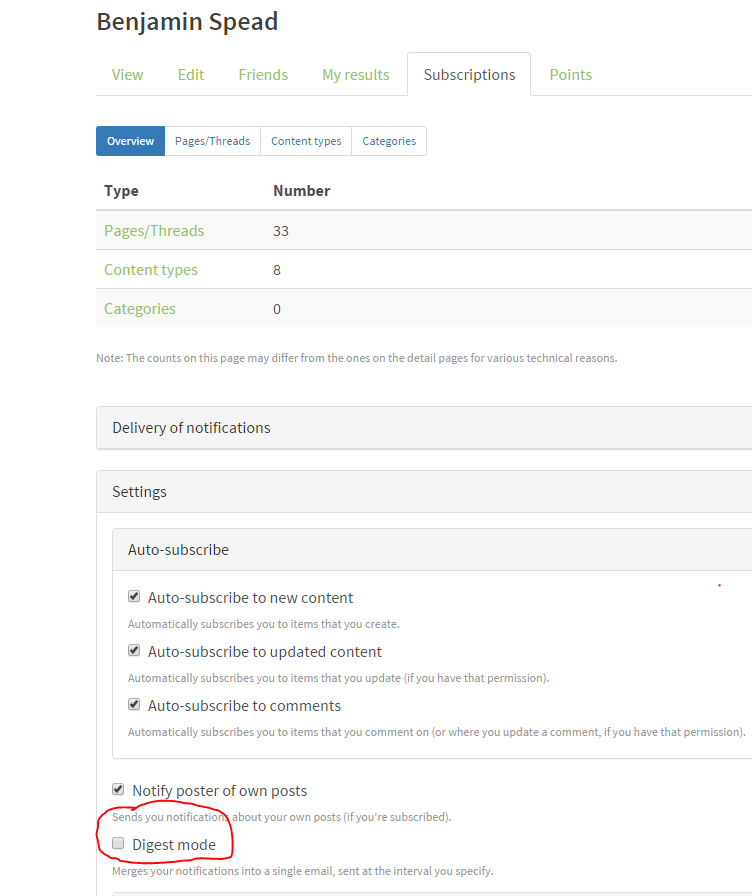
Then I strongly recommend that you click "Settings" and Uncheck "Digest Mode". The Digest emails are really not very usable (IMHO) and work has been done to make the individual emails more useful - you may find those to be better and closer to what you are used to in the Google Groups (assuming you didn't use Digest in Google Groups).
Under the "Page / Threads" tab you can unsubscribe to the threads you are no longer interested in.
I hope that helps. The email update mechanism has come a long way but it still has quite a ways to go. There is work that will be commencing shortly to enable HTML based email which should be an improvement as well.
Yes - if you New $namespace, then once the context pops off the stack it will revert automatically to the original namespace before setting the newed version of $namespace
I want to bump this post up because it is really useful (thanks Evgeny) and people definitely need to be aware of this great resource for getting the example source!
Timur - THANK YOU! It hadn't gotten annoying enough to google a solution yet, and you just saved me the effort :)
Tim- I saw the same thing and then I realized it was an outlook thing:

It saws right the top that Outlook removed extra line breaks. If you click that message you can reverse it and the line breaks will then get corrected.
HTH,
Ben
This looks like a tremendous resource. Thanks for posting it Nikita!!
Mike,
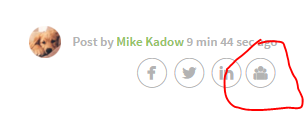
You can send yourself a link via email using the last icon shown beneath the poster's name:
If you want to save the content as a file, just use your browser's "Save As" options to save the page to a local HTML file.
Hope that helps!
Ben
Thanks for the shout-out Paul!
I would like to clarify that subscription emails have been revamped for non-digest emails *only*. In order to turn off Digest, you need to go to:
My Account > Subscriptions Tab > Expand "Settings" at the bottom and then uncheck "Digest mode"
The new email formatting isn't fully where we're like to see it yet (e.g. it is not HTML and it doesn't include full thread history) but I hope that people find that it makes consumption of updates via email significantly more useful than it was previously. Personally - I can't wait to see this change go live!
Here is a sample method which I created for a Zen Mojo project a couple of years ago:
ClassMethod GeocodeAddress(pAddress As %String, Output pFormattedAddress As %String, Output pLatitude As %Numeric, Output pLongitude As %Numeric) As %Status {
Set sc=$$$OK Set r=##class(%Net.HttpRequest).%New()
Set r.Server="maps.googleapis.com"
Set url="/maps/api/geocode/json?address="
Set address=pAddress
Set requestUrl=url_##class(%CSP.Page).EscapeURL(address)
Do r.Get(requestUrl)
Set json=r.HttpResponse.Data.Read()
Set sc=##class(%ZEN.Auxiliary.jsonProvider).%ConvertJSONToObject(json,,.geoObj)
If $$$ISERR(sc) Quit sc
If (geoObj.status="OK") {
 Set pFormattedAddress=geoObj.results.GetAt(1)."formatted_address"
 Set pLatitude=geoObj.results.GetAt(1).geometry.location.lat
 Set pLongitude=geoObj.results.GetAt(1).geometry.location.lng
 }
Else {
 Set sc=$$$ERROR($$$GeneralError,"Google API Returned the following status: "_geoObj.status)
 }
Quit sc }
We used Google's service for an application for a while but ended up pulling it out. Let me know if you want me to point you to the specific code.
Dan,
You might take a look at Benjamin DeBoe's iKnow demos which I believe are all sharable with customers. They leverage REST+AngularJS (which cuts down on the JS code you have to write)+Bootstrap (which ships with Caché in 2016.1 I believe to support ZenMojo's Bootstrap flavor). That might be a good starting point for sample code if this is a direction they are willing to explore.
HTH,
Ben
To add one more details to what Tim wrote about how we handle internal applications - we have a partnership with our QD department where at least one during every beta release period they will request a copy of each of our apps and verify compilation, automated unit tests and manual unit tests on that beta version of Caché. This way if there is going to be any sort of breaking change, we know it before we upgrade our dev environment and we can schedule that upgrade more wisely so as not to halt other development work. This practice is supported by the fact that we run all of our environments on VMs so it is fairly easy for us to get a new VM cloned off for them from Test and then we are not otherwise impacted in our development workflow.
We have been able to move to new released much more quickly as a result of this practice
Bravo Paul - looks great!
In the title it says that this release will come out March 15th (tomorrow)
John,
As you are probably aware, the Ensemble Management Portal does enforce source control hooks when editing other Ensemble configuration items, but that does not extend to the Production class currently. There is a (rather long-standing) Prodlog asking that this be corrected and that the Production class be protected via the Source Control hooks that are active for a given namespace. The number is 94592 and I suggest that you contact the WRC and ask them to officially log your need for this feature against that Prodlog (other customers are encouraged to do the same if it is something that you need as well).
Until this is available, the best process that I have found for managing Ensemble productions via Source Control is:
This is certainly open to user error, but until the product supports source control hooks in the portal, it is the best hack that I have found for making sure the source of your Production is protected. You could also create a watchdog task which periodically checks the save timestamp of the Production and compares it to the timestamp on disk to see if perhaps the production has been changed while your export has not - I have not tried this but theoretically it would be a way to provide a level of protection against people forgetting to check in changes.
To answer your question about environment specific production settings, I would point you to the System Default feature of Ensemble which was designed specifically to meet this need:
http://docs.intersystems.com/ens20152/csp/docbook/DocBook.UI.Page.cls?K…
Using System Defaults your environment-specific details are no longer stored in your class so you can move the class without having to worry about overriding an IP address, etc.
Hope That Helps!
Ben
Herman,
That is a great question! Today, you can separate your personal from professional subscriptions by logging out and then clicking the "Become a Member" link in the upper right-hand corner to create a new personal account (perhaps linked to your Gravatar to be used in the future ;) ). This way you can control your content apart from whomever your current employer is.
Longer term, I would like to see the ability of making an account a collection of different personas (hats if you want) which would represent different roles within different organizations. Internally we're looking at a project this year which may be able to move us in that direction (for all of our InterSystems-login controlled applications - DC included). But I can't make any promises at this time in terms of timing or functionality. But we definitely see the value in the points that you raised!
Thanks!
Ben Spead
Manager, AppServices, InterSystems
People would certainly be able to register their professional email if they so chose. I think it's an intriguing idea!
John,
I can pull back the curtain and explain the variety of ways that we handle this for Caché and Ensemble-based applications within InterSystems. We have about 35 in-house applications based on our own technologies. Some of them are visible to customers while a majority are internal only (as an aside, you can see which of them are available to you by going to https://login.InterSystems.com and looking at the Application Catalog which is available to you after you log in with your InterSystems credentials).
The in-house applications are owned by a variety of teams and see a wide range of development activity - from only occationally being touched to having up to 5 or 6 developers working on the same code-base concurrently. My team (Application Services) is responsible for providing tools, best practices and standard approaches which teams across the company can choose to adopt as opposed to reinventing the wheel. As such, teams decide what is best for them and we have a variety of models currently in use.
In general, we work with three environments for each application - production (LIVE), TEST and development (BASE). Over the past few years we have moved to a model of deploying all of our LIVE servers on VMs which then enables us to clone LIVE and make TEST and BASE identical in terms of configuration, OS, etc. This has saved a lot of time which was previously lost to surprises introduced by environments being out of sync.
With a BASE VM in place for most apps, our default work-flow is to make this a 'Shared BASE' which developers can use for their development work. The advantages are that individual developers don't have to build out configuration and data which may impact the code they are writing (we periodically refresh BASE and TEST with the data from LIVE after appropriate scrubbing), and if a developer works with a half dozen applications they can jump in and out easily and quickly when they need to address items across a number of applications. Also, this makes it easier to handle things like integration (which Bill refers to above) as well as provide essentially zero ramp-up time for someone asked to jump in and help on an app for a short period. Lastly, having a Shared BASe makes it easy for someone on call to debug code on an application which they may not normally touch. In this model, our Studio Source Control hooks enforce only 1 developer checking out a file at a time from the Shared BASE.
However, while this works for a majority of our applications due to the small number of developers concurrently working on the same application at the same time, we do see collissions on our most active applications with this model (because of only allowing a single developer to have a file checked out or due to different in-process changes breaking the system for others developing on it) and so we have moved other means of working in that case. The most common is a 'hybrid' model where people can work on the Shared BASE for quick fixes, etc, but longer projects or changes which hit the most frequently edited items take place in a "Private BASE" where the developer does their work and after validation they check in their source into the BASE branch and then loads it into the Shared BASE to final development testing (this is prior to independent testing which will take place in TEST or LIVE). In some cases the Private BASEs are per-developer namespaces on the "Shared BASE" server so that they can take advantage of common configuration and data (each developer has their own code DB but they point to the shared data DB). In other cases developers build their own Private BASE locally and do nothing on the Shared BASE server until their code is pushed there for final BASE testing. In the hybrid model, one developer can have a file checked out on the Shared BASE while someone else is working on the same file in their Private BASE and whoever does the check-in second will need to merge their code with the first check-in.
Finally, we have one application which decided to have no Shared BASE at all, and instead they have a VM Template of a BASE environment for that application and each developer will spin off their own BASE VM. This can make integration testing harder and there is no common place to test (and set-up time is much greater) so I am not in favor of this and don't generally recommend it internally to teams trying to figure out their own collaboration.
I tend to recommend a Shared BASE as a starting point, and if a team finds that they are having confilcts due to the number of developers or level of activity I recommend that the most active developers spin off a Private BASE but leave the Shared BASE for small bug fixes, integration testing, data-driven testing or crisis debugging. This recommendation aligns well with the home grown change control and deployment tools that we use internally and may not work well for other shops with other tools (our tools were tailored to make this model work well in order to try to maximize productivity for our internal application development activities).
Feel free to hit me with any questions or comments on this approach :)
Ben Spead
Manager, AppServices, InterSystems
Nicki,
To answer your last question, the button on the bottom right of the editor bar can be used to upload images direcetly to the site:

Agreed - normally the right-facing arrows are for forwarding :)
The first character on each new line of a Caché routine needs to be a label or function name. Add a tab to the beginning of each of your lines and I will bet you'll find it works better :)
Scott - I am sure Evgeny will provide some clarification here once he gets online. Thanks for your patience!
Thanks for your patience Scott - it's no question that this has been a little bumpy ;) But I am confident that we will get there.
Scott,
There was an attempt in the past to try custom but it didn't suceed. Why re-invent the wheel when there are already mature platforms out there?
The use of Confluence came after the Drupal deployment was already launched. It is a fairly new tool within US team at InterSystems.
I am doing the same thing as Stefan. It is far from perfect currently but better than nothing. We're working on a better specification for email subscription updates.
Ahhh ... thanks Evgeny - that is the easier way I was missing :) We might want to have the button renamed from "Upload file" to "Upload/Insert Image" as that would make it much more intuitive.