Wow, once again, you make my day :)
With love from Paris :)
- Log in to post comments
Wow, once again, you make my day :)
With love from Paris :)
I love it — thanks a lot, @Muhammad Waseem! It’s so much more comprehensive when you can see a tutorial or presentation of the topic from another point of view.
Hi @Rob Tweed,
I actually prefer @Dmitry Maslennikov ’s approach. His method uses the official server port, which provides a more secure setup (can't do thing that are not plan).
Relying on a third-party server that opens remote connections to the IRIS server could be risky, since it’s harder to control ( can permit things that should not be able to do remotely without the right permissions ) and could effectively act like a back door.
Once again, you make a breakthrough.
Bravo !
+1 and for community web site too :)
Thank you 😍
Great question! To install Python packages in the mgr/python folder, you can use the pip command with the --target option. This allows you to specify the directory where the packages should be installed. Here's how you can do it:
pip install --target=/path/to/your/iris/mgr/python requests numpy
A second option can be to use a virtual environment, which is a good practice to isolate your Python dependencies. You can create a virtual environment in whatever directory you want, and then install the packages there. After that, you can add the path to the virtual environment's site-packages directory to the sys.path in your ObjectScript code.
Here's how you can do it:
# Create a virtual environment
python -m venv /where/you/want/your/venv
# Activate the virtual environment
source /where/you/want/your/venv/bin/activate
# Install the packages you need
pip install requests numpy
Then, in your ObjectScript code, you can add the path to the virtual environment's site-packages directory:
set sys = ##class(%SYS.Python).Import("sys")
do sys.path.append("/where/you/want/your/venv/lib/pythonX.X/site-packages")
set requests = ##class(%SYS.Python).Import("requests")
An article about this is coming soon, stay tuned!
I also recommend checking this article about Python modules for more details on how to manage Python modules in IRIS.
Thanks again for this amazing contribution, once again you make a break through, i guess this is as much important as SQLAlchemy was.
What a deep article, thanks.
Special kudo python examples :).
Hi, have you tried this : https://openexchange.intersystems.com/package/iris-readonly-interop
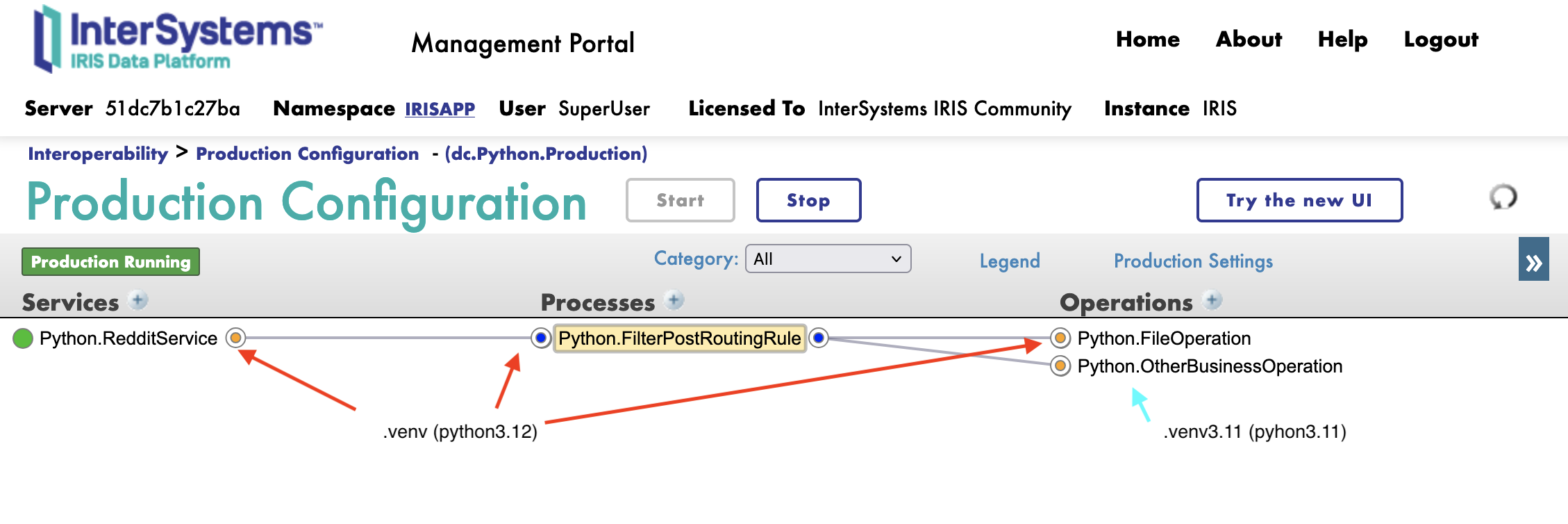
Official, IRIS support only one version of python and one set of library (default in <installdir/mgr/python).
But you can find here a PoC of venv support in our interoperabilty framework https://grongierisc.github.io/interoperability-embedded-python/venv/.
The good new is that each componement of the interoperabilty has it's own process, it means it can run different version of python.
Remember it's a PoC and it's community based.
Give it a try, and let me know what you think of it.
I mostly use Embedded Python but without the language tag : [ language = python ] in objectscript classes, in my opinion it doesn't make senses to mix two languages in one file.
Why Embedded Python mostly because it's faster and it's in the DNA of intersystems compute close to the data.
Now, time to time, i also use DB-API with sqlalchmy, to manipulate SQL data, thanks to the community edition of DB-API for IRIS, i can chose if i want to use it remotly or with Embedded Python.
At the end of the day, it should not have any difference between embedded python or "native API".
I'm doing the same with the triple-slash, it's working fine on iris 2024.3 and 2025.1 with firefox.
.png)
github and zpm package updated.
Thanks for your contribution.
What a terrific article! Thanks.
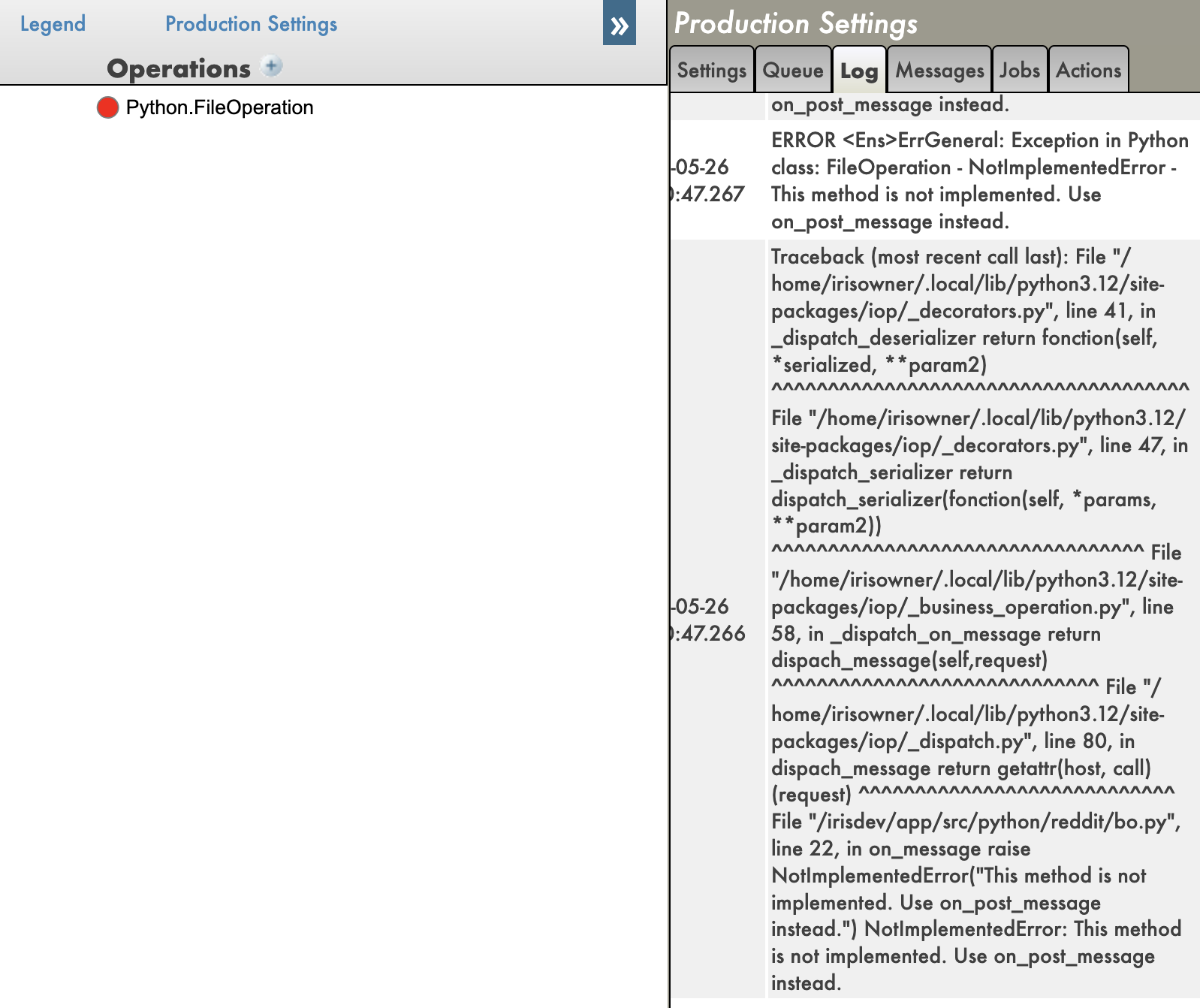
I hope will see the object %Exception.PythonException:PyExc in the next release of InterSystems IRIS. It will make debugging embedded Python so much easier.
Meanwhile, I implemented a workaround in IoP, it now supports tracebacks and remote debugging. You can find it here:
And tracebacks here:

Hummm, interesting idea, but I think there is some missing context here.
First about objects by themselves. We have Embedded Python that already bridge/bind Python objects to ObjectScript objects. So try to cast a Python object to a %RegisteredObject may not be the optimal way to go. The Embedded Python is already doing that for you.
Second, about Pydantic/ORM. The end goal of this idea is to persist the Pydantic model to a database, right? There are many ways to do that, I would prefer to stick to the 'pythonic' way of doing things. So, if you want to persist a Pydantic model, I would suggest using SQLAlchemy or SQLModel. They are both great libraries for ORM in Python and have a lot of features that make it easy to work with databases.
Now, if your second goal is to be able to leverage DTL for Python objects, then I would suggest to use an Vdoc approach. You can find a POC here : https://grongierisc.github.io/interoperability-embedded-python/dtl/
In a nutshell, don't try to bind python way of doing things to ObjectScript. Use the best of both worlds. Use Python for what it is good at and use ObjectScript for what it is good at.
you have to install it with quote :
pip install "sqlalchemy-iris[intersystems]"Btw, if you want to avoid conflict between Embedded Python, Community driver and Official one, you can use iris embedded python wrapper :
pip install iris-embedded-python-wrapperin your case you have to. force-reinstall it :
pip install https://github.com/intersystems-community/intersystems-irispython/releases/download/3.9.2/intersystems_iris-3.9.2-py3-none-any.whl --upgrade --force-reinstall
pip install iris-embedded-python-wrapper --upgrade --force-reinstallI bet the issue is due to a conflict with iris official driver.
Embedded python and iris official driver share the same module name iris.
But the official driver obviously doesn't include the cls attribute.
To solve this issue please for install this module :
pip install iris-embedded-python-wrapper --upgradeThis module is an helper to play with embedded python with a native python interpreter not only irispython.
Hi,
to_json method. As long as the instance supports handling the data in memory, you should be good to go. You can handle files up to 1GB in size without any issues.TL;DR: iris string are limited in size usually 3MB, so you need to use streams to handle large data. In python string size is limited by the memory available on the machine. To pass large data between python and iris, you need to use stream and the buffer size is used to avoid memory issues when reading/writing large data beteween string and stream.
Hi, you are on the right tracks.
Here how I would do it:
Input file :
{"id": 1, "name": "Alice", "city": "New York", "age": 28}
{"id": 2, "name": "Bob", "city": "Chicago", "age": 35}
{"id": 1, "name": "Alice", "city": "New York", "age": 28}
{"id": 3, "name": "Charlie", "city": "Boston", "age": 42}
{"id": 4, "name": "David", "city": "Seattle", "age": 31}
{"id": 2, "name": "Bob", "city": "Chicago", "age": 35}
{"id": 5, "name": "Eve", "city": "Miami", "age": 29}
{"id": 3, "name": "Charlie", "city": "Boston", "age": 42}
{"id": 6, "name": "Frank", "city": "Denver", "age": 38}
{"id": 1, "name": "Alice", "city": "New York", "age": 28}
The python code:
import pandas as pd
import iris
def string_to_stream(string:str,buffer=1000000):
stream = iris.cls('%Stream.GlobalCharacter')._New()
n = buffer
chunks = [string[i:i+n] for i in range(0, len(string), n)]
for chunk in chunks:
stream.Write(chunk)
return stream
def stream_to_string(stream,buffer=1000000)-> str:
string = ""
stream.Rewind()
while not stream.AtEnd:
string += stream.Read(buffer)
return string
def sort_remove_count(file_name: str):
# read the ndjson file
data = pd.read_json(file_name, lines=True)
# sort the data by id
data = data.sort_values(by='id')
# remove the duplicates based on name, city and age
data = data.drop_duplicates(subset=['name', 'city', 'age'])
# count the number of unique ids
unique_ids = data['id'].nunique()
print(unique_ids)
# save the data to a new ndjson string (not a file)
buffer = data.to_json(orient='records', lines=True)
# convert it as an iris stream
stream = string_to_stream(buffer)
return stream
if __name__ == '__main__':
stream = sort_remove_count('demo/input.ndjson')
print(stream_to_string(stream))
Result :
6
{"id":1,"name":"Alice","city":"New York","age":28}
{"id":2,"name":"Bob","city":"Chicago","age":35}
{"id":3,"name":"Charlie","city":"Boston","age":42}
{"id":4,"name":"David","city":"Seattle","age":31}
{"id":5,"name":"Eve","city":"Miami","age":29}
{"id":6,"name":"Frank","city":"Denver","age":38}
Now to industrialize this code, you can use IoP :
from iop import BusinessOperation
import pandas as pd
import iris
class SortRemoveCount(BusinessOperation):
def string_to_stream(self, string:str,buffer=1000000):
stream = iris.cls('%Stream.GlobalCharacter')._New()
n = buffer
chunks = [string[i:i+n] for i in range(0, len(string), n)]
for chunk in chunks:
stream.Write(chunk)
return stream
def stream_to_string(self, stream,buffer=1000000)-> str:
string = ""
stream.Rewind()
while not stream.AtEnd:
string += stream.Read(buffer)
return string
def sort_remove_count(self, file_name: str):
# read the ndjson file
data = pd.read_json(file_name, lines=True)
# sort the data by id
data = data.sort_values(by='id')
# remove the duplicates based on name, city and age
data = data.drop_duplicates(subset=['name', 'city', 'age'])
# count the number of unique ids
unique_ids = data['id'].nunique()
print(unique_ids)
# save the data to a new ndjson string (not a file)
buffer = data.to_json(orient='records', lines=True)
# convert it as an iris stream
stream = self.string_to_stream(buffer)
return stream
def iris_message(self, request: 'iris.Ens.StringRequest') -> 'iris.Ens.StreamContainer':
stream = self.sort_remove_count(request.StringValue)
return iris.cls('Ens.StreamContainer')._New(stream)
Hope this helps.
From your screenshot, it seems that you have properly install flask module and it's working.
Now you have to build an flask app.
Maybe a good starting point is here : https://github.com/grongierisc/iris-flask-template
Can you check if in the cookie sent back the domain is empty.
Something like this :
my-token=eyJhbGciO...C4grnBXBPeVc5A;Version=1;Comment=;Domain=;Path=/;HttpOnly
If so, it's a know bug, that is solved in 2024.2, i can help you with an ad hoc patch, otherwise, it some thing else.
Thanks for this valuable feedback.
Few years ago (2020 ish), i had to do a project based on DocDB. We encontered the same issues :
What you didn't mention and that we encountered :
What great is that we never get blocked by those issues, we always found a workaround.
I'm glad to see that DocDB is still alive and the team is working on it.
It's a step in the right direction to support "json" databases. I can't wait to see the next steps maybe a client side library, support for nested objects, composite indexes, a great sql function to support json objects, etc.
can you give a try to https://github.com/grongierisc/iris-embedded-python-wrapper.
follow the readme, it will give you the instruction to work with venv and a chosen version of python and bind it to iris.
behind the scene, this module help to setup the PythonPath, PythonRuntimeLibray and PythonRuntimeLibrayVersion
let me know, if you find any issue.
Btw, it will not solve the python 3.13 issue, you need to upgrade to 2025.1 to support it.
FYI in python :
import iris
iris.system.Process.SetNamespace("%SYS")
db_ref_list = iris.ref(None)
iris.cls("Config.Databases").DatabasesByServer("", db_ref_list)
db_list = db_ref_list.value
db_names = db_list.split(",")
for db_name in db_names:
print(db_name)I just build it, i had no issue on my side.
In your case, it seems that you don't have the permissions to access /tmp while building the image.
It's weird because /tmp is a public directory, so you should have access to it.
Make sure you haven't mounted a volume on /tmp.
Otherwise, you can try to modify the Dockerfile to use another directory, like /home/your_user/tmp.
# run iris and initial
RUN iris start IRIS \
&& iris session IRIS < /opt/irisapp/iris.script \
&& iris stop IRIS quietly
import iris
GLOBAL_QUEUE = iris.gref("Ens.Queue")
defget_list_host_queue() -> dict:
dict_queue = {}
for composed_key, v in GLOBAL_QUEUE.query():
host = composed_key[0]
if host notin dict_queue:
try:
dict_queue[host] = v if composed_key[2] == 'count'elseNoneexcept IndexError:
dict_queue[host] = Nonereturn dict_queue
if __name__ == "__main__":
print(get_list_host_queue())
# {'Ens.Actor': 0, 'Ens.Alarm': 0, 'Ens.ScheduleHandler': 0, 'EnsLib.Testing.Process': 0, 'Python.MyAsyncNGBO': 10, 'Python.MyAsyncNGBP': 0, 'SystemSignal:29404': 0, '_SyncCall:29420': 0}Try some thing like that
Thanks @Dmitry Maslennikov, once again you make things clear. What we do today and what can be improve, i hope, other can have a look at this study and understand the value of such feedback.