ObjectScript Search — Full-Text Server-Side Search for VS Code, Right Now

If you have ever dug through a large IRIS namespace looking for where a particular string, method call, or pattern was used, you know the pain: there was no built-in way to do a grep-style search across your server-side ObjectScript code from VS Code — at least not without jumping through some hoops.
That is what ObjectScript Search fixes.
Try it today with a simple install from the VS Code Marketplace. If you don't like it, uninstalling is just as easy. But I think you will like it — it is a huge quality-of-life improvement for anyone doing ObjectScript development in VS Code.
Why This Extension Exists
The official vscode-objectscript extension does include search functionality. However, enabling it currently requires either waiting for the proposed VS Code API to be finalized, or manually installing a custom build of the extension and enabling the proposed VS Code API. Neither approach is ideal for developers who expect things to work out of the box.
ObjectScript Search is a temporary, standalone extension that bridges that gap right now. It delivers full-text server-side search through a dedicated panel in the InterSystems activity bar, no special builds or proposed APIs required. Once the official extension ships search as a first-class feature, this extension will have served its purpose — but until then, it is here and it works.
What It Does
ObjectScript Search adds a Search view directly to the InterSystems sidebar. From there you can search inside:
- Classes (
.cls) - Routines (
.mac,.bas,.int) - Include files (
.inc) - Web / CSP files
across any connected IRIS namespace, with the following capabilities:
| Feature | Details |
|---|---|
| Full-text search | Matches inside file content, not just file names |
| Match options | Case-sensitive, whole-word, and regular-expression modes |
| Type filters | Toggle each document type on or off independently |
| Streaming results | Results appear progressively as the server returns batches |
| Live preview | The search picker shows matching file names as you type |
| Click to open | Click any result to open it read-only in the ObjectScript editor |
| Cursor positioning | Match items scroll the editor to the exact matched line |
| Match highlights | Query text is highlighted in both file names and match lines |
| Search history | Last 20 queries are saved per workspace |
| Copy results | Export the full result list to the clipboard as Markdown |
| Status bar | Shows match/file count after each search |
| Multiple namespaces | A namespace picker lets you target the right server when multiple workspace folders are connected |
How It Works Under the Hood
The extension talks directly to the InterSystems Atelier REST API:
- On IRIS API v6+ it queues an asynchronous search job via
POST /api/atelier/v6/{ns}/workand polls until complete, yielding result batches progressively so the UI is never blocked. - On older servers it falls back to
GET /api/atelier/v2/{ns}/action/search, issuing one request per selected document-type mask.
In regular-expression mode the query is automatically wrapped to align with IRIS regex semantics, so what you type is what gets matched.
Results open read-only through the objectscript:// URI scheme provided by vscode-objectscript, so you get full syntax highlighting and can jump straight to the matched line.
Screenshots
No active connection — the panel guides you to configure objectscript.conn:

Ready to search — once connected, click to open the search picker:

Search picker with history — previous queries are shown instantly; results stream in as you type:

Options panel — toggle document types and match behaviour:

Search results — classes and routines with per-file match counts and highlighted snippets:

Click to go to line — jump straight to the matched line in the file:

Getting Started
Prerequisites
Install the two required companion extensions (they are listed as dependencies and install automatically):
| Extension | Purpose |
|---|---|
intersystems-community.servermanager |
Manages IRIS server connections and keychain authentication |
intersystems-community.vscode-objectscript |
Provides the objectscript:// document provider |
Configure your server
// .vscode/settings.json
{
  "intersystems.servers": {
    "my-iris": {
      "webServer": {
        "host": "localhost",
        "port": 52773,
        "scheme": "http"
      },
      "username": "SuperUser"
    }
  },
  "objectscript.conn": {
    "active": true,
    "server": "my-iris",
	// Or
	"host":"localhost",
	"port":52773,
    "username": "_IRIS_USERNAME_",
    "password": "_IRIS_PASSWORD_",
    // Or
    "docker-compose": {
        "service": "iris",
        "internalPort": 52773
     },
    "ns": "USER"
  }
}
Then click the InterSystems icon in the Activity Bar and expand the Search section. That is it.
Extension settings
| Setting | Default | Description |
|---|---|---|
objectscriptSearch.maxResults |
100 |
Maximum results per search (1–1000) |
objectscriptSearch.includeSystem |
false |
Include %-prefixed system documents |
objectscriptSearch.allowSelfSignedCertificates |
false |
Accept self-signed TLS certificates |
Install
The extension is available on the VS Code Marketplace and on Open VSX.
Source code is on GitHub: https://github.com/grongierisc/vscode-objectscript-search
Acknowledgements
A huge thank you to @John Murray, @Dmitry Maslennikov , and @Brett Saviano for building and maintaining the official vscode-objectscript extension — without their work none of this would be possible. The objectscript:// document provider, the server connection infrastructure, and the overall architecture that this extension builds on are all theirs.
A special extra thank you to John Murray for the line-match algorithm that makes it possible to jump the cursor to the exact matched line when you click a result.
This extension stands on the shoulders of giants. Once the official extension ships search natively, please migrate to it — it will be the right long-term home for this feature.
Happy searching!
Comments
The utility of Find In Files from Studio is one that is badly missed in VSCode, so I'm glad to see something in this space.
Hi @Julian Matthews, The vscode-objectscript extension has had this functionality for years. Unfortunately it requires installing a version from GitHub instead of the official marketplace due to restrictions from Microsoft. Guillaume calls this out in his "Why This Extension Exists" section. Our README gives the steps for enabling the feature: https://github.com/intersystems-community/vscode-objectscript?tab=readme-ov-file#enable-proposed-apis
Thanks for kind words @Guillaume Rongier! It's great to see the community building cool things in this space.
Great stuff, @Guillaume Rongier !
Could you please also publish at https://openexchange.intersystems.com ?
Done
Thanks for creating this @Guillaume Rongier, and for your words of appreciation. It's a pleasure to see you joining the ranks of VS Code extension developers.
Anyone wanting to lobby for finalization of the VS Code API that will allow everyone to benefit from server-side search integrated into VS Code's native Search view without having to install a beta VSIX downloaded from our GitHub repo, please visit this 8-year-old VS Code issue and add your vote to the 👍on the initial post, i.e. here:
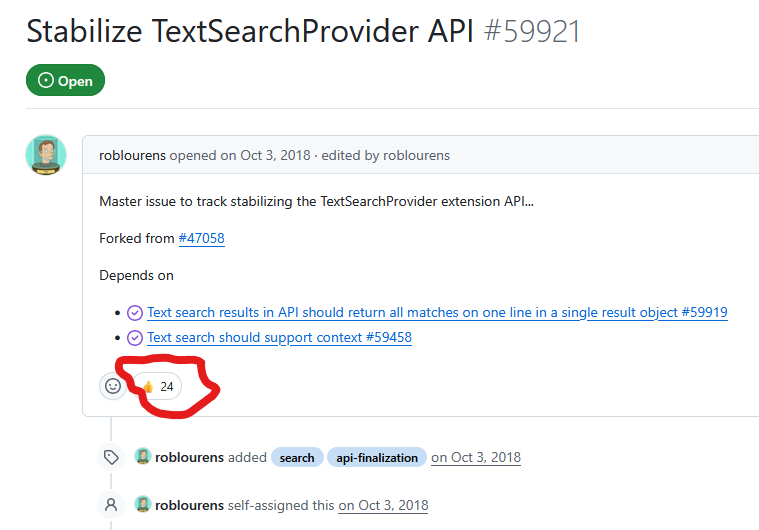
Let's see if we can move the dial on this.
Voted !
Excellent work. I was just search for this yesterday and this morning saw this. I gave it a spin and it works perfectly.
Thanks, glad this help :)