Alessandro Marin · Aug 21, 2018 go to post

Yes, that would work. You can test that in RelatedCubes/Patients and RelatedCubes/Patients. The downside of this approach is having to use cube relationships, which are more complex to maintain and in general have slower queries.

Alessandro Marin · Jun 5, 2018 go to post

There is no direct equivalent in ObjectScript to the ternary operator. You can use $SELECT or $CASE

Alessandro Marin · Apr 11, 2018 go to post

Hi Evgeny,

I think I'd better leave the answer to somebody with more experience in this field.

Alessandro Marin · Apr 11, 2018 go to post

I did not plan to introduce such a script though I actually do have scripts doing operations on databases, mappings, security, etc. It would not be too difficult to implement such a script. There is already something similar for Ensemble namespaces.

One problem however is that, as I hope it will be clear from my series, there is no universal solution for all user cases. In spite of this my opinion is that the solution of intermediate complexity outlined here would be the most likely to be adopted by most users.

Alessandro Marin · Mar 31, 2018 go to post
  • Those listings in italics are defined in Listing Groups. You can find them in SMP > DeepSee > Tools > Listing Group Manager > Open > Additional Listing for HoleFoods Sample
    They work in MDX:
    Do $SYSTEM.DeepSee.Shell()
    >>DRILLTHROUGH SELECT FROM [holefoods] %LISTING [Another Sample Listing by Date]
     
  • "Custom Listing" is the listing that you construct in pivots using Listing Fields, see here: Display a Detail Listing. I have not checked the code but to me it makes sense that, if defined on the pivot, "Custom Listing" will not be available for general MDX queries.
Alessandro Marin · Mar 31, 2018 go to post

What is exactly that custom listing? Is it defined in Listing Group (those ones should work using %LISTING)?

Alessandro Marin · Mar 19, 2018 go to post

In spite of the fact that your queries do not show dates nor the PARTEPOLICIAL cube, I do not think related cubes change anything from what suggested in answer 2 here: https://community.intersystems.com/post/filters-deepsee-dashboards . Below I rephrase what was suggested:

A) Create a "myDate" pivot variable used as "Literal" and of type "Day" in your main cube, which I will assume is EVENTOSPOLICIALES.

B) Define two calculated dimensions. First get the spec of the two dates from your main cube. You can drag and drop dates and inspect the MDX query. For example, the specs will be something like:

[Some dimension].[H1].[Fecha Creacion]

[Relation to PARTEPOLICIAL].[Some other dimension].[H1].[Fecha Parte]

C) Create two calculated dimensions with Local Storage. The expressions should use the specs in B and the pivot variable in A, for example:

[Some dimension].[H1].[Fecha Creacion].$variable.myDate

[Relation to PARTEPOLICIAL].[Some other dimension].[H1].[Fecha Parte].$variable.myDate

D) Use the calculated dimensions as filter or in rows/columns for your pivots. The dashboard will have to have a widget with a Apply Pivot Variable control.

Alessandro Marin · Mar 15, 2018 go to post

I am glad point 1 helped, though I see that you flagged as accepted answer another one which is about the problem you have not yet solved.

Alessandro Marin · Mar 15, 2018 go to post

> when I choose the dimension appears only the name of the relation and in the field dimension level didn´t appear anything. 

Please clarify what the issue is, preferably in a new post as Evgeny suggested

Alessandro Marin · Mar 9, 2018 go to post

1) Filter controls have a target field that determine what widgets are affected. Please check the docs:

  •   Target - Specifies which widgets this control affects. Specify one of the following:
    •  If this option is blank, the control affects only the widget that owns it.
    •  If this option is *, the control affects all widgets.
    •  If this option is the name of the widget, the control affects that widget. In this case, use the value given in the WIdget Name option for that widget.

2) About your second question on a generic date, try using a pivot variable used as "Literal" and of type "Day". I tested that it works in a simple case using Patients in SAMPLES. If you call the pivot variable "myDate", you can use it in a calculated dimension with this expression:

[BIRTHD].[H1].[DATE].$variable.myDate

Then you can use the calculated dimension as filter or in rows/columns. The dashboard will have to have a widget with a Apply Pivot Variable control, and use the Target field as described in point 1.

Alessandro Marin · Nov 9, 2017 go to post

You can find the link to Management Portal in the documentation:  http://docs.intersystems.com/latest/csp/docbook/DocBook.UI.Page.cls?KEY=GSA_using_portal 

To see if the instance is running: I suggest getting familiar with the ccontrol command from terminal: http://docs.intersystems.com/latest/csp/docbook/DocBook.UI.Page.cls?KEY=GSA_using_instance#GSA_using_instance_control

For example, ccontrol list will list basic information about your instance. This is an example on my (Linux) computer where you can see that the first instance is down and the second is running: 

amarin> ccontrol list

Configuration 'C152'
    directory:    /home/amarin/intersystems/cache20152
    versionid:    2015.2.1.705.0
    datadir:      /home/amarin/intersystems/cache20152
    conf file:    cache.cpf  (SuperServer port = 56778, WebServer = 57778)
    status:       down, last used Fri Jul  7 09:37:47 2017

Configuration 'C161'
    directory:    /home/amarin/intersystems/cache20161
    versionid:    2016.1.0.610.0
    datadir:      /home/amarin/intersystems/cache20161
    conf file:    cache.cpf  (SuperServer port = 56777, WebServer = 57777)
    status:       running, since Wed Nov  8 11:33:16 2017
    state:        ok
 

Alessandro Marin · Oct 25, 2017 go to post

No problem, your case (no time part in the timestamp, just get the fact that comes last in your source table) is even easier. Once you make the fact order in your source table work this plugin should work.

This plugin uses SensorReading, but it is possible to make it more dynamic (hint: implement a filter definition and %OnGetListingFields). 

/// Use this plugin in a calculated measure as %KPI("User.LastFact","LASTFACT",1,"%CONTEXT")
Class User.PluginLast Extends %DeepSee.KPIPlugIn
{

/// Cube(s) that this plug-in is based on.
Parameter BASECUBE = "*";

/// SourceTable
Parameter LISTINGSOURCE = "SourceTable";

Parameter PLUGINTYPE = "Pivot";

// The ID is probably not even needed:
Parameter LISTINGFIELDS = "SensorReading, %ID as ID";

XData KPI [ XMLNamespace = "http://www.intersystems.com/deepsee/kpi" ]
{
<kpi name="User.LastFact" displayName="LastFact" caption="LastFact" >

<filter name="%cube" displayName="Subject Area"/>
<property name="LASTFACT" displayName="LastFact" description="" />

</kpi>
}

/// Get the base query for this plug-in.
Method %OnGetMDX(ByRef pMDX As %String) As %Status
{
    Set tBaseCube = ""

    // Use %cube filter to find the base cube
    If $IsObject(..%filterValues) {
        If (..%filterValues.%cube'="") {
            Set tBaseCube = ..%filterValues.%cube
        }
    }

    If (tBaseCube'="") {
        Set pMDX = "SELECT FROM "_tBaseCube
    }
    Quit $$$OK
}

/// Compute the LastFact of values within the result set.
Method %OnCompute(pSQLRS As %SQL.StatementResult, pFactCount As %Integer) As %Status
{
    Set tSC = $$$OK
    Try {
        Set tErrMsg = ""
        While (pSQLRS.%Next(.tSC)) { 
            If $$$ISERR(tSC) {
                Set tErrMsg = $System.Status.GetErrorText(tSC)
                Quit
            }
            // Get the last fact added to the table. If unsure use pSQLRS.ID
            Set tValue = pSQLRS.SensorReading
            
            If ($ZSTRIP($P(tValue,":"),"<>W")="ERROR") {
                Set tErrMsg = $P(tValue,":",2)
                Quit
            }
        }

        // place answer in KPI output
        Set ..%seriesCount = 1
        Set ..%seriesNames(1) = "LastFact"
        If (tErrMsg'="") {
            Set ..%data(1,"LASTFACT") = tErrMsg
        } Else {
            Set ..%data(1,"LASTFACT") = tValue
        }
    }
    Catch(ex) {
        Set tSC = ex.AsStatus()
    }
    Quit tSC
}

}
 

Alessandro Marin · Oct 24, 2017 go to post

In Steve's example there are multiple (two) facts in one day, and he need to get the latest. IMO this means that Steve need to get the time of the reading (or maybe get the reading in a certain day that was added to the source table last). When using time dimensions we do not have a level more granular than DayMonthYear that can compare the time part of a reading.

I tried working around this problem but so far without success. With a plugin we have access to the lowest-level data, in particular the whole time stamp containing the time of the reading (I am assuming Steve used in his source class a regular time stamp). In my test I was able to use that piece of information to get all readings in one single period (day, month,..), compare the time stamps, and return only the most recent.

Unless Steve is ok with using Average as the aggregation function for his SensorReading measure as suggested by Asaf

Alessandro Marin · Oct 24, 2017 go to post

I would opt for a PlugIn. I need some more time to double check my implementation but I think it is working. I tried to make this work with MDX functions but we would need a time function more granular than DayMonthYear which you are using to get the dates. 

I call %KPI with my plugin passing in a measure (your "SensorReading") and %CONTEXT to get the context of the row member. The listing fields (or the %OnGetListingFields method) can be used to make the measure and the Date (I am assuming you have the full date with time in your source class) available to the %SQL.StatementResult object used in the %OnCompute.

In my test I am using these listing fields from the source table, and I do not need to implement %OnGetListingFields: 

Parameter LISTINGSOURCE = "SourceTable";

/// This allows you to do pSQLRS.SensorReading and pSQLRS.MyDate in %OnCompute:

Parameter LISTINGFIELDS = "SensorReading, MyDate"; 

In %OnCompute (which I modified from %DeepSee.PlugIn.Median) you might have to make sure the temperature of the most recent fact is returned. 

I have limited time this week but it is an interesting problem to work on. I will probably send you more details about my KPI asap. Thank you for your patience

Alessandro Marin · Aug 31, 2017 go to post

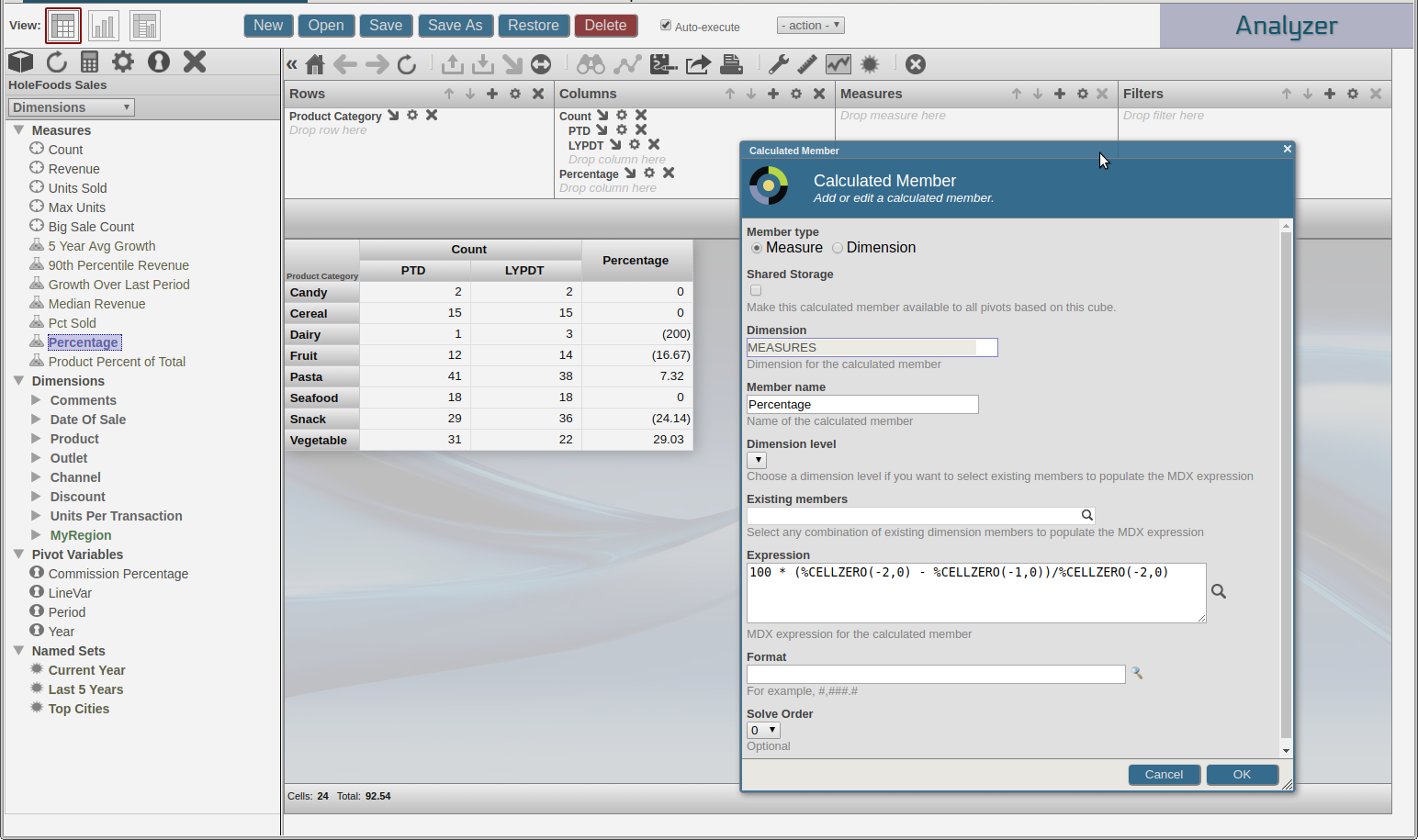
I can reproduce the error and I will look into it more carefully. In the mean time I think you should be able to achieve the same result by doing exactly what I show in my screenshot above: put Count and your calculated member on Columns, then crossjoin PTD and LYPTD with Count. 

Alessandro Marin · Aug 30, 2017 go to post

Hello Razvan,

I assume you are starting from the last figure in the tutorial where the pivot in the figure has the Count measure on Columns.

Your calculated member is considered a measure because it performs a calculation, not a "pure" aggregation of facts. Two measures cannot be crossjoined (that is you cannot place one under the other, or one in the Columns and the other in the Measures box),and for this reason you see an error. In this page you can find more details on why you cannot crossjoin two measures:

https://docs.intersystems.com/latest/csp/docbook/DocBook.UI.Page.cls?KEY=GCNV_R2015_2

That said, try creating a "Percentage" calculated measure with this expression: 

100 * (%CELLZERO(-1,0) - %CELLZERO(-2,0))/%CELLZERO(-1,0)

and place it in the Columns box (do not crossjoin it with Count though!). 

I hope this helps.

Alessandro Marin · Jul 28, 2017 go to post

Journaling the DeepSee cache (the ^DeepSee.Cache* globals) can also cause low query performance

Alessandro Marin · Apr 18, 2017 go to post

I do not think it is possible to print a whole dashboard. I suggest using the browser's printing interface. For best results I would suggest using URL parameters on your dashboard, for example using  &NOTITLE=1;&NOMODIFY=1  or even &EMBED=1.

Alessandro Marin · Apr 10, 2017 go to post

I did not see any problem in previous versions so I do not think that will help.

I suspect the problem might be due to the Week dimension that you added to the model! From this post:

"A week level in the same hierarchy as day and month will lead to unexpected results. If a week period is needed the week level should be placed in a different hierarchy than the rest of the levels."

Alessandro Marin · Apr 10, 2017 go to post

I did not see any problem in previous versions so I do not think that will help.

I suspect the problem might be due to the Week dimension that you added to the model! From this post:

"A week level in the same hierarchy as day and month will lead to unexpected results. If a week period is needed the week level should be placed in a different hierarchy than the rest of the levels."

Alessandro Marin · Apr 9, 2017 go to post

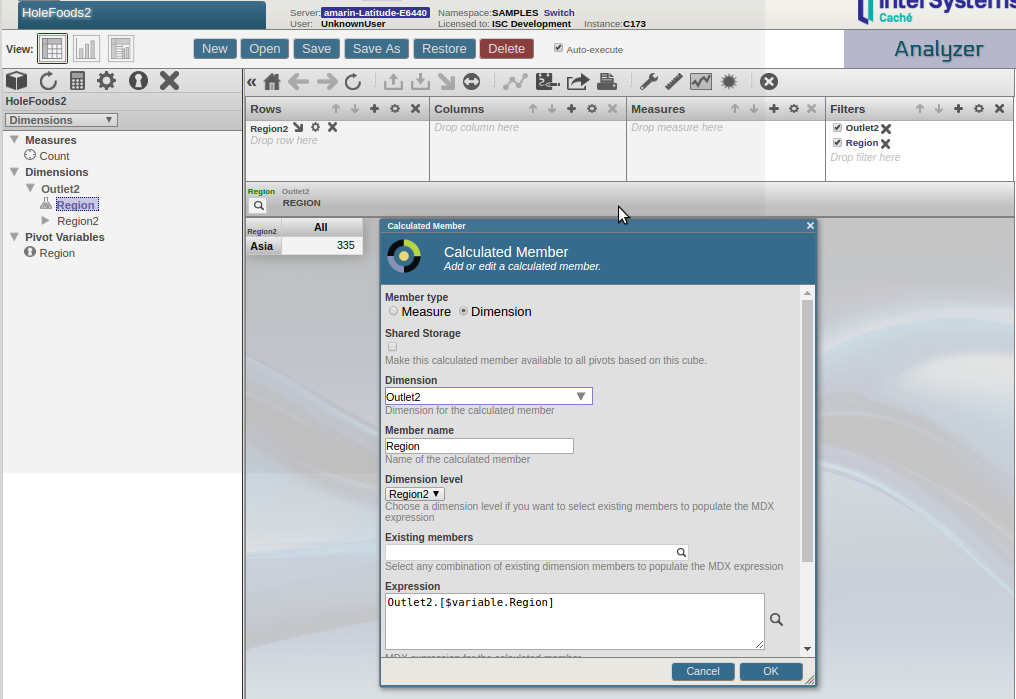
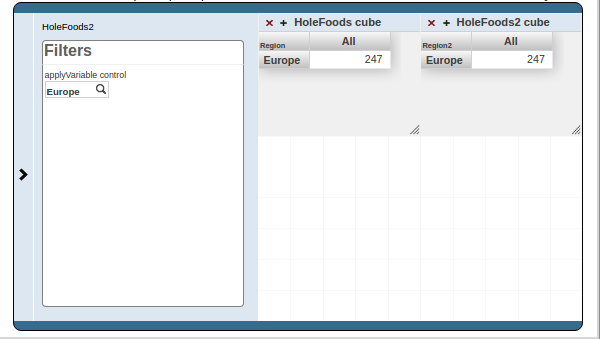
One way to do this is by using a pivot variable. Create the same pivot variable "Region" in both pivots on which your widgets are based. These pivot variables should return the members, in your example Asia, Europe, N. America, S. America. You can define the manually or in a termlist, or use a kpi to retrieve them. 

For the example in the screenshot below I created a HoleFood2 cube with a Outlet2.H1.Region2 level. This level is "incompatible" with an Outlet.H1.Region level in HoleFoods. In my manual Region pivot variable I simply defined two regions, which can be selected manually. 

Once you have these two pivot variables create a calculated dimension on each pivot using the pivot variable. In your example in HoleFoods the expression should be Outlet.[$variable.Region]. Place the calculated dimension on Filters.

This is how I did it in HoleFoods:

and this is how I did it in HoleFoods2:

Finally, add an ApplyVariable control on one of your widgets with "*" as target. Selecting a region will filter both widgets.

Alessandro Marin · Apr 9, 2017 go to post

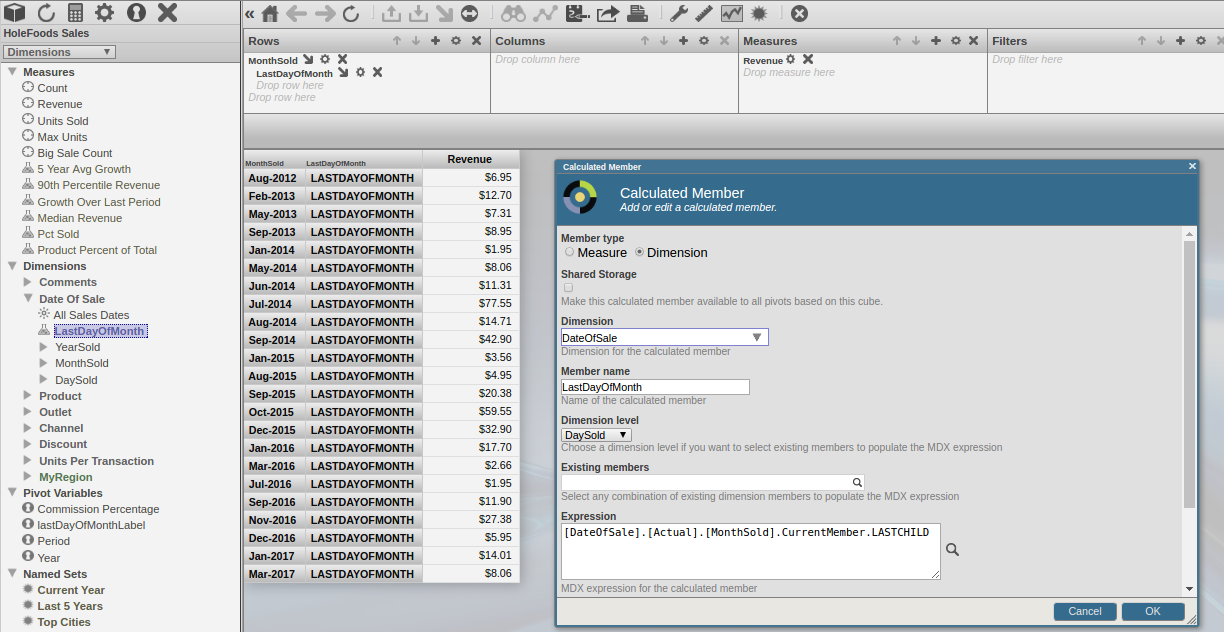
That is what I understood from your original post. The query I suggested in my first answer works should do and it works for me, see the screenshot. If it doesn't and you are sure you have a last day of the month with revenue in your data try to troubleshoot it by simplifying the query. For example, start by removing .LASTCHILD from the calculated dimension.


Alessandro Marin · Apr 6, 2017 go to post

The query I posted should return the revenue on the last day of a month (for example 31 Jan 2017, 28 Feb 2017, 31 March 2017). Maybe your data does not have any revenue on some last day of the month. 

I probably misunderstood your questions. In particular these questions you wrote:
"How can I manage to show in MDX query months where every month shows the value of the last month?"

"But what MDX will show the months with the revenue for the last day in a month?"

Could you clarify?

Thanks

Alessandro Marin · Apr 5, 2017 go to post

%LAST evaluates a measure or numeric expression for the last non-empty member of a set, so I do not think that is what you want.

I am using %LASTCHILD, but you cannot append it to [DateOfSale].[Actual].[MonthSold].Members because %LASTCHILD only works on specific member. For the moment I found this solution:

WITH  MEMBER [DateOfSale].[LastDayOfMonth] AS '[DateOfSale].[Actual].[MonthSold].CurrentMember.LASTCHILD' 

SELECT [Measures].[Amount Sold] ON 0,

NON EMPTY NONEMPTYCROSSJOIN([DateOfSale].[Actual].[MonthSold].Members,[DATEOFSALE].[LASTDAYOFMONTH]) ON 1 FROM [HOLEFOODS]

The resulting headers are ugly and I have not yet been able to successfully use [DateOfSale].[Actual].[MonthSold].CurrentMember.Properties("Name")

Alessandro Marin · Mar 15, 2017 go to post

I do not think there is a way to ask the user to select a user before displaying the dashboard. 

Maybe you can try setting the filter as required in the dashboard settings and as default value using a run-time variable. The run-time variable should return the current username. To return the current user start from the COS $username special variable. 

Alessandro Marin · Feb 26, 2017 go to post

You can use an applyFIlter or setFilter control and under Filter select "Named Filters". In the resulting control you will be able to select the named filters you defined on your pivot.

Alessandro Marin · Feb 14, 2017 go to post

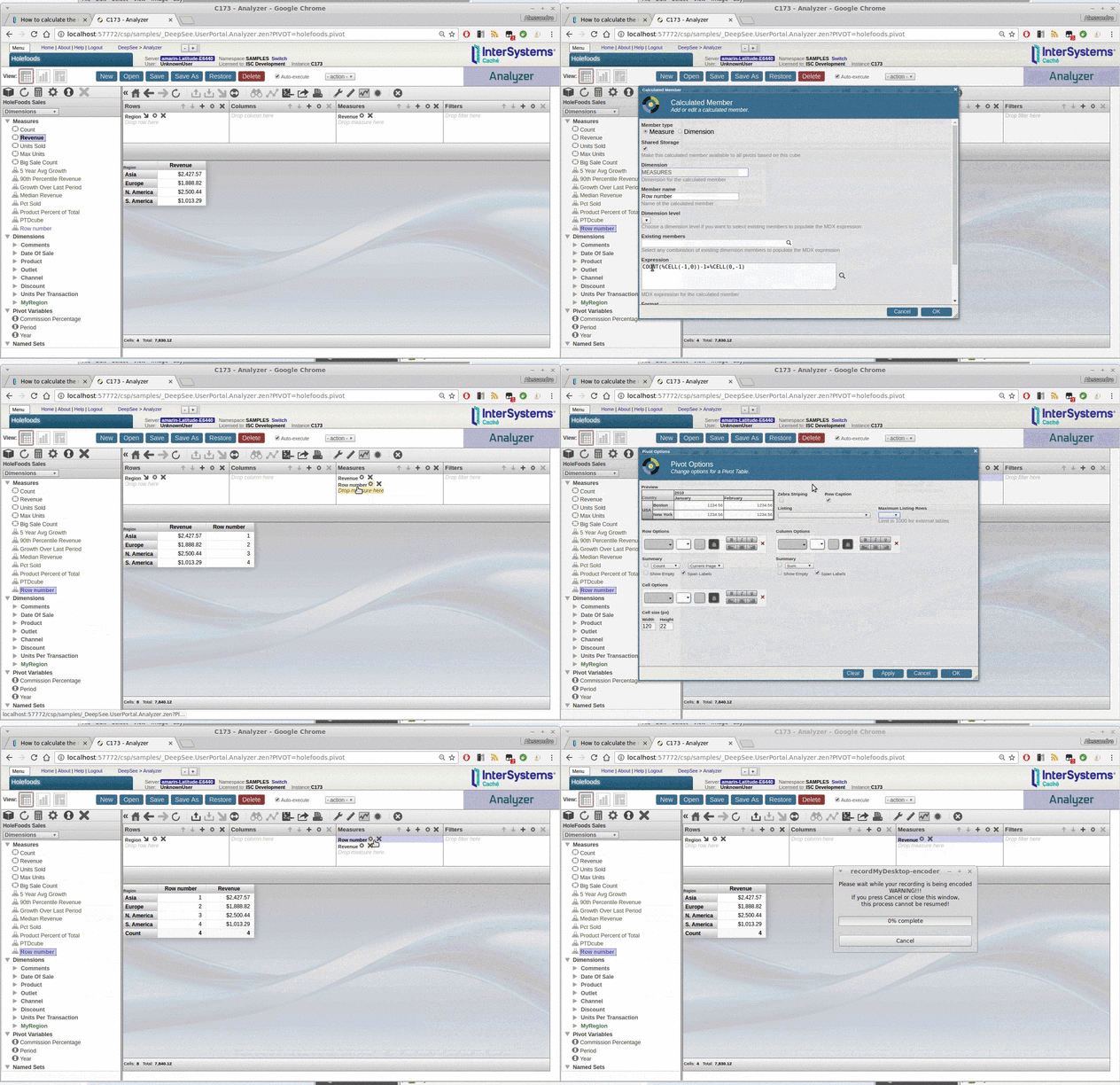
In the options for pivot table you can use Count instead of Grand Total as Summary. However, you will have to choose between the Grand Total and Count. If you calculate the grand total in some other way (for example by placing another [Outlet].[H1].[Region].Members and then Gear icon > Compute Aggregate > SUM), that COUNT will also count the cell with the Grand Total. 

Otherwise you can create a "Row Number" calculated measure with the expression below and place it on measures next to Revenue

COUNT(%CELL(-1,0))-1+%CELL(0,-1)

Alessandro Marin · Feb 14, 2017 go to post

If you are asking how to show the number of rows in a given DeepSee pivot, edit your current MDX and wrap the expression on rows in the COUNT function.

If you are asking how to limit the number of rows, click on the gear on the Rows box and use the "Return the first n members" checkbox.