- Log in to post comments
All
Accepted answers
Danny, thank you for this fantastic series!
- Log in to post comments
Glad to hear that!
- Log in to post comments
Hi, Lin!
You are creating this calculated dimensions as shared members. In this case, they are stored in some ^DeepSee.* global.
One of the options to avoid calculated dimensions' storage in the global and further deployment difficulties you can use calculated members with Shared Storage option turned off.
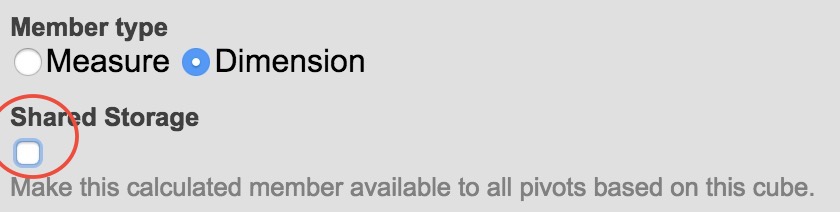
You can alter this option if you create calculated dimension in a named and saved pivot.
In this case, the calculated measure definition will be placed directly in the MDX query of this pivot thus you don't need to deploy it, cause it will live with the pivot.
- Log in to post comments
- Log in to post comments
Hi, Ron!
Just checked it - all works fine. What is the error you are having?
- Log in to post comments
Thanks, Eduard!
This is very helpful.
May I ask, what are the caveats using basic authentication instead of CLP (Caché Login Page)?
- Log in to post comments
This is really nice!
And short, so very is suitable for macro.
- Log in to post comments
Sergey, thank you for the thorough answer!
Then, in your client app settings
Do you mean web-app settings like in the following screenshot?

But why not using basic authentication? Can I consider using it?
- Log in to post comments
Hi, Dan!
Sure, it is the option, thank you! And I can mention your series of posts with the step-by-step implementation of it.
- Log in to post comments
Hi, Danny!
iFind search on documentation is implemented. Try it out ;)
- Log in to post comments
Hi, Constantin!
When I search documentation with your online tool what is the version of documentation it works with?
Would you please add the version of the product in the results or somewhere?
Thanks in advance!
- Log in to post comments
Hi, [@Rubens Silva]!
You mean we shouldn't be shrinking replies?
But how about indent in the discussion tree? I think indent helps to follow the discussion. Thoughts?
- Log in to post comments
Yep, we will post remastered version soon )
- Log in to post comments
- Log in to post comments
Sure, Jeff! Hope you can make the next one. Prepare your questions! )
- Log in to post comments
Join Live Stream today and ask your questions online!
- Log in to post comments
Got it now.
Steve, you can introduce your own data hierarchy build with expressions on this property which will have levels:
Year, Month, Day, hour (or minute).
And thus with LASTCHILD on Day level you can get the last member of the day.
- Log in to post comments
Hi, Thomas!
It's a great idea! Do you want to provide a description for the group?
- Log in to post comments
Hi, Alessandro!
But why it is not the case of what we already have solved?
- Log in to post comments
Here are the slides on DeepSee Web session
- Log in to post comments
Steve, but it does for me exactly what you are describing.
WITH MEMBER [DateOfSale].[LastDayOfMonthRevenue] AS 'AGGREGATE([DateOfSale].[Actual].[MonthSold].CurrentMember.LASTCHILD,MEASURES.[Amount Sold ])'
This will show last child member which has value in the next level of hierarchy. And with AGGREGATE you can alter the Measure you want to show up.
Hope [@Alessandro Marin] can provide more info.
- Log in to post comments
Here is the related video.
- Log in to post comments
Hi, Steve!
Hope this thread might be helpful.
- Log in to post comments
And also you can earn 300 points in Global Masters for the survey completion.

- Log in to post comments
Thanks, Robert! That was fast.
- Log in to post comments
One week left for the meetup! Come to discuss Sharding - the new feature which comes with InterSystems IRIS, High Availability and Atelier with InterSystems Developers and Product Managers. See you in Cambridge!
- Log in to post comments