take a look at https://www.jinfonet.com/
- Log in to post comments
take a look at https://www.jinfonet.com/
Hi Cris,
Thanks! I am going contact you as suggested by Ben Spead.
Later on I can post the solution over here.
Great! I am going to try that and call a rest api async in order to record that. We are concerned about a high volume of user access and have peformance issues.
Pageviews is related to the UI side. Some UI can have acces to multiple API endpoints and it would not be a good approach. We have tried that already. Also they would not like to use Google Analytics.
I use !
Great article!
You can use a temporay global ^CacheTemp or a global scope process ^||CacheTemp. You can get a good performance. Also you can use a regular global and turn-off jurnal for that specific job if you want a better performance and doesn´t care about that journaling process.
I hope it helps
Hi Ben!
In order to clarify your question I have done the following test:
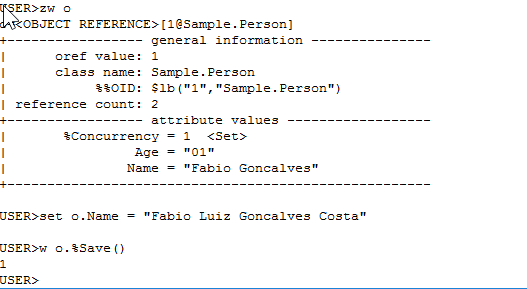
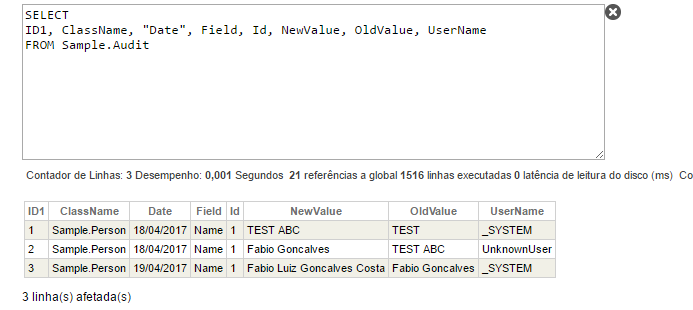
For those who want additional details about when a triggers is fired, here is the documentation url:
https://docs.intersystems.com/latest/csp/docbook/DocBook.UI.Page.cls?KE…
Take a look at this article:
https://community.intersystems.com/post/tracking-data-changes-audit-log
I would like to emphasize that if it is a new customer or if they are considering upgrading you would evaluate the possibility of guiding your customer to use Atelier. According to the 2017.1 release notes "the focus of future development will be on the new Eclipse based IDE". See the following link for additional details:
http://docs.intersystems.com/documentation/cache/20171/pdfs/GCRN.pdf (Page 6 - 1.8 New Features in Atelier, the Eclipse-Based IDE)
Additional comments:
Basic authentication is the easiest to implement security to your application and it can be implemented without additional libraries. Everything needed to implement basic authentication is what you have done. The problem with basic authentication is that it is (well “basic”) and it offers the lowest security options of the common protocols.
As far as I know there are no advanced options for using basic authentication, so you are just sending a username and password as base64 encoded.
Basic authentication should never be used without SSL encryption because the username and password combination can be easily decoded otherwise.
The UseSession = 1 as you mentioned will break the stateless caracteristics of restfull services and you will also consume a CSP license until the session ends.
You could take a look at other autorization frameworks as OAuth2.0, SAML (supported by Caché and Ensemble) or create your own custom protocols for access token control by using the ZAUTHENTICATE routine and Caché/Ensemble delegated access.
There are 2 nice posts from Daniel Kutac that may help you with additional options:
https://community.intersystems.com/post/cach%C3%A9-open-authorization-f…
https://community.intersystems.com/post/cach%C3%A9-open-authorization-f…
In order to solve Access-Control-Allow-Origin error you can use the HandleCorsRequest feature from your rest service.
Set class parameter HandleCorsRequest = 1 in your rest service class.
Override the OnHandleCorsRequest method in order to provide the origin domain that you want to allow acces to your application.
https://docs.intersystems.com/latest/csp/docbook/DocBook.UI.Page.cls?KE…
another option
do EnableDeepSee^%SYS.cspServer("/csp/samples/")
Nice article!!!!
Hi Victor,
There is a customer in Brazil which is using HAProxy and KeepAlived to set up high availability for their load balancers. They currently have 2 HAProxy servers (primary an secondary) 4 ECP servers and 1 DB server. They currently are load balancing all connections ODBC, JDBC, etc. with this solution. They are managing/load balancing approximately 5.000 user connections. I can manage to put you in contact with the customer in order to help you with some question about the architecture or configuration.
I hope it helps.
Regards.
Fábio Gonçalves.
Are you using any license key?
Hi Andrei,
As we have talked out list, it is possible to call the getContent client method in order to get data dinamically instead of using the zen mojo document stack. To do so, see the example code bellow:
This example is going to manipulate de data document content on the document stack instead of adding a new document on the zen mojo document stack.
Also you can notice that the zen('mainView').currLevel will remains the same. It means that there is no new document inserted on the document stack after call getContent.
Zen Mojo is working with its all cache mechanism according to the document key which didn´t change. At this point when you call UpdateLayout Zen Mojo will just get the new document data (from getContent) and render the content (do the data binding) on the current document Layout.
Please, let me know if you have additional question about this topic.
P.S.: You can user 'force parameter' = 1 (zenPage.getContent('data','show-employee',obj,1); ) or call the invalidate (zenPage.getContentProvider().invalidate('data','show-employee'); ). According to the documentation the force parameter will clean the data before call the OnGetContent call back.
Regards.
Hi Andrei!
Although I understand your problem, I didn´t get exactely what you want. Anyway, there is an example on SAMPLES namespace ( ZMdemo.bootstrap.HomePageServerSide.cls ) that demonstrates how to get your layout and data content from the server side. To do that yoy just to return null con getContent javascript method.
Please let me know if it helps otherwise provide additional details about what you realy expect to do.
Regards
Hi Sansa,
Take a look at the web application configuration if the Session Cookie Path are pointing to the same path. Also take a look at http://localhost:57772/csp/docbook/DocBook.UI.Page.cls?KEY=GCSP_session…. Are you using CSPSHARE=1 url parameter?
HTH,
Fábio
Yeap! I was trying to use getTemplateForArea(area) and zenPage.loadTemplateNS(), but I couldn´t make it work as I expected.
Good. Thank you very much!
I agree with Eduard Lebedyuk answer bellow that, SPA don´t work with browser back/forward buttons and consequently with the browser history.
However, I noticed that the pushDocument has a parameter 'nohistory' that uses the mechanism history.pushState when set as 'true'. It is available on %ZEN.Mojo.basePage. I did some test in order to try to help Alexandre and i have noticed that after you pushDocument, popDocument, than click on back or forward browser buttons and than try to pushDocument once again, it does not work correctly as it was.
Does anybory has any thoughts about that?
I agree with Eduard Lebedyuk answer bellow that, SPA don´t work with browser back/forward buttons and consequently with the browser history.
However, I noticed that the pushDocument has a parameter 'nohistory' that uses the mechanism history.pushState when set as 'true'. It is available on %ZEN.Mojo.basePage. I did some test in order to try to help Alexandre and i have noticed that after you pushDocument, popDocument, than click on back or forward browser buttons and than try to pushDocument once again, it does not work correctly as it was.
Does anybory has any thoughts about that?
Hi,
After read all I didn't get exactly what you need. However, you can get all variables using ˆSPOOL.
If you run the following command, which uses the device 2 (ˆSPOOL) you will get all variables on the global ˆSPOOL
http://docs.intersystems.com/latest/csp/docbook/DocBook.UI.Page.cls?KEY…
/* Writing to the ^SPOOL global */
OPEN 2
USE 2
WRITE
CLOSE 2

/* Displaying the ^SPOOL global */
ZW ^SPOOL
Hi
you can take a look at :
|
%ZEN.Auxiliary.jsonProvider |
This provider can give you a JSON object that allows you to serialize.
Browse the class above via class reference and have a look at the methods bellow.
http://docs.intersystems.com/cache201317/csp/documatic/%25CSP.Documatic…
%WriteJSONFromObject
%ObjectToJSON
I hope it helps
I usually add a HANG command when I want to start debugging
Hang 15
And call the system or app which runs the specific class method, routine, csp, etc.
This hang gives me some time to go to studio and attach my studio debug to that process according to the name.
Fantastic!
Hi Terri!
Yes. It is possible. Yoy can take a look at Aviation.ReportDomain class on SAMPLES namespace where there is an example of SQL load.
Also It is possible via $System.iKnow.IndexTable(). If you take a look at %SYSTEM.iKnow:IndexTable you will find an example of %iKnow.Source.SQL.Lister use.
From the Administration Portal you can go to iKnow >Architect where there is some option to load SQL data and other Listers. (this resource is available from 2016.x)
Another option is: http://docs.intersystems.com/latest/csp/docbook/DocBook.UI.Page.cls?KEY…
Regards
Hello Daniel,
Here in Brazil I am working with some APs and customers about the same issue. During some conversations on internal mail lists I got those inputs:
1) The first recommendation in the chain is Zen Mojo if they want to use our offering. If they have web developers they should consider HTML development with JS frameworks like AngularJS, React and connect via JSON over REST.
2) The bigger the application, the better a framework that suits more complex needs. You can build more complex systems with Zen Mojo, but after you hit a certain level of complexity it is better to leverage a less simplistic framework, like Angular or React. In general: If the customer or AP is able to build up and maintain knowledge in Angular or React, they should choose that path. If they are a Caché shop that wants to do web development, but can’t dedicate resources to it, they should choose Zen Mojo.
3) If the customer or AP decision is to use the ZEN Mojo, they can use use multiple templates for desktop applications. Multiple templates has some disadivantages.
4) We have already customers who have built complex desktop applications with Zen Mojo. Both used a generator approach, because that is what they used in their previous generation of their front-end. The Plugin Documentation is an example of a small desktop application.
5) There is some nice content related to global summit 2016 wich uses some Angular examples
6) In general we release every 2.5 months.
I have been discussing with those AP and customers the advantages and disadivantages and also demonstrating to them in pratice how both works. The final decission should be the AP or customer decisions according to their team, busineess and strategy.
I hope it helps.
Hi Sergio,
I don´t know what exactly you are looking for, but you can take a look at both links bellow:
http://docs.intersystems.com/latest/csp/docbook/DocBook.UI.Page.cls?KEY…
http://docs.intersystems.com/latest/csp/docbook/DocBook.UI.Page.cls?KEY…
I hope it helps.