Guillaume Rongier · May 5, 2022 go to post

Great initiative,

I will try to apply this to most of my repository.

BTW, there is an easy way to enable BuildKit without editing the config file of docker :

Unix :

DOCKER_BUILDKIT=1 docker-compose build

Windows :

set "DOCKER_BUILDKIT=1" & docker-compose build
Guillaume Rongier · Apr 6, 2022 go to post

Since the launch of IRIS, ENSDEMO namespace is gone.

Now to have demo or anything else you have to go with ZPM : https://community.intersystems.com/post/install-zpm-one-line (the package manager).

Check the list here :

https://openexchange.intersystems.com/

If you still want EnsDemo check those githubs :

Guillaume Rongier · Mar 24, 2022 go to post

This demo is now 100% python :

https://github.com/grongierisc/iris-python-interoperability-template/tree/master/src/python/Demo

Look at this beauty :

FileOperation.py

import grongier.pex
import datetime
import os
import iris

class FileOperation(grongier.pex.BusinessOperation):

    def OnInit(self):
        if hasattr(self,'Path'):
            os.chdir(self.Path)

    def OnMessage(self, pRequest):
        
        ts = title = author = url = text = ""

        if (pRequest.Post is not None):
            title = pRequest.Post.Title
            author = pRequest.Post.Author
            url = pRequest.Post.Url
            text = pRequest.Post.Selftext
            ts = datetime.datetime.fromtimestamp(pRequest.Post.CreatedUTC).__str__()

        line = ts+" : "+title+" : "+author+" : "+url
        filename = pRequest.Found+".txt" 

        self.PutLine(filename, line)
        self.PutLine(filename, "")
        self.PutLine(filename, text)
        self.PutLine(filename, " * * * * * * * * * * * * * * * * * * * * * * * * * * * * * * * * * * * * * * * *")

        return iris.cls('Ens.StringResponse')._New("hello")


    @staticmethod
    def PutLine(filename,string):
        try:
            with open(filename, "a",encoding="utf-8") as outfile:
                outfile.write(string)
        except Exception as e:
            raise e

FileOperationWithIrisAdapter (we can use native iris adapter :)):

import iris
import grongier.pex

class FileOperation(grongier.pex.BusinessOperation):

    def getAdapterType():
        """
        Name of the registred adaptor
        """
        return "EnsLib.File.OutboundAdapter"

    def OnMessage(self, pRequest):

        ts = title = author = url = text = ""

        if (pRequest.Post != ""):
            title = pRequest.Post.Title
            author = pRequest.Post.Author
            url = pRequest.Post.Url
            text = pRequest.Post.Selftext
            ts = iris.cls("%Library.PosixTime").LogicalToOdbc(iris.cls("%Library.PosixTime").UnixTimeToLogical(pRequest.Post.CreatedUTC))

        line = ts+" : "+title+" : "+author+" : "+url
        filename = pRequest.Found+".txt" 
        
        self.Adapter.PutLine(filename, line)
        self.Adapter.PutLine(filename, "")
        self.Adapter.PutLine(filename, text)
        self.Adapter.PutLine(filename, " * * * * * * * * * * * * * * * * * * * * * * * * * * * * * * * * * * * * * * * *")

        return 1

Guillaume Rongier · Mar 16, 2022 go to post

With this image you will see the difference between Kong Enterprise and Kong Community :
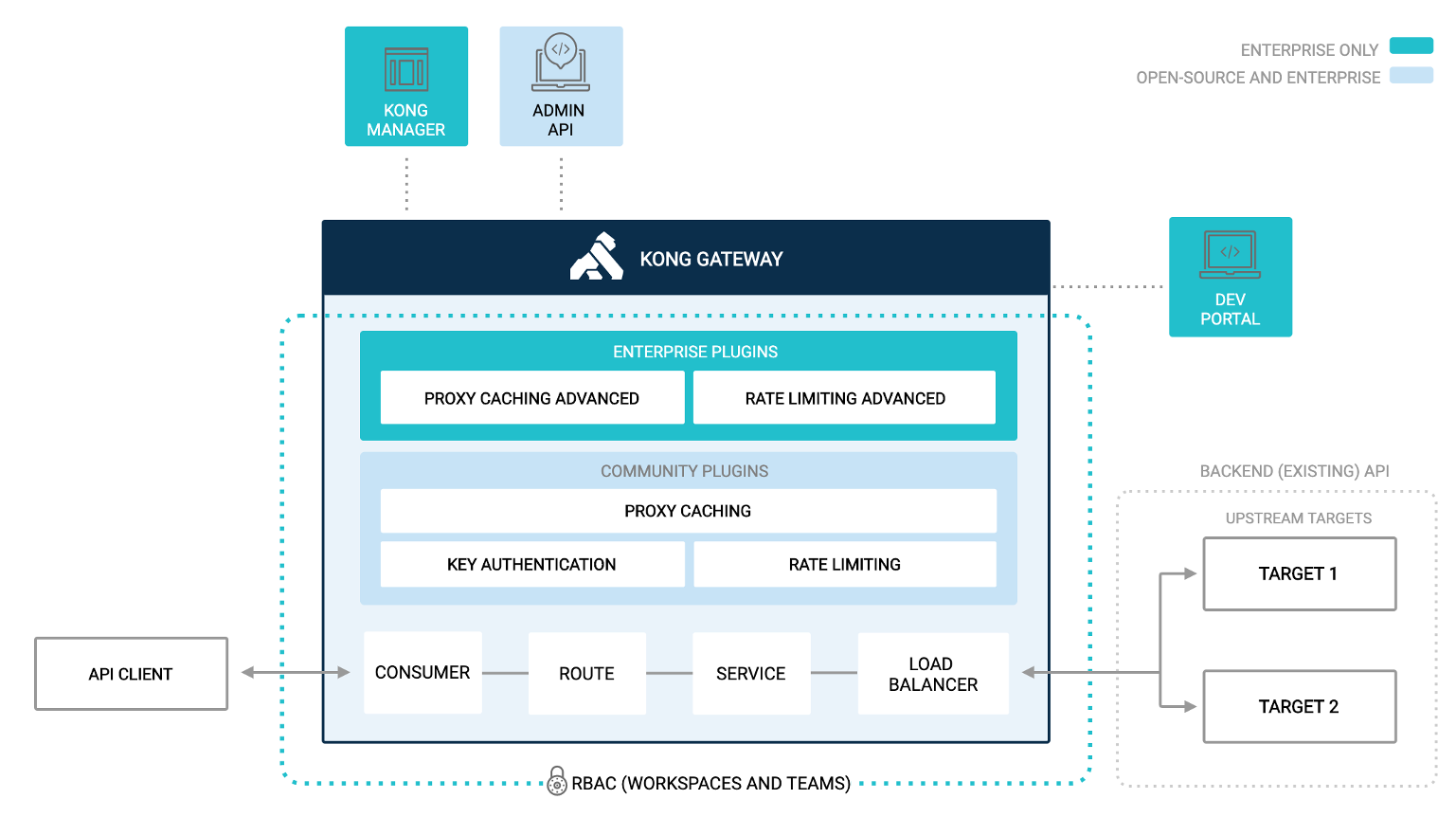
alt

In short Kong EE (Enterprise Edition) bring :

  • A web portal to manage your services/routes
  • A dev portal to publish and test you API for developers
  • Some additional plugins like LDAP support, proxy caching, advanced rate limiting
  • Kong EE inherits from all Kong Community features

If you need training on Kong EE you can follow this guide :

https://community.intersystems.com/post/iam-intersystems-api-manager-zero-hero

Guillaume Rongier · Mar 7, 2022 go to post

Great article !

Is it possible to use a custom image from a local docker registry with Kubeless ?

Guillaume Rongier · Feb 28, 2022 go to post

If you want to discover IRIS for Health with some samples, the best way is to install ZPM (community package manager). More info here : https://community.intersystems.com/post/install-zpm-one-line

Then, you have access of almost all application in OpenExchange.

Let's have an example with csvgen-ui : https://openexchange.intersystems.com/package/csvgen-ui

zpm "install csvgen-ui"

In OpenExchange you will find may example about rest API, web app, and so.

Guillaume Rongier · Feb 28, 2022 go to post

Well done,

This driver is a game changer. It sets the foundation for complex projects based on python and IRIS.

I can't wait to see new projects based on Django and IRIS.

Guillaume Rongier · Feb 28, 2022 go to post

What a great example of IRIS Embedded Python + Dash Framework, very instructive.

You are using mostly sql query + dataframes, I can't wait to see another example of dash with SQLalchemy on IRIS.

The SQLalchemy toolkit for IRIS is expected in the next coming month.

Guillaume Rongier · Feb 18, 2022 go to post

For now, it's not possible in pure python, because the select namespace is specified by the environment variable IRISNAMESPACE, and environment variable can't be change in the parent process, I have tried by reloading iris module with no success.

To achieve that, for now, as Robert says, you have to create an helper method in objectscript ... :(

Class Embedded.Utils
{

ClassMethod GetNameSpace() As %Status
{

    Return $namespace
}

ClassMethod SetNameSpace(pNameSpace) As %Status
{
    zn pNameSpace
    Return $namespace
}

}

Python :

import iris

print(iris.cls("Embedded.Utils").GetNameSpace())
try:
    print(iris.cls("Security.Users").Exists("SuperUser"))
except RuntimeError:
    print("Wrong NameSpace")

print(iris.cls("Embedded.Utils").SetNameSpace("%SYS"))
try:
    print(iris.cls("Security.Users").Exists("SuperUser"))
except RuntimeError:
    print("Wrong NameSpace")
Guillaume Rongier · Feb 18, 2022 go to post

I did a last PR.

Many small fixes (check every commit).

Now I can't help you more, it's java stuff and it's no more related to IRIS.

Guillaume Rongier · Feb 17, 2022 go to post

I publish a PR to your repo.

What I did, I removed your hibernate jar, doesn't know what is in, so I directly used dialect code.

Then, in you property files you named the iris connection string : quarkus.datasource.reactive.url
 instead of quarkus.datasource.jdbc.url.

That's it.
 

Guillaume Rongier · Feb 8, 2022 go to post

If you are using Ensemble you can use EnsLib.SQL.Snapshot.

This helper class can persist ResutSet in global :

Set rset1 = ##class(%ResultSet).%New()
set sc = rset1.Prepare("Select * FROM Ens_Util.Log")
Set:+sc sc = rset1.Execute()

set snap = ##class(EnsLib.SQL.Snapshot).CreateFromResultSet(rset1)
set glb = snap.%GblRef

zw @glb

glb :

%Ensemble("12@EnsLib.SQL.Snapshot")=21
%Ensemble("12@EnsLib.SQL.Snapshot",1,1)=1
%Ensemble("12@EnsLib.SQL.Snapshot",1,2)=""
%Ensemble("12@EnsLib.SQL.Snapshot",1,3)=445
%Ensemble("12@EnsLib.SQL.Snapshot",1,4)=""
%Ensemble("12@EnsLib.SQL.Snapshot",1,5)=""
%Ensemble("12@EnsLib.SQL.Snapshot",1,6)="Ens.Director"
%Ensemble("12@EnsLib.SQL.Snapshot",1,7)="StartProduction"
%Ensemble("12@EnsLib.SQL.Snapshot",1,8)=""
%Ensemble("12@EnsLib.SQL.Snapshot",1,9)="Production 'Connector.Production' starting..."
%Ensemble("12@EnsLib.SQL.Snapshot",1,10)="2022-02-08 14:29:33.724"
%Ensemble("12@EnsLib.SQL.Snapshot",1,11)=""
%Ensemble("12@EnsLib.SQL.Snapshot",1,12)=4
%Ensemble("12@EnsLib.SQL.Snapshot",2,1)=2
%Ensemble("12@EnsLib.SQL.Snapshot",2,2)="Ens.Actor"
%Ensemble("12@EnsLib.SQL.Snapshot",2,3)=618
%Ensemble("12@EnsLib.SQL.Snapshot",2,4)=""
%Ensemble("12@EnsLib.SQL.Snapshot",2,5)=""
%Ensemble("12@EnsLib.SQL.Snapshot",2,6)="Ens.Job"
%Ensemble("12@EnsLib.SQL.Snapshot",2,7)="Start"
%Ensemble("12@EnsLib.SQL.Snapshot",2,8)=""
%Ensemble("12@EnsLib.SQL.Snapshot",2,9)="ConfigItem 'Ens.Actor' started in job 618"
%Ensemble("12@EnsLib.SQL.Snapshot",2,10)="2022-02-08 14:29:33.978"
%Ensemble("12@EnsLib.SQL.Snapshot",2,11)=""
%Ensemble("12@EnsLib.SQL.Snapshot",2,12)=4
%Ensemble("12@EnsLib.SQL.Snapshot","ColIDs")=12
%Ensemble("12@EnsLib.SQL.Snapshot","ColIDs","configname")=2
%Ensemble("12@EnsLib.SQL.Snapshot","ColIDs","id")=1
%Ensemble("12@EnsLib.SQL.Snapshot","ColIDs","job")=3
%Ensemble("12@EnsLib.SQL.Snapshot","ColIDs","messageid")=4
%Ensemble("12@EnsLib.SQL.Snapshot","ColIDs","sessionid")=5
%Ensemble("12@EnsLib.SQL.Snapshot","ColIDs","sourceclass")=6
%Ensemble("12@EnsLib.SQL.Snapshot","ColIDs","sourcemethod")=7
%Ensemble("12@EnsLib.SQL.Snapshot","ColIDs","stack")=8
%Ensemble("12@EnsLib.SQL.Snapshot","ColIDs","text")=9
%Ensemble("12@EnsLib.SQL.Snapshot","ColIDs","timelogged")=10
%Ensemble("12@EnsLib.SQL.Snapshot","ColIDs","tracecat")=11
%Ensemble("12@EnsLib.SQL.Snapshot","ColIDs","type")=12
%Ensemble("12@EnsLib.SQL.Snapshot","ColNames")=12
%Ensemble("12@EnsLib.SQL.Snapshot","ColNames",1)="ID"
%Ensemble("12@EnsLib.SQL.Snapshot","ColNames",2)="ConfigName"
%Ensemble("12@EnsLib.SQL.Snapshot","ColNames",3)="Job"
%Ensemble("12@EnsLib.SQL.Snapshot","ColNames",4)="MessageId"
%Ensemble("12@EnsLib.SQL.Snapshot","ColNames",5)="SessionId"
%Ensemble("12@EnsLib.SQL.Snapshot","ColNames",6)="SourceClass"
%Ensemble("12@EnsLib.SQL.Snapshot","ColNames",7)="SourceMethod"
%Ensemble("12@EnsLib.SQL.Snapshot","ColNames",8)="Stack"
%Ensemble("12@EnsLib.SQL.Snapshot","ColNames",9)="Text"
%Ensemble("12@EnsLib.SQL.Snapshot","ColNames",10)="TimeLogged"
%Ensemble("12@EnsLib.SQL.Snapshot","ColNames",11)="TraceCat"
%Ensemble("12@EnsLib.SQL.Snapshot","ColNames",12)="Type"
%Ensemble("12@EnsLib.SQL.Snapshot","ColSizes")=12
%Ensemble("12@EnsLib.SQL.Snapshot","ColTypes")=12
%Ensemble("12@EnsLib.SQL.Snapshot","ColTypes",1)="BIGINT"
%Ensemble("12@EnsLib.SQL.Snapshot","ColTypes",2)="VARCHAR"
%Ensemble("12@EnsLib.SQL.Snapshot","ColTypes",3)="VARCHAR"
%Ensemble("12@EnsLib.SQL.Snapshot","ColTypes",4)="INTEGER"
%Ensemble("12@EnsLib.SQL.Snapshot","ColTypes",5)="INTEGER"
%Ensemble("12@EnsLib.SQL.Snapshot","ColTypes",6)="VARCHAR"
%Ensemble("12@EnsLib.SQL.Snapshot","ColTypes",7)="VARCHAR"
%Ensemble("12@EnsLib.SQL.Snapshot","ColTypes",8)="VARCHAR"
%Ensemble("12@EnsLib.SQL.Snapshot","ColTypes",9)="VARCHAR"
%Ensemble("12@EnsLib.SQL.Snapshot","ColTypes",10)="TIMESTAMP"
%Ensemble("12@EnsLib.SQL.Snapshot","ColTypes",11)="VARCHAR"
%Ensemble("12@EnsLib.SQL.Snapshot","ColTypes",12)="INTEGER"

If you are not using Ensemble, I guess you will have to build this kind of helper class by your self.

Guillaume Rongier · Feb 8, 2022 go to post

If you don't want to create new data on the FHIR protocol, you must use the PUT verb with an ID instead of POST.

PUT creates the resource with the specified ID if the ID does not exist, otherwise it replaces the pre-existing data.

POST always creates a new resource with a new ID, that's why the ID is not mandatory when POSTing.

For automatic transformations from HL7/CDA to FHIR, there is the possibility to define the ID for some resources and thus to avoid duplication.

Below is an example of code to transform an HL7 payload to SDA by specifying the ID of the patient in order to avoid duplicating this resource, after that you can transform this SDA to FHIR with no duplication of patient.

/// This is a custom business process that transforms an HL7 message to SDA format (an internal healthcare data format for InterSystems IRIS for Health).
/// To use this class, add a business process with this class to the production and configure the target. The default target will send the SDA to a component
/// that converts the data to FHIR.
/// 
Class FHIRDemo.HL7TransformProcess Extends Ens.BusinessProcess [ ClassType = persistent ]
{

Parameter SETTINGS = "TargetConfigName:Basic:selector?context={Ens.ContextSearch/ProductionItems?targets=1&productionName=@productionId},TransformFile:Basic";

Property TargetConfigName As Ens.DataType.ConfigName [ InitialExpression = "HS.FHIR.DTL.Util.HC.SDA3.FHIR.Process" ];

/// Transforms an HL7 message to SDA, an internal healthcare format for InterSystems IRIS for Health.
Method OnRequest(pRequest As EnsLib.HL7.Message, Output pResponse As Ens.Response) As %Status
{
	set tSC = $$$OK
	try {
		$$$ThrowOnError(##class(HS.Gateway.HL7.HL7ToSDA3).GetSDA(pRequest,.tSDA))
		$$$LOGINFO(tSDA.Read())

		Set tQuickStream = ##class(HS.SDA3.QuickStream).%New()
		$$$ThrowOnError(tQuickStream.CopyFrom(tSDA))
		
		Set tResponse = ##class(HS.Message.XMLMessage).%New()
		Do tResponse.AdditionalInfo.SetAt(tQuickStream.%Id(),"QuickStreamId")
		Do tResponse.AdditionalInfo.SetAt($P(pRequest.GetValueAt("PID:3:1"),"^"),"PatientResourceId")
	
        Set tSC = ..SendRequestSync(..TargetConfigName,tResponse,.pResponse)
	} catch ex {
		set tSC = ex.AsStatus()
	}
	quit tSC
}

Storage Default
{
<Data name="HL7TransformProcessDefaultData">
<Subscript>"HL7TransformProcess"</Subscript>
<Value name="1">
<Value>TargetConfigName</Value>
</Value>
</Data>
<DefaultData>HL7TransformProcessDefaultData</DefaultData>
<Type>%Storage.Persistent</Type>
}

}

Guillaume Rongier · Jan 31, 2022 go to post

Hi Evgeny, I confirm that irispip is not working, if you want to install python package you shall use pip3 or /usr/irissys/bin/irispython -m pip

Guillaume Rongier · Jan 30, 2022 go to post

Hi Steve, have a look a this github repo, it has a lot of examples :

Here is what you are looking for call python methods from objectscript and vice versa :

/// embedded python example
Class ObjectScript.Embbeded.Python Extends %SwizzleObject
{

/// HelloWorld with a parameter
ClassMethod HelloWorld(name As %String = "toto") As %Boolean [ Language = python ]
{
    print("Hello",name)
    return True
}

/// Description
Method compare(modèle, chaine) As %Status [ Language = python ]
{
    import re

    # compare la chaîne [chaîne] au modèle [modèle]
    # affichage résultats
    print(f"\nRésultats({chaine},{modèle})")
    match = re.match(modèle, chaine)
    if match:
        print(match.groups())
    else:
        print(f"La chaîne [{chaine}] ne correspond pas au modèle [{modèle}]")
}

/// Description
Method compareObjectScript(modèle, chaine) As %Status
{
    w !,"Résultats("_chaine_","_modèle_")",!
    set matcher=##class(%Regex.Matcher).%New(modèle)                             
    set matcher.Text=chaine
    if matcher.Locate() {
        write matcher.GroupGet(1)
    }
    else {
        w "La chaîne ["_chaine_"] ne correspond pas au modèle ["_modèle_"]"
    }
}

/// Description
Method DemoPyhtonToPython() As %Status [ Language = python ]
{
    # expression régulières en python
    # récupérer les différents champs d'une chaîne
    # le modèle : une suite de chiffres entourée de caractères quelconques
    # on ne veut récupérer que la suite de chiffres
    modèle = r"^.*?(\d+).*?$"

    # on confronte la chaîne au modèle
    self.compare(modèle, "xyz1234abcd")
    self.compare(modèle, "12 34")
    self.compare(modèle, "abcd")
}

Method DemoPyhtonToObjectScript() As %Status [ Language = python ]
{
    # expression régulières en python
    # récupérer les différents champs d'une chaîne
    # le modèle : une suite de chiffres entourée de caractères quelconques
    # on ne veut récupérer que la suite de chiffres
    modèle = r"^.*?(\d+).*?$"

    # on confronte la chaîne au modèle
    self.compareObjectScript(modèle, "xyz1234abcd")
    self.compareObjectScript(modèle, "12 34")
    self.compareObjectScript(modèle, "abcd")
}

/// Description
Method DemoObjectScriptToPython() As %Status
{
    // le modèle - une date au format jj/mm/aa
    set modèle = "^\s*(\d\d)\/(\d\d)\/(\d\d)\s*$"
    do ..compare(modèle, "10/05/97")
    do ..compare(modèle, " 04/04/01 ")
    do ..compare(modèle, "5/1/01")
}

}
/// embedded python example
Class ObjectScript.Embbeded.Python Extends %SwizzleObject
{

/// HelloWorld with a parameter
ClassMethod HelloWorld(name As %String = "toto") As %Boolean [ Language = python ]
{
    print("Hello",name)
    return True
}

/// Description
Method compare(modèle, chaine) As %Status [ Language = python ]
{
    import re

    # compare la chaîne [chaîne] au modèle [modèle]
    # affichage résultats
    print(f"\nRésultats({chaine},{modèle})")
    match = re.match(modèle, chaine)
    if match:
        print(match.groups())
    else:
        print(f"La chaîne [{chaine}] ne correspond pas au modèle [{modèle}]")
}

/// Description
Method compareObjectScript(modèle, chaine) As %Status
{
    w !,"Résultats("_chaine_","_modèle_")",!
    set matcher=##class(%Regex.Matcher).%New(modèle)                             
    set matcher.Text=chaine
    if matcher.Locate() {
        write matcher.GroupGet(1)
    }
    else {
        w "La chaîne ["_chaine_"] ne correspond pas au modèle ["_modèle_"]"
    }
}

/// Description
Method DemoPyhtonToPython() As %Status [ Language = python ]
{
    # expression régulières en python
    # récupérer les différents champs d'une chaîne
    # le modèle : une suite de chiffres entourée de caractères quelconques
    # on ne veut récupérer que la suite de chiffres
    modèle = r"^.*?(\d+).*?$"

    # on confronte la chaîne au modèle
    self.compare(modèle, "xyz1234abcd")
    self.compare(modèle, "12 34")
    self.compare(modèle, "abcd")
}

Method DemoPyhtonToObjectScript() As %Status [ Language = python ]
{
    # expression régulières en python
    # récupérer les différents champs d'une chaîne
    # le modèle : une suite de chiffres entourée de caractères quelconques
    # on ne veut récupérer que la suite de chiffres
    modèle = r"^.*?(\d+).*?$"

    # on confronte la chaîne au modèle
    self.compareObjectScript(modèle, "xyz1234abcd")
    self.compareObjectScript(modèle, "12 34")
    self.compareObjectScript(modèle, "abcd")
}

/// Description
Method DemoObjectScriptToPython() As %Status
{
    // le modèle - une date au format jj/mm/aa
    set modèle = "^\s*(\d\d)\/(\d\d)\/(\d\d)\s*$"
    do ..compare(modèle, "10/05/97")
    do ..compare(modèle, " 04/04/01 ")
    do ..compare(modèle, "5/1/01")
}

}