John Murray · May 3, 2018 go to post

Kenneth, I don't think you are correct here. Apart from invalid syntax you gave, even with the correct syntax the routine is fetched from the specified namespace and executed in the current namespace. See the following example using a simple test routine (YJM) that I created in my USER namespace and then executed from my SAMPLES namespace:

USER>zl YJM zp
YJM      w !,"Runs in ",$namespace,! q
 

USER>d ^YJM

Runs in USER

USER>zn "SAMPLES"

SAMPLES>d ^YJM

D ^YJM
^
<NOROUTINE>^YJM *YJM
SAMPLES>d ^|"USER"|YJM

Runs in SAMPLES

SAMPLES>w $zv
Cache for Windows (x86-64) 2017.2.1 (Build 801U) Wed Dec 6 2017 09:07:51 EST
SAMPLES>d ["USER"]YJM^YJM

D ["USER"]YJM^YJM
^
<SYNTAX>^YJM
SAMPLES>

John Murray · Apr 26, 2018 go to post

Like you, I get this error and find that simply stopping and restarting Eclipse resolves it.

I'm using Eclipse Oxygen (fully up-to-date) on 64-bit Windows 10, with the most recent publicly available version of Atelier 1.1 (IIRC, build 391).

John Murray · Apr 24, 2018 go to post

My hunch is that your server namespace is set to use a source control class, and maybe that class is issuing a WRITE command at a point where the current device is the TCP socket that should be receiving a JSON response for forwarding to Atelier.

John Murray · Apr 23, 2018 go to post

I don't know why this isn't working. Perhaps because you are running Studio in English but on a Windows instance with a different default locale?

But that is only a wild guess.

I wonder if any other DC readers have noticed templates not getting added to the MRU list.

Anyway, I suggest you ask InterSystems WRC for help.

John Murray · Apr 20, 2018 go to post

Bob, your question doesn't belong in the "Developer Community Feedback" group, since that's for -- well -- feedback about Developer Community. Nor is the "Developer Community" tag appropriate for it, since that also is intended for posts about DC. Please edit your post, moving it to another group, perhaps "Ensemble", and removing the "Developer Community" tag.

UPDATE - it looks like someone (one of my fellow mods?) has moved it to the Ensemble group already. You can still remove the tag, and maybe remember not to post to "Developer Community Feedback" in future unless that's the nature of your post. Thanks!

John Murray · Apr 20, 2018 go to post

My, how the years pass by.  Latest update via WRC is this isn't going to get fixed in 2018.2, and no idea when/if it ever will be.

John Murray · Apr 20, 2018 go to post

Sounds like you already have server-side source control (CCR) similar to the Deltanji product from my employer George James Software. In that case, your simplest option is to get your Atelier users to connect to the server instances in the same way as they currently do with Studio.  There's no need to change your code management paradigm (and thus your source control system) as well as your editor.

I recommend you go through that Global Summit session Ben Spead referenced in his earlier comment.

John Murray · Apr 20, 2018 go to post

What do you currently do with Studio? For example, does each developer install Studio on their local machine, then connect to whichever Cache /Ensemble server instance contains the namespace(s) they need to edit code in?

John Murray · Apr 20, 2018 go to post

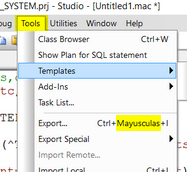
So, the "Templates..." option brings up a dialog that shows all the templates available to you? And that you can run one of them from that dialog? But after running that template, when you go back to the menu it doesn't show that template in the menu's MRU list?

John Murray · Apr 20, 2018 go to post

To answer your request for info about the registry entries, here's what one of mine looks like:

John Murray · Apr 20, 2018 go to post

That's odd. I just checked one of my Studios (2017.2.1) and it lists the templates I have used recently.

What does Help\About show your Studio version as?

I assume you have a document open in Studio when you look at that menu, because when no document is open it looks like this (both options disabled):

John Murray · Apr 20, 2018 go to post

I think Studio manages this submenu's contents automatically as a most-recently-used list, and you can't directly control what gets listed.

But if I have misunderstood your question, and you're actually asking how to create your own template, then here is the doc link.

John Murray · Apr 20, 2018 go to post

If you're not already committed(smiley) to using Git, you might consider the Deltanji source code management tool from my employer, George James Software. One of its features is the ability to manage deletion of code components (e.g. classes, routines, files, lookup tables, HL7 schemas etc) and propagate those deletion downstream in whatever workflow  you have configured (e.g. DEV, QA, STAGING, LIVE).

John Murray · Apr 12, 2018 go to post

The documentation is misleading about this.  It says:

When you upgrade Caché to a new version, existing Query Plans are automatically frozen.

And later:

The earliest upgrade that performs this operation is an upgrade to 2017.1.0.

What it needs to say is:

The earliest upgrade that performs this operation is an upgrade from 2016.2.0.

The docs do use 2016.2 as the "from" version in their example, but not in a way that communicates how this nice feature won't help with upgrades from pre-2016.2 versions.

@Brendan Bannon - please draw this to the attention the InterSystems documentation team.

Above I've deliberately linked explicitly to the 2017.2 doc rather than to "latest" because I hope that in due course the latter will get corrected.

John Murray · Apr 10, 2018 go to post

A bit more info on the answer from @Jeffrey Drumm

Here's how the relevant part of the 'Environment, Documentation and Proxy' section of Studio's Tools\Options dialog starts out:

In this state I can use the standard 'SOAP Wizard' add-in but it is served by the private web server of my Cache server installation. I'm testing from the Windows desktop this runs on.

I also have an instance of IIS on that Windows host, and the IIS is correctly configured to serve Portal and documentation pages from both http://localhost/ and https://localhost, plus from http://localhost/cache111 and https://localhost/cache111

Back in the Studio Options dialog I set the checkbox and start trying some value-pairs in the now-active Address and Port fields. Here are my results:

Address Port Result of launching add-in
localhost 80 Success
localhost 443 White page, presumably because HTTP is requested from 443
localhost/cache111 80 CSP Error page, which reveals that the CGI variable CACHE_URL has the malformed value http://localhost:80/cache111:80/isc/studio/templates/SOAPClientWizard.csp
https://localhost 443 Works from Studio 2017.2.1 but fails from Studio 2014.1.1 and displays a page headed "Navigation to the webpage was canceled".
https://localhost/cache111 443 Fails from Studio 2014.1.1 as above. Gives CSP Error page from Studio 2017.2.1, which reveals that the CGI variable CACHE_URL has the malformed value http://localhost:443/cache111:443/isc/studio/templates/SOAPClientWizard.csp

Note too that if we enter a value for Address but leave Port blank the dialog files a value of 80 in the Port field. This can be seen when the dialog is reopened.

Conclusions from above:

  1. Templates and add-ins can be served from a server other than the Private Web Server as long as they are served from the root.
  2. Studio 2017.2.1 can fetch templates and add-ins using HTTPS when correctly configured. This is not true of some earlier versions of Studio.
John Murray · Apr 10, 2018 go to post

Nice! And you can shave off 3 characters by using $EXTRACT instead of $SELECT

f i=1:1:s w ! f j=1:1:s w $e(" #",j#s<2!(i#s<2)!(j=i)!(s-i+1=j)+1)

John Murray · Apr 9, 2018 go to post

No, a variable name cannot contain the underscore character, because that character is the concatenation operator. If it was allowed in a variable name, how would we interpret this, for example?

WRITE TICK_TOCK

Is it concatenating variables TICK and TOCK, then writing out the result? Or writing the value of a single variable named TICK_TOCK.

If the utility you refer to is expecting you to supply data values in variables whose names match the SQL column names, then the developer of the utility hasn't accounted for the fact that SQL column names can contain underscores but Caché variables can't. So the utility needs fixing.

John Murray · Apr 5, 2018 go to post

For Windows the link http://docs.intersystems.com/latest/csp/docbook/DocBook.UI.Page.cls?KEY=GCI_windows#GCI_windows_upgrade gets you to a short section titled "Caché Upgrade Installation".

For other platforms the principle is the same. Stop the Caché instance you're going to upgrade (or at least be prepared to allow the upgrade procedure to stop it). Then run the installer script in the same way as if doing a new installation. Pick the existing instance you want to upgrade.

John Murray · Apr 5, 2018 go to post

Bob, as one of the moderators I have removed the "Developer Community" tag from your post. That tag is intended for posts or questions related to the operation of Developer Community itself.

John Murray · Apr 3, 2018 go to post

For the record,  if you subsequently want to Ensemble-enable namespace XYZ, here's the call that does it verbosely:

do ##class(%Library.EnsembleMgr).EnableNamespace("XYZ",1)

To do it quietly, omit the second argument or pass it as 0.

John Murray · Mar 29, 2018 go to post

In case this behaviour is version-specific, please tell us your $ZVERSION string.

John Murray · Mar 27, 2018 go to post

Fixed it again. If it breaks in future, try searching InterSystems documentation for "cinstall setserviceusername" (without the quotes)

John Murray · Mar 26, 2018 go to post

Specifically, the $-style methods (called system methods) were introduced in 2016.1 and then removed in 2016.2. See here for details.

John Murray · Mar 26, 2018 go to post

I'm seeing extra whitespace characters at unexpected places in the code fragments you posted. For example between  $ and fromJSON(data)

What is your $ZVERSION value? The $-style methods got introduced at one point, then removed in a later version.

John Murray · Mar 26, 2018 go to post

I assume you are using Caché on Windows, and you are launching Terminal from the Cube on the local desktop of the PC where Caché is running.

In this case the security settings of the %Service_Console service (System > Security Management > Services) are what you need to adjust.

Enabling only "Unauthenticated" will mean that you don't get prompted for username/password, and your Terminal session will report $username="UnknownUser". But the security settings for UnknownUser will also have to allow that account to get to the programmer prompt. If they don't, your Terminal session won't start.

Enabling only "Operating System" will mean that provided a Caché user account exists that matches the Windows account you are logged into the desktop as, your Terminal session will report that username as its $username. Again, the Caché account will need sufficient permissions to get to the programmer prompt.

John Murray · Mar 13, 2018 go to post

I was wondering the same thing, seeing how Kevin referred to "directory" names. But given that he tagged the post as "Studio" I assumed he meant "package" rather than "directory".