It works! Thanks, @Danny Wijnschenk !
- Log in to post comments
It works! Thanks, @Danny Wijnschenk !
Thanks @Evgeniy Potapov ! Good article! What about change management for Cubes, Pivots and Dashboards?
Hi Martin! In InterSystems ObjectScript
Updated
Hi @Maksym Shcherban !
Bring my apologies for that! The "life" of all the deployments on https://portal.events.isccloud.io/ is 7 days long by default.
Could you create a new one?
Also if you need the deployment to keep alive longer please reach me out in direct message.
No magic here) BYOP - which means bring your own parameters)
Another option is you code it by yourself in some preliminary window and then form an URL that contains filter settings for widgets and open dashboard with those filters set up.
Looks like it is not possible today. I suggest you add it as an idea for IRIS BI.
Thanks a lot to all the contributors and to the community that supported with feedback, pull-requests and which adopted broadly the tool!
Currently there are 250+ packages published on OEX, at least 300+ developers who install packages every month, and the amount of installed packages is above 2,000 every month.
Thank you!
Hi @Dmitrii Baranov!
Check this basic iris-dev template on the Open Exchange. As you can see it installs git in Dockerfile changing user to root and back to iris-owner:
## install git
## USER root
##RUN apt update && apt-get -y install git
##USER ${ISC_PACKAGE_MGRUSER}
if uncommented it installs git via user root. I hope this is what you wanted.
thank you, @José Pereira !
IRIS For Health has this functionality and it is Kubernetes compatible today
Thanks @John Murray ! ZPM package is updated
@Nikita.Savchenko7047 made a ZPM release - now could be installable via ZPM too
Here are the Release notes.
Great feature, @Dmitry Maslennikov !
Thank you!
[USER|python-faker]     Reload START (/usr/irissys/mgr/.modules/USER/python-faker/0.0.2/)
[USER|python-faker]     requirements.txt START
[USER|python-faker]     requirements.txt SUCCESS
Is it possible with -v tag to see what packages were installed?
Yes!! Thank you! Thank you @Guillaume Rongier !
Also on OEX
Yes, @Jose-Tomas Salvador , this was my point.
But
r = iris.cls('MyPackage.Subpackage.ClassName')._GetParameter('MYPARAM') Can be converted to:
r = iris.cls(__name__)._GetParameter('MYPARAM') if you are in the same class.
Hi Scott! which version of IRIS it is? What is the version of ZPM client?
Yet another majestic thing about ObjectScript. Wicked cool.
Thanks @Benjamin De Boe ! Useful article. I think $SYSTEM.OBJ.SetQualifiers("/exportselectivity=0") should be default for the development templates.
Thank you, @Alexander Koblov
Thank you @Vitaliy Serdtsev
Hi @John Murray ! Great we have such documentation.
But here is my repo: I have the settings in .vscode/settings.json and don't have it in Devcontainer. Could you send a PR with at least one menu item as an example?
I see. On the other hand ZPM usage can give you a more exposure amongst active ZPM users as this is a very simple and effective approach to install IRIS software packages.
Could it be installed via ZPM package?
Great! What is the format of the files?
Do you support all the elements of Interoperability productions? Can you list it, please?
BTW, @John Murray - is there a way to set up custom links for the menu? E.g. Terminal, Test portal, IRIS BI, etc?
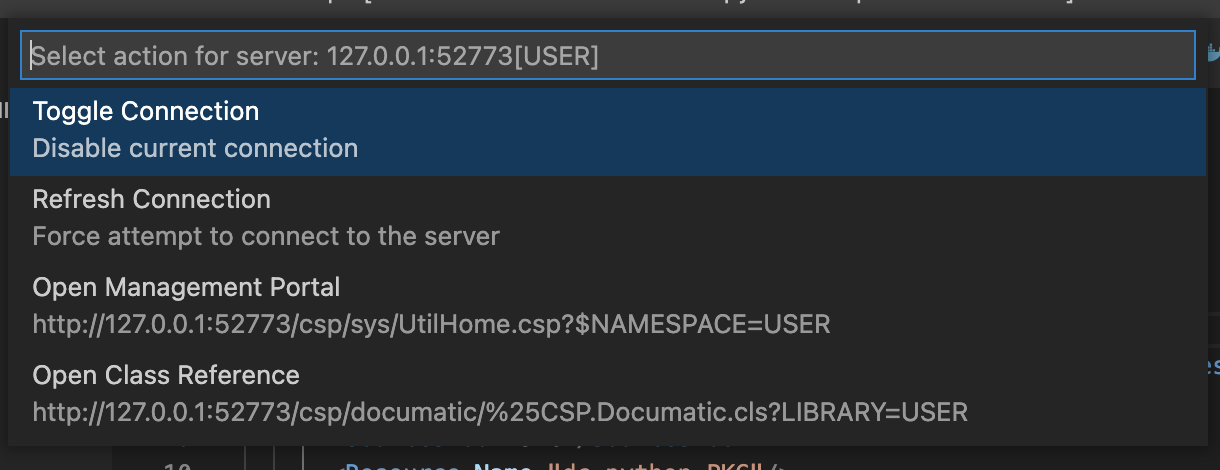
@John Murray , when I restarted the container it worked. The solution is to install the extension into the devcontainer.