Evgeny Shvarov · May 16, 2016 go to post

Mike, if you don't like it - you don't use it. 

You'll not miss any DC content if you just subscribe for every post and comment in subscription settings.

DC Twitter is intended to increase the audience for DC highlights. 

Write valuable topic and it will be tweeted on DC Twitter.

Evgeny Shvarov · May 15, 2016 go to post

One more optimisation. This:

Set list = $ListFromString(string,",") 
Set pointer = 0 
While $ListNext(list,pointer,piece) 
 { //Do something with piece... 
 }

Can be changed to:

Set list = $ListFromString(string,",") 
Set pointer = 0 
For   { 
 quit:'$ListNext(list,pointer,piece) 
 //Do something with piece... 
 }

Which is faster, as 'for' is generally faster than 'while'.

Took from Russian Caché forum

Evgeny Shvarov · May 13, 2016 go to post

Hi!

You can make it with ParallelPeriod keyword.

F.e. let's take sales in Samples for the Holefoods cube.

To show YearToYear monthly growth in percent add in the pivot calculated measure "YTY growth" with expression:

(DateOfSale.CurrentMember-ParallelPeriod(DateofSale.YearSold,1,DateOfSale.CurrentMember))/ParallelPeriod(DateofSale.YearSold,1,DateOfSale.CurrentMember)

And format: ##.##%

How to use it. 

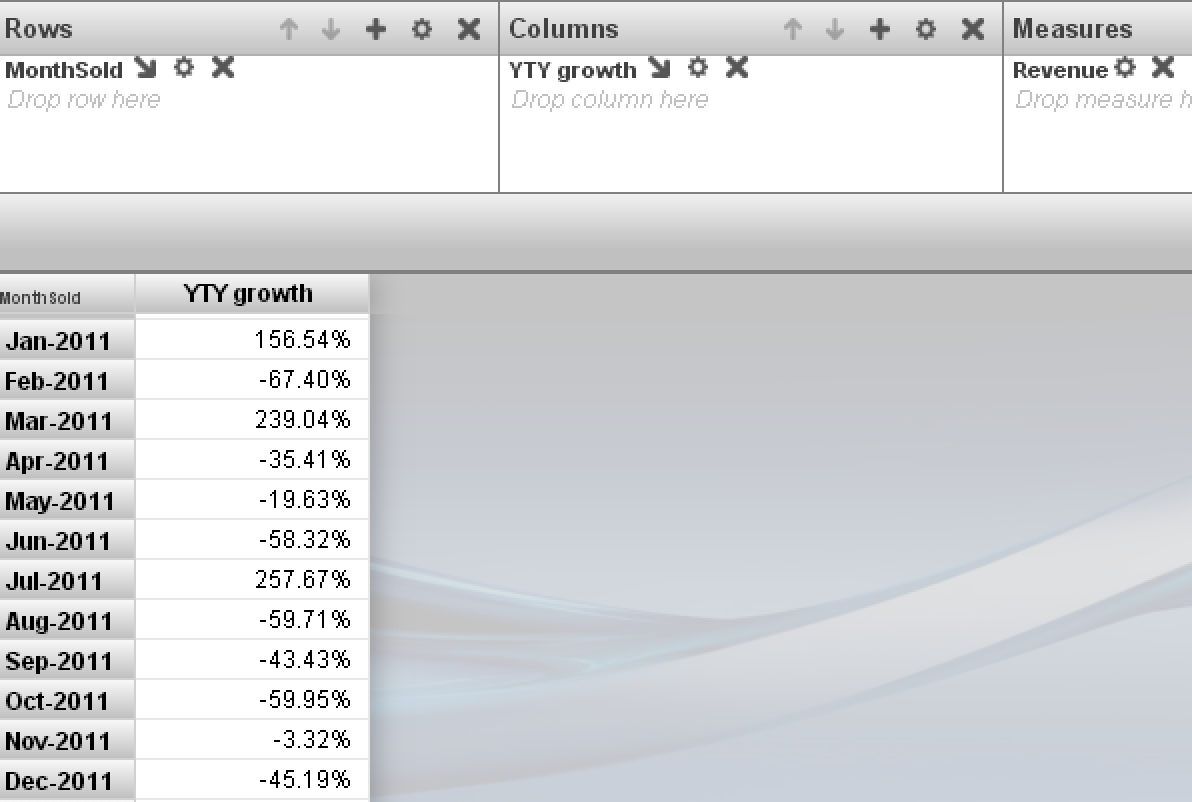
Place months in a pivot in Rows. Add YTY Calculated Measure to Cols. And add any Measure you want to compare into Measures, f.e. Revenue. 

You'll get following MDX:

 WITH  MEMBER [DateOfSale].[SelectedYear] AS '[DateOfSale].[Actual].[YearSold].$VARIABLE.Year' MEMBER [MEASURES].[YTY growth] AS '(DateOfSale.CurrentMember-ParallelPeriod(DateofSale.YearSold,1,DateOfSale.CurrentMember))/ParallelPeriod(DateofSale.YearSold,1,DateOfSale.CurrentMember)',FORMAT_STRING='###.##%' SELECT NON EMPTY {[Measures].[%COUNT],[MEASURES].[YTY GROWTH]} ON 0,NON EMPTY [DateOfSale].[Actual].[MonthSold].Members ON 1 FROM [HoleFoods]

See the result:

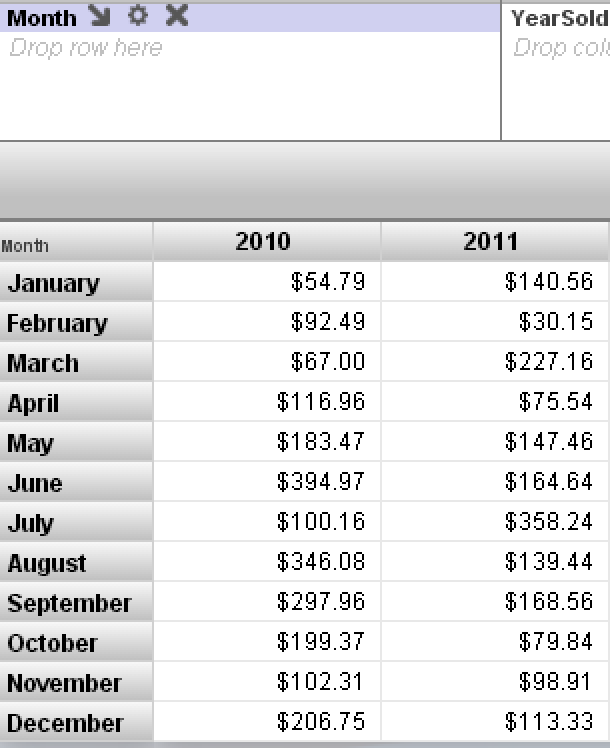
And here are 2011 and 2010 together to prove the measure above works properly:

Hope that helps.

Evgeny Shvarov · May 13, 2016 go to post

Hi!

You can make it with ParallelPeriod keyword.

F.e. let's take sales in Samples for the Holefoods cube.

To show YearToYear monthly growth in percent add in the pivot calculated measure "YTY growth" with expression:

(DateOfSale.CurrentMember-ParallelPeriod(DateofSale.YearSold,1,DateOfSale.CurrentMember))/ParallelPeriod(DateofSale.YearSold,1,DateOfSale.CurrentMember)

And format: ##.##%

How to use it. 

Place months in a pivot in Rows. Add YTY Calculated Measure to Cols. And add any Measure you want to compare into Measures, f.e. Revenue. 

You'll get following MDX:

 WITH  MEMBER [DateOfSale].[SelectedYear] AS '[DateOfSale].[Actual].[YearSold].$VARIABLE.Year' MEMBER [MEASURES].[YTY growth] AS '(DateOfSale.CurrentMember-ParallelPeriod(DateofSale.YearSold,1,DateOfSale.CurrentMember))/ParallelPeriod(DateofSale.YearSold,1,DateOfSale.CurrentMember)',FORMAT_STRING='###.##%' SELECT NON EMPTY {[Measures].[%COUNT],[MEASURES].[YTY GROWTH]} ON 0,NON EMPTY [DateOfSale].[Actual].[MonthSold].Members ON 1 FROM [HoleFoods]

See the result:

And here are 2011 and 2010 together to prove the measure above works properly:

Hope it helps.

Evgeny Shvarov · May 12, 2016 go to post

Oh, thanks for this! I think it worth to make a separate snippet posting how to use the record mapper. Haven't found it in the documentation.

Evgeny Shvarov · May 12, 2016 go to post

Agreed. Will fix it. Anyway, you are very welcome to add your version of the simplest ever file management snippet ;)

Evgeny Shvarov · May 12, 2016 go to post

Didn't get it. You mean I should change the description for the snippet?

Or to change the snippet to make it less "csv" specific?

Evgeny Shvarov · May 12, 2016 go to post

Yes) Timur already answered. This snippet is not very general "read from file" snippet - but snippet to parse "russian-like" csvs) But every time when I work with text files line by line I use it. 

Evgeny Shvarov · May 11, 2016 go to post

Mark, thank you, that's useful!

I use also $T command in terminal, which shows the line with bug, like:

USER> w $T(Method+7^Package.Class.1)

Evgeny Shvarov · May 10, 2016 go to post

Yes, at least these cases. And what is the general approach with your type of installation to show the user:

What's happened?

Were there any errors during installation?

Evgeny Shvarov · May 9, 2016 go to post

Great article, Nikita! What is the general approach in your case to show/save logs of what was installed? Of course, I can open Package.Installer class to see what should have happened during installation, but I think it is good to know what really happened with the target system.

Evgeny Shvarov · May 7, 2016 go to post

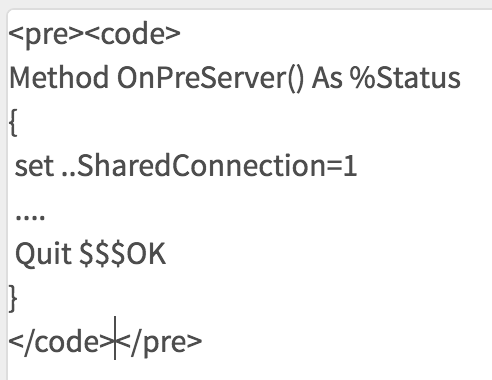
To highlight the code you also can simply go into post's html source (press source button or "disable rich text") and insert your code between pre and code tags, like it is shown in the shot

Evgeny Shvarov · May 6, 2016 go to post

We introduced Code Snippet tag. Please use it if your post contains a good snippet, or one of the answers/comments on your post is a valuable code snippet.

Evgeny Shvarov · Apr 25, 2016 go to post

Good article, Eduad. Is this prototype only or you do use  it in production somehow?

Evgeny Shvarov · Apr 25, 2016 go to post

Bookmarks are another may be rare use case but I meant  links to the documentation with "latest" segment  in URL f.e. in this article.  There are a lot of links to documentation there. What will happen with this links if  some parts from documentation will be removed in the next version?

Evgeny Shvarov · Apr 24, 2016 go to post

If so, create a new database on instance A and then use GBLOCKCOPY to copy from the existing database to the new one.   Then just move the new database to instance B.

That can help sometimes. Thank you. Just move - you mean unmount and download cache.dat file?

Is this a one-time migration of data from instance A to instance B?

My question is a request for general  approaches.  But my task now is to extract some part of consistent data from the large database to use it as test data in my local database for development purposes.

Evgeny Shvarov · Apr 24, 2016 go to post

Thank you Kenneth!

But what if you need a part of data? Say the records only from current year or from particular customer?

And what if you need not all the classes, but part of them - what globals should I choose to export?

I believe in this cases we should use SQL to gather data. The question is how to export/import it.