New post

Find

Article
· Sep 7, 2023 2m read

Using Embedded Python in WebTerminal

In a previous question, I have illustrated a few problems using Embedded Python
interactively as you would do from Docker console or IRIS terminal.
Investigation of the causes brought a rather clear picture. It's a classic impedance mismatch

  • While consoles act rather relaxed WebTerminal is very precise in output presentation line terminators from (Embedded) Python's print() function are typically <LF>  0x0A  $C(10) And WebTerminal does exactly this while eg. my console in Docker also does a <CR> und cover. So a sequence of print() looks like a scale
  • Compared to ObjectScript where a WRTE !  sends <CR><LF>  $C(13,10) and WebTeminal is happy. So a sequence of lines looks like a tower of text. This is not a serious problem more embarrassing.
    •  
  • User input from the console is a more serious problem. WebTerminal presents his actual device as some /nul  and uses device redirection for passing values.  Embedded Python interprets this as immediate Empty String input. If you have appropriate defaults you go along.  But if you expect some STOP signal from the user you are lost in an endless loop.

So I have created this workaround:

  • A wrapper starts my Embedded Python ONLY and establishes an internal TCP channel as a background job.
  • By this, my Python code sees some Non-NUL device similar to a terminal or console and acts without change.
  • The wrapper acts as the front end
    • to take care of normal-looking output adding <CR> %C(13) to simple >LF> $C(10)
    • takes care of proper prompted input  

And now my package in Online Deme looks more attractive:

1 Comment
Discussion (1)1
Log in or sign up to continue
Article
· Sep 4, 2023 3m read

Webアプリケーションのトラブルシュート方法(ログの取得方法)

こちらの記事では、RESTやCSPなどの「Webアプリケーションのトラブルシューティング」のヒントをご紹介します。

何かしらのトラブルと思われる事象が発生した場合、確認したいのがログファイルになります。
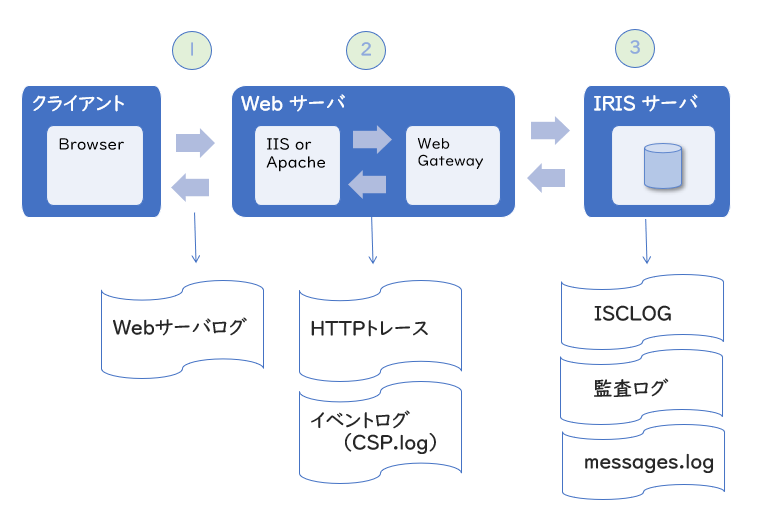
各コンポーネント間のやり取りで、どこでどのようなトラブルが発生しているかを、それぞれログを取得して確認することができます。

① クライアント ⇔ Webサーバ間では、「Webサーバログ(IISやApacheのアクセスログなど)」、
② Webサーバ ⇔ Webゲートウェイ間では、「イベントログ」・「HTTPトレース」、
③ Webゲートウェイ ⇔ IRISサーバ間では、「ISCLOG」・「監査ログ」・「messages.log」などがあります。


こちらの記事では、IRISで取得できるログとして で取得可能なログの取得方法をご紹介します。
 

② Web サーバと Webゲートウェイ間のアクセスに関連するログ情報


◆ イベントログ

1) Webゲートウェイ管理ページ(http://<IPアドレス>:<ポート>/csp/bin/Systems/Module.cxw)に接続します。

2) イベントログを削除します。
 [イベントログを参照] > ログをクリア をクリック

3) イベントログレベルを設定します。
     [デフォルトパラメータ(Default Parameters)] > イベントログレベル(Event Log Level)に 
     イベントログレベル を設定し保存します(例:ev7)

4) エラーやトラブルとなっている事象を発生させます。

5) イベントログレベルを解除します。 ※ログの解除は忘れずに行うようにしてください。
     [デフォルトパラメータ(Default Parameters)] > Event Log Level を消して保存します


◆ HTTPトレースログ

1) Webゲートウェイ管理ページ(http://<IPアドレス>:<ポート>/csp/bin/Systems/Module.cxw)に接続します。

2) HTTP トレースを表示(View HTTP Trace) をクリックします。 

3) トレース ON をクリックします(HTTPトレースを開始します)

4) エラーやトラブルとなっている事象を発生させます。

5) トレース OFF をクリックします(HTTPトレースを終了します) 
  ※トレースの解除は忘れずに行うようにしてください。
 

③ Webゲートウェイ と IRIS サーバ間のアクセスに関連するログ情報


◆ ISCLOG

ISCLOGの使用方法については、以下のFAQトピックをご覧ください。
CSP(REST)に関するトラブルシューティングに使用できるツールはありますか。


◆ 監査ログ

監査ログの使用方法については、以下のFAQトピックをご覧ください。
CSP/RESTアプリケーションに接続できません。どのように調査すれば良いですか?

管理ポータルに接続できる場合は、以下の方法で確認できます。
いつも使用しているユーザで IRIS や Caché にアクセスできなくなった時の原因の探り方(監査の使い方)


◆ messages.log

messages.log は、InterSystems IRIS のシステム管理者のディレクトリ (install-dir/mgr) にあります。
詳細は以下のドキュメントをご覧ください。
messages.log
 

【注意】
調査後、ログの解除を忘れずに行うようにしてください。
また、必要がない場合は収集したログのクリアも行うようにしてください。
ログの解除を忘れると、そのままログ情報を収集し続け、ディスク容量を圧迫することになりますのでご注意ください。


おまけ:
FHIRの場合は、別途取得できるログ情報があります。詳細は以下のドキュメントをご覧ください。
FHIR サーバのデバッグ

Discussion (0)0
Log in or sign up to continue
Question
· Aug 31, 2023

How exactly does the OperationLimit Property on the Regex-Matcher work, and how do I get it to work?

Hi there,

I want to use regex in my code, and I saw that the %Regex.Matcher class contains a property "OperationLimit" that you can also set to a number of steps that the regex engine should take maximum in analysing a given string. So far so good.

I tried to set the property with the function OperationLimitSet() to a silly value like 3. In 3 steps only very few regex should be executed, right? But what I found is that my regex always comes up with a solution. Here is what I did:


First I initialised my %Regex.Matcher.

set m = ##class(%Regex.Matcher).%New("(.+)\@(.+)\.(.+)")
do m.OperationLimitSet(3)
do m.TextSet("thisismytest@email.com")


Then I ran the regex and found my 3 groups.

zw m.Locate()
1
zw m.Group(1)
"thisismytest"
zw m.Group(2)
"email"
zw m.Group(3)
"com"


Now maybe I have completely misunderstood the OperationLimit property, or my implementation of this simple regex matcher is faulty, but the documentation clearly states: "Setting OperationLimit to a positive integer will cause a match operation to signal a TimeOut error after the specified number of clusters of steps by the match engine".  As I am using the Locate() function and not the Match() function, I wondered if the documentation specifically talks about the Match() function. But both the Locate() and Match() function execute without any problem.

set m = ##class(%Regex.Matcher).%New("(.+)\@(.+)\.(.+)")
do m.OperationLimitSet(3)
do m.TextSet("thisismytest@email.com")

zw m.Match()
1

I would appreciate any input as to why my regex is still running perfectly and what I can do to prevent this, as I would obviously like to set a realistic OperationLimit of 4000 or something in that range in the future.

Thanks for your help!

1 Comment
Discussion (1)2
Log in or sign up to continue
Question
· Aug 17, 2023

Custom task that exports query result in a csv file

Hello!

I'm new to Caché systems and I have a question...

I need to develop a custom task that daily exports the result of a query to a csv file in the database directory (I use the UNIX version).

Does anyone have any code or help to solve this case?

Thanks!!!

2 Comments
Discussion (2)1
Log in or sign up to continue
Article
· Aug 17, 2023 1m read

Download Globals as XML using CSP

Inspired by a Question from @Evgeny Shvarov and a Reply from @Ashok Kumar T
I have created a base for Global download as XML file

How to use:
 
just call the page like http://<your_server>/csp/samples2/dc.Gdown.cls?GBL=global_name

gbl-name  without the initial ^ (caret)

The output has a default name <global_name>.XML  Your choice is available.

Known Limits:

  • you have to install it at your sourcing server
  • it is not tested/working across namespaces
  • there is no partial download
  • error handling is just basic or missing

There is space for personal improvements.

and this is it:

Class dc.Gdown Extends %CSP.Page
{

ClassMethod OnPreHTTP() As %Boolean [ ServerOnly = 1 ]
{
  #dim %response as %CSP.Response
  set %rcc=$Get(%request.Data("GBL",1),"")
  if %rcc]"" {
    set %rcd=$D(@("^"_%rcc))
    if %rcd {
      set %response.ContentType="application/xml"
      set %response.Headers("Content-Disposition")="attachment; filename="""_%rcc_".xml"""
    }
  }
  else  { 
    set %rcd=0
    set %rcc="Parameter GBL"
  }  
  quit $$$OK
}

ClassMethod OnPage() As %Status
{
  if '%rcd {
  &html<<html><head></head><body>
   #(%rcc)# &gt;&gt; not found </body></html>>
  quit $$$OK
  }
  do $system.OBJ.Export(%rcc_".GBL")
  Quit $$$OK
}
}


2 Comments
Discussion (2)2
Log in or sign up to continue