Congratulations!
That's real engineering. Getting control over the engine without modifying it.
![]()
![]()
![]()
- Log in to post comments
Congratulations!
That's real engineering. Getting control over the engine without modifying it.
![]()
![]()
![]()
![]()
![]()
David,
I digged a little bit following your hint into Eclipse.
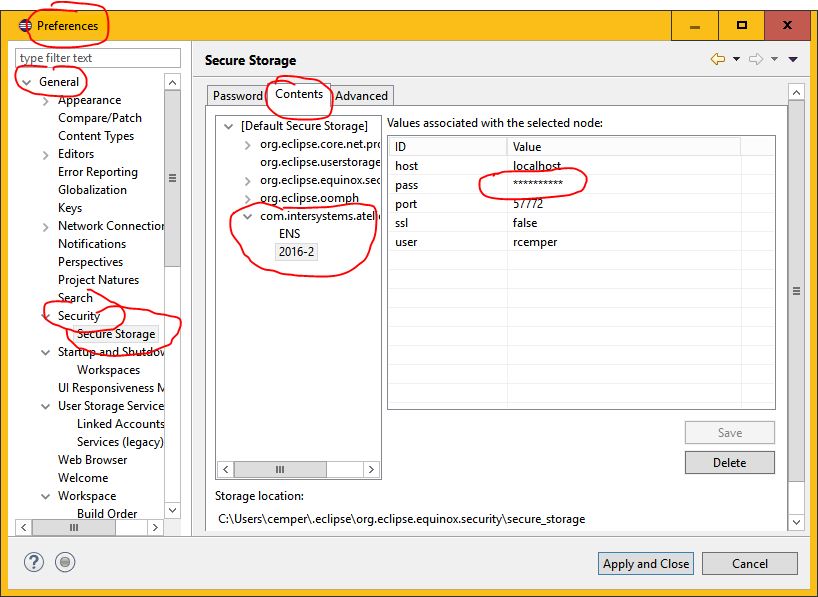
menu Windows / Prefernces (by user !) presented this image

and this is the content of storage_location
I doubt that without hijacking your (Windows ?) account this can NOT be misused.
Ruslan,
After execution, the JOB Command sets system variable $ZCHILD
$ZCHILD contains the ID of the last child process that the current process created with the JOB command. If your process has not used JOB to create a child process, $ZCHILD returns 0 (zero).
$ZCHILD being set does not mean that the job was successfully started. It only means that the process was created and the parameters were passed successfully.
Now you have the OIID in hands to apply to $System.Process.Terminate(bgjob) as suggested already by Vitaliy Serdtsev
It's one of the rather hard to follow rules in XML that converted me into a fan of JSON
Alex,
add Parameter
to one of your child classes
inherited comment is somewhat vague:
/// This parameter provides the default XMLTYPE for the class. If it is
/// empty then the class name will be used to construct a default XML type.
///
/// The default XMLTYPE is used when naming and referencing this type
/// in a schema and the schema context did not provide an XML type name.
documentation is more precise:
For an XML-enabled class or a property that is based on an XML-enabled class, the XML type is determined as follows:
If the class has a value for the XMLTYPE parameter, that is used as the type name.
Otherwise, the short class name is taken as the XML type name.
so you would have 2 different classes with the same type: CHILD
that's not allowed in an XML schema they have to be unique.
suggested OTHER WAY.
Run Cache locally and connect to the server over ECP.
So Atelier does a local access and the rest follows your rules.
So your standards are observed.
Managing this config might be some extra effort.
Not an official one.
This is not Eclipse. What's your expectation?
JAVA is not a language used in Caché
pls. be more precise what you are talking about
see this subject:
OK, There wasn't much echo so far.
The workaround was to encode the Description (and limit it for indexing) according to the language used.
The encoding is basically the position in the list of allowed/used characters or character groups.
If we use also numbers and interpunctuation it has to go into our list.
Instead of %String the descriptions are stored in a serial class:
It's obvious that for English and your installed NLS no encoding is required.
For triplets or doublets like in Hungarian, you need several runs to encode
The Query itself has a minor change
The encoding is definitely not fast but change frequency is not an issue here and change happens
by typing in descriptions on the keyboard.
Query performance is supported by this index construct:
Index IdxHU On DescHU.Sort [ Data = (ArtNr, DescHU.Description) ];
So the query plan just iterates over this index.
class %SQL.Statement has a special property named %SchemaPath for this case.
property %SchemaPath as %String(MAXLEN="");
%SchemaPath provides a list of schema names for resolving unqualified names during statement preparation. By default, its value is null; to set its value, use a comma-delimited list of schema names
Check if in your Browser Cookies are enabled.
I just killed my license just by disabling cookies. And getting a new session for every click.
I agree with you!
But you know,
reinventing the wheel is mostly much more fun than applying some existing tool and READING the user guide. ![]()
Especially in the software business.
It's like hunting a rabbit or going to the butcher or even to the restaurant or order by web.
Marco you are RIGHT !
The example is just wrong! And never got fixed.
Instead of set status = adapter.%Open("R")
it should be set status = adapter.Open("R")
This are 2 differnet methods with total different incompatible parameters.
it is good practice to close the file after use by do adapter.Close()
In this case, I'd suggest to contact WRC for help.
SMSS seems to select the wrong DSN.
I personally deeply distrust all products from Microsoft and their management tools
BUT:
If your Caché is installed on a 64bit Windows you also need to use 64bit ODBC drivers.
Removing the 32bit DSN for Caché might solve your issue.
As your screenshot says (in German) you can do this only with a 32bit ODBC administrator tool.
Good point. The retro stuff seems to react only partially.
I had the same experience.
I moved it to "Later" to get it out of sight.
You verified the error message of the original question. This doesn't work.
<LIST>%open+3^%stream.
You could try to apply the ACCEPTED ANSWER
#1) thanks for the Reminder on IRIS
#1) + #2) concentrate on finding. but that's not the key issues.
As an example: The problem becomes visible when you run
The problem is to get control of ORDER which depends on global collation.
Example for German:
- With Standard collation, you sort A,B,C..,O,...,U,...Z,Ä,Ö,Ü... (classic ANSI sort)
- With collation German3, you sort A,Ä,B,C,....O,Ö,....U,Ü,....Z
It is mostly the handling of characters with diacritical signs.
Hungarian is my worst case with much more diacriticals AND groups of characters in total 44 "character" tokens
A Á B C Cs D Dz Dzs E É F G Gy H I Í J K L Ly M N Ny O Ó Ö Ő P Q R S Sz T Ty U Ú Ü Ű V W X Y Z Zs
If you do it correctly then Cx sorts before Cs and Gz should sort before Gy and so on.
Now for ORDER BY you typically get your default collation derived from NLS settings.
#3) custom index seems to offer the most promising features.
on behalf of @pmkadow@gmail.com .
You find the examples and tables here
the only thing which i have done was installing some windows update
This was enough to confuse Eclipse.
Run Updates for Glassfish and/ or Eclipse inside Eclipse and the setup is updated.
![]()
incredible. %bi.* is still around !!
![]()
Clayton,
I agree with you, especially for fast inserting multi-server environments.
In "slow" environments there is less risk.
It depends on where you set your timestamp.
So %OnBeforeSave might provide the smallest possible gap.
Fabian,
this is a conceptual issue. If there is no ACCEPTED answer it shows up as UNanswered.
- no further comment from my side - ![]()
while NO answer has really no ANSWER type reply