Sometimes customers need a small IRIS instance to do something in the cloud and shut it down, or they need hundreds of containers (i.e. one per end user or one per interface) with small workloads. This exercise came about to see how small an IRIS instance could be. For this exercise we focused on what is the smallest amount of memory we can configure for an IRIS instance. Do you know all the parameters that affect the memory allocated by IRIS ?
Here you have an easy way to write and execute COS code from your unix scripts. This way one does not need to write routines or even open Studio or Atelier. It can be an option for simple and small actions for instance things like installation tasks or compiling.
See sample bash script (compile.sh) to compile classes:
#!/bin/bash
#####################################################################
# Script to compile classes
# $1 = NAMESPACE
# $2 = ClassName
#
# For example:
# ./compile.sh "SAMPLES" "Sample.Person"
#####################################################################
echo -n "username:"
read username
echo -n "password:"
read pwd

csession HSINSTANCE -U "$1" <<EOFF
$username
$pwd
set status = \$SYSTEM.OBJ.Compile("$2")
h
EOFF
With a routine like this one, you can quickly calculate how many lines of code you are working with. And it is not only for routines, it works for classes because remember that classes generate routines !
Here you have the routine source code:
LinesOfCode ;
    new SQLCODE,tRoutine
    set tTotalLOC = 0
    &sql(DECLARE ROUTINES CURSOR FOR
     SELECT NAME
FROM %Library.RoutineIndex
WHERE TYPE = 'MAC'
ORDER BY NAME)
    &sql(OPEN ROUTINES)
    &sql(FETCH ROUTINES INTO :tRoutine)
    while (SQLCODE=0)
    {
        write !,$j($i(tCount),5),": ",tRoutine
        set tLOC = $get(^rMAC(tRoutine,0,0))
        write "("_tLOC_")"
        set tTotalLOC = tTotalLOC + tLOC
        &sql(FETCH ROUTINES INTO :tRoutine)
    }
    &sql(CLOSE ROUTINES)
    write !!,"Total lines of code = "_tTotalLOC
Now, let’s say you can’t access the terminal or simply you just rather execute it from a web interface. In this article, I will show you how to execute terminal commands from a simple web page.
For example, in the image below you see how we execute $zv on a webpage:
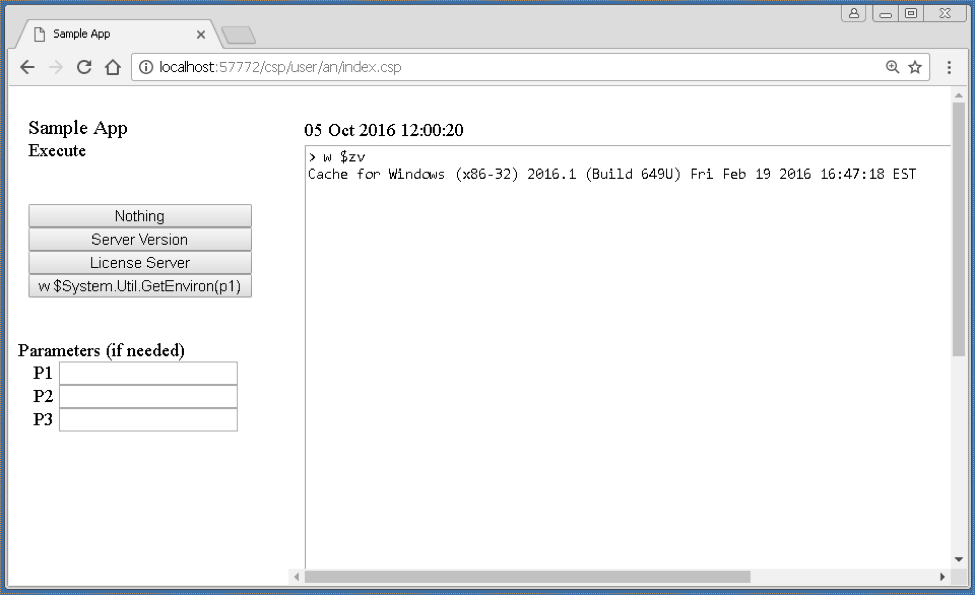
This is mostly possible due to the XECUTE command in Caché ObjectSCript. This command takes a string as a parameter and tries to execute it. This is the command used from the webpage, to execute what is being passed from the left navigation menu.
This article contains three snippets of code.