Follow up on that. Can I store MD5/SHA in a database as is or do I need to convert it to base64 first?
- Log in to post comments
Follow up on that. Can I store MD5/SHA in a database as is or do I need to convert it to base64 first?
Hello.
Can you please publish it as a GitHub repository?
Yes, I'm aware of that. There is not that much records (hundreds of thousands tops). Still, decided to do a comparison:
ClassMethod Time(count = 100000000)
{
    Set str = "111111111111111111111111111111111111111111111111111111111"
    Set time1 = $P($h, ",", 2)
    For i=1:1:count {
        s a = $zcrc(str, 7)
    }
    Set time2 = $P($h, ",", 2)
    For i=1:1:count {
        s a = $System.Encryption.MD5Hash(str)
    }
    Set time3 = $P($h, ",", 2)
    For i=1:1:count {
        s a = $System.Encryption.SHA1Hash(str)
    }
    Set time4 = $P($h, ",", 2)
    For i=1:1:count {
        s a = $System.Encryption.SHAHash(256, str)
    }
    Set time5 = $P($h, ",", 2)
    Write !,"CRC: ",time2-time1,!,"MD5: ",time3-time2,!,"SHA1: ",time4-time3,!,"SHA2: ",time5-time4
}
It outputs the following results:
CRC: 14
MD5: 72
SHA1: 119
SHA2: 140
A maximum of 254 arguments can be passed to a method:
ClassMethod Gen(count = 255)
{
    set out = "w ..hash("
    for i=1:1:count-1 {
        set out = out _ "1,"
    }
    set out = out _ "1)"
    x out
}

ClassMethod hash(in...)
{
    set crc = 0
    for i=1:1:in {
        set crc = $zcrc($char(i#256)_in(i), 7, crc)
    }
    return crc
}> EnsLib.SQL.Snapshot.GetRowList().
Thank you.
> additional field in the external database
Would have been nice, but not happening unfortunately.
Here's CRC hashing method (accepts any number of arguments):
ClassMethod hash(in...)
{
    set delimiter = $c(255)
    set str = delimiter
    for i=1:1:in {
        set str = str _ in(i) _ delimiter
    }
    return $zcrc(str, 7)
}Yes. Use resources instead. Read the docs. $ZPARENT value is also a "resource" that's getting created with the process, so children processes can communicate events to a parent process easily. As processes you want to pass messages between are not parent and child, you need to create and use explicitly named resources.
I think only profiler for the exact case can really answer this kind of questions. Too many nuances in the real-life code for one-fits-all solution of any kind to be feasible.
> one "extremum" version:
Does not really count. The method signature must be:
ClassMethod ToPhone(t As %String) As %String {}Hello.
While there is currently no way to it, you can see %DeepSee.UI.MDXExcel class, which does excel export and write your own csv exporter. It would be a simplified copy of %DeepSee.UI.MDXExcel.
All output is done via &html so you need to replace that with the usual write.
I knew about the second option (my original question was not clear on that I guess), but I'm really interested in the first option: how do I open *.cls directly?
Here's the sample process:
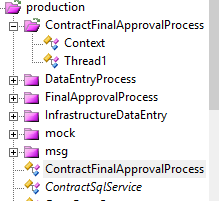
when I click on ContractFinalApprovalProcess BPL opens instead of cls.
You can use %SerialObject for that:
Class Utils.Serial Extends %SerialObject
{

Property Payload As %String;

/// zw ##class(Utils.Serial).Test()
ClassMethod Test(input As %String = {$lb(1,2,3,",",5)}) As %String
{

    set obj = ##class(Utils.Serial).%New()
    set obj.Payload = input
    do obj.%SerializeObject(.str)
    kill (str)

    set obj = ##class(Utils.Serial).%Open(str)
    return obj.Payload
}
}
For example:
zw ##class(Utils.Serial).Test("1,2,3,,,5")
>"1,2,3,,,5"

zw ##class(Utils.Serial).Test($lb(1,2,3,",",5))
>$lb(1,2,3,",",5)Q1:
1. JS client sends URL encoded string automatically or almost automatically (most frameworks do URL encoding for any URL)
2. In your broker override OnPreDispatch method and unescape pURL with:
set pURL = $ZCONVERT($ZCONVERT(pURL,"I","URL") ,"I","UTF8")Q2: It is against core REST architecture principles, so I hope not.
You can use MDX2JSON or DeepSee REST API for pivot execution -> JSON conversion.
Why do you need MDX expression as a query string, through?
Here it is:
/// Returns MDX string used to create pivot.<br>
/// <b>pPivotName</b> - fullname of pivot. Eg: "KPIs & Plugins/HoleFoods.pivot". Case insensitive.<br>
/// <b>pStatus</b> - Status of query execution.<br>
/// <b>MDX</b> - MDX query with filters<br> /// <b>BaseMDX</b> - MDX query without filters<br>
ClassMethod GetMdx(pPivotName As %String, Output MDX, Output BaseMDX) As %Status
{
    #dim tPivot As %DeepSee.Dashboard.Pivot
    #dim tPivotTable As %DeepSee.Component.pivotTable
    set MDX = ""
    set BaseMDX = ""

    set tPivot = ##class(%DeepSee.UserLibrary.Utils).%OpenFolderItem(pPivotName,.pStatus)
    return:'$IsObject(tPivot) $$$OK
    return:$$$ISERR(pStatus) pStatus

    set tPivotTable = ##class(%DeepSee.Component.pivotTable).%New()
    set pStatus = tPivot.%CopyToComponent(tPivotTable)
    return:$$$ISERR(pStatus) pStatus

     // returns tQueryText - mdx without filters
    set rs = tPivotTable.%CreateResultSet(.pStatus, .tParms, .tFilterInfo, .tAdvancedFilters, .BaseMDX)

    return:$$$ISERR(pStatus) pStatus

    set pStatus = tPivotTable.%GetFilterInfo(.tFilterInfo, .tAdvancedFilters)
    //return:$$$ISERR(pStatus) pStatus

    if (($d(tFilterInfo)=0) &&($d(tAdvancedFilters)=0)) {
        set MDX = BaseMDX // no filters, so we're good
    } else {
        // returns tQueryText - mdx with filters
        set rs = tPivotTable.%CreateResultSet(.pStatus, .tParms, .tFilterInfo, .tAdvancedFilters, .MDX)
        return:$$$ISERR(pStatus) pStatus
    }

    // Remove \n
    set MDX = $TR(MDX, $C(10), "")
    set BaseMDX = $TR(BaseMDX, $C(10), "")

    return pStatus
}
It is a part of MDX2JSON REST API.
If you're okay with /api/deepsee as it is - use it.
If, however, you want to change some settings (auth methods for one), then it's better to define your own application, since your changes may be lost during system update.
Save timestamp with user timezone (get timezone from request), for example (returns server timezone):
write $ZDATETIME($HOROLOG, 1, 5)
Return timestamp to a client, there are a lot of js libraries which automatically convert incoming timestamp with a different timezone into user's local time.
The advantage of this approach is that you only need to convert timezone once, the rest would be done on client.
Check out ISO 8601 for timestamp formats with timezone support and which js understands.
This approach works best, when you don't need to access your application data from the systems without support for this type of timestamp.
Thank you Timothy, that worked.
 s array = []
 While (result.Next()) {
     s object = {}
     s object.data = {}

     s object.data.id = result.Data("ID")
     s object.data.reg = result.Data("Registration")
     s object.data.snNum = result.Data("SatNavVehNumber")
     do array.$push(object)
     }
  w !!,array.$toJSON()
This should produce the desired output.
1) I tried all three with the same result.
2) I linked the procedure, and it does not work when I select data from a linked table. When I check the int code for a query, there is no call to my procedure or linked procedure to be found.
Some comments on code.
That said, it does not work on my sql script on the table creation part, despite throwing no errors (data insert throws an error - Table not found, but previous statement which creates the table seems to run okay, but the table does not get created)
UPD: Reread your post, only INSERT, ok.
Documentation, Measures That Refer to Other Cells. There is an example in Samples which shows how to implement 'relative' measure: "Pareto Chart for Category" dashboard.
Tried it again, got the same results as you. $find performs better on both short (20 chars per piece, 100 pieces) and long strings (2000 chars per piece, 100 pieces).
Please don't remove class reference.
Graphs (and measurements in a method) include conversion times.
>$find
I tried this:
$$$START("Using $find (hardcoded delimiter): ")
For i=1:1:pIterations {
    Set tPosition = 0
    Do {
        Set tNewPosition = $Find(tString,",",tPosition)
        Set tValue = $Select(tNewPosition'=0:$Extract(tString,tPosition,tNewPosition-2),1:$Extract(tString,tPosition,*))
        Set tPosition = tNewPosition
    } While tPosition '= 0
}
$$$END
It was slow. Is there any way to write this faster - eg. without select (or other condition for the last piece)?