Macros can eliminate using $method/dynamic dispatch here altogether.
- Log in to post comments
Macros can eliminate using $method/dynamic dispatch here altogether.
Macros for method names which compile into AmethodName or methodName depending on global var set for compilation then.
Dynamic dispatch is a hit on speed anyway.
Always call
do a.AmethodName()
And inside dynamic dispatch check global variable %debug (or global, or some IsDebug method etc.). If it exists call both annotation methods and target method, If it does not exist only call target method.
Another approach would be using dynamic dispatch:
Let's say you have this method:
/// @NiceTest1
ClassMethod Test()
{
    Write 1
}
Using Class Generators you generate 2 additional methods:
/// @NiceTest1
ClassMethod OnBeforeTest()
{
    Write "Before NiceTest1"
}

/// @NiceTest1
ClassMethod OnAfterTest()
{
    Write "After NiceTest1"
}
and you add dynamic dispatch method (and dynamic dispatch classmethod) to the class:
/// Is used to implement an unknown method call.  It is also used
/// to resolve an unknown multidimensional property reference (to get the value
/// of a property) because that syntax is identical to a method call.
Method %DispatchMethod(Method As %String, Args...) [ ServerOnly = 1 ]
{
    // Amethod -> method
    set Method = $e(Method, 2, *)
    do $method(, "OnBefore" _ Method, Args...)
    do $method(, Method, Args...)
    do $method(,"OnAfter" _ Method,Args...)
}
So, as a whole it can look like this:
Class Utils.Annotations1 Extends %RegisteredObject
{

Method OnBeforeTest()
{
    Write "Init NiceTest1",!
}

/// @NiceTest1
Method Test()
{
    Write 1,!
}

Method OnAfterTest()
{
    Write "End NiceTest1",!
}

/// Is used to implement an unknown method call.
Method %DispatchMethod(Method As %String, Args...) [ ServerOnly = 1 ]
{
    set Method = ..getMethodName(Method)
    do $method(, "OnBefore" _ Method, Args...)
    do $method(, Method, Args...)
    do $method(,"OnAfter" _ Method,Args...)
}

/// Is used to implement an unknown class method call
ClassMethod %DispatchClassMethod(Class As %String, Method As %String, Args...) [ ServerOnly = 1 ]
{
    set Method = ..getMethodName(Method)
    do $classmethod(, "OnBefore" _ Method, Args...)
    do $classmethod(, Method, Args...)
    do $classmethod(,"OnAfter" _ Method,Args...)
}

ClassMethod getMethodName(method As %String) As %String
{
    // Amethod -> method
    set method = $e(method, 2, *)
    return method
}

}
Works like this:
USER>do a.ATest()
Init NiceTest1
1
End NiceTest1

USER>do a.Test()
1
You can modify method code during compilation (obviously dangerous) using generators. Here's the sample that annotates all methods, containing @ in description:
Class Utils.Annotations
{

/// @NiceTest1
ClassMethod Test()
{
    Write 1
}

ClassMethod OnCompile() As %Status [ CodeMode = objectgenerator ]
{
    #dim sc As %Status = $$$OK
    for i=1:1:%class.Methods.Count() {
        #dim method As %Dictionary.MethodDefinition = %class.Methods.GetAt(i)
        if method.Description [ "@" {
            set sc = ..annotate(method)
            quit:$$$ISERR(sc)
        }
    }
    quit:$$$ISERR(sc) sc
    set sc = %class.%Save()
    quit sc
}

ClassMethod annotate(method As %Dictionary.MethodDefinition) As %Status
{
    #dim sc As %Status = $$$OK
    set code = method.Implementation.Read($$$MaxCacheInt)
    set code = ..cleadOldAnnotation(code)
    set code = ..addNewAnnotation(code, $e(method.Description, 2,*))

    do method.Implementation.Clear()
    do method.Implementation.Write(code)

    quit sc
}

ClassMethod cleadOldAnnotation(code As %String) As %String
{
    if $find(code, "//init annotation end") {
        set code = $e(code, $find(code, "//init annotation end") + 2, $find(code, "//complete annotation start") - $l("//complete annotation start") - 2)
    }
    return code
}

ClassMethod addNewAnnotation(code As %String, annotation As %String) As %String
{
    #define Tab $c(9)
    set code =  $$$Tab _ "Write ""Init " _ annotation _ """" _ $$$NL _
                $$$Tab _ "//init annotation end" _ $$$NL _
                code _
                $$$Tab _ "//complete annotation start"_ $$$NL _
                $$$Tab _ "Write ""End " _ annotation _ """"
    return code
}

}
Compiles into:
/// @NiceTest1
ClassMethod Test()
{
    Write "Init NiceTest1"
    //init annotation end
    Write 1
    //complete annotation start
    Write "End NiceTest1"
}Yes, you can query everything you see in Message Viewer and Event Viewer. Their code is defined in EnsPortal.MessageViewer.zen and EnsPortal.EventLog.zen respectively. You can see the queries these pages use and adapt them, or inherit from them and publish it as another separate web application.
Also, here's modification example - Ensemble Log Viewer with namespace support.
You need:
You can specify Logfile setting for logging and these settings for debug:
%DB_CACHESYS may also be required, because data for this table is stored in CACHESYS database.
Atelier accesses web port, which can be open.
Thank you!
Do you import code from GitHub repository into Ensemble instance automatically?
you are entirely correct.
Good to hear.
$$$SIMSRCDOMENT
If I change algorithm to $$$SIMSRCDOMENT I don't receive any results (Results local is undefined).
If I choose $$$SIMSRCEQUIVS or $$$SIMSRCSIMPLE I get Results local as expected.
What may be the reason? I didn't modify the domain between runs.
Method returns $$$OK and %objlasterror is empty using any algorithm.
You can ran them from a terminal.
Yes, same as with studio, Caché supports Unit Tests. Documentation.
write ##class(Config.CPF).Activate()
Would read and activate current configuration file without system restart.
You can search for the references in studio:
It should find relevant entities.
Hello.
Thank you for this information. I started testing it and %iKnow.Queries.SourceAPI:GetSimilar() returned the following as a result local:
result(1)=$lb(890,":SQL:2002:20020308X00320",.4737,.9606,57,27,686,.4737)
The list is formed from these values:
$lb(srcId, externalId, percentageMatched, percentageNew, nbOfTgtsInRefSrc, nbOfTgtsInCommon, nbOfTgtsInSimSrc, matchScore)
What does that mean?
Is that correct? Are there documentation on that?
Cache Fileserver is an old project of mine which allows file upload/download. Files have IDs, but to download each client get's an unique link active only for his IP for a limited time. You can remove IDs altogether.
REST DAL
What's a REST DAL?
If you have a web application, you can enforce codepage on a client side, there are several advantages to it:
The best approach would be to move to unicode.
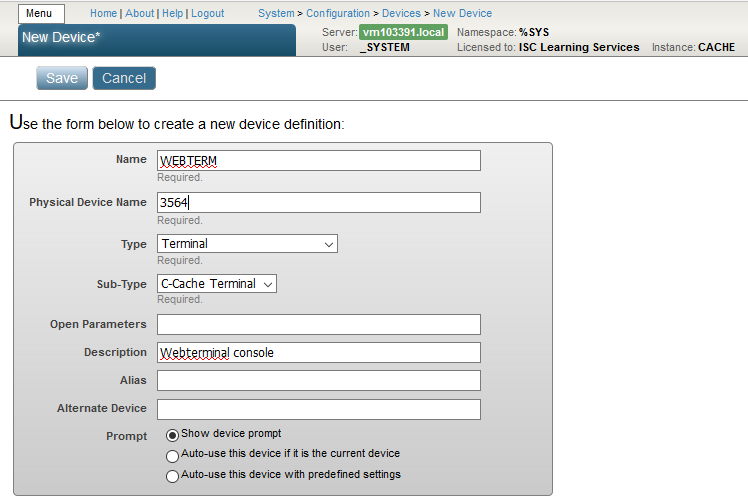
You can define your own device of terminal type (also see System - Configuration - Devices you can see other defined Cache terminals) :
Possible solution:
write $SYSTEM.Status.GetErrorText($SYSTEM.SQL.SetTCPKeepAlive(3600))About TCPKeepAlive.
UPD: well, that did not work. I set it to 3600 and later to 30, and it did not help any.
Does it work if its not active?
The best way to add RESTForms (or any other repository) into your repository is submodules. Submodule is a pointer to specific commit from another repository. On disk it looks like folder. More info on submodules. To add RESTForms execute in git cli:
git submodule add https://github.com/intersystems-ru/RESTForms.git
I was caught on PYTHON too! Turns out that I had 3rd, but 2nd was required.
Release page offers releases for both 2016.1 and 2016.2+. And in 2016.2+ $ methods are already removed.
If however you want to use latest commit from repo, then you need to run SMR.
Here's an idea on how to do it without triggers altogether.
1. Set IsLeader property only in case member is a leader. So its 1 or NULL.
2. Add unique index on (Team, IsLeader). Unique index can have any number of NULL records.
3. If you try to add more than one leader, you'll get an error:
ERROR #5808: Key not unique: Utils.TeamMember:IsLeaderIndex:^Utils.TeamMemberI("IsLeaderIndex"," 1"," 1") [%SaveData+14^Utils.TeamMember.1:USER]Sample code:
Class Utils.TeamMember Extends %Persistent
{

Property Team As %String;

Property Member As %String;

Property IsLeader(VALUELIST = ",1");

Index IsLeaderIndex On (Team, IsLeader) [ Unique ];

/// do ##class(Utils.TeamMember).Test()
ClassMethod Test(AddTwoLeaders = {$$$YES})
{
    do ..%KillExtent()
    write $System.Status.GetErrorText(..Add(1, "Alice"))
    write $System.Status.GetErrorText(..Add(1, "Bob"))
    write $System.Status.GetErrorText(..Add(1, "Clover"))
    write $System.Status.GetErrorText(..Add(1, "Dave", 1))
    if AddTwoLeaders {
        write $System.Status.GetErrorText(..Add(1, "Helen", 1))
    }
}

ClassMethod Add(Team, Member, IsLeader = "")
{
    set obj = ..%New()
    set obj.Team = Team
    set obj.Member = Member
    set obj.IsLeader = IsLeader
    quit obj.%Save()
}

}Thank you!