Updated the article according to new notification types and changes in the Developer Community notification system.
- Log in to post comments
Updated the article according to new notification types and changes in the Developer Community notification system.
Hi, John!
Do you hope it would be delivered "on the other side"? )
BTW, do you think it makes sense to repost unique questions from Google Group here?
I think what you are suggesting here is a kind of Telegram bot for several/all your Caché instances.
Great idea BTW. But what would be on the "other side" of the bot? Another Caché app or something else?
I think it would be really the very helpful option to run any COS command via Telegram bot.
I think it would be great to have a Telegram bot with Caché server.
Suppose you are and admin of a certain Caché server.
It would be great to have a telegram channel with it to do the following:
1. Restart the server or some services (e.g. restart the CSP Gateway).
2. Request for the status of license usage.
3. Request for the status of freespace and CPU load.
4. Get push messages for severe alerts.
Of course, it should be secured and available for the admin of the server only. I think Telegram can provide such a functionality.
Hi, Dmitry!
What should I do if I want to use "prepared" docker image?
E.g. not the standard installation but the image with some 3rd party community software installed and set up like WebTerminal, ClassExplorer, MDX2JSON and DeepSeeWeb, cache-udl, Cache REST-Forms , etc...
Hi, Francisco!
You're invited!
Hi, Jon!
Thanks for that, it would be fixed. Filed.
Hi, Paras!
I didn't get.
Do you need to translate the UI or the data of the application itself?
Thanks, Jon!
The link to Global Masters introduced to the Community menu.

Thank you, Stephen!
We will look into it!
Hi, John!
Thanks for mentioning it.
It's an experiment for us, so the list of countries is as it is on behalf of "experiment conditions". UK is included), so the students from UK are very welcome.
Hi, John and Steve!
The issue is not resolved yet, but would be solved in a few days.
There was another problem with the link to a dashboard itself which was fixed.
The issue you and Alexander provided is the fair request for the improvement it and it would be introduced as soon as possible.
Hi, Stephen!
You are invited!
Great! The invitation sent.
Hi, Derrek!
If the balance is a measure you can make the measure searchable and you would be able to use it in complex filters with >< operands.
We've fixed the link, now it should show your articles stats.
Hi, Paras!
Here is the related article.
Hi, Stephen!
Thanks for the comment!
We are looking into that.
Thanks, Jon!
I think I've fixed that
Thanks Peter! I gave it a try and it seems that the second block of SETTINGS is not parsed too.
Also, I ran into an issue of 250 characters limit for the URL value.
Hi, Sameera!
It's not an answer, but have you tried this Studio+Git solution?
Thanks Eduard! Fixed and changed )
Hi Derrek!
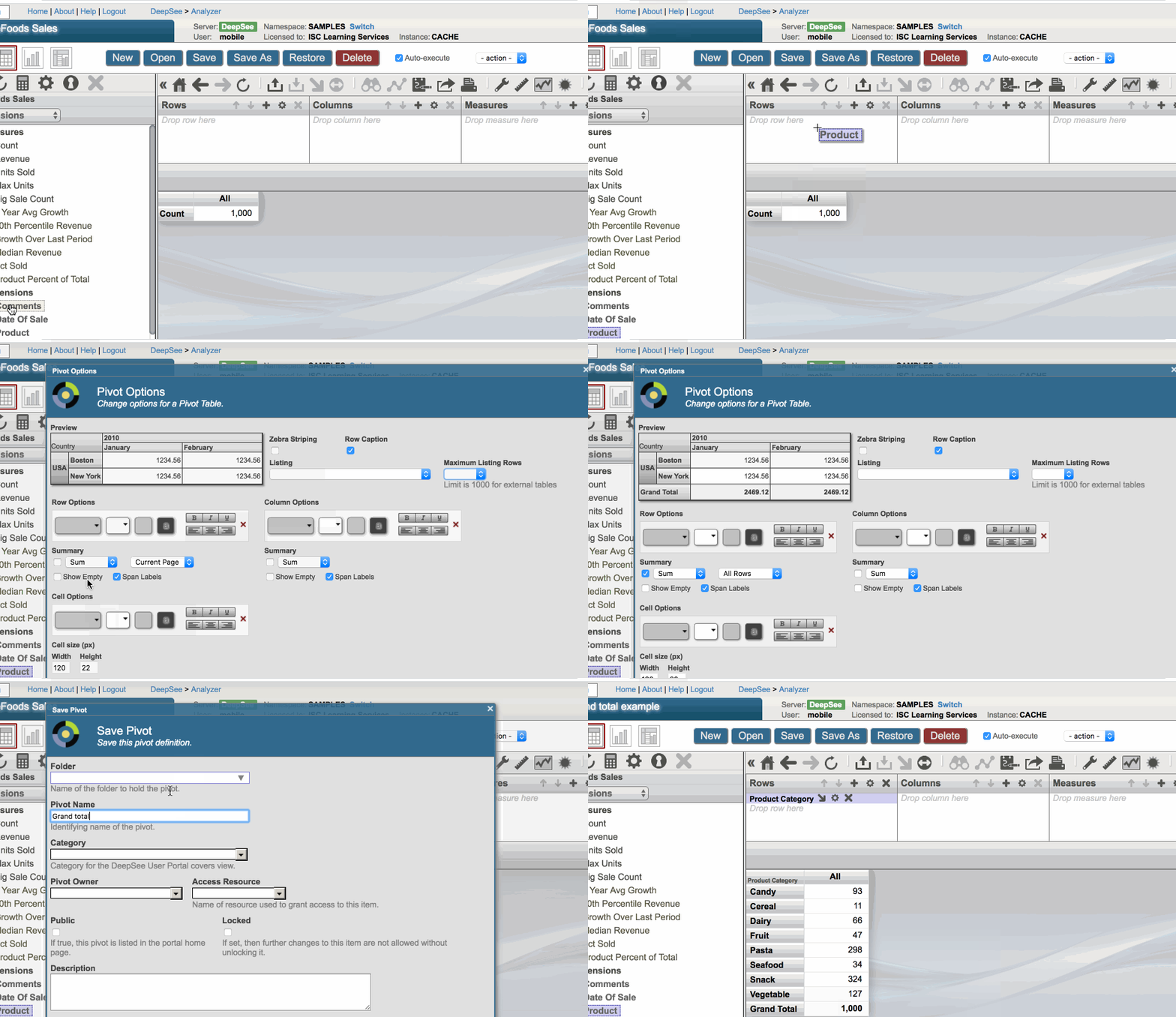
Please find in the same pivot settings window grand total for rows as well.
Here it is:
Hi, Derrek!
Go to the pivot settings in Analyzer and turn on the Grand Total for the rows, and you'll get it.
And are there any plans to have a 'named filter' control within widgets that would let you change the operand?
It is possible. There was the question regarding this option.
If you need the filter for the measure, make it searchable, as Peter said.
If you want to filter calculated measure, try to change it to classic measure with COS expressions in the measure definition.
Very nice, Eduard!
Consider I want to develop the reporting in Microsoft Word and Excel from my Caché application using templates. Can I use your approach to make it?