#DIM vs SET - Objectscript
SETassigns value to the variable at RUNTIME.
#DIM declare the variable and it's Data Type at COMPILE TIME.
SET |
#DIM |
| Makes the variables Dynamic. | Improves Readability. |
| No Data Type Declaration. | Enables IDE auto-completion. |
| Runtime | Useful for Object references. |
#DIM name As %String
Set name = "Micheal Scott"
#DIM age As %Numeric
Set age = 36
#DIM employer As App.Employer               ; compile time
Set employer = ##class(App.Employer).%New() ; runtime SETor #DIM? Your design, your rules.
Comments
#DIM is just a hint for VSCode ObjectScript code completion and also a hint for a developer "what this thing is about". Compiler skips #dim lines.
There are nuances ;)
According to the documentation, the following two lines will give different results at the runtime:
#dim a,b,c = ##class(Sample.Person).%New() ; all the variables are assigned the same initial value
#dim a,b,c As Sample.Person = ##class(Sample.Person).%New() ; each variable is assigned a separate OREF
Wow. ObjectScript is like an endless book of surprises :) You never know what you can find the next day :)
Don't know if I ever used something like this. For me, #dim can be useful to easily suggest a possible method or property while coding, but good to know about such an option!
Thank you @Vitaliy Serdtsev !
I tend to break up my usage between SET when an object is being created within the class, and using #DIM when working with responses from another ClassMethod. For example:
Set SearchParams = ##Class(DM.EmployeeSearch).%New()
Set SearchParams.EmployeeID = 042114040518
#DIM Employee As DM.Employee
Set tSC = ##class(DM.Employee).EmployeeSearch(SearchParams,.Employee)
If '$ISERROR(tSC){
    $$$TRACE(Employee.Name) //Should return "Jim Halpert"
}
A good example.
VS Code sees the signature of EmployeeSearch() and knows that Employee is a DM.Employee, so you'll get code completion automatically here also.
This is really helpful to know. I think I have seen it not work like this in the past and picked it up as a habit, but can't say for sure.
To test this for myself, I have written out above pseudocode into real classes and found that the code completion doesn't kick in when attempting in the $$$TRACE, but does when attempting outside of the macro params:
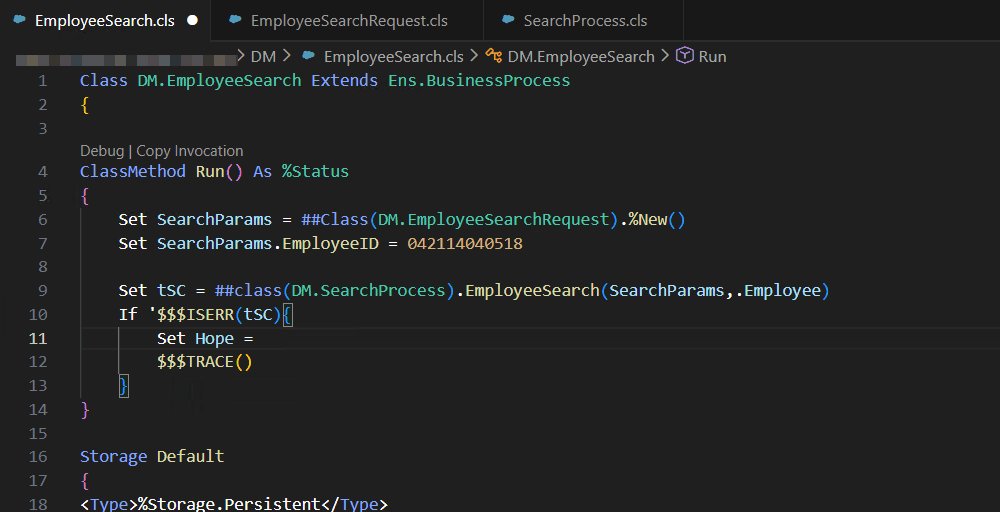
I'll try get this logged via github later today assuming this isn't intended behaviour for the Language Server.
EDIT:
Logged here and I realise that my habit of using #Dim for Intellisense 100% comes from my historic use of Studio.
I'm still not a big fan of #dim. It was useful for code completion in Studio. But it hasn't been necessary for code completion in VS Code for a while. Check this post from last year for more details. Perhaps code clarity is the only remaining reason to use it, to help developers who are used to declaring variables in other languages (like Python type hints).
My main reason for discouraging its use is that it makes it seem like it's necessary to declare variables in ObjectScript, which it isn't. There is no variable declaration in ObjectScript, as you can read at the top of the documentation that @Vachan C Rannore cited. He is not the first developer to write something like this: "#DIM declares the variable and it's Data Type at COMPILE TIME." #dim causes confusion for developers.
As @Evgeny Shvarov says, the compiler skips #dim. But as the examples prove (thanks @Vitaliy Serdtsev), the compiler doesn't skip #dim that includes variable assignment, which it helpfully changes into Set statements. More confusion...
The first example looks a little weird because it uses #dim but doesn't include "as datatype".
#dim a,b,c = ##class(Sample.Person).%New()Why use #dim syntax that supposedly declares something, and then avoid declaring anything? Confusing. The compiler just changes it into this standard Set syntax. Just use the Set syntax in the first place.
set (a,b,c) = ##class(Sample.Person).%New()For the second example, I admit that it's slightly useful to get 3 different objects with a single statement. I never knew about this. The compiler turns this #dim statement into 3 separate Set statements, so it does save some typing.
set a = ##class(Sample.Person).%New(), b = ##class(Sample.Person).%New(), c = ##class(Sample.Person).%New()Some developers will like this "insider trick." But I think using an obscure non-command instead of just calling %New() 3 times for this one special case is not worth it. Just use Set statements.
By the way, what do you think this statement does? Note the %OpenId(20) at the end instead of %New().
#dim a,b,c As Sample.Person = ##class(Sample.Person).%OpenId(20)Confusing. The addition of "As Sample.Person" has no effect when used with %OpenId(). How about this statement?
#dim a,b,c As Sample.Company = ##class(Sample.Person).%New()Do you get 3 companies or 3 persons? Does it try to "cast" persons as companies? Do you get an error at compile time or run time? Would it work if Sample.Company extends Sample.Person? More confusion... The addition of "As Sample.Company" has the same effect as "As Sample.Person" or "As Bla.bla" would. No casting, no error, inheritance doesn't matter. You just get 3 new persons.
By the way, what do you think this statement does? Note the %OpenId(20) at the end instead of %New().
#dim a,b,c As Sample.Person = ##class(Sample.Person).%OpenId(20)
Confusing. How about this statement?
#dim a,b,c As Sample.Company = ##class(Sample.Person).%New()
Do you get 3 companies or 3 persons? Does it try to "cast" persons as companies? Do you get an error at compile time or run time? Would it work if Sample.Company extends Sample.Person? More confusion...
There is no confusion. Here's another example where the class may not even exist and yet the code compiles without errors and according to the documentation. test.MAC
#dim a,b,c As %Boolean = ##class(bla.bla).%OpenId(20)
#dim a,b,c As bla.bla.bla123 = ##class(bla.bla).%OpenId(20)
--> test.INT
Set (a,b,c)=##class(bla.bla).%OpenId(20)
Set a=##class(bla.bla).%OpenId(20),b=##class(bla.bla).%OpenId(20),c=##class(bla.bla).%OpenId(20)
The only thing is that in this case Studio Assist will not work.
I clarified what I meant by "confusing" in my post. Maybe "useless" would have been better.
A good thing to know is, that there isn't actually a thing as 'during compile time' in ObjectScript.
Compiling a class is a three step process:
- transform the class definition (including any superclasses) to a (set of) .MAC files
- the Macro 'compiler' resolves the $$$macros and #xxx statements and create a (set of) .INT routines
- which in turn are pre-compiled into byte code .OBJ routines
#dim a,b,c = ##class(Data.Product).%New()
#dim x,y,x as Data.Product = ##class(Data.Product).%New()
in a .MAC routine becomes:
Set (a,b,c)=##class(Data.Product).%New()
Set x=##class(Data.Product).%New(),y=##class(Data.Product).%New(),x=##class(Data.Product).%New()
in a .INT routine
A good thing to know is, that there isn't actually a thing as 'during compile time' in ObjectScript.Do you think that the documentation contains an error?
##function Evaluates an ObjectScript function at compile time.#execute Executes a line of ObjectScript at compile time.
##expression Evaluates an ObjectScript expression at compile time.
No, not perse, since InterSystems calls this process 'Compiling'. I just wanted to point out that the first two steps are not a compilation such as C++ or Rust.
I did post an example last year of how I traditionally would use #DIM, and it was (rightly) pointed out that the scenario was no longer required due to how VSCode behaves these days (well, the Language Server extension used in VSCode).
However today I have found a more common example where #DIM seems to be needed for code completion, based around using Business Services/Processes within an Interoperability Production.
Class Some.Business.Process Extends Ens.BusinessProcess
{

Property OnwardTarget As Ens.DataType.ConfigName;

Parameter SETTINGS = "OnwardTarget";

Method OnRequest(pRequest As Ens.Request, Output pResponse As Ens.Response) As %Status
{
    //Some code above

	Set someReqMsg = ##Class(Some.Req.Msg).%New()
	Set someReqMsg.abc = "123"
	Set tSC = ..SendRequestSync(..OnwardTarget,someReqMsg,.someRespMsg)
	#; No autocomplete on someRespMsg.xyz without #dim before ..SendRequestSync

	//Some code below

	Quit $$$OK
}

}
Without the #dim in the above, there is no context for the IDE to know what someRespMsg returned from the ..SendRequestSync() call will be.
That said, its use is certainly dwindling compared to pre-VSCode times and it's continued usage can be more from habit than necessity a lot of times (I'm certainly guilty of this).
Is it because someRespMsg can be different types of objects?
Hey Joel.
Absolutely - there are a couple levels of ambiguity for the IDE without throwing a #dim in to know what that response object could be.
The biggest being that the target of the call of ..SendRequestSync/Async is something that can, and for good practice should, be configured within the Interoperability Production. Therefore the IDE has nothing to work from with regards to identifying what the response object will be to then provide code completion. Even if it's not configured within the Interoperability Production directly but a developer has simply declared the Target Dispatch Name as a string within the code, the link between that name and the target Class is still contained within the Production and could also not yet exist in the production at the time of development.
It's great to see the effort put into improving the Language Server which has massively reduced the need to use #dim, but I'm not we will see the last of it for some time.
Thanks for the clarification, Julian. So despite the fact that I don't have any problem with @Robert Barbiaux's rules, my rules would be:
- Use #dim only when necessary for code completion, maybe even with a generic comment explaining that that's the reason, for newer developers. The cases I know of are:
- Julian's case, where a method returns a particular object and the method's signature doesn't specify the exact class (it probably specifies a generic superclass, or the method doesn't exist yet.
- The exception variable within a catch block.
- Since I'd use #dim sparingly, I would probably put the #dim right above the variable it applies to.
- No inline assignment.
My rules, motivated by readability :
- use #dim with no inline assignment
- group dims at the beginning of the method/routine
- use set to assign variables