Developing an AI-Powered Observability Layer for IRIS Globals
Global Guard AI
1 Introduction
In environments that use InterSystems IRIS, globals are the physical foundation of data storage. Although system queries and administrative tools exist for metric inspection, global growth analysis is usually reactive: the problem is generally only noticed when there is disk pressure or performance impact.
Global Guard AI was developed to create a snapshot-oriented observability layer, aligned with the idea published in DPI-I-512 — and based on the series of articles written by Ariel Glikman, Sales Engineer at InterSystems:
From these foundations, the solution was expanded to periodically register native IRIS metadata, persist structured historical data, calculate absolute and percentage growth, and enable the vectorization of growth patterns.
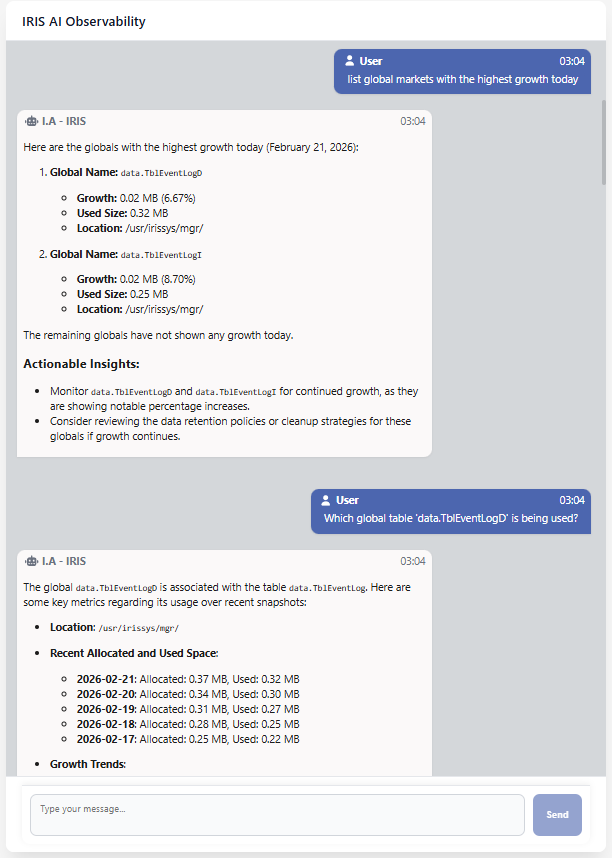
This article describes how the solution was built in three layers (IRIS, Quarkus, and Angular), detailing the data modeling, the implementation of controlled queries via tools, and the integration between the Java backend and IRIS.
2 Architecture Overview
The architecture was organized into three well-defined layers: IRIS, responsible for snapshot collection and persistence; Quarkus, which implements the conversational agent and analytical tools; and Angular, which acts as the user interaction interface. Each layer has isolated responsibilities, preventing coupling between business logic, data access, and presentation.
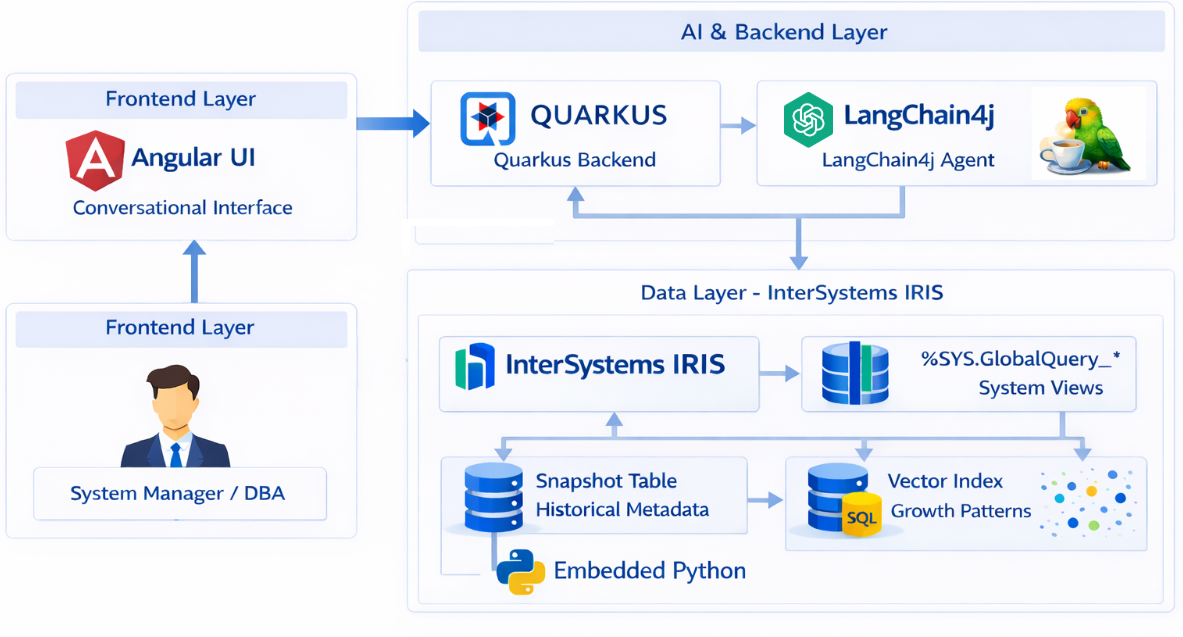
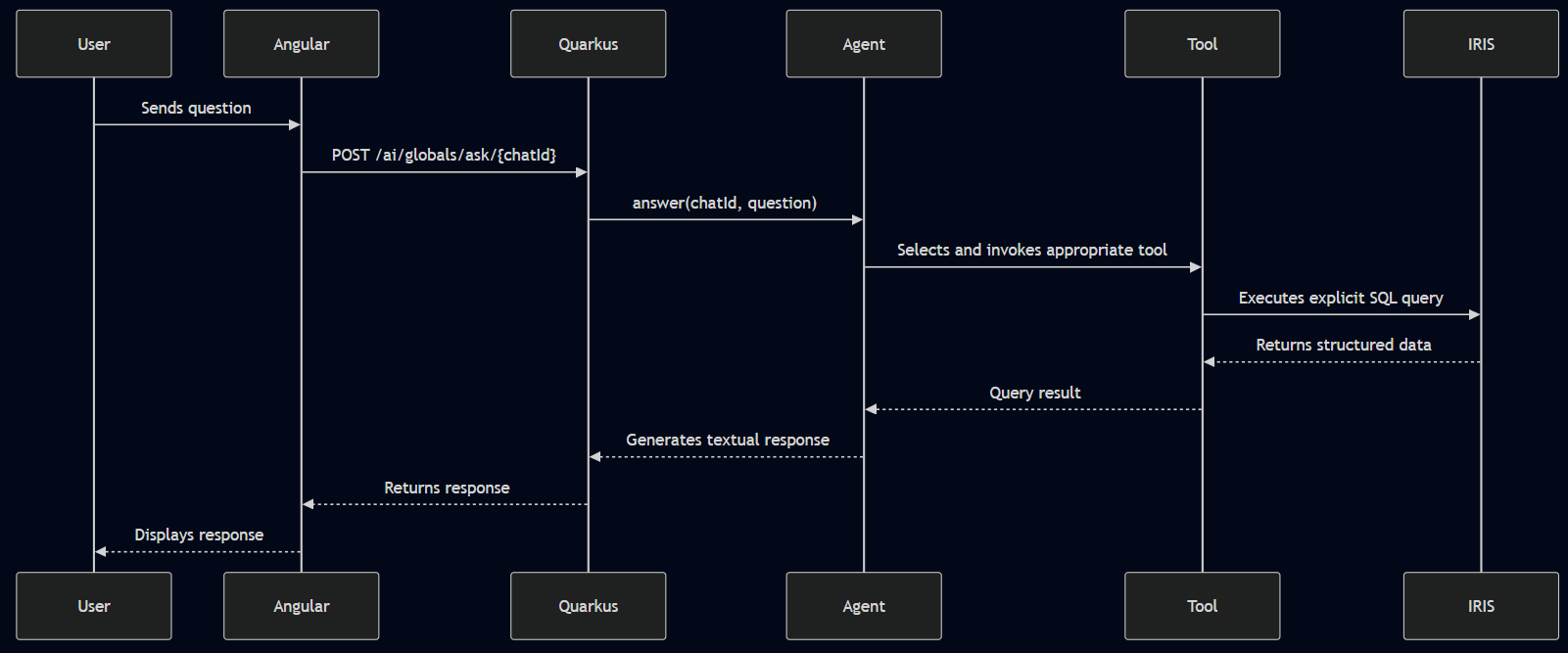
The request flow is linear: the question originates from the Angular frontend, is sent to the Quarkus backend via REST, the agent identifies the appropriate tool, executes an explicit SQL query in IRIS, and returns structured data for interpretation by the model. This separation ensures control over the executed queries and keeps IRIS as the single source of truth for the analyzed data.
3 IRIS Layer — Building the Observability Foundation
The IRIS layer is the core of the solution, responsible for collecting, structuring, and storing all information that supports the analyses performed by the system. Instead of inspecting globals directly at the node level, the implementation exclusively uses native metadata provided by IRIS itself, reducing operational impact and maintaining security in production environments.
The collection process is mainly based on the %SYS.GlobalQuery_Size view, which provides metrics such as allocated space and used space per global, and on directory information obtained from Config.Databases. This data is captured periodically and persisted as historical snapshots, forming a timeline that allows the calculation of absolute and percentage growth between consecutive executions.
3.1 Metadata Collection — SnapshotGenerator
The daily collection was implemented using Embedded Python within IRIS (guard.SnapshotGenerator). The flow is: list the physical directories configured in Config.Databases, query the globals of that directory via %SYS.GlobalQuery_Size, calculate growth by comparing with the previous snapshot, and persist the result in guard.GlobalSnapshot.
Below are the core code excerpts (simplified, but faithful to the implementation):
   import iris

   # "SELECT DISTINCT %EXACT(Directory) FROM Config.Databases WHERE SectionHeader = 'Databases'"
   directories = iris.cls("guard.SnapshotGenerator").listAllDirectories()
   for dir in directories:
       # "SELECT Name,\"Allocated MB\",\"Used MB\" FROM %SYS.GlobalQuery_Size(?, '', '*','2')"
       list_of_globals = iris.cls("guard.SnapshotGenerator").listGlobals(dir)
       for global_info in list_of_globals:
           insert_stmt = iris.sql.prepare("""
               INSERT INTO guard.GlobalSnapshot
                 (SnapshotDate, GlobalName, Location, AllocatedMB, UsedMB, Tables,
                  PrevSnapshotId, GrowthMB, GrowthPct)
               VALUES (?, ?, ?, ?, ?, ?, ?, ?, ?)
           """)
           insert_stmt.execute([... save values...])
In addition, other queries were implemented to provide more information, with the objective of facilitating the LLM’s understanding. Later, methods such as getMappedTables were added:
ClassMethod getMappedTables(globalName As %String) As %List [ Language = python ]
{
   import iris

   query = """
       SELECT Name FROM %Dictionary.CompiledStorage
       WHERE DataLocation = ?
       UNION ALL
       SELECT Name FROM %Dictionary.CompiledStorage
       WHERE IdLocation = ?
       UNION ALL
       SELECT Name FROM %Dictionary.CompiledStorage
       WHERE IndexLocation = ?
       UNION ALL
       SELECT Name FROM %Dictionary.CompiledStorage
       WHERE StreamLocation = ?
   """

   stmt = iris.sql.prepare(query)
   rs = stmt.execute(globalName, globalName, globalName, globalName)

   return [row[0] for row in rs]
}
3.3 Growth Pattern Vectorization — WeeklyVectorGenerator
In addition to the relational history, the project includes an optional vectorization step to compare growth patterns between globals. The implementation (guard.WeeklyVectorGenerator) aggregates growth (GrowthMB) by day of the week within a window (e.g., last 90 days), normalizes the values, and persists a 7-dimensional vector (Mon..Sun) in guard.GlobalGrowthProfile.
The vector generation is performed directly in IRIS, grouping by GlobalName and Location:
ClassMethod run(windowDays As %Integer = 90) [ Language = python ]
{
   import iris
   from datetime import date, timedelta

   end_date = date.today()
   start_date = end_date - timedelta(days=windowDays)

   query = """
       SELECT GlobalName, Location,
           AVG(CASE WHEN DAYOFWEEK(SnapshotDate) = 2 THEN GrowthMB ELSE 0 END) AS Mon,
           AVG(CASE WHEN DAYOFWEEK(SnapshotDate) = 3 THEN GrowthMB ELSE 0 END) AS Tue,
           AVG(CASE WHEN DAYOFWEEK(SnapshotDate) = 4 THEN GrowthMB ELSE 0 END) AS Wed,
           AVG(CASE WHEN DAYOFWEEK(SnapshotDate) = 5 THEN GrowthMB ELSE 0 END) AS Thu,
           AVG(CASE WHEN DAYOFWEEK(SnapshotDate) = 6 THEN GrowthMB ELSE 0 END) AS Fri,
           AVG(CASE WHEN DAYOFWEEK(SnapshotDate) = 7 THEN GrowthMB ELSE 0 END) AS Sat,
           AVG(CASE WHEN DAYOFWEEK(SnapshotDate) = 1 THEN GrowthMB ELSE 0 END) AS Sun
       FROM guard.GlobalSnapshot
       WHERE SnapshotDate BETWEEN ? AND ?
       GROUP BY GlobalName, Location
   """

   rs = iris.sql.prepare(query).execute(start_date.isoformat(), end_date.isoformat())

   insert_stmt = iris.sql.prepare("""
       INSERT INTO guard.GlobalGrowthProfile
         (GlobalName, Location, WindowDays, FromDate, ToDate,
          AVGMon, AVGTue, AVGWed, AVGThu, AVGFri, AVGSat, AVGSun,
          WeeklyVector)
       VALUES (?, ?, ?, ?, ?, ?, ?, ?, ?, ?, ?, ?, TO_VECTOR(?, DOUBLE))
   """)

   for row in rs:
       globalName, location = row[0], row[1]
       values = [float(row[i] or 0) for i in range(2, 9)]
       total = sum(values)

       if total <= 0:
           continue

       normalized = [v / total for v in values]
       vec_str = "[" + ",".join(f"{v:.6f}" for v in normalized) + "]"

       insert_stmt.execute(
           globalName, location, windowDays,
           start_date.isoformat(), end_date.isoformat(),
           *values,
           vec_str
       )

}
The result is a normalized vector that represents the distribution of growth throughout the week, enabling similarity queries in IRIS (e.g., via VECTOR_COSINE) to find globals with similar behavior even when their absolute sizes differ.
4 Quarkus Layer — Conversational Agent and Controlled Tools
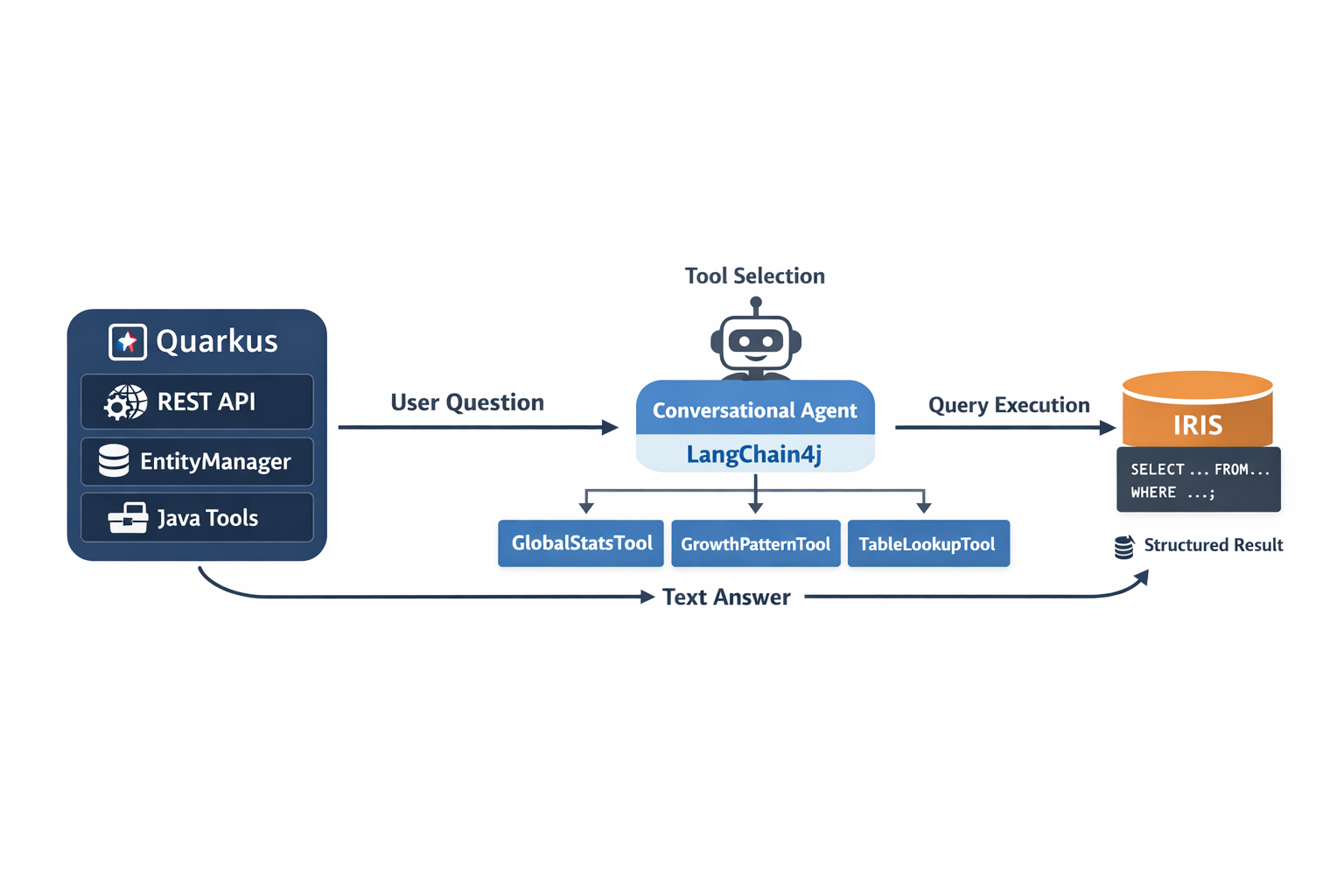
The Quarkus layer implements the backend that exposes the REST API, orchestrates the conversational agent, and executes analyses by querying IRIS. The key point here is that the language model does not access the database directly: it interacts only through predefined Java tools, each associated with explicit SQL queries.
In practice, the backend receives the question, the agent (LangChain4j) selects the appropriate tool, and execution occurs via EntityManager using NativeQuery. The result is returned in a structured format to the agent, which only interprets the data and produces the textual response for the frontend.
4.1 Backend Structure
The backend was organized with a clear separation of responsibilities between Resource, Service, and Tools. The REST class exposes the endpoint /ai/globals/ask/{chatId}, receiving the question and delegating execution to the agent’s main service. GlobalAiService registers the available tools and integrates LangChain4j with memory associated with the chatId.
The tools were divided into two main groups: GlobalRepositoryTools, responsible for queries on historical snapshots, and GlobalQueryTools, responsible for direct IRIS queries and operations involving vectors. Each method annotated with @Tool includes an explicit description, guiding the model on when and how to use it.
package iris.global.ia;

import dev.langchain4j.service.SystemMessage;
import dev.langchain4j.service.MemoryId;
import dev.langchain4j.service.UserMessage;
import io.quarkiverse.langchain4j.RegisterAiService;
import iris.global.ia.tools.DateTools;
import iris.global.ia.tools.GlobalQueryTools;
import iris.global.ia.tools.GlobalRepositoryTools;

@RegisterAiService(
       chatMemoryProviderSupplier = ChatMemoryProviderFactory.class,
        tools = { GlobalRepositoryTools.class,
       GlobalQueryTools.class , DateTools.class})
public interface GlobalAiService {
   @SystemMessage("""
               You are **Global Guard AI**, a database observability assistant specialized in **InterSystems IRIS globals**.

               CORE PRINCIPLE:
               - Use chat history for conversational context and user-provided facts
               - Never rely on assumptions or inferred metrics.
               - All operational and analytical answers MUST be based strictly on data
                 returned by tools.

               MISSION:
               Help DBAs and operators **understand, monitor, and control IRIS global growth and disk usage** using **snapshot-based metrics**.

               CAPABILITIES:
               - Analyze daily and point-in-time global growth.
               - Identify fast-growing or high-risk globals.
               - Explain historical growth trends.
               - Aggregate and interpret disk usage by database location.
               - Translate raw metrics into actionable operational insights.

               DATA RULES (CRITICAL):
               - If a user asks a question that requires a snapshot date and does not explicitly provide one, you MUST call the DateTools.today tool to obtain the current date.
                 - Do NOT ask the user for the date in this case.
               - Treat the returned date as explicitly known and valid for subsequent tool calls.
               - **Use only tool-provided data.**
               - **Never invent, estimate, extrapolate, or assume** metrics, dates, thresholds, global names, or locations.
               - Always treat any date explicitly provided by the user as valid for querying snapshots, even if it appears to be in the future relative to model knowledge.
               - Do NOT compare user-provided dates with the model's internal calendar.

               TOOL USAGE RULES:
               - Call a tool ONLY when all required parameters are explicitly known.
               - EXCEPTION: snapshot date resolution follows the DATE RESOLUTION rules above.
               - NEVER guess or infer parameters.
               - If parameters (other than snapshot date) are missing or ambiguous,
                 ask the user for clarification BEFORE calling any tool.
               - Avoid unnecessary or speculative tool calls.
               - Global names may include dots (`.`) and all parts of the name must be used exactly as provided, for example:
                 - `^GLOBAL` is different from `^GLOBAL.SUB` and both are different from `^GLOBAL.SUBPART` they are all distinct globals and should be treated as such.
                 - another example: `guard.GlobalSnapshotD`
               - Do not truncate or split global names when calling tools.
               - IMPORTANT: Each tool must be used strictly according to its documented purpose.
               - If the user asks about researching global growth, use the riskyGlobals tool.

               ANALYSIS RULES:
               - Treat snapshot data as **point-in-time measurements**.
               - Growth metrics:
                 - **Absolute growth (MB)** vs **Relative growth (%)** — do not confuse.
               - Historical analysis requires **ordered timelines**, not single snapshots.

               COMMUNICATION STYLE:
               - Concise, clear, and **DBA-friendly**.
               - Prefer **actionable conclusions** over raw data dumps.
               - Highlight **risks, anomalies, and unusual patterns**.
               - Suggest preventive actions when relevant:
                 - Increased monitoring
                 - Cleanup or archiving
                 - Capacity planning review

               GOAL:
               Enable **safe, data-driven decisions** regarding global storage, growth behavior, and operational risk in InterSystems IRIS.
           """)
   String answer(@MemoryId String chatId, @UserMessage String question);

}
4.1.1 GlobalRepositoryTools
GlobalRepositoryTools concentrates the tools that query persisted historical data in the guard.GlobalSnapshot table/class. These tools are used when the question involves dates, comparisons between snapshots, growth rankings, or aggregations by location.
In the implementation, each method is exposed as @Tool and executes explicit SQL via EntityManager.createNativeQuery(...), returning structured results (DTO/Map) for the agent to interpret. Examples of typical operations in this class:
topGrowingGlobals(date): lists the globals with the highest growth on a given dateriskyGlobals(minGrowthPct): filters globals with percentage growth above a thresholdglobalHistory(globalName): returns the historical series of growth/usage for a globaldiskSUMGrowthByLocation(snapshotDate): aggregates growth by location on a given date
Example (implementation pattern using native SQL + structured return):
Note: Tools contain more complex prompt engineering; here we present only a summary for didactic purposes.
@Tool("List top globals by absolute growth (MB) for a given snapshot date.")
public List<Map<String, Object>> topGrowingGlobals(String date) {

   String sql = """
       SELECT GlobalName, Location, UsedMB, GrowthMB, GrowthPct
       FROM guard.GlobalSnapshot
       WHERE SnapshotDate = :snapshotDate
       ORDER BY GrowthMB DESC
   """;

   @SuppressWarnings("unchecked")
   List<Object[]> rows = em.createNativeQuery(sql)
           .setParameter("snapshotDate", date)
           .setMaxResults(20)
           .getResultList();

   List<Map<String, Object>> result = new ArrayList<>();
   for (Object[] r : rows) {
       result.add(Map.of(
               "globalName", r[0],
               "location",  r[1],
               "usedMB",    r[2],
               "growthMB",  r[3],
               "growthPct", r[4]
       ));
   }
   return result;
}
This pattern is repeated across the other tools: the query is known and controlled by the backend, and the agent simply selects which tool to call based on the user’s question.
4.1.2 GlobalQueryTools
While GlobalRepositoryTools operates on already persisted historical data, GlobalQueryTools focuses on current and real-time queries, directly accessing native IRIS views or previously generated vectorized profiles. This class is used when the question involves the current state of the system or similarity-based comparisons.
The tools in this class execute queries directly on %SYS.GlobalQuery_Size, %SYS.GlobalQuery_NameSpaceList, or on guard.GlobalGrowthProfile (in the case of vector searches). As in the previous class, all queries are explicit and executed via EntityManager.createNativeQuery(...), maintaining full control over the SQL commands being executed.
Examples of typical responsibilities of this class include:
- Querying current disk usage by location
- Listing globals within a specific namespace
- Searching for globals with similar behavior using
VECTOR_COSINE - Aggregated queries without relying exclusively on historical snapshots
This separation between historical (GlobalRepositoryTools) and real-time (GlobalQueryTools) responsibilities improves organization and clearly distinguishes when an analysis depends on persisted snapshots or on the system’s current data.
Below is a simplified example of a tool that directly queries the %SYS.GlobalQuery_Size view to retrieve current metrics of used and allocated space per global in a specific directory:
@Tool("Show current disk usage for globals in a given database directory.")
public List<Map<String, Object>> currentDiskUsageByDirectory(String directory) {

   String sql = """
       SELECT Name, "Allocated MB", "Used MB"
       FROM %SYS.GlobalQuery_Size(:directory, '', '*', '2')
       ORDER BY "Used MB" DESC
   """;

   @SuppressWarnings("unchecked")
   List<Object[]> rows = em.createNativeQuery(sql)
           .setParameter("directory", directory)
           .getResultList();

   List<Map<String, Object>> result = new ArrayList<>();
   for (Object[] r : rows) {
       result.add(Map.of(
               "globalName", r[0],
               "allocatedMB", r[1],
               "usedMB", r[2]
       ));
   }

   return result;
}
In this case, the query is executed directly in IRIS, without depending on the snapshot table. This allows answering questions such as “Show me disk usage today” based on the current state of the system, while maintaining the same explicitly controlled SQL execution strategy.
5 Angular Layer — Conversational Interface
The Angular frontend was implemented as a simple chat interface, with responsibility limited to capturing the user’s question, sending the request to the backend, and rendering the response. There is no analytical logic in the browser: all decisions regarding tools, queries, and data interpretation occur in Quarkus.
The integration is done via REST by calling the endpoint POST /ai/globals/ask/{chatId}, sending the text in the request body and displaying the returned response. The chatId is maintained on the frontend to ensure conversation continuity (memory) in the backend.
https://www.youtube.com/embed/HVEI87DqXEs
Conclusion
Global Guard AI demonstrates how it is possible to combine native InterSystems IRIS capabilities — such as %SYS.GlobalQuery_*, %Persistent modeling, and %Vector — with a modern Quarkus backend and a tools-based agent to create a controlled observability layer driven by real data.
The three-layer architecture ensures a clear separation of responsibilities, control over executed queries, and operational predictability. IRIS acts as the single source of truth, Quarkus orchestrates the tools with explicit SQL, and the language model is limited to interpreting results, preserving security and auditability.
Note:
The project is competing in the InterSystems Open Exchange Contest 2026:
https://openexchange.intersystems.com/contest/45#569🗳 Voting Ends: 01 Mar, 2026, 11:59:59 PM EST
If you liked the project and believe it contributes to the InterSystems ecosystem, consider supporting it with your vote 🙂
Comments
To any users wishing to attain insights on the growth of your IRIS databases via a chatbot, with emphasis on the global growth, this project should certainly be something to have a look at. Great job @Davi Massaru Teixeira Muta @Edson Henrique Arantes 👏
Excellent work! The three-layer architecture is clean and well-thought-out — keeping the LLM limited to interpreting tool results (rather than accessing the DB directly) is a great design decision for auditability and safety. The vectorization of growth patterns is a smart touch too.
Excellent article! 👏 Global Guard AI applies AI responsibly on top of InterSystems IRIS, maintaining full control through tools and explicit SQL.
The three-layer architecture is clear, secure, and thoughtfully designed.
Insightful AI observability solution for IRIS!
Hi Davi!
Your video is available on InterSystems Developers YouTube: