Question Vivek Ranjan · Sep 28, 2018

Method1(){

Set OID1=##class(Table).%OpenId(100)

// do Kill OID

}

&SQL(Update Table Set  Column=88)

Method2(){

Set OID2=##class(Table).%OpenId(100)

// Or do %Reload()

Set OID.Column=99

Do OID.%Save()

}

// Column 1 still holds value as 1

For getting the updated value I should do Kill OID in Method1
4
0 709
Question Vivek Ranjan · Aug 31, 2018

The same piece of data never throws this error on other operations. I am getting this error on one always .

The same SDA container never throws error on other operation.

ERROR #6901: XSLT XML Transformer Error: SAXParseException: invalid character 0x1C (Occurred in an unknown entity)


Set xslt=##class(%Dictionary.XDataDefinition).%OpenId(..%ClassName(1)_"||Xmethod",-1,.tStatus)
$$$ThrowOnError(tStatus)
Set tStatus= ##class(%XML.XSLT.Transformer).TransformStream(myStream,xslt.Data,.OpStream)
$$$ThrowOnError(tStatus)

XData Xmethod
{

<xsl:stylesheet version="1.0"

1
0 1317
Question Vivek Ranjan · Apr 13, 2018

I am trying to created SOAP request body that I need to post as string. I created the SOAP client and tried with this to get SOAP envelope. Can you suggest a way for this.

Set proxy=##Class(Client.Class.Client.Methodname).%New("Methodname")
Set proxy.Para1="a"
Set proxy.Para2="b"
Set tClient=##Class(Client.Class.Client).%New()
Do tClient.WriteHTTPContent(proxy,proxy.%RequestName,0,0,"","",.stream)

14
0 1865
Question Vivek Ranjan · Feb 8, 2018

Intersytems  documentation says not to hold entire SDA  as object in In-memory. 

 http://localhost:57772/csp/documatic/%25CSP.Documatic.cls?LIBRARY=registry&CLASSNAME=HS.SDA3.Container&MEMBER=&CSPCHD=001000000000x1zyO3kkajy0iIjjpi2dxUJUnwFSY_pz7jtbNV&CSPSHARE=1

 // Serialize Object to XML
  
  Set object = ##class(User.NewClass1).%New()
  object.Property1="one"
  object.Property2="two"
  object.Property3="three"
  object.Property4="four"
  Set w=##class(%XML.Writer).%New()
  set w.Charset="UTF-8"
  Set w.Indent=1
  set status=w.OutputToString()
  set status=w.StartDocument()
  Set status=w.RootO

1
0 572
Question Vivek Ranjan · Feb 1, 2018

WRF to below example my idea is to check whether red is present in the list mylist.  You can very well use LINQ on enumerable in C#

mylist.Where(x => (x.Property2 == "red")).ToList().Count;
set mylist=##class(%ListOfObjects).%New()For i=1:1:2 {S object = ##class(User.NewClass).%New()
  Sobject.Property1=iS object.Property2="red"do mylist.Insert(object)}

It can be done with iterating over mylist

for j=1:1:mylist.Count(){Set item = mylist.GetAt(j)
   If (item.Property1 = "red") { // get the count }
   //set exist = item.Find("viv",1)}
3
0 557
Question Vivek Ranjan · Nov 22, 2017

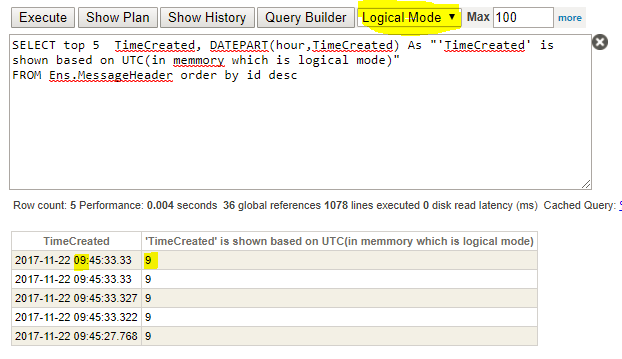
I ran the below query in three different modes.  Coordinated Universal Time is 5 hours ahead of Eastern Time so there is difference in value from column 1 and column 2 in ODBC, Display mode, but not in Logical Mode. By default the query executes in ODBC mode when we query the data from outside world(via ODBC connection). 

I don't know  why query 2 and query 3 outputs different from query 1.

Query 1. Ran in Logical mode, DATEPART() took in memory stored timestamp data(stored in UTC)

'Hour ' returned are same for both the columns

Query 2. Ran in ODBC mode, DATEPART() took in memory stored timestamp

3
0 517