Check win version against version supported by Caché first.
http://docs.intersystems.com/cache20141/csp/docbook/DocBook.UI.Page.cls…
- Log in to post comments
Check win version against version supported by Caché first.
http://docs.intersystems.com/cache20141/csp/docbook/DocBook.UI.Page.cls…
I was waiting for it.
And I missed this setup in other places.

So we are back to Documentation vs. Reality.
And another excellent example for the importance of this community.
develop on prod ? 
you are right on %objlasterror. and that's how I work it around
but if you want to keep a log and chase sporadic error events this is quite an extra effort.
definitely a good idea to run routine ^%GSIZE to find the big consumers and packingdirectory: c:\intersystems\cache\mgr\user\
Page: 1 GLOBAL SIZE 08 Aug 2017
10:28 AM
Global Blocks Bytes Used Packing Contig.
-------- -------- --------------- ------- -------
CacheStd 1 140 2 % 0
CacheStdS 1 92 1 % 0
CacheStream 109 764.376 86 % 70
ERRORS 1 12 0 % 0
G1 1 72 1 % 0
thx.
so you confirmed to me that it was't just wishful thinking 
pls. add some details on Caché version & os
Wow. 5.0 is roughly 12..15 yrs. back.
Could be ^GBLOCKCOPY existed then already in NS %SYS.
It should be able to cover your needs and create a new smaller CACHE.DAT in a new directory.
My personal preference is %Status: 1 = OK,
0 = something went wrong + standard or handmade Error Code
+ ability of $system.Status.Append(Status) to get a chain of error messages
which gives you the chance to drill down to the source. Which is especially important when
you get it from some embedded action.
The opposite to me is
<ZSOAP> that leave you alone with no hint what went wrong
or the famous <ZSG> homed in %Save() Method
to pass return value I prefer objects or variables passed byRef od Output
The other opposite is SQLCODE (would be better named SQLerror) 0 is OK. Anything else needs action
But that's tradition in SQL world since more than half a century
I'm deeply impressed.
should have seen this earlier.
all Studio settings are stored in Windows registry.
Search with regedit for InterSystem
as suggested earlier
thx
where do you verify the result and where do you see the error ?
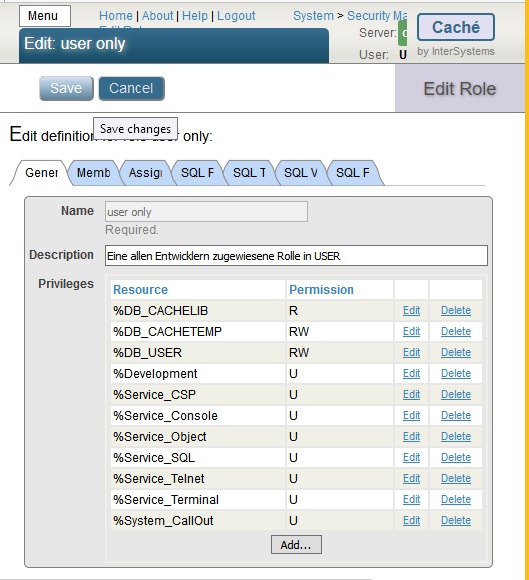
If this user should also be programmer you can create a new role copying from %Developer
and then remove the DB's that you want him to lock out like this just for NS = USER
 .
.
Thanks for the pointer!
Good to see that someone got the time to productize the idea of Custom Index Type
With this development the win could have been even more dramatic.
My benchmark was done in March2011, so Caché version must have been 2010 .
2013.1 was my last version @ISC just rolling out.
At that time bitmaps helped only with rather relaxed precision.
For an engineer this sounds like a quite challenging exercise to rewrite a PGP lib in COS.
But it seems more promising to wrap the existing (and hopefully well tested) code and consume it from Caché using one of the existing Gateways:
- Callout Gateway http://docs.intersystems.com/latest/csp/docbook/DocBook.UI.Page.cls?KEY…
- ActiveX Gateway http://docs.intersystems.com/latest/csp/docbook/DocBook.UI.Page.cls?KEY…
- or just connect
over TCP/IP http://docs.intersystems.com/latest/csp/docbook/DocBook.UI.Page.cls?KEY…
or UDP http://docs.intersystems.com/latest/csp/docbook/DocBook.UI.Page.cls?KEY…
or a Pipe http://docs.intersystems.com/latest/csp/docbook/DocBook.UI.Page.cls?KEY…
I bet the community has even more ideas to reuse the existing code
congratualtions !
indeed this is surprising.
but is this really: do content.ReadLine(,,isEOL)
it should be a pass by reference to receive something back do content.ReadLine(,,.isEOL)
with the <dot> in front of the variable
You still have the option to create your own %ZLANGC00.int
and make you own ZZEXIT to avoid the risky HALT
It's a miracle to me how HALT could survive from PDP-7 sn#103 at MGH and nobody touched it.

to me this looks like your content had an extra $C(13,10) at the end.
It could help to have the full content at hands.
eg:
before content.OutputToDevice()
set ck=content.Read()
set ^ck($i(^ck))=ck
do content.Rewind()
I expect zwrite ^ck will show more than 3 lines
That would indicate that the source of trouble is on the input side.
Some closing action ?
if you change wnl() ...
to
wnl() quit
you just disable it to see if it plays a role at all
I don't see a call for wnl()
but ancient coding practices would suggest its: writenewline just that
and that's what it does without any other content.
though the remark is rater direct if interpreting feedback := line
// Should be smart as well: routines ending with write ! will create an empty feedback!
just a guess:
with do content.MoveTo(content.Size - 1) you are probably just between CR and LF
Could you try do content.MoveTo(content.Size - 3) just to make sure you a e before CRLF
I'm not sure how EOL is triggered
eventually also check returned success code
1)
%Stream.GlobalBinary has a warning:
Note that on a unicode Cache although you can write unicode data into this class and read it back out this is not a supported use of this class and the Size property would be incorrect in this case as it would be the size in characters rather than the size in bytes
2)
do content.OutputToDevice()
now your content is out and you are positioned at end
do content.MoveTo(content.Size)
now you re-read content until LastCharacter-1, whatever total size might be
set isNewLineTerminator = (content.Read(1) = $char(10))
reading the assumed last character
3)
you might be better off to use content.ReadLine(,.sc,.eol) and check eol for the termination status
The first thing to check in Mgmt Portal is size of Global Buffers - Rule of thumb: 50% of available RAM
http://<yourhost>:<yourport>/csp/sys/mgr/%25CSP.UI.Portal.MemoryStartup.zen
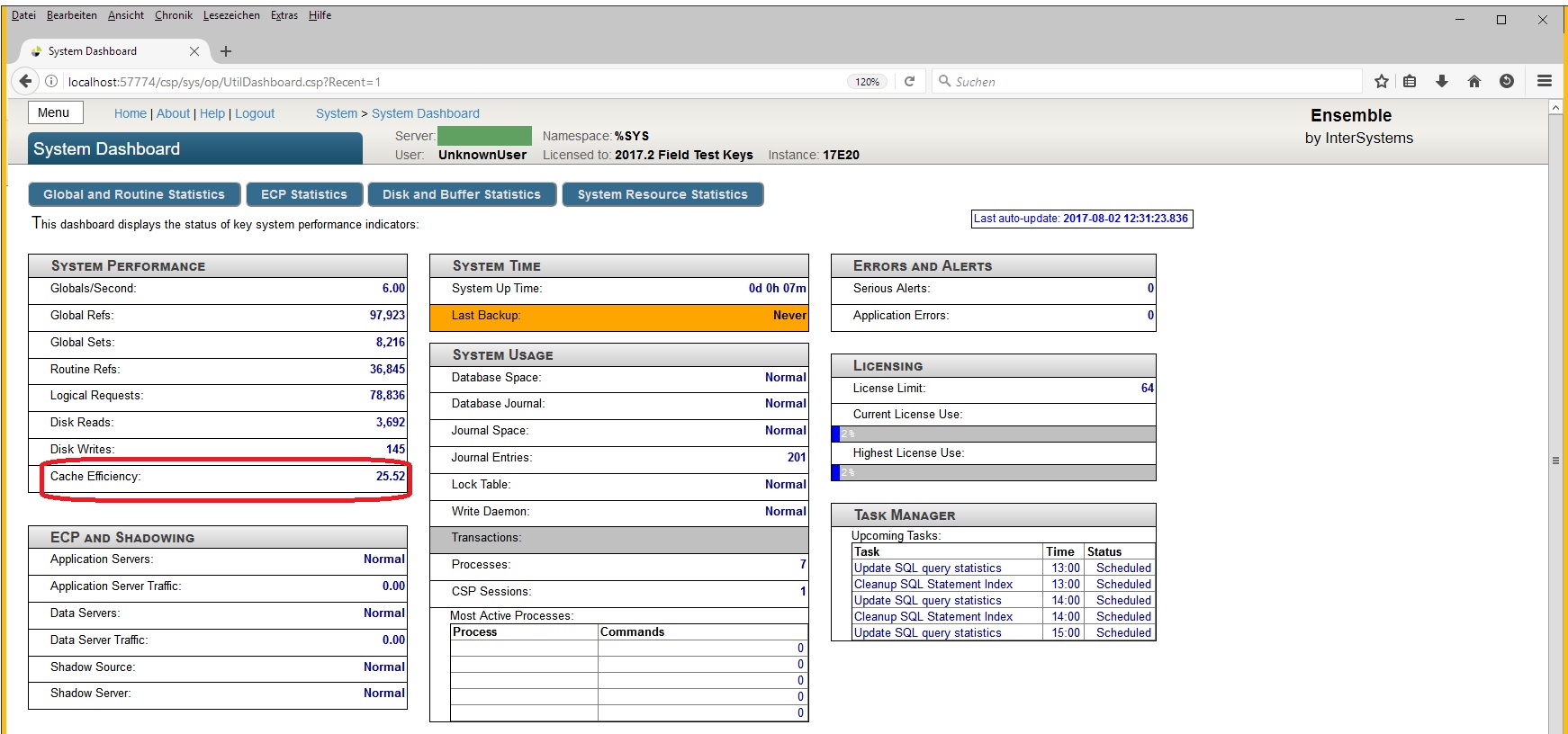
Check Cache Efficiency in System Dashboard before and after restart
http://<yourhost>:<yourport>/csp/sys/op/UtilDashboard.csp?$NAMESPACE=
Thanks Ed!
I just went through old DC post for half an hour+ to detect it. 
It's much better than my link to Facebook.
Regards
For me there is the InterSystems Ensemble Logo - NOW
do you look for this one?
%ENSInstallDir%\CSP\broker\portal\EnsembleLogo210x50.png