much faster and straight forward string conversion then $ZD* stuff doing unnecessary conversions .
- Log in to post comments
much faster and straight forward string conversion then $ZD* stuff doing unnecessary conversions .
24 hrs is fine. but which time zone? UTC,EST, ...?
Rollig it along the globe will extend it to be 48 hrs.
I assume you know where you get your email address from.
The rest is straight COS and your code my look like this
Exact !
That's the way it was done since .... {ever}
A dirty hack:
- make a new class extending %SerialObject with VALIDIFNULL set.
- export your serial classes (to XML)
- replace %SerialObject by your MySerialObject
- reload the changed classes.
Not so nice but I had the same issue with some 100 Serial Objects.
The more sophisticated way would be do it programatically over %Dictionary.DefinedProperty .....
Very interesting and very time consuming
You have to set $ZTRAP again at the begin:
Or start with do infile^myroutine ....
at the 1. run it is set i line 3
you my also pass the filename as parameter
Kevin,
there a bunch of excellent examples in standard classes e.g
%Regex.Matcher
http://docs.intersystems.com/latest/csp/documatic/%25CSP.Documatic.cls?…
%Net.HttpRequest
http://docs.intersystems.com/latest/csp/documatic/%25CSP.Documatic.cls?…
%Net.SMTP
http://docs.intersystems.com/latest/csp/documatic/%25CSP.Documatic.cls?…
And they are also in source on your system.
So it's easy to see how special Tags are used.
Welcome back!infile ; simple file read
set filename="C\mydir\myfile.txt"
set $ZTRAP="end"
open filename:("R"):0 else Write "file error"
for line=1:1 use filename read text use 0 write text,!
end
close filename
set $ZTRAP=""
use 0 write "Done",
quit
it's not so sophisticated and I used the end-of-file error to exit
This is also available in class %Library.File with lot more comfort
http://docs.intersystems.com/latest/csp/documatic/%25CSP.Documatic.cls?…
HTH
Taskmanager is a part of Caché System Management and you should read the Docs.
JOB is a COS command also used in Taskmanager but not only. Any routine may use it.
So your Request / Question is just not clear
If you don't want / need the content as object and just want to convert XML2JSON
why wasting time and energy to re-invent the wheel an not just using any of the many downloadable tools
and call them over $ZF(-2) and consume the result ?
Google gave my some thousand hits of tested solutions e.g. https://github.com/sinelaw/xml-to-json
I mean it's doable with Caché but file_in => file_out is not more than a nice exercise for training.
GREAT !
SQL Code and it's style and methodology was there long before Objects in actual style where introduced. (feeling mid 90ties)
It was mainly kept for backward compatibility.
In Caché 5 (2002) they were a real parallel universe Object - SQL.
Later Computed + SQLcomputed Properties were for long time the only place for common code.
Thanks, totally correct!
It's mentioned in line 5 of the doc I pointed to.
Make it a serial class with 2 numeric properties and a calculated for the difference
But 2015 and before has
class %ZEN.Auxiliary.jsonProvider
http://docs.intersystems.com/cache201513/csp/documatic/%25CSP.Documatic…
Udo,
will we meet in Frankfurt at the Symposium next week ?
Positive! Confirmed!
If you highjack your previous workspace (as I did by accident) there's nothing to move anymore.
Especially all conections are there already.
Suggested solution:
#1 create a ROLE with resources DOCBOOK (Readonly) + the required Nmaspaces
#2 remove required resources %Development from web application /csp/documatic
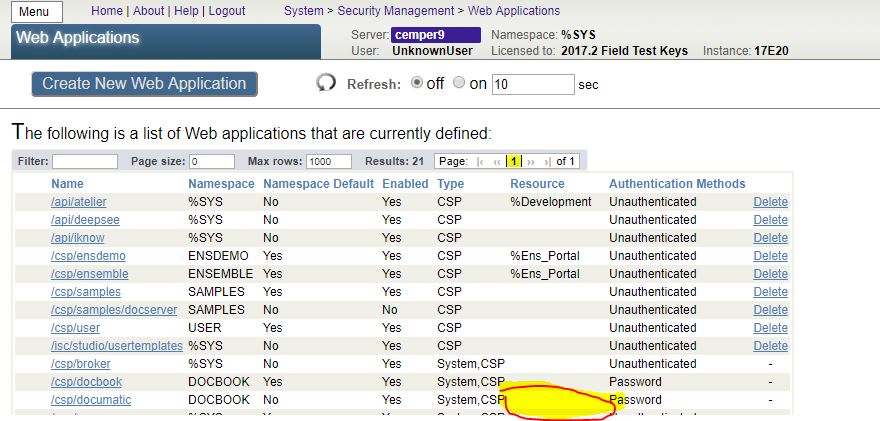
#3 next create a user with the new defined role (here: "docread")

I decided not to give %Development as it could allow access to terminal prompt.
Thanks, I missed that leaving before
And I've seen the new generated code added to %Save()
It confirmed my feelings about %* .... 
Thank You Alex!
I knew it's a can of worms and spread over documentation like feeding pigeons.
And honestly I was pretty sure not catch them all and hesitated quite some time to touch it.. Great contribution.
%On... callbacks are served and integrated into he OBJECT world and typically don't care about any Trigger.
Triggers live in the SQL TABLE world of your class, with a hand full off %-variables unknown at the Object sideand without an actual instance of object but directly writing to Globals.
Take a look to the generated .INT code of your class and see what you have at hands.
I always found it quite ambitious to attempt a common code of both sides when directly changing Objects or Tables.
Summary:
- for SQL access have Triggers
- for Object access have your %On* methods
Applies only before 2014.1 as pointed out.
But Trigger code doesn't look much better.
something similar:
%Save() stream doesn't mean closing.
and Rewind() is different from %Reload().
So the intention of the 3 out-commented lines is not obvious.
Opposite to your comment %Open() does a reload from disk.
It's available if you update an already existing object.
NOT available for a New or Cloned object
THX .
Do I understand it correctly?
an example how to use:
https://community.intersystems.com/post/unlimited-unique-index
Just for info:
I'm elaborating a suggestion for an 'unlimitted' UNIQUE index based on old code fragments.
It may take some time depending on my luck on personal backups.
Here it is:
https://community.intersystems.com/post/unlimited-unique-index
correct.
OVER(PARTITION BY
is an unknown keyword in documentation
You may need to reformulate your query to achieve a similar result
It's OK.
The winner takes it all !
Dmitry was faster.