@DC AI Bot answer solved this topic. Thank you (even if you are an AI) :=)
- Log in to post comments
@DC AI Bot answer solved this topic. Thank you (even if you are an AI) :=)
Thank you!
I think this initiative is interesting to make us (the community) be engaged, with the knowledge provided by the Intersystems Sales Engineers.
Thank you so much.
Thank you so much @Suprateem Banerjee for your interesting demo!! 🙂👍👌
For the raffle:
Does IRIS Agents support version controlling prompts?
Yes, IRIS Agents does support version controlling prompts.
In the demo, Suprateem shows that prompts can be stored with a name (for example, "agent 007") and then updated without overwriting the previous version. When a new prompt with the same name is created, the framework automatically creates a new version instead of replacing the old one.
Thank you to @Alyssa Ross and @Emil Polakiewicz and @Boris Mamkin for this interesting demo. I did not know this was a risk on the United States; I mean, I did not know that in the US Wwhen an implanted device is removed from a patient, hospitals are legally required to pursue manufacturer credits and refund payers if the credit exceeds 50% of the device's cost.
For the raffle:
In the demo, Jordan uses the ExplantIQ AI Assistant to investigate a spike in the claims data. What is the third question she asks the assistant to close the loop on that investigation?
List the top five procedures contributing to warranty credits recovered in Q4 2025
Thanks Alyssa Ross for this demo.
Thank you so much @Zelong Wang for your deep interesting demo!
What protocol does Health Galaxy use to allow AI to communicate with FHIR endpoints?
Health Galaxy uses the MCP (Model Context Protocol) to allow AI agents to communicate with FHIR endpoints and healthcare systems.
Really interesting project combining AI + FHIR + InterSystems IRIS to create a unified gateway for intelligent healthcare workflows such as appointment scheduling, insurance checks, and automated pre-op assessments. Great demo! 👏
ᘙᗤᖊ The simplest way I would explain this to my grandma is: imagine you hurt your knee and instead of calling five different places, waiting on hold, and repeating your information over and over, you could simply ask an AI assistant for help, for help!. The assistant could find the right doctor, book the appointment, check whether your insurance covers it, and prepare the paperwork for you automatically. It’s basically like having a helpful secretary for healthcare that saves time and reduces stress. 🙂🙂🙂
Thank you so much for your demo, I enjoyed it. Thanks to Danielle Micciantuono, @Brad Nissenbaum and @Vic Sun
What are the 3 agents involved in our chatbot's workflow?
The three agents in the chatbot’s workflow are:
1. Intake Agent 📥. It collects demographics and retrieves relevant clinical context.
2. Triage Decision Agent 👀. This agent evaluates the patient’s condition and determines urgency.
3. Routing Agent 📤. Creates a structured summary of the case, generates FHIR resources and routes the patient to the appropriate caregiver or queue (e.g., nurse, emergency...)
So, we have the Intake Agent, Triage Decision Agent, and Routing Agent.
I like the idea, however, I think, to make triage fully dependent on an AI model, interacting directly with a patient, it is a puzzling idea. Maybe it should be improved, as most patients do not really know what are their shymphomps clearly. Thanks for your demo, it is truly interesting!
Thank you for this demo about aggregating different data: HL7, FHIR... in the same table.
For the raffle: A collection table is a user-defined data table that is dynamically populated with selected fields extracted from messages flowing through the integration engine (e.g., HL7, FHIR, CDA).
Imagine a busy airport where passengers arrive from all over the world, each speaking different languages and carrying different types of documents.
A collection table is like a smart customs desk that, in real time, picks out the same key details from every traveler: name, nationality, destination...; no matter what language their passport is in, and writes them neatly into a single standardized logbook.
This way, instead of dealing with hundreds of different document formats, the airport staff can instantly see clear, consistent information to monitor traffic, spot issues, or make decisions... without needing to archive and analyze every original document later!! ✈️
Thanks to @Kwabena Ayim-Aboagye, @Jeff Morgan Semmens and @Christopher Carmichael for this demo!
Thank you so much @Irène Mykhailova for sharing it. I did not notice that it has been marked as "Planned", yesterday, 23 April :=) :=) :=)
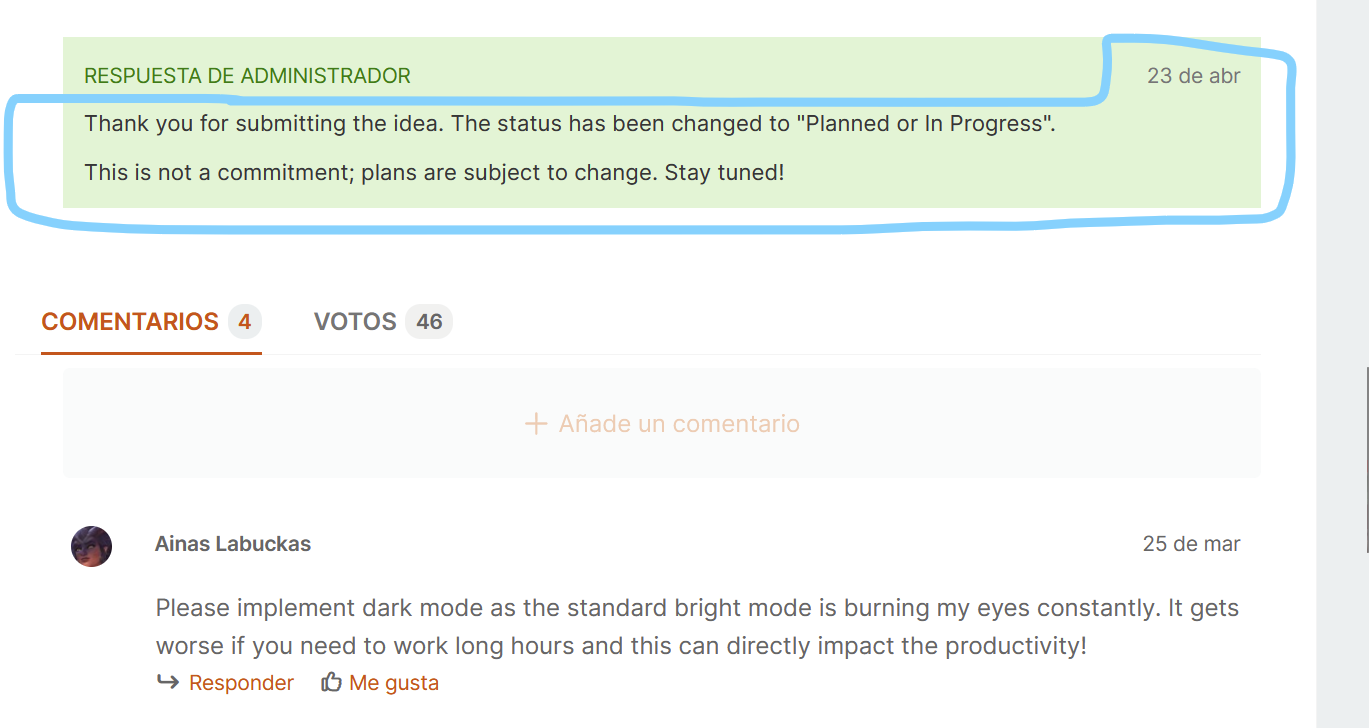
🙏🙂🙏
Interesting demo, really insightful.
About the raffle: InterSystems Health Gateway connects to three major national health information networks: Carequality, CommonWell, and eHealth Exchange.
What I found especially interesting is how the physician could benefit so much by applying this solution. And, I did not expect rare diseases would be a key topic to handle, as, well, they are "rare" and important, so I am glad you have taken time and effort to think and implement a demo showcasing how to solve this topic.
Thanks to @Annie Tong, @Jesse Reffsin and @Georgia Gans for this cool demo. 🙂
Yuri Marx, thanks for your help. However, as we (the team where I work and I) use Healthshare inside a Remote Desktop inside a VPN inside a VirtualBox, we (I) have not access to Internet, and there is no way to download Browser Extensions. So, it means, people like me, do really need a native way to have a dark mode on the Healthshare Portal Management, to have less visual fatigue, and increase the productivity. Thank you so much for your help, @Yuri Marx
Please, to the participants: would you consider this idea? A native dark mode in the Management Portal isn’t just cosmetic, it’s about accessibility, focus, and long-term comfort. Dark Mode for Management Portal (or even generalized support for multiple themes)
Many of us spend hours inside the Healthshare Management Portal (often late at night), and the current bright (very bright) interface can become really exhausting, especially for people with visual sensitivities (like me).
Implementing this through the ""Idea to Application"" program would bring immediate, tangible value: better comfort -> less fatigue -> better productivity.
Please, could you consider implementing this idea? 🙏🙏🙏🙇🙇🙇🙏🙏🙏🙂🙂🙂🙏🙏🙏🙇🙇🙇
Thank you.
Gracias.
Interesting explanation, thank you so much @Robert Cemper
Why are the AI assistants called "Castor" and "Pollux"?
“Castor” and “Pollux” are the twin stars of the Gemini constellation. And as Gemini LLM model is used to process and search on FHIR, CDA and HL7 data, Simon Sha decided to name the two AI agents as Castor and Pollux: Gemini's twins.
By the way thanks to @Simon Sha for this great video. The allergy part, and the discharge summary were so interesting examples showing how this solution could help save time to Clinicians and Patients. Thank you so much!
Which programming language is the HL7 validation data profiler implemented in?
The programming language used is Python. Also it uses libraries like pandas and plotly. And Claude Code to speed up development.
Thank you so much to @Henry Wojnicki and @Lynn Wu for your effort. I really liked this video.
@Kurro Lopez quizás podrías probar a separar las líneas del "Editor de Valores" del BP, del margen izquierdo; es decir, poner un tabulador entre las 5 líneas del ObjectScript escrito en el BP, porque, en mi caso, he visto, que si el código lo escribo pegado al margen izquierdo, al compilar el Proceso, el BP, podría dar errores. Ahora bien, no sé si tiene relación con lo que nos has escrito en el hilo. En mi caso, he trabajado con IRIS 2020 e IRIS 2023 (y versiones anteriores), no sé si en la 2025, esto ya está solucionado.
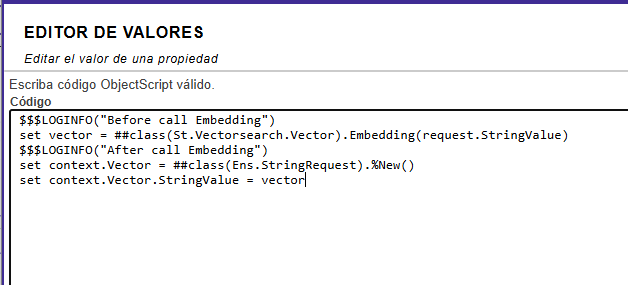
Lo digo, porque por Terminal si te funciona, y llamando al Proceso no.
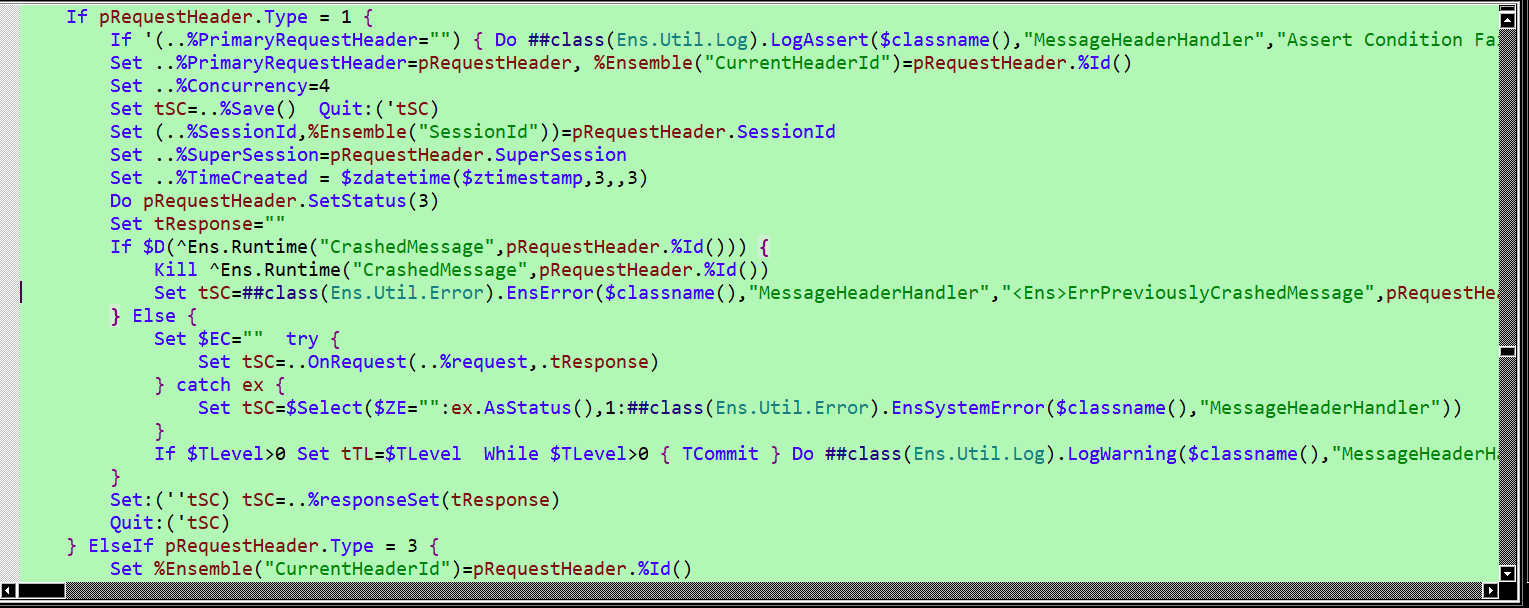
En la imagen de la traza, pone que falla en la línea 16 del método: "Stack When Logged: $$^MessageHeaderHandler+16^St.Vectorsearch.Demo.BP.Feeling.1 +1".
Prueba a abrir la clase: "St.Vectorsearch.Demo.BP.Feeling.1" y buscar esa línea.
No sé si te serviría. Quizás te de una pista. Imagino que apuntará a una clase interna, como por ejemplo (si busco en un BP cualquiera "MessageHeaderHandler+16", sale lo siguiente):
Gracias @Luis Angel Pérez Ramos por la explicación. Muy interesante la referencia a Monty Python 😄😄😄 (por cierto gracias por explicarla, porque no la conocía).
Leyéndote, no he podido evitar acordarme del libro: "Klara y el Sol". Klara (una "amiga artificial" [AA]) intenta entender el mundo con una lógica impecable, pero cuando hay demasiadas variables o patrones superpuestos, su interpretación empieza a volverse… "difusa" (por ejemplo, al ver que un mendigo y su perro parecían moribundos, y al ver que al día siguiente había un "sol radiante" y mendigo y perro se habían repuesto, interpretar que el Sol dispone de efectos curativos "especiales").
A nosotros nos ha pasado algo parecido: al definir 1 sintaxis abstracta con múltiples sintaxis de transferencia dentro, aunque en teoría todo está correcto (la abstracta coincide y la transferencia también), en la práctica parece que el sistema “no sabe por dónde mirar” y acaba rechazando la asociación (entre la Operación del ESB y el PACs). Es decir, que si se configura 1 abstracta con N de transferencia dentro, pese a que la abstracta y la de transferencia empleadas en el envío por el ESB estén configuradas para ese par AET Local y AET Remoto; el ESB, rechaza, dando la excepción que has puesto...
Es como si IRIS, igual que Klara, tuviera que elegir entre demasiadas posibilidades simultáneas y terminara fallando en la decisión más básica: aceptar la conexión. 🤖✨😄😄😄
43 votes:
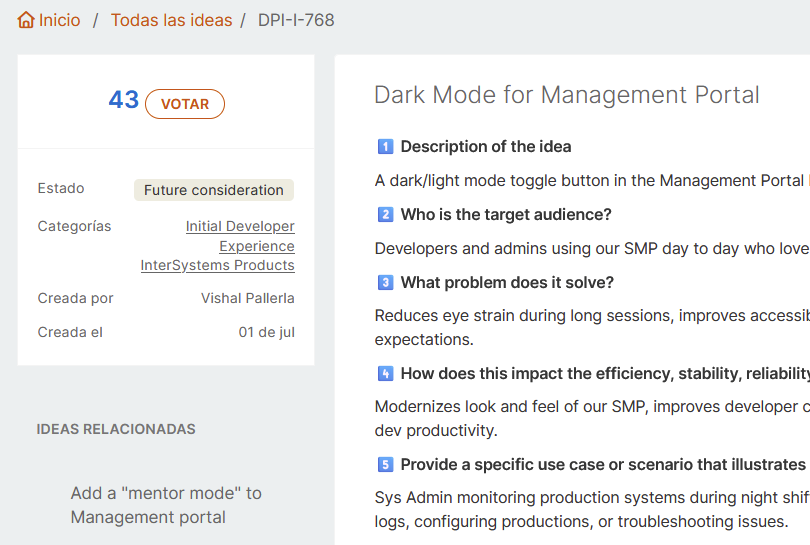
Word has dark mode, Excel has dark mode, Notepad++ has dark mode, many IDEs (most of them) have dark mode. Please, please, would you consider to add an official dark mode for Healthshare.
Thank you @Jenna Makin for your kind reply.
I will share why none of the options mentioned can be used by me:
Option 1 — Browser Extensions (Desktop Chrome / Edge / Firefox)
We (my team and I) work inside a Virtual Box with a VPN without Internet access (the VPN blocks it all), so there is no way to install browser extensions where we use Healthshare.
Option 2, 3, 4
I (we) don't have iOS. Also CSS Override does not seem like a good solution.
This is why a dark theme is really needed for people like me. 🙏🙂😎🙏
The idea has already 42 votes:
How many votes would be needed to be this need implemented? Because it is more than an idea, it is just a real huge deep true need.
Thank you so much @Stephen De Gabrielle . This utility is truly useful! 🙂
Thank you so much @Robbie Luman for your helpful article. We had trouble understanding how to convert a String to JSON without structuring it into an Ens.Response message. Thank you so much. It helped us a lot Robert Luman!
Congratulations to all participants 👍👍👍
Thank you so much @David Loveluck for your explanation, it is truly helpful. Thanks a lot! It is clear, and gives steps to easily understand and start to use this tool.
Thank you Alexander for explaining it!
Thank you!
Upvoted indeed! 7 votes so far. Thank you @Vishal Pallerla for your kind help!
Thank you @Guillaume Rongier 🙂😊🙂
Fascinating.
For example, we have created an user "Reader"
Who has the custom role "rol_Reader"
.png)
Whose privileges are:
%DB_%DEFAULT RW
%DB_ESBSSCC R
%Ens_Portal R
%Ens_ProductionConfig R
.png)
But it can not even activate the Interoperability button:
.png)
Why?
How could we solve this?
Thank you for your help!