Question Mathew Burt · Jul 13, 2020

If you're viewing a HL7 message in the front end, with a schema correctly applied, you can mouse over a segment or a field and see the schema path, e.g:
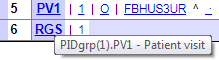
Mousing over PV1 in the above message shows the schema path is "PIDgrp(1).PV1".

I'm writing a utility function which you pass an EnsLib.HL7.Message into. I'd like to loop through each segment and take action dependant on that schema path. How can I reference or determine that schema path in code?

Any help would be much appreciated!

2
0 845
Question Mathew Burt · Jun 4, 2019

I'm running SQL reports on some HL7 messages and need to report the raw content of both the outbound message and the ACK response.

When looking in a Visual Trace at an I/O (Ens.Util.IOLog), under the Header tab it lists "InObject" and "OutObject" as each having values - in the example I'm looking at, the OutObject value is the EnsLib.HL7.Message ID I need for the outbound message, and the InObject value is the EnsLib.HL7.Message ID I need for the ACK response. My thought was that I could query that class via SQL and do two joins on the EnsLib_HL7.

1
0 412
Question Mathew Burt · Oct 19, 2016

I'm writing an operation to use the LDAP Outbound Adapter to query AD.

The operation's settings include a basic Credentials selector, to allow you to use the built in Credentials function of Ensemble. This can be referenced in the operation with ..Adapter.Credentials

But when it comes to specifying the credentials in the Bind method, the documentation indicates that only a format of $lb(Username,Domain,Password) is supported. I tried ..Adapter.Credentials and $lb(..Adapter.Credentials) but the only thing that worked was setting the three variables in plain text first in the operation itself

6
0 842
Question Mathew Burt · Oct 6, 2016

I have an operation which calls an external web service, returning a long XML string.

Passing the string into Excel creates a table like this:

Each row above relates to a document on a server. In Ensemble, I need to parse the XML similarly to Excel, where I can loop over each document and take various actions depending on the different values.

I created a BPL to call the operation and return the XML string, which I've converted it to an %XML.TextReader object, and I'm using a While loop to loop through each element.

1
0 1001