Zdeněk Bartušek · Jul 30, 2019 go to post

Yes ok, this working me too that's not problem, but... I want to set variable in, like in your example, but then I want to run script by this comand

./csession Cache -U "%SYS" <".....\run.script"

But when I started this script it hasn't access to setted variable from cmd. But if I saw your example it gives me some idea, which I need to try.

Zdeněk Bartušek · Jul 30, 2019 go to post

Ok thanks, but "problem" with function $ZF I've fixed, but as I mentioned higer my biggest problem now is with enviroment variables and their usage in menifest.

But thanks so much for your time.

Zdeněk Bartušek · Jul 30, 2019 go to post

I know about GetEnviron() but it's not working, let's see...

It set's me empty string into variable in Cache and I don't know how to fix it. I've got export variable in bash script, but this method doesn't see that. If I use system varieble in windows it's working fine, but I need to use only user/enviroment variables... That's why I'm trying to use $ZF function.. but it doesn't work to..

Zdeněk Bartušek · Jul 30, 2019 go to post

Yes ok I understand, now I can succesfuly execute script.sh by $ZF(-1) but still I don't know if it's wothit for me, how can I get my variables from script into Cache?

Zdeněk Bartušek · Jul 30, 2019 go to post

I've got this version so it should be allright

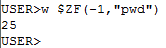
If i thy $ZF(-1) it's better but still not best.

Zdeněk Bartušek · Jul 25, 2019 go to post

I've try it but i returns me Access denied error(318). I've tried Admin, Normal user, with password, without password, but nothing... :/

Zdeněk Bartušek · Jul 25, 2019 go to post

Yes ok, variant with system variables isn't worthit for me. But if i want run Ensemble under user account I should specify that in instalation is that right?

Zdeněk Bartušek · Jul 22, 2019 go to post

After long thinking and reading some documentation, I'm maybe closer to solve this problem.

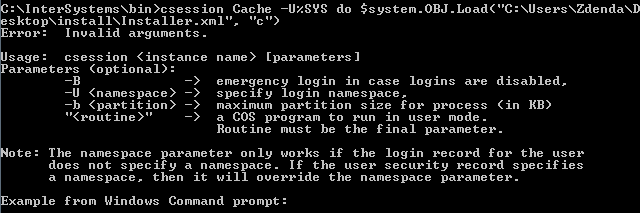
I stardet using ccotrol and by this commad I started terminal where I'm trying to invoke some code.

It looks like this:

But as you can see terminal returns me Access Denied. I don't know why.. I've installed Ensemble with minimal security parameters.

Is this information or porgress somehow helpful for you, can you now give me some advices how to do this?
Thanks again!

Zdeněk Bartušek · Jul 18, 2019 go to post

In .cmd file is this:

@ECHO OFF

cd /

cd InterSystems\bin

type NUL > file.txt

ccontrol qlist Cache nodisplay > file.txt

set instance = ""

FOR /F "tokens=1 delims=^" %%x in (file.txt) DO set instance=%%x

echo %instance%

IF "%instance%" NEQ "" (

    csession Cache -U%SYS < C:\Users\Zdenda\Desktop\run.script

) ELSE (
    
    Echo Somenthing goes wrong with error number %ERRORLEVEL%.
)

del file.txt

::FOR /F "tokens=1 delims=^" %%x in (file.txt) DO echo %%x

Pause

And in file run.script is this code:

Do $system.OBJ.Load("C:\Users\Zdenda\Desktop\install\Installer.xml", "c")
Do ##class(User.Installer).setup()

I really don't know why.. Thanks a lot..

Zdeněk Bartušek · Jul 18, 2019 go to post

Ok

In terminal it's working fine, but in my .cmd script no. If i run this:

csession Cache -U%SYS do $system.OBJ.Load("C:\Users\Zdenda\Desktop\install\Installer.xml", "c")

It return an error like this:

Zdeněk Bartušek · Jul 18, 2019 go to post

Ok finally I try to put there this line of codedo ##class(User.Installer).setup()  but as you can guess it doesn't working, According to documentation it should be COS code is that right? Then I tried put there Installer file, but it's .xml it must be rouitne or not? 
I'm appologise, that I restrain you, but I started recently and I'm not completely friend with Ensemble.
Again thank you for your time.

Zdeněk Bartušek · Jul 18, 2019 go to post

Ok thank you I've got it, but I've got here something else, if I do this verify and result will be, that Ensemble is installed, how can I start only Manifest, my idea was, that I could invoke Ensemble terminal by ccontrol, and somehow type here commands, but is there any possibyllity how can I do this only from cmd, without typing by my hands?

Thank you, I'm so grateful to you.

Zdeněk Bartušek · Jul 16, 2019 go to post

Yes ok I undertand both solutions, but only the last question.

If I try set the variable in (Windows) cmd as you and try to write it in Ensemble terminal it return empty string. Do you know reason why?

Zdeněk Bartušek · Jul 16, 2019 go to post

Ok thank you so much but I've got some more questions.

1. You mean passing variables to installation Manifest by tag <var> is it right?
2. This is maybe stupid, but if i set var like this, how can I get to them by my .cmd file is there any possibility?

But once again thak you so much.