Working with enviroment variables
Hello,
I've got similar question as I have mentioned here once. Itś about enviroment variables and getting their values into manifest.
Now a know, that I must use this method $system.Util.GetEnviron("") but still if I try to use it it doesn't work. I need to set variable in bash.sh file and then get that value into manifest. If I try this in terminal it works only for system variables as you can see, but it shoul normally works for user variables to or not? 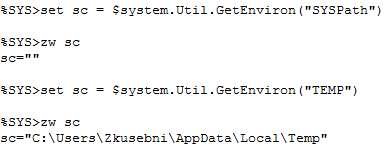
I've tried this this syntax several times and it was working until I've reinstall my Ensemble instantion:
So is there any possibility how to get user variable by this method into install manifest?
I will be glad for every help, now I'm quite confused.
Thanks a lot.
Zdeněk
Comments
By default Ensemble service is run under System account, which does not have user environment variables.
You can either specify system variables or run Ensemble service from a user account.
Yes ok, variant with system variables isn't worthit for me. But if i want run Ensemble under user account I should specify that in instalation is that right?
You can also change it after installation by running cinstall setserviceusername in the bin directory.
I've try it but i returns me Access denied error(318). I've tried Admin, Normal user, with password, without password, but nothing... :/
It should be OS users, not Ensemble users.
For reference, the documentation on that command can be found at the bottom of this page:
https://docs.intersystems.com/latest/csp/docbook/DocBook.UI.Page.cls?KEY=GCI_windows_nonadminperm