Does Caché or IRIS have Data Masking capability natively to Test/Dev/Report environment, like other databases?
Does anyone know if there is a table or query to get the Application Error Log (^ERRORS) by SQL?
Does Caché have any features similar to PostgreSQL 'WITH RECURSIVE'? Something that allows recursion in SQL.
I have a FullBackup.cbk file generated by Caché Backup Online. This file has many databases.
Is there a Caché feature to restore only one database?
I've tried EXTSELCT^DBREST(), but this routine runs through all databases (skipping the unselected). This process becomes slow, lasting 1 day to finalize the process.
We recently registered unavailability of the Web service in some moments. The application goes offline.
Analyzing the IIS logs and logs in "C:\Windows\System32\LogFiles\HTTPERR" I found nothing relevant.
Analyzing the CSP Gateway logs I noticed the following behavior when unavailability occurs:
>>> Time: Tue Mar 19 09:35:12 2019; RT Build: 1701.1606aa (win64/iis); Log-Level: 0; Gateway-PID: 3536; Gateway-TID: 6020
    Initialization
    The CSP Gateway module 'C:\Inetpub\CSPGateway\CSPms.dll' is loaded  (IPv6 Enabled; MAX_CONNECTIONS=1024; MAX_SERVERS=10; MAX_APPLICATIONS=10; MAX_RESPONSE_BUFFER_SIZE=128000; Connection_Allocation=First Free; Nagle_Algorithm=Disabled; SHM=OS; IPC=WNP)
>>> Time: Tue Mar 19 09:35:12 2019; RT Build: 1701.1606aa (win64/iis); Log-Level: 0; Gateway-PID: 3536; Gateway-TID: 6316
    Initialization
    Windows Sockets library loaded (WS2_32.DLL) Version: 2.2
>>> Time: Tue Mar 19 09:35:27 2019; RT Build: 1701.1606aa (win64/iis/mod:srv=8.5); Log-Level: 0; Gateway-PID: 3536; Gateway-TID: 7224
    Error Condition
    Exception caught in f:csp: c0000005:4600
>>> Time: Tue Mar 19 09:35:27 2019; RT Build: 1701.1606aa (win64/iis/mod:srv=8.5); Log-Level: 0; Gateway-PID: 3536; Gateway-TID: 5348
    Error Condition
    Exception caught in f:csp: c0000005:4600
>>> Time: Tue Mar 19 09:35:27 2019; RT Build: 1701.1606aa (win64/iis/mod:srv=8.5); Log-Level: 0; Gateway-PID: 3536; Gateway-TID: 8836
    Error Condition
    Exception caught in f:csp: c0000005:4600
>>> Time: Tue Mar 19 09:35:27 2019; RT Build: 1701.1606aa (win64/iis/mod:srv=8.5); Log-Level: 0; Gateway-PID: 3536; Gateway-TID: 8928
    Error Condition
    Exception caught in f:csp: c0000005:4600
>>> Time: Tue Mar 19 09:35:27 2019; RT Build: 1701.1606aa (win64/iis/mod:srv=8.5); Log-Level: 0; Gateway-PID: 3536; Gateway-TID: 3736
    Error Condition
    Exception caught in f:csp: c0000005:4600
>>> Time: Tue Mar 19 09:37:46 2019; RT Build: 1701.1606aa (win64/iis/mod:srv=8.5); Log-Level: -1; Gateway-PID: 3536; Gateway-TID: 7308; Connection-No: 4; Server: csp; Cache-PID: 7196; Request-ID: 5; Session-ID: 5ELPK6TnFh; Remote-Addr: xxx.xxx.xxx.xxx; Page: GET /csp/erp/system/lib/filtro.csp
    Error Condition
    CSP application closed the connection before sending a complete response

>>> Time: Wed Mar 20 14:39:28 2019; RT Build: 1701.1606aa (win64/iis); Log-Level: 0; Gateway-PID: 4540; Gateway-TID: 2312
    Initialization
    The CSP Gateway module 'C:\Inetpub\CSPGateway\CSPms.dll' is loaded  (IPv6 Enabled; MAX_CONNECTIONS=1024; MAX_SERVERS=10; MAX_APPLICATIONS=10; MAX_RESPONSE_BUFFER_SIZE=128000; Connection_Allocation=First Free; Nagle_Algorithm=Disabled; SHM=OS; IPC=WNP)
>>> Time: Wed Mar 20 14:39:28 2019; RT Build: 1701.1606aa (win64/iis); Log-Level: 0; Gateway-PID: 4540; Gateway-TID: 6620
    Initialization
    Windows Sockets library loaded (WS2_32.DLL) Version: 2.2
>>> Time: Wed Mar 20 14:39:29 2019; RT Build: 1701.1606aa (win64/iis/mod:srv=8.5); Log-Level: 0; Gateway-PID: 4540; Gateway-TID: 5384
    Configuration Error: Insufficient space in the configuration buffer
    Configuration block Size: 126397; Size of configuration block to insert: 55114; Space available: 68611 (Consider setting CONFIG_BUFFER_SIZE=112K (or higher) in the [SYSTEM] section of CSP.ini)
>>> Time: Wed Mar 20 14:42:22 2019; RT Build: 1701.1606aa (win64/iis/mod:srv=8.5); Log-Level: -1; Gateway-PID: 4540; Gateway-TID: 5384; Connection-No: 5; Server: csp; Cache-PID: 3864; Request-ID: 6; Session-ID: OQGM5Lp1Sw; Remote-Addr: xxx.xxx.xxx.xxx; Page: GET /csp/erp/system/lib-np/js/menu/menuCtrl.js
    Error Condition
    CSP application closed the connection before sending a complete response
>>> Time: Wed Mar 20 14:43:33 2019; RT Build: 1701.1606aa (win64/iis/mod:srv=8.5); Log-Level: 0; Gateway-PID: 4540; Gateway-TID: 5912; Connection-No: ; Request-ID: 20f; Session-ID: bTpfnzY1EW; Remote-Addr: xxx.xxx.xxx.xxx; Page: GET /csp/erp/system/modulos/spd/cads/spd001.csp
    Diagnostic
Failed to connect to 'csp' - Reason: -8 (Server busy: Gateway's configured limits exceeded) (No Retry)Can I apply a custom resource to a Management Portal page through code, using the method or global? The documentation only shows the manual mode: https://docs.intersystems.com/latest/csp/docbook/DocBook.UI.Page.cls?KEY=GCAS_rsrcs#GCAS_C181701
Or export the settings already saved.
Hi
I want to get the total amount of time that a process is active or the timestamp that it was created/started.
I tried the %SYS.ProcessQuery class, but I did not find any related information.
Is there any way to get this information from a process?
I'm using Caché 2017.
When I try to compile through Atelier (Compile Project), I noticed that in compilation with error it returns this message 'Failed to read /api/atelier/v1/ ...':
No additional Atelier files to synchronize.
Compile failed: Failed to read /api/atelier/v1/ERP/action/compile?flags=ck
Compile failed: Failed to read /api/atelier/v1/ERP/action/compile?flags=ck
Compile failed: Failed to read /api/atelier/v1/ERP/action/compile?flags=ck
Compile failed: Failed to read /api/atelier/v1/ERP/action/compile?flags=ck
Hi community,
I need to monitor Caché Intersystems with some custom indicators.
I started customizing the SNMP Mib. But I've been in a Zabbix event, all speakers use ODBC to monitor their database, Oracle, MySQL, PostgreSQL ...
What is the best way? Use ODBC or SNMP Custom Mib?
What are you guys using?
Hi,
Can I get "Window Size" from terminal? By command line.
Terminal > Edit > Window Size
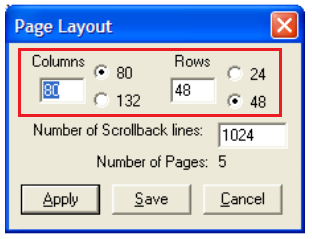
I already tried to use 'do CURRENT^%IS', but without success. It does not return the change, for example, when the column is 132.
Is there any routine or method for this?