Up. Still searching for Windows/CTerm solution.
- Log in to post comments
Up. Still searching for Windows/CTerm solution.
Alternatively, %Dictionary package macros can be used:
ClassMethod Values(class = {$classname()}, property) As %Status  [ CodeMode = expression]
{
$$$defMemberArrayGet(class,$$$cCLASSproperty,property,$$$cPROPparameter,"VALUELIST")
}
Also, you can find object from list without explicitly iterating the whole thing:
set i = %class.Properties.FindObjectId(%class.Name _ "||" _ "Status")instead of:
for i=%class.Properties.Count():-1:0 if i,%class.Properties.GetAt(i).Name="Status" quitInteroperability is one word and not a portmanteau btw.
Please consider upgrading to InterSystems IRIS!
%Net.WebSocket.Client is available and provides WebSocket client.
%Net.WebSocket.Client is available and provides WebSocket client.
Do not specify a timeout or specify a longer timeout.
In your example if the response is taking more than 15 seconds the sync activity will complete

Here's a minimal example for you. BP sends 2 async calls and waits for them in sync activity:
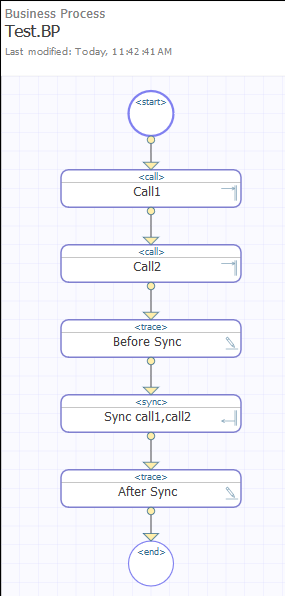
And Visual Trace looks like this:

To test:
How about the topic: Interoperability Adapter for InterSystems IRIS?
July - InterSystems IRIS IntegratedML.
Is only IntegratedML based apps applicable? Or can participants use apps based on a whole stack of technologies available for orchestrating AI/ML solutions on InterSystems IRIS Data Platform, such as PythonGateway, RGateway, JuliaGateway, Spark, Native API for Python and PMML?
Send async calls.
Wait for response from one or both calls.
My preferred approach is using a Query class element.
Here's how it can look like:
Class Sample.Person Extends %Persistent
{

Property Name As %String;

Query ByName(name As %String = "") As %SQLQuery
{
SELECT ID, Name
FROM Sample.Person
WHERE (Name %STARTSWITH :name)
ORDER BY Name
}

ClassMethod Try(name)
{
  set rset = ..ByNameFunc(name)
  do rset.%Display()
}

}
Short and concise.
Easy to do that.
Here's how.
First of all let's find out where we do the iteration. If we open UtilExpGlobalView.csp we see that it's essentially a wrapper over %CSP.UI.System.GlobalViewPane.
In %CSP.UI.System.GlobalViewPane there's a LoadGlobal method which has this promising line:
Set tRS = ##class(%ResultSet).%New("%Global:Get")Next we follow the trail to %Library.Global class implementing Get query, which has GetFetch method, which actually iterates over the global here:
Set idx=$Order($$$ISCQUERYTEMP(Index,idx),1,Row)So now we wrap it up back.
We need a new query (GetFetch is copied as is with one change - inverse iteration order, bolded):
Test.Global class
Class Test.Global Extends %Global
{

ClassMethod GetFetch(ByRef qHandle As %Binary, ByRef Row As %List, ByRef AtEnd As %Integer = 0) As %Status [ Internal, PlaceAfter = GetExecute ]
{
    Set $zt="ERROR"
    Set idx=$p(qHandle,"^",2)
    Set Index=$p(qHandle,"^")
    Set idx=$Order($$$ISCQUERYTEMP(Index,idx),-1,Row)
    If idx="" {
        Set Namespace=qHandle("Namespace")
        Set SearchMask=qHandle("SearchMask")
        Set LastNode=qHandle("LastNode")
        Set NameFormat=qHandle("NameFormat")
        Set ValueFormat=qHandle("ValueFormat")
        Set OldNsp=$zu(5),%UI="CHUI",Count=100
        If Namespace'=OldNsp ZN Namespace
        Set data=$$page^%Wgdisp(SearchMask,LastNode,.Count,0,"","",1,NameFormat,ValueFormat)
        If $zu(5)'=OldNsp ZN OldNsp
        If 'Count Set AtEnd=1,Row="" Quit $$$OK
        ;
        Kill $$$ISCQUERYTEMP(Index)
        For i=1:1:Count {
            Set rec=$p(data,$$$del1,i),subs=$p(rec,$$$del2),val=$p(rec,$$$del2,2)
            Set nf=$p(rec,$$$del2,3),vf=$p(rec,$$$del2,4)
#;SML618+
#;Setup ^CacheTemp with a subroutine in case it overflows the $LB() list.
            d BuildCacheTemp
#;SML618-
        }
        Set qHandle("LastNode")=..Unquote(subs,1)
        Set qHandle=Index_"^"
        Quit ..GetFetch(.qHandle,.Row,.AtEnd)
    } Else {
#;SML618+
#;If there is extension of data then set them to Row array for %ResultSet to get them.
        if $d($$$ISCQUERYTEMP(Index,idx,1)) {
            Set Row(1)=$$$ISCQUERYTEMP(Index,idx,1)
            if $d($$$ISCQUERYTEMP(Index,idx,2)) {
                Set Row(2)=$$$ISCQUERYTEMP(Index,idx,2)
            }
        }
#;SML618-
        Set qHandle=Index_"^"_idx
    }
    Quit $$$OK
ERROR Set $zt=""
    If $g(OldNsp)'="",$zu(5)'=$g(OldNsp) ZN OldNsp
    Quit $$$ERROR($$$CacheError,$ze)
#;SML618+
#;Set the data extension to two or three pieces if it could not fit in one piece.
BuildCacheTemp s $zt="BuildErr1"
    i subs["(" {
        s sub1="("_$p(subs,"(",2,999)
    } else {
        s sub1=""
    }
    s Perm=$s(qHandle("GetPermissions")=0:"",1:$$GetGlobalPermission^%SYS.SECURITY(Namespace,$p(subs,"(",1),sub1,1))
    Set $$$ISCQUERYTEMP(Index,i)=$lb(subs,val,nf,vf,Perm)
    Q
BuildErr1 s $zt="BuildErr2"
    Set $$$ISCQUERYTEMP(Index,i)=$lb(subs,$e(val,1,$l(val)\2),nf,vf,$g(Perm))
    Set $$$ISCQUERYTEMP(Index,i,1)=$lb("",$e(val,$l(val)\2+1,$l(val)),"","","")
    Q
BuildErr2 s $zt=""
    Set $$$ISCQUERYTEMP(Index,i)=$lb(subs,$e(val,1,$l(val)\3),nf,vf,$g(Perm))
    Set $$$ISCQUERYTEMP(Index,i,1)=$lb("",$e(val,$l(val)\3+1,$l(val)\3*2),"","","")
    Set $$$ISCQUERYTEMP(Index,i,2)=$lb("",$e(val,$l(val)\3*2+1,$l(val)),"","","")
    Q
#;SML618-
}

}
Now we wrap it into a pane
Test.GlobalViewPane
And finally create a csp page
UtilExpGlobalViewR.csp
<Pane name="Title" type="%CSP.Util.SMTitlePane">
<Text>View Global Data</Text>
</Pane>
<Pane name="Detail" type="Test.GlobalViewPane">
</Pane>
And done, add R to URL and see the global in reverse in SMP:

During delay activity the process is unloaded from memory, so you can't kill it.
What are you trying to do?
Thank you!
This is the schema.
Do you uses GraphiQL packaged with the repo?
What does running this code
write ##class(GraphQL.Utils.Schema).GetSchema().%ToJSON() return for you?
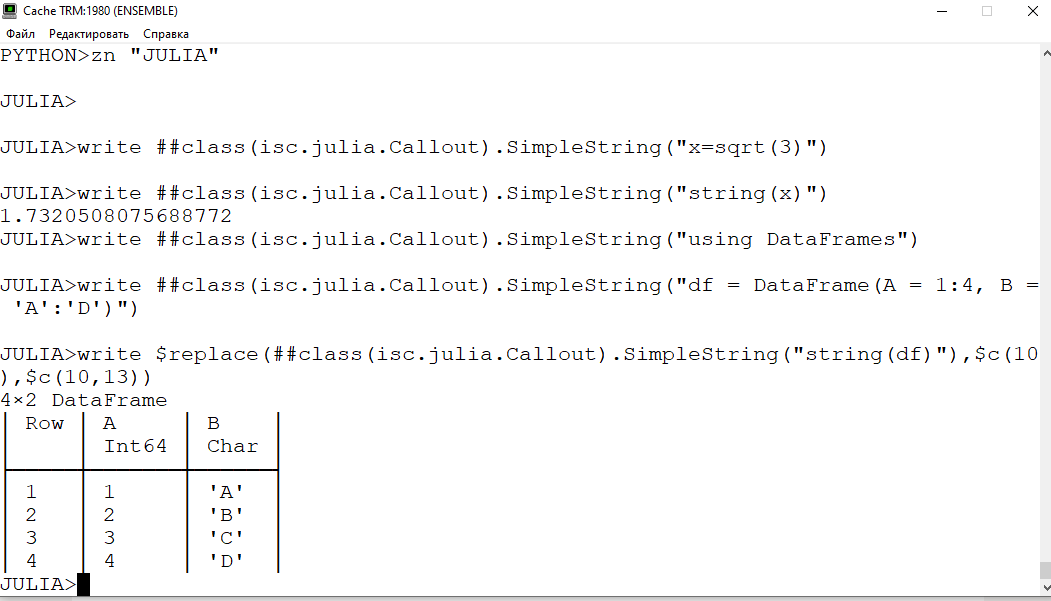
2. JuliaGateway offers a way to execute Julia code. You can use that to interact with JuliaDB.
If you can rebalance later, the easiest way is to run the workload and see how much journals are generated.
Otherwise run workload tests in a DEV environment.
The more write-intensive the system is the more journals you need.
I would really recommend moving to REST. With InterSystems products it's very easy. There are many articles available here on community about REST implementation.
No need to init the array object:
Set valueRecived = ["green","yellow","blue"]
Do ##class(%ZEN.Auxiliary.jsonProvider).%ConvertJSONToObject(valueRecived.%ToJSON(),,.array)
Zw array
To add, globals can also be distributed across several InterSystems IRIS instances via global mapping or ECP/Distributed Caching.
What are you trying to do with it?
Hello!
Can you elaborate on your high-level use case:
Any particular reason you decided to use globals instead of tables/classes? Article on how globals/tables/classes interact.
In general your task can be solved in two mainstream and one additional way:
Additionally if you need to just check a condition (i.e. that f>0) you may not need an f value as by applying functional analysis, you can solve the issue analytically if f is a continuous function.
set in = "1.2.3"
set separator = "."
set separatorOut  = ","
set out = "tmp(" _ $lts($lfs(in, separator), separatorOut) _ ")"
If you're sure that separator length is always equal you can use $replace, and if you're sure that separator is one character long you can use $translate.
Open role as an object (note lowercase):
set role = "%db_cachetemp"
set roleObj = ##class(Security.Roles).%OpenId(role)
Create required resource as an object:
set resouceObj = ##class(Security.Resource).%New()
/// set resource
Insert resource into the role and save the role
do roleObj.Resources.Insert(resourceObj)
set sc = roleObj.%Save()
And role has a new resource.
Use List query:
do ##class(Security.Resources).ListFunc().%Display()Current implementation resolves GraphQL query into SQL, so classes/tables are required.
This is our advantage as we don't need to write resolvers manually.
That said, if you want to provide custom schema - you can, as our GraphQL implementation includes GraphQL parser so you can use parsed AST to write your own resolver.
I'm not really sure what do you mean by
if there was a class parameter I had missed that just indicated the extent was temporary
what do you want to achieve with this?
All images are not loaded when privacy protection is enabled in Firefox (which is enabled by default).
Copy them on community maybe?
Images are broken in this article and Part 2.