Awesome.
How do you work with CSP/HTML/JS/CSS files?
- Log in to post comments
Awesome.
How do you work with CSP/HTML/JS/CSS files?
It would depends on the nature of an error.
In your %XML.Reader set IgnoreSAXWarnings to 1.
In your XML enabled classes set params:
Parameter XMLIGNOREINVALIDTAG As BOOLEAN = 1;
Parameter XMLIGNOREINVALIDATTRIBUTE As BOOLEAN = 1;
This would allow for errors to be skipped, but they wouldn't be reported either.
I'm not sure if the behavior you want is possible without some modifications.
Here's a few thoughts:
Should be doable. DeepSee API has all the required functions.
GuruBaseAllah.BLZServiceSOAP11porthttp class already exists.
Check UserAction method of %Studio.Extension.Base class. You can call CSP pages from there.
Modify your objectgenerator method to get myFlag variable?
Please provide code sample and error text.
Write statement does what it's name implies - outputs characters into a current device. It's a way to go if you're working from a terminal, but ZEN does it's own device management, so writing into a current device interferes with ZEN also writing into current device, which causes an error.
To make it work check if there's no data (SQLCODE=100) and set OutVal to empty (or error message) and work with that on a client.
HttpResponse property contains response. Here's a sample:
Set req = ##class(%Net.HttpRequest).%New()
// build the request
Do req.Post("url")
Set str = req.HttpResponse.Data.Read()
Write strAdd on insert trigger. myFlag value should be available there.
To get query text you can query %Dictionary.QueryDefinition. For example:
SELECT *
FROM %Dictionary.QueryDefinition
WHERE Parent = class
Would return all queries for a class.
As for getting only columns, here's some ideas:
What do you want to achieve?
Why is executing a query not possible?
Fast and easy way:
1. Set temporary global:
Set ^temp($zparent, $job) = current status
2. From a parent, iterate over ^temp and display current status.
Other ideas.
1. Try to switch devices before calling $System.Event.Signal($zparent)
2. Can you provide a simple code sample where $System.Event.Signal($zparent) doesn't signals the parent if a device is open?
Call this method to output as HTML the values of all the objects associated with this page. This can be called from anywhere in your page as a debugging aid.
set %response.ContentType = "html"
do ##class(%CSP.Utils).DisplayAllObjects()New RESTForms release should fix that error.
//Set req.Location = "repos/" _ Owner _ "/" _ Repository _ "/contents"
This should resolve into
/repos/vadsamm/sam/contents
And request should go for:
https://api.github.com/repos/vadsamm/sam/contents
I'd uncomment original location line and check call arguments.
No, just add your Cache server as DataSource. DataGrip uses jdbc. Here's sample connection screenshot.
Everything seems to be in order. Can you post an error from browser dev tools?
Have you tried providing user credentials with %All access?
If you're getting this error for user with %All, and it's a dev box, add %All to /forms application.
Adding this to your REST broker may help:
/// Dispatch a REST request according to URL and Method
ClassMethod DispatchRequest(pUrl As %String, pMethod As %String, pForwarded As %Boolean = 0) As %Status
{
    set pUrl = $zcvt(pUrl, "l")
    quit ##super(pUrl, pMethod, pForwarded)
}50 shouldn't be a problem for URL. URL length problems starts in thousands. This looks suspiciously like String MAXLEN problem.
What kind of error are you getting?
Datagrip can do it:
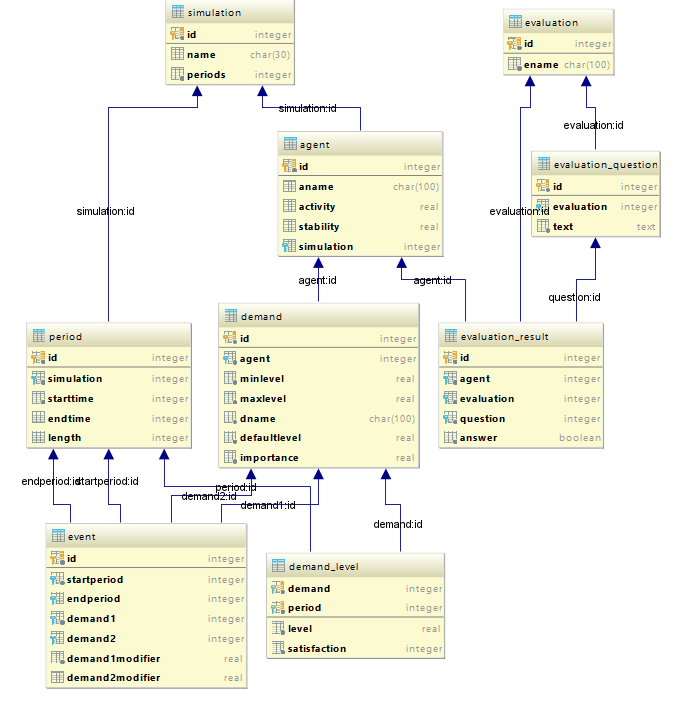
Also UML Architect. And there's Caché Class Explorer. There's also a script for PowerDesigner if someone needs that.
OnPostHTTP() doesn't get hit, I have tried it first thing. The sample is in the question.
My current efforts so far:
Class Test.REST Extends %CSP.REST
{

XData UrlMap [ XMLNamespace = "http://www.intersystems.com/urlmap" ]
{
<Routes>

<Route Url="/:classname" Method="GET" Call="TEST" Cors="true"/>

</Routes>
}

ClassMethod TEST(name) As %Status
{
    set ^CacheTemp.DBG($i(^CacheTemp.DBG)) = "TEST"
    set ^DBG($i(^DBG)) = "TEST"
    //w 1/0
    quit $$$OK
}

/// Issue an '500' error and give some indication as to what occurred
ClassMethod Http500(pE As %Exception.AbstractException) As %Status
{
    set %zzzsc = pE.AsStatus()
    set ^CacheTemp.DBG($i(^CacheTemp.DBG)) = "Http500"
    set ^DBG($i(^DBG)) = "Http500"
    quit ##super(pE)
}

/// Dispatch a REST request according to URL and Method
ClassMethod DispatchRequest(pUrl As %String, pMethod As %String, pForwarded As %Boolean = 0) As %Status
{
    #dim %zzzsc As %Status = $$$OK
    kill ^CacheTemp.DBG,  ^DBG

    tstart
    set ^CacheTemp.DBG($i(^CacheTemp.DBG)) = "BeforeDispatch"
    set ^DBG($i(^DBG)) = "BeforeDispatch"

    set sc = ##super(pUrl, pMethod, pForwarded)

    set ^CacheTemp.DBG($i(^CacheTemp.DBG)) = "AfterDispatch"
    set ^DBG($i(^DBG)) = "AfterDispatch"

    if ($$$ISERR(sc) || $$$ISERR(%zzzsc)) {
        set ^CacheTemp.DBG($i(^CacheTemp.DBG)) = "trollback"
        trollback
    } else {
        set ^CacheTemp.DBG($i(^CacheTemp.DBG)) = "tcommit"
        tcommit
    }
    quit sc
}
It works, but I'm searching for a better solution.
Rollbacked transaction:
>zw ^CacheTemp.DBG, ^DBG
^CacheTemp.DBG=5
^CacheTemp.DBG(1)="BeforeDispatch"
^CacheTemp.DBG(2)="TEST"
^CacheTemp.DBG(3)="Http500"
^CacheTemp.DBG(4)="AfterDispatch"
^CacheTemp.DBG(5)="trollback"
Commited transaction:
>zw ^CacheTemp.DBG,  ^DBG
^CacheTemp.DBG=4
^CacheTemp.DBG(1)="BeforeDispatch"
^CacheTemp.DBG(2)="TEST"
^CacheTemp.DBG(3)="AfterDispatch"
^CacheTemp.DBG(4)="tcommit"
^DBG=3
^DBG(1)="BeforeDispatch"
^DBG(2)="TEST"
^DBG(3)="AfterDispatch"
It calls IsFileSame method from %UnitTest.TestCase class, which has a following signature:
ClassMethod IsFileSame(file1, file2, ByRef diff) As %Boolean
Diff would contain differences between files. You can check that.
As Fabio said
Set class parameter HandleCorsRequest = 1 in your rest service class.
To enable CORS support.