Another option might be "View Other":

If ClassA generates ClassB and sets GeneratedBy = ClassA.CLS, then ClassB will show up under "View Other" for ClassA. (Studio works the same way.)
- Log in to post comments
Another option might be "View Other":
If ClassA generates ClassB and sets GeneratedBy = ClassA.CLS, then ClassB will show up under "View Other" for ClassA. (Studio works the same way.)
Good point!
This is a good use case for HAVING. Using Sample.Person as an example, the following queries are equivalent:
SELECT a.Age,A.Name
FROM
   Sample.Person a
   LEFT JOIN Sample.Person b
   on a.home_state = b.home_state
     and a.DOB < b.DOB
WHERE
   b.ID is null
Implemented with HAVING:
SELECT Age,Name
FROM Sample.Person
GROUP BY Home_State
HAVING Age = MIN(Age)
The second is much more intuitive, and runs significantly faster too.
I suspect your query would be expressed as:
SELECT *
FROM client_address
GROUP BY client_id
HAVING date_updated = MIN(date_updated)
$get does what you're looking for. Note that it's 0-based, like JavaScript:
USER>set arr = [1,2,3]

USER>w arr.$get(0)
1
USER>w arr.$get(2)
3
Yes:
USER>set objFromJSON = {}.$fromJSON("{""a"":""1""}")

USER>w objFromJSON.a
1The business operation's "Archive I/O" setting might do what you want, depending on what messages you're passing around. This will add some extra things to the message trace showing what the input to services or the output from operations is.
You can enable I/O archiving in the business operation's settings on the production configuration page, at the end of the "Development and Debugging" section.
Methods in Zen classes declared with "Method" or "ClassMethod" are all server-side. These may also have the ZenMethod keyword, which allows them to be called from javascript (e.g., zenPage.MethodName().)
If you want to have a JavaScript method in a Zen class, the method should be declared as a ClientMethod with [Language = javascript].
A useful convention you'll see in %ZEN is that server-side, non-ZenMethods have names starting with %, ZenMethods (Methods or ClassMethods with the ZenMethod keyword) start with capital letters, and ClientMethods start with lower case letters. It's useful to follow the same convention when you build your own Zen pages.
Your last example is really close - probably just the typo in the component ID that's the problem.
Class DC.ZenRadioOnLoad Extends %ZEN.Component.page
{

/// This XML block defines the contents of this page.
XData Contents [ XMLNamespace = "http://www.intersystems.com/zen" ]
{
<page xmlns="http://www.intersystems.com/zen" title="">
<radioSet id="appRadio" name="appRadio"
displayList="App One,App Two,App Three"
valueList="One,Two,Three"
/>
</page>
}

/// This callback is called after the server-side page
/// object and all of its children are created.<br/>
/// Subclasses can override this to add, remove, or modify
/// items within the page object model, or to provide values
/// for controls.
Method %OnAfterCreatePage() As %Status
{
    Set ..%GetComponentById("appRadio").value = "Three"
    Quit $$$OK
}

}You could always use process private globals instead of local variable names if you want to avoid collisions in local variable names.
ClassMethod GetVariables() As %List
{
    Set ^||VariableNameList = ""
    Set ^||VariableName = ""
    Set ^||VariableName = $Order(@^||VariableName)
    While (^||VariableName '= "") {
        Set ^||VariableNameList = ^||VariableNameList_$ListBuild(^||VariableName)
        Set ^||VariableName = $Order(@^||VariableName)
    }
    Quit ^||VariableNameList
}
This might do some things you don't expect depending on variable scope, though - possibly relevant depending on the use case you have in mind.
Class Demo.Variables
{

ClassMethod OuterMethod()
{
    Set x = 5
    Do ..InnerMethod()
}

ClassMethod InnerMethod() [ PublicList = y ]
{
    Set y = 10
    Write $ListToString(..GetVariables())
}

ClassMethod NoPublicListMethod()
{
    Set y = 10
    Write $ListToString(..GetVariables())
}

ClassMethod GetVariables() As %List
{
    Set ^||VariableNameList = ""
    Set ^||VariableName = ""
    Set ^||VariableName = $Order(@^||VariableName)
    While (^||VariableName '= "") {
        Set ^||VariableNameList = ^||VariableNameList_$ListBuild(^||VariableName)
        Set ^||VariableName = $Order(@^||VariableName)
    }
    Quit ^||VariableNameList
}

}
Results:
SAMPLES>kill  set z = 0 d ##class(Demo.Variables).OuterMethod()
y,z
SAMPLES>kill  set z = 0 d ##class(Demo.Variables).NoPublicListMethod()
z
If you specified credentials during installation and don't remember them, you can use this process to get to the terminal prompt:
http://docs.intersystems.com/latest/csp/docbook/DocBook.UI.Page.cls?KEY…
After starting in emergency access mode, you can run the command:
Do ^SECURITY
And navigate through the prompts to see what users there are and change the password of one so you can log in.
That's odd - something may have gone wrong with your build. (This is an internal issue.)
You can remove/change the "Source Control" class for the namespace in Management Portal:
Go to System Administration > Configuration > Additional Settings > Source Control, select the proper namespace, select "None," and click "Save."
The class you listed fails for me too, but it's because there's no package name, not because of the bracket mismatch. In Atelier, the class name gets an error marker:
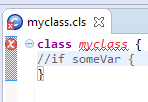
If I change it to:
class somepackage.myclass {
//if someVar {
}
Then the file will happily sync and compile.
If adding the package doesn't fix things, it would be helpful to know what Atelier and Caché versions you're using.
Export with File > Export > General > Preferences; check "Keys Preferences" (which only appears if you've customized any preferences)
Import with File > Import > General > Preferences; select file then check "Keys Preferences"
See: http://stackoverflow.com/questions/481073/eclipse-keybindings-settings
It seems that the CSV export from Window > Preferences, General > Keys, Export CSV ... doesn't have a corresponding import feature.
I think you're probably looking for the maxRows attribute of jsonSQLProvider, which defaults to 100 (hence 5 pages with page size 20, in the example) - try something like:
 <jsonSQLProvider id="json" OnSubmitContent="SubmitContent"
  targetClass="%ZEN.proxyObject" sql="select ID,Name,DOB,SSN from sample.person order by name" maxRows="1000" />
Ensemble has a nice utility for this - see the class reference for Ens.Util.HTML.Parser.
Ah - yes, a number of things log to ^%ISCLOG. It's very important to set ^%ISCLOG = 0 at the end to keep it from continuing to record. The command I mentioned previously is an easy way to make sure that you're only logging for a brief period of time - paste the command into Terminal and hit enter to start logging, then load the page, then hit enter in Terminal to stop logging. Still, there could be lots of other stuff in there even from having it enabled briefly depending on how busy the server is.
It might make sense for you to contact InterSystems' outstanding Support department - someone could work through this with you directly and help you find a solution more quickly.
The port isn't part of the debug target - that's configured as part of the remote/local server definition in the cube (in the system tray).
Since the page works with ?CSPDEBUG removed, it'd be interesting to see ^%ISCLOG or if there are any interesting events (e.g., <PROTECT>) recorded in the audit database.
A few questions:
For troubleshooting CSP issues (although more often on InterSystems' side than in application code), ISCLOG can be helpful. For example, run the following line in terminal:
kill ^%ISCLOG set ^%ISCLOG = 3 read x set ^%ISCLOG = 0
Then make whatever HTTP request is causing an error, then hit enter in terminal (to stop logging), then:
zwrite ^%ISCLOG
There might be a lot of noise in there, but also possibly a smoking gun - a stack trace from a low-level CSP error, an error %Status from something security-related, etc.
In Studio, choose Debug > Debug Target... and enter the URL you want to debug, including CSP application - e,g,, /csp/samples/ZENDemo.MethodTest.cls. Put a breakpoint in the method you want to debug. Click Debug > Go. That should do it.
See: http://docs.intersystems.com/latest/csp/docbook/DocBook.UI.Page.cls?KEY=GSTD_Debugger#GSTD_C180276
Here's a sample, using %ToDynamicObject (2016.2+):
Class DC.CustomJSONSample extends %RegisteredObject
{
Property myProperty As %String [ InitialExpression = "hello" ];

Property other As %String [ InitialExpression = "world" ];

/// Rename myProperty to custom_property_name
Method %ToDynamicObject(target As %Object = "", ignoreUnknown = 0) [ ServerOnly = 1 ]
{
	Do ##super(.target,.ignoreUnknown)
	Do target.$set("custom_property_name",target.myProperty,target.$getTypeOf("myProperty"))
	Do target.$remove("myProperty")
}

ClassMethod Run()
{
	Set tObj = ..%New()
	Write tObj.$toJSON()
}

}
Output:
SAMPLES>d ##class(DC.CustomJSONSample).Run()
{"other":"world","custom_property_name":"hello"}
For other discussions with solutions/examples involving %ToDynamicObject, see:
https://community.intersystems.com/post/json-cache-and-datetime
https://community.intersystems.com/post/create-dynamic-object-object-id
Hi John,
Thank you for your feedback. We'll address these issues very soon.
I previously hadn't been aware of the ##www.intersystems.com:template_delimiter## syntax, but found it documented here (along with more details about Studio Templates). It looks like we do support this in Atelier for templates themselves (Tools > Templates), but not yet for templates launched from Studio extensions. This should change.
Thanks,
Tim
Also see the class documentation for Security.Applications:
[quote]
Bit 2 = AutheK5API
Bit 5 - AutheCache
Bit 6 = AutheUnauthenticated
Bit 11 = AutheLDAP
Bit 12 = AutheLDAPCache
Bit 13 = AutheDelegated
Bit 14 = LoginToken
Bit 20 = TwoFactorSMS
Bit 21 = TwoFactorPW
[/quote]
The problem is that REST uses IO redirection itself, and OutputToStr changes the mnemonic routine but doesn't change it back at the end.
For a great example of the general safe approach to cleaning up after IO redirection (restoring to the previous state of everything), see %WriteJSONStreamFromObject in %ZEN.Auxiliary.jsonProvider.
Here's a simple approach that works for me, in this case:
set tOldIORedirected = ##class(%Device).ReDirectIO()
set tOldMnemonic = ##class(%Device).GetMnemonicRoutine()
set tOldIO = $io
try {
	set str=""

	//Redirect IO to the current routine - makes use of the labels defined below
	use $io::("^"_$ZNAME)

	//Enable redirection
	do ##class(%Device).ReDirectIO(1)

	if $isobject(pObj) {
		do $Method(pObj,pMethod,pArgs...)
	} elseif $$$comClassDefined(pObj) {
		do $ClassMethod(pObj,pMethod,pArgs...)
	}
} catch ex {
	set str = ""
}

//Return to original redirection/mnemonic routine settings
if (tOldMnemonic '= "") {
	use tOldIO::("^"_tOldMnemonic)
} else {
	use tOldIO
}
do ##class(%Device).ReDirectIO(tOldIORedirected)

quit str
It would be cool if something like this could work instead:
new $io
try {
	set str=""

	//Redirect IO to the current routine - makes use of the labels defined below
	use $io::("^"_$ZNAME)

	//Enable redirection
	do ##class(%Device).ReDirectIO(1)

	if $isobject(pObj) {
		do $Method(pObj,pMethod,pArgs...)
	} elseif $$$comClassDefined(pObj) {
		do $ClassMethod(pObj,pMethod,pArgs...)
	}
} catch ex {
	set str = ""
}

quit str
But $io can't be new'd.
These demos? https://github.com/intersystems?query=isc-iknow
You could map the package containing the class related to that table using a package mapping, and the globals containing the table's data using global mappings.
You can see which globals the class uses in its storage definition - since the entire package is mapped, it might make sense to add a global mapping with the package name and a wildcard (*).
After taking those steps, you can insert to the table the way you usually would, without any special syntax or using zn/set $namespace.
They track execution time:
#define START(%msg) Write %msg Set start = $zh
#define END Write ($zh - start)," seconds",!
Nice. I'll add a section comparing the O(n) variations this week.
Interesting. It might be related to the recipient's content then; I didn't see anything about that post, but I did get notified about content (answers) I'd added a while back that had not been changed.
I've seen the same. I got an email that had a bunch of my own answers in it, although I hadn't changed any of them. What threads did you see in that email?
Eduard, that actually does run faster for me than the $ListFromString/$ListNext approach (with the conversion included). Not including the conversion, $ListNext is still faster. (I've updated the Gist to include that example.)