The Istio Service Mesh is commonly used to monitor communication between services in applications. The "battle-tested" sidecar mode is its most common implementation. It will add a sidecar container to each pod you have in your namespace that has Istio sidecar injection enabled.

11 3
2 318

Table of Contents

  1. Purpose of the article
  2. What containers are and why they make sense with IRIS
     2.1 Containers and images in a nutshell
     2.2 Why containers are useful for developers
     2.3 Why IRIS works well with Docker
  3. Prerequisites
  4. Installing the InterSystems IRIS image
     4.1 Using Docker Hub
     4.2 Pulling the image
  5. Running the InterSystems IRIS image
     5.1 Starting an IRIS container
     5.2 Checking container status
     5.3 Executing code in the container terminal
     5.4 Accessing the IRIS Management Portal
     5.5 Connecting the container to VS Code
     5.6 Stopping or removing the container
     5.7 Setting a specific password with a bind mount
     5.8 Using durable %SYS volumes
      5.8.1 What gets stored with durable %SYS
      5.8.2 How to enable durable %SYS
  6. Using Docker Compose
     6.1 Docker Compose example
     6.2 Running Docker Compose
  7. Using a Dockerfile to run custom source code
     7.1 Dockerfile example
     7.2 Docker Compose example
     7.3 Understanding layers, image tagging and build vs. run time
     7.4 Source code and init script
     7.5 Building the image with Dockerfile
     7.6 Running instructions in the containerized IRIS terminal
  8. Conclusion and what’s next

14 6
6 215

All pods are assigned a Quality of Service (QoS). These are 3 levels of priority pods are assigned within a node.

The levels are as following:

1) Guaranteed: High Priority

2) Burstable: Medium Priority

3) BestEffort: Low Priority

It is a way of telling the kubelet what your priorities are on a certain node if resources need to be reclaimed. This great GIF below by Anvesh Muppeda explains it.

7 0
2 252

Hey folks! Having recently onboarded to InterSystems, I realized that despite having a totally free and awesome Community Edition, it's not super clear how to get it. I decided to write up a guide highlighting all the different ways you can access the Community Edition of InterSystems IRIS:

Get InterSystems IRIS Community Edition as a Container

Working with a containerized instance of the Community Edition is the recommended approach for folks who are new to developing on InterSystems IRIS, and in my opinion it's the most straightforward. InterSystems IRIS Community Edition can be found on DockerHub; if you have an InterSystems SSO account, you can also find it in the InterSystems Container Registry.

In either case, you'll want to pull the image you want using the docker CLI:

docker pull intersystems/iris-community:latest-em
// or
docker pull containers.intersystems.com/intersystems/iris-community:latest-em

Next, you'll need to start the container: In order to interact with IRIS from outside the container (for example, to use the management portal) you'll need to publish some ports. The following command will run the IRIS Community Edition container with the superserver and web server ports published; note that you can't have anything else running that depends on ports 1972 or 52773!

docker run --name iris -d --publish 1972:1972 --publish 52773:52773 intersystems/iris-community:latest-em

5 0
1 186

Over time, while I was working with Interoperability on the IRIS Data Platform, I developed rules for organizing a project code into packages and classes. That is what is called a Naming Convention, usually. In this topic, I want to organize and share these rules. I hope it can be helpful for somebody.

5 4
2 81

Deploying new IRIS instances can be a time-consuming task, especially when setting up multiple environments with mirrored configurations.

I’ve encountered this issue many times and want to share my experience and recommendations for using Ansible to streamline the IRIS installation process. My approach also includes handling additional tasks typically performed before and after installing IRIS.

4 2
3 71

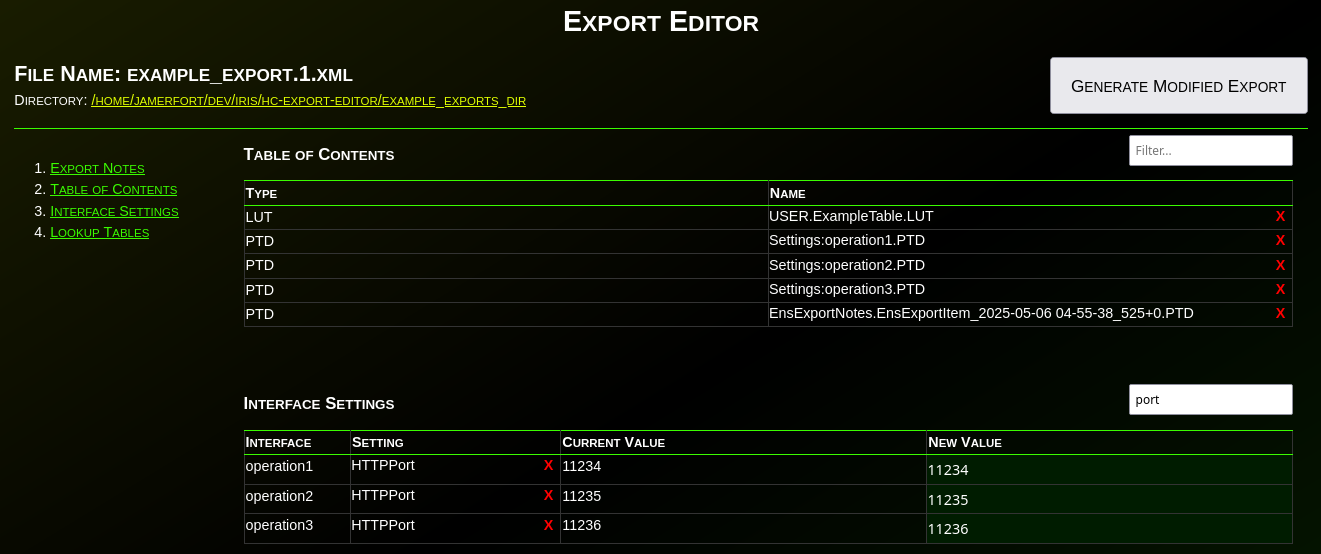
Have you ever needed to change an IP or port before deploying an interface to production? Needed to remove items from an export? What about modifying the value(s) in a lookup table before deploying? Have you wanted to disable an interface before deploying? What about adding a comment, category, or alert setting to an interface before deploying to production?

1 0
0 73

IKO Helm Status: WFH

Here is an option for your headspace if you are designing an multi-cluster architecture and the Operator is an FTE to the design. You can run the Operator from a central Kubernetes cluster (A), and point it to another Kubernetes cluster (B), so that when the apply an IrisCluster to B the Operator works remotely on A and plans the cluster accordingly on B. This design keeps some resource heat off the actual workload cluster, spares us some serviceaccounts/rbac and gives us only one operator deployment to worry about so we can concentrate on the IRIS workloads.

3 1
1 37

"Haul" a Portable Registry for Airgapped IrisClusters

Rancher Government Hauler streamlines deploying and maintaining InterSystems container workloads in air-gapped environments by simplifying how you package and move required assets. It treats container images, Helm charts, and other files as content and collections, letting you fetch, store, and distribute them declaratively or via CLI — without changing your existing workflows. Meaning your charts and what have yous, can have conditionals on your pull locations in Helm values, etc.

If you have been tracking how HealthShare is being deployed via IPM Packages, you can certainly appreciate the adoption of OCI compliance storage for the packages themselves using ORAS... which is core to the Hauler solution.

3 0
1 31