What does the + suffix at the end of a Studio document name denote?
Here is a screenshot from my 2016.2 FT instance of Studio and Ensemble:
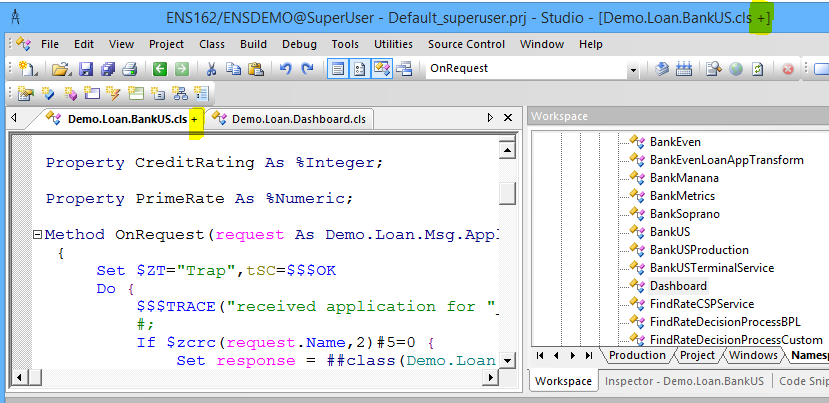
I don't recall having seen the highlighted "+" suffix on document names previously. Who can tell me what it denotes?
I originally posted this in the Field Tests group but it turned out to be a 2016.1 feature that I hadn't previously noticed. So I subsequently moved the post to the Cache group.
Comments
Saved but not compiled.
Odd then that when I click the Compile button the suffix disappears while compiling but then reappears afterwards, even though the Output tab reports successful compilation.
My guess that this sounds like result of some source control hook activity (Deltanji?)...
No, it even happens when I have no source control class set for the namespace (and have restarted my Studio after confirming that).
Then it is a bug. What is client version and how to reproduce it?
Edit: this i s a bug for classes inherited from Ens.BusinessProcess. We will work on it.
Given that John Willeke reports the "+" feature arrived in 2016.1, is that version of Ensemble also affected by this bug? I don't currently have a 2016.1 Ensemble to test.
Yes to 2016.1. This is server side problem already corrected by MAK4540, not sure to what versions correction will be ported to.
The MAK4540 fix was approved for porting to 2016.1.1 and all later releases.
Good to see this indicator behaving reliably now.
This indicator is new in 2016.1.
It is a bug due to Ensemble code adding routines to the set of items generated by the class but not setting the timestamp for these. So when we look at all routines generated from this class and verify the timestamps of each one has not changed these are different and so cause the flag showing it is not up to date.
As there is pre-existing code that sets this $$$cCLASSroutines array manually I updated the logic to only verify timestamps that are not "" which should fix this problem. This fix was submitted as MAK4540.