InterSystems IRIS Data Models Explained: Hierarchical, Key-Value, Object, Document, Relational, and Columnar
In the modern world, data is rarely uniform. Applications often require the structural rigidity of a relational database, the flexibility of a document store, and the performance of a high-speed key-value storage. Luckily, InterSystems IRIS solves this complexity by providing a single, unified engine that natively supports multiple distinct data models:
- Hierarchical
- Key-value
- Object
- Document (JSON)
- Relational
- Columnar
Crucially, all of these models access exactly the same physical data.

To illustrate this approach, let's examine all these data models using the same conceptual structure: The Record of Patient P101 (John Doe).
Block 1 - Storage Layer: Hierarchical Model and Key-Value Storage
At the heart of the InterSystems IRIS architecture lies the Global structure, which provides the platform's raw performance engine. All other data models ultimately persist their information within this fundamental structure.
1. Hierarchical Model
The Hierarchical model is the raw, direct-to-disk representation. It uses subscripts to create a tree structure. Since Globals are managed directly by the high-performance IRIS kernel, their access mechanisms are optimized to traverse the hierarchy with minimal disk R/W. This is ideal for high-throughput scenarios where you need to bypass every layer of abstraction for maximum speed.
How it works: You define a path (subscripts) in a tree and store your value in a leaf.
Let's say we want to record details about a patient and his visits. In this case, we might design the following structure.
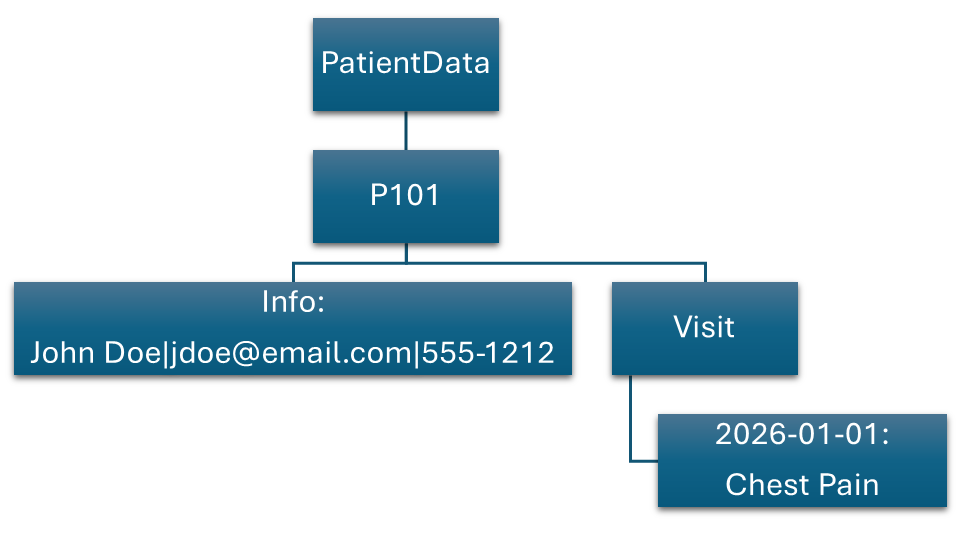
We can use a hierarchical model to write this info into globals:
// WRITE: Directly populating the global tree
Set ^PatientData("P101", "Info") = "John Doe|jdoe@email.com|555-1212"
Set ^PatientData("P101", "Visit", "2026-01-01") = "Chest Pain"
Below you can see the results, which will be displayed in Globals:

We can then retrieve specific details from this tree, such as general information about the patient:
// READ: Retrieving a specific node
Set data = $Get(^PatientData("P101", "Info"))
Write "Patient Info: ", data
Alternatively, we can fetch the history of all his visits:
// READ: Traversing the hierarchy (iterating through visits)
Set date = ""
For {
   Set date = $Order(^PatientData("P101", "Visit", date), 1, reason)
   Quit:date=""
   Write "Date: ", date, " Reason: ", reason, !
}
2. Key-Value Storage
The Key-Value storage model is not a separate technology, but rather a streamlined perspective of the hierarchical model. In this approach, we ignore the "tree" logic and treat the entire subscript path as a singular, unique key. This provides the fastest possible route to retrieve a record using a known identifier. This paradigm is perfect for caching, high-speed lookups, session management, and other use cases that demand lightning-fast, direct access without processing overhead.
Consequently, the same data will appear slightly different, with the subscript acting as the complete path rather than being divided into chunks:
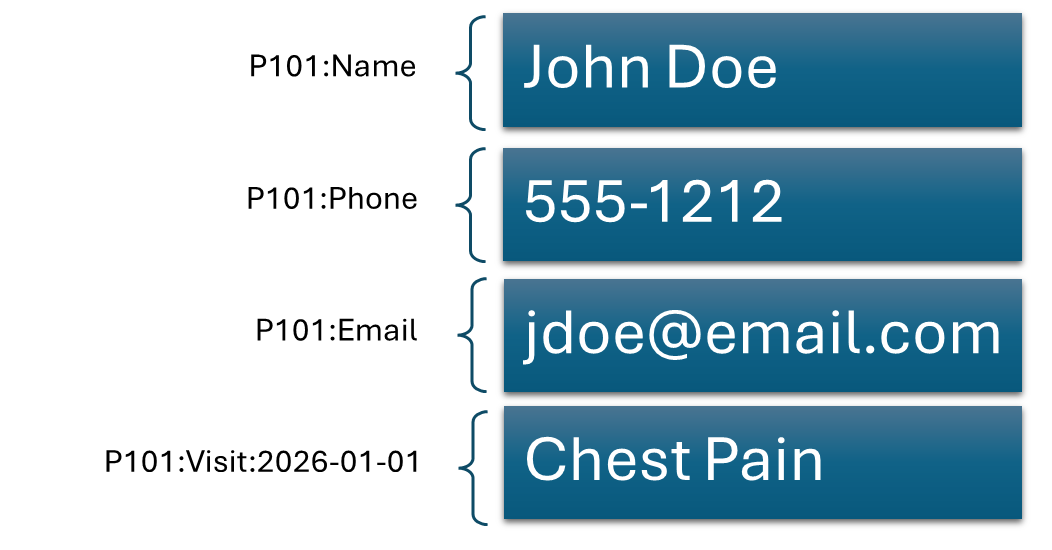
// WRITE: Treating the global path as a simple key
 Set key = "jdoe@email.com"
 Set value = "John Doe"
 Set ^PatientRecord(key) = value
 Set ^PatientRecord("P101:Phone") = "555-1212"
 Set ^PatientRecord("P101:Email") = "jdoe@email.com Doe"
 Set ^PatientRecord("P101:Visit:2026-01-01") = "Chest Pain"
Below, you can see the result that will be displayed in Globals:
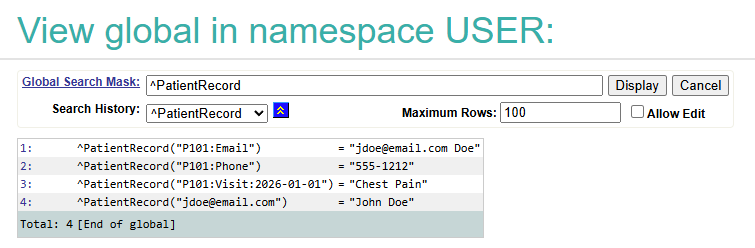
We can extract this data using the following:
// READ: Simple lookup with check if data exists
Set email = $Get(^PatientRecord("P101:Email"), 'Email not found')
Write email
Block 2 - Application Layer: Object and Document Models
Applications are not usually built on trees (though it is possible); they rely on objects and similar data structures. IRIS automatically projects the underlying globals into these familiar formats. This conceptual view allows developers to work with rich, nested data structures, e.g., classes or JSON documents, without worrying about the underlying storage mechanics.
3. Object Model
The Object model is a natural way for developers working with such languages as Python, Java, or C# to manipulate data. Information is encapsulated into instances of a class, complete with attributes (properties) and behavior (methods). When a developer defines a persistent class, the IRIS engine automatically maps its properties and methods to specific nodes within a Global structure. This process is automatic and seamless.
In our example, we will create a Record class containing the patient's details:
%3CmxGraphModel%3E%3Croot%3E%3CmxCell%20id%3D%220%22%2F%3E%3CmxCell%20id%3D%221%22%20parent%3D%220%22%2F%3E%3CmxCell%20id%3D%222%22%20parent%3D%221%22%20style%3D%22swimlane%3BfontStyle%3D0%3BchildLayout%3DstackLayout%3Bhorizontal%3D1%3BstartSize%3D26%3BfillColor%3Dnone%3BhorizontalStack%3D0%3BresizeParent%3D1%3BresizeParentMax%3D0%3BresizeLast%3D0%3Bcollapsible%3D1%3BmarginBottom%3D0%3BwhiteSpace%3Dwrap%3Bhtml%3D1%3B%22%20value%3D%22Record%22%20vertex%3D%221%22%3E%3CmxGeometry%20height%3D%22130%22%20width%3D%22190%22%20x%3D%2280%22%20y%3D%2280%22%20as%3D%22geometry%22%2F%3E%3C%2FmxCell%3E%3CmxCell%20id%3D%223%22%20parent%3D%222%22%20style%3D%22text%3BstrokeColor%3Dnone%3BfillColor%3Dnone%3Balign%3Dleft%3BverticalAlign%3Dtop%3BspacingLeft%3D4%3BspacingRight%3D4%3Boverflow%3Dhidden%3Brotatable%3D0%3Bpoints%3D%5B%5B0%2C0.5%5D%2C%5B1%2C0.5%5D%5D%3BportConstraint%3Deastwest%3BwhiteSpace%3Dwrap%3Bhtml%3D1%3B%22%20value%3D%22PatientID%3A%20%25String%22%20vertex%3D%221%22%3E%3CmxGeometry%20height%3D%2226%22%20width%3D%22190%22%20y%3D%2226%22%20as%3D%22geometry%22%2F%3E%3C%2FmxCell%3E%3CmxCell%20id%3D%224%22%20parent%3D%222%22%20style%3D%22text%3BstrokeColor%3Dnone%3BfillColor%3Dnone%3Balign%3Dleft%3BverticalAlign%3Dtop%3BspacingLeft%3D4%3BspacingRight%3D4%3Boverflow%3Dhidden%3Brotatable%3D0%3Bpoints%3D%5B%5B0%2C0.5%5D%2C%5B1%2C0.5%5D%5D%3BportConstraint%3Deastwest%3BwhiteSpace%3Dwrap%3Bhtml%3D1%3B%22%20value%3D%22Name%3A%20%25String%22%20vertex%3D%221%22%3E%3CmxGeometry%20height%3D%2226%22%20width%3D%22190%22%20y%3D%2252%22%20as%3D%22geometry%22%2F%3E%3C%2FmxCell%3E%3CmxCell%20id%3D%225%22%20parent%3D%222%22%20style%3D%22text%3BstrokeColor%3Dnone%3BfillColor%3Dnone%3Balign%3Dleft%3BverticalAlign%3Dtop%3BspacingLeft%3D4%3BspacingRight%3D4%3Boverflow%3Dhidden%3Brotatable%3D0%3Bpoints%3D%5B%5B0%2C0.5%5D%2C%5B1%2C0.5%5D%5D%3BportConstraint%3Deastwest%3BwhiteSpace%3Dwrap%3Bhtml%3D1%3B%22%20value%3D%22ContactInfo%3A%20list%20of%20%25String%22%20vertex%3D%221%22%3E%3CmxGeometry%20height%3D%2226%22%20width%3D%22190%22%20y%3D%2278%22%20as%3D%22geometry%22%2F%3E%3C%2FmxCell%3E%3CmxCell%20id%3D%226%22%20parent%3D%222%22%20style%3D%22text%3BstrokeColor%3Dnone%3BfillColor%3Dnone%3Balign%3Dleft%3BverticalAlign%3Dtop%3BspacingLeft%3D4%3BspacingRight%3D4%3Boverflow%3Dhidden%3Brotatable%3D0%3Bpoints%3D%5B%5B0%2C0.5%5D%2C%5B1%2C0.5%5D%5D%3BportConstraint%3Deastwest%3BwhiteSpace%3Dwrap%3Bhtml%3D1%3B%22%20value%3D%22Visits%3A%20array%20of%20%25String%22%20vertex%3D%221%22%3E%3CmxGeometry%20height%3D%2226%22%20width%3D%22190%22%20y%3D%22104%22%20as%3D%22geometry%22%2F%3E%3C%2FmxCell%3E%3C%2Froot%3E%3C%2FmxGraphModel%3E
Below you can see what the class looks like in IRIS:Here's the r a clas a clas
Class Article.Record Extends %Persistent
{

Property PatientID As %String;

Property Name As %String;

Property ContactInfo As list Of %String;

Property Visits As array Of %String;

Index IdKey On PatientID [ IdKey, Unique ];

Storage Default
{
<Data name="RecordDefaultData">
<Value name="1">
<Value>%%CLASSNAME</Value>
</Value>
<Value name="2">
<Value>Name</Value>
</Value>
<Value name="3">
<Value>ContactInfo</Value>
</Value>
</Data>
<Data name="Visits">
<Attribute>Visits</Attribute>
<Structure>subnode</Structure>
<Subscript>"Visits"</Subscript>
</Data>
<DataLocation>^Article.RecordD</DataLocation>
<DefaultData>RecordDefaultData</DefaultData>
<IdLocation>^Article.RecordD</IdLocation>
<IndexLocation>^Article.RecordI</IndexLocation>
<StreamLocation>^Article.RecordS</StreamLocation>
<Type>%Storage.Persistent</Type>
}
}
With this class configured, we can generate an instance to be saved in globals:
 // WRITE: Creating a new Record instance
 Set patient = ##class(Article.Record).%New()
 Set patient.PatientID = "P101"
 Set patient.Name = "John Doe"
 Do patient.ContactInfo.Insert("jdoe@email.com")
 Do patient.ContactInfo.Insert("555-1212")

 // Adding an array of visits (Collection)
 Do patient.Visits.SetAt("Chest Pain", "2026-01-01")

 // Save to disk (This automatically creates globals)
 Do patient.%Save()
Below you can find what will be shown in globals:

Subsequently, we can read the previously saved instance from the database:
 // READ: Opening an existing object and getting the number of visits
 Set p = ##class(Article.Record).%OpenId("P101")
 Write "Name: ", p.Name, !
 Write "Total Visits: ", p.Visits.Count()
4. Document Model
The Document model provides schema-less flexibility. This is essential for modern web APIs, where the data structure may change frequently without requiring the migration of a formal class schema. In InterSystems IRIS, documents are stored as JSON objects and arrays within document collections, where each record dictates its own structure.
Using our patient example, the identical information can be represented as a single JSON document:
{
 "PatientID": "P101",
 "Name": "John Doe",
 "ContactInfo": {
   "Email": "jdoe@email.com",
   "Phone": "555-1212"
 },
 "Visits": [
   {
     "Date": "2026-01-01",
     "Reason": "Chest Pain"
   }
 ]
}
We can build and store this document in the HospitalDB database (%DocDB.Database):
 //Creating a JSON string with patient record
 Set patient = {
 "PatientID":"P101",
 "Name":"John Doe",
 "ContactInfo":{
   "Email":"jdoe@email.com",
   "Phone":"555-1212"
 },
 "Visits":[
   {
     "Date":"2026-01-01",
     "Reason":"Chest Pain"
   }
  ]
 }

 // Create a document collection
 Set db = ##class(%DocDB.Database).%CreateDatabase("HospitalDB")

 // Insert document
 Set doc = db.%SaveDocument(patient)
Check out below what will appear in globals:

We can then fetch the document and navigate it using familiar JSON syntax:
 // Open a document collection
 Set db = ##class(%DocDB.Database).%GetDatabase("HospitalDB")

 // Print the date and reason for a visit
 Set patient = db.%GetDocument(1)
 set iter = patient.Visits.%GetIterator()
 do iter.%GetNext(.key, .value, .type )
 write patient.Name_" came with "_value.Reason_" on "_value.Date
Unlike the Object model, no class definition is required. Yet, the data remains fully integrated with the same IRIS storage engine that powers all other data models.
Block 3 - Query and Analytics Layer: Relational and Columnar Models
While the object and document models focus on how applications interact with data, the relational and columnar models concentrate on how users query and analyze it. InterSystems IRIS grants access to the same data through SQL-accessible structures, enabling developers, analysts, and reporting tools to leverage familiar tables and queries without duplicating records.
5. Relational Model
In IRIS, when you compile a class, a corresponding table (or several) is automatically generated to store rows of data. Thus, developers can manipulate objects in application code while analysts and reporting tools query the same data via SQL.
Using our patient example, the information will appear as two related tables. The first one will contain the patient's info:

The second one, on the other hand, will hold the visit history:

In Globals, you will observe precisely the same underlying structure as with the Object model.
We can insert data using the standard SQL:
-- Add a patient
INSERT INTO Article.Record (PatientID, Name, ContactInfo) VALUES ('P102', 'Jane Doe', 'jdoe@email.com 555-1212');
-- Add a visit
INSERT INTO Article.Record_Visits (Record, Visits, element_key) VALUES ('P102', 'Chest Pain', '2026-01-01');
Then, we can retrieve the data with an SQL query:
SELECT p.Name,
       v.element_key as VisitDate,
       v.Visits as Reason
FROM Article.Record p
JOIN Article.Record_Visits v
  ON p.PatientID = v.Record
Naturally, instead of relying on the tables created automatically when compiling an object class, you can construct a table using the CREATE TABLE statement. Doing so will automatically generate the corresponding persistent class.
6. Columnar Model
The Columnar model is optimized for analytical workloads that process massive datasets. Instead of storing information row by row, data is physically organized by columns, allowing IRIS to scan only the attributes required by a specific query. This drastically accelerates the performance of aggregations, filtering, and reporting operations.
CREATE TABLE Article.Visits
AS
SELECT p.ID,
       p.Name,
       v.element_key as VisitDate,
       v.Visits as Reason
FROM Article.Record p
JOIN Article.Record_Visits v
  ON p.PatientID = v.Record
WITH STORAGETYPE = COLUMNAR
Below, you can see the representation in Globals:

Note that each ^DlMF.BF5G.1.V* global contains data for a specific column:

Simultaneously, we can use precisely the same queries to insert data into or retrieve data from this table. The distinction lies entirely in how IRIS stores and processes the data internally.
SELECT Reason,
       COUNT(*) AS TotalVisits
FROM Article.Visits
GROUP BY Reason
Conclusion
To summarize, most databases force developers to choose a single data model and then build supplementary infrastructure whenever new requirements emerge. InterSystems IRIS takes a fundamentally different approach. The same patient record can be viewed as a hierarchical structure, accessed as a key-value store, manipulated as an object, stored as a JSON document, queried through SQL, and analyzed using columnar storage. All of this is achieved without duplicating data or synchronizing multiple databases.
The result is a truly multi-model platform where each data representation serves a distinct purpose, while all operate on the same underlying set of data. This empowers developers to choose the most appropriate abstraction for each task without sacrificing performance, consistency, or interoperability.