How can I create properties (DocDB, Python)?
Hey guys,
I need your help.
I am writing a code in Python and I want to create a database and some properties and then to send json files (data) to this database. (I use client-server-model for loading the data into IRIS)
I use curl methods and convert it in Python code with:
curl.trillworks.com/#python
My code so far:
url = "http://127.0.0.1:52773/api/docdb/v1/NamespaceName/db/DBName"
url2 = "http://127.0.0.1:52773/api/docdb/v1/NamespaceName/doc/DBName/"


header = {
        'Content-Type': 'application/json',
    }

response = requests.get(url, headers=header)
print(response.status_code)     #Number of error

if response.status_code == 404:
        print('DB not found, create DB ...')
        response = requests.post(url, headers=header)
        print(response.status_code)
else:
        print('DB found, load data...')
So I create a Database in the Namespace but all the data is in one column:

I need some properties now, so the data could be parsed.
The curl command for creating a property is:
headers = {
'Content-Type': 'application/json\nhttp://127.0.0.1:52773/api/docdb/v1/NamespaceName/db/DBName/\nJahr?type=',
}
response = requests.post('http://Integer&', headers=headers)
Is the code right? And if yes - where should I insert these code in my code? And.. I have more than one properties. How should the code look like?
Thank you in advance
Comments
To create one property call:
http://127.0.0.1:52773/api/docdb/v1/NamespaceName/db/DBName/propertyName?type=propertyType&path=propertyPath&unique=propertyUnique
You'll need one call per property.
For your property Ergebniszuf, url would be:
http://127.0.0.1:52773/api/docdb/v1/NamespaceName/db/DBName/Ergebniszuf?type=%String&path=Ergebniszuf&unique=0
Hi Eduard,
thank you for your answer.
I do know how to call it, but I don't know where schould I add it.
Should I add the url in the header or should I create a new header - header2 - and separate it with comma from
'Content-Type': 'application/json'
or how can I call it in my code that I shared:
url = "http://127.0.0.1:52773/api/docdb/v1/NamespaceName/db/DBName"
url2 = "http://127.0.0.1:52773/api/docdb/v1/NamespaceName/doc/DBName/"


header = {
        'Content-Type': 'application/json',
    }

response = requests.get(url, headers=header)
print(response.status_code)     #Number of error

if response.status_code == 404:
        print('DB not found, create DB ...')
        response = requests.post(url, headers=header)
        print(response.status_code)
else:
        print('DB found, load data...')
Can you please add the following urls in my code at the right place?
http://127.0.0.1:52773/api/docdb/v1/NamespaceName/db/DBName/Ergebniszuf?type=%Numeric&path=Ergebniszuf&unique=0
http://127.0.0.1:52773/api/docdb/v1/NamespaceName/db/DBName/Jahr?type=%Integer&path=Jahr&unique=0
Thank you in advance
Made an erro in URL, it's not .../db/DBName/Propname but .../prop/db/DBName/Propname.
Here's a sample code that creates a db and a property.
import requests

def getBaseUrl(host = "127.0.0.1", port = 52773,  namespace = "user", db = "test"):
    return "http://{}:{}/api/docdb/v1/{}/db/{}" .format(*[host, port, namespace, db])

def getPropertyUrl(property, host = "127.0.0.1", port = 52773,  namespace = "user", db = "test"):
    return "http://{}:{}/api/docdb/v1/{}/prop/{}/{}" .format(*[host, port, namespace, db, property])

def main():

    url = getBaseUrl()
    print(url)
    header = {
        'Content-Type': 'application/json',
    }

    session = requests.Session()
    session.auth = ("_SYSTEM", "SYS")

    response = session.get(url, headers=header)
    #response = requests.get(url, headers=header)
    print(response.status_code)  # Number of error

    if response.status_code == 404:
        print('DB not found, create DB ...')
        response = session.post(url, headers=header)
        print(response.status_code)
    elif response.status_code != 200:
        print('Unknown error: ' + response.status_code + ' ' + response.reason)
    else:
        property = "Ergebniszuf"
        # check that property exist
        response = session.get(getPropertyUrl(property), headers=header)

        if response.status_code == 404:
            print('Property not found, creating property: ' + property)
            response = session.post(getPropertyUrl(property), params= {"type":"%Numeric", "path": property, "unique":0}, headers=header)
            print(response)
        elif response.status_code != 200:
            print('Unknown error: ' + response.status_code + ' ' + response.reason)
        else:

            print('DB found, load data...')

    return 1


if __name__ == '__main__':
    print(main())
It actually doesn't create neither database or property. Something is wrong. And if I have 20 properties... this would be a long code right?
It actually doesn't create neither database or property.
Check that %Service_DocDB is enabled. Your screenshot also shows that database gets created.
if I have 20 properties... this would be a long code
You need to cycle over all properties, so +2 lines probably.
OK, sorry, it does create the database but still not the property :(
url = "http://127.0.0.1:52773/api/docdb/v1/DEMO/db/Demo.TEST11"


header = {
        'Content-Type': 'application/json',
    }


def getPropertyUrl(property, host = "127.0.0.1", port = 52773,  namespace = "DEMO", db = "DEMO.TEST11"):
    return "http://{}:{}/api/docdb/v1/{}/prop/{}/{}" .format(*[host, port, namespace, db, property])

def main():
    session = requests.Session()
    session.auth = ("_SYSTEM", "SYS")

    response = session.get(url, headers=header)

    print(response.status_code)  # Number of error

    if response.status_code == 404:
        print('DB not found, create DB ...')
        response = session.post(url, headers=header)
        print(response.status_code)
    elif response.status_code != 200:
        print('Unknown error: ' + response.status_code + ' ' + response.reason)
    else:
        property = "Ergebniszuf"
        # check that property exist
        response = session.get(getPropertyUrl(property), headers=header)

        if response.status_code == 404:
            print('Property not found, creating property: ' + property)
            response = session.post(getPropertyUrl(property), params= {"type":"%Numeric", "path": property, "unique":0}, headers=header)
            print(response)
        elif response.status_code != 200:
            print('Unknown error: ' + response.status_code + ' ' + response.reason)
        else:

            print('DB found, load data...')

    return 1


if __name__ == '__main__':
    print(main())
That is my code now, but the result is still as the screenshot above..
What's the status_code on
            response = session.post(getPropertyUrl(property), params= {"type":"%Numeric", "path": property, "unique":0}, headers=header)
            print(response.status_code)
The full answer is:
(Verbindung erfolgreich = Connection success
Daten erhalten = load data)
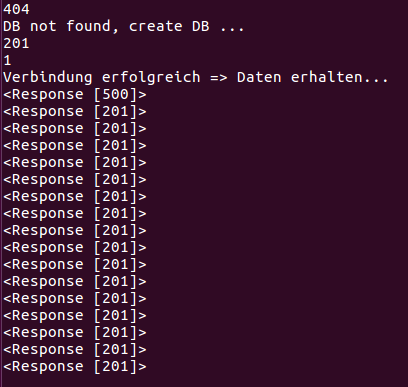
201 looks like a correct response.
500 on the other hand is an error. Check what's the error.
I had this before too, but the data is there. One cell of my data is empty (the first one) an this could be the error, but it's no problem for now. It has nothing to do with the properties I think..
Check response with 500 error code, it probably contains error information
https://docs.intersystems.com/latest/csp/docbook/DocBook.UI.Page.cls?KE…
"
None.
"
I mean response body may contain additional info
print(response.content)It has nothing to do with the properties.
If I first create the properties in Atelier and then send the data with python to my database.. it throws the same error and the data is there..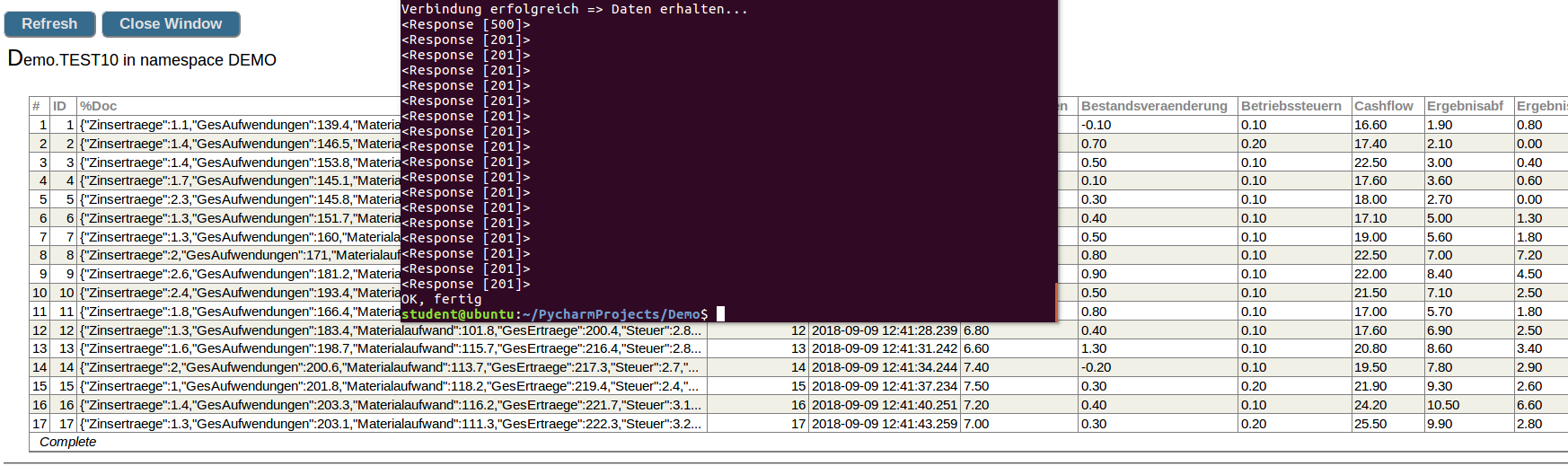
Your code creates a property when getting the property returns a 404. However, I'm getting a 400 when a property doesn't exist:
$ curl --user _system:SYS -w "\n***\n%{http_code}\n" 'http://127.0.0.1:52773/api/docdb/v1/DEMO/prop/DEMO.TEST11/Ergebniszuf'
{"status":{"errors":[{"error":"ERROR #25541: DocDB Property 'Ergebniszuf' does not exist in 'Demo.TEST11'","code":25541,"domain":"%ObjectErrors","id":"DocumentDatabasePropertyNotValid","params":["Demo.TEST11","Ergebniszuf"]}],"summary":"ERROR #25541: DocDB Property 'Ergebniszuf' does not exist in 'Demo.TEST11'"},"content":null}
***
400