Unexpected Token Error in VS Code
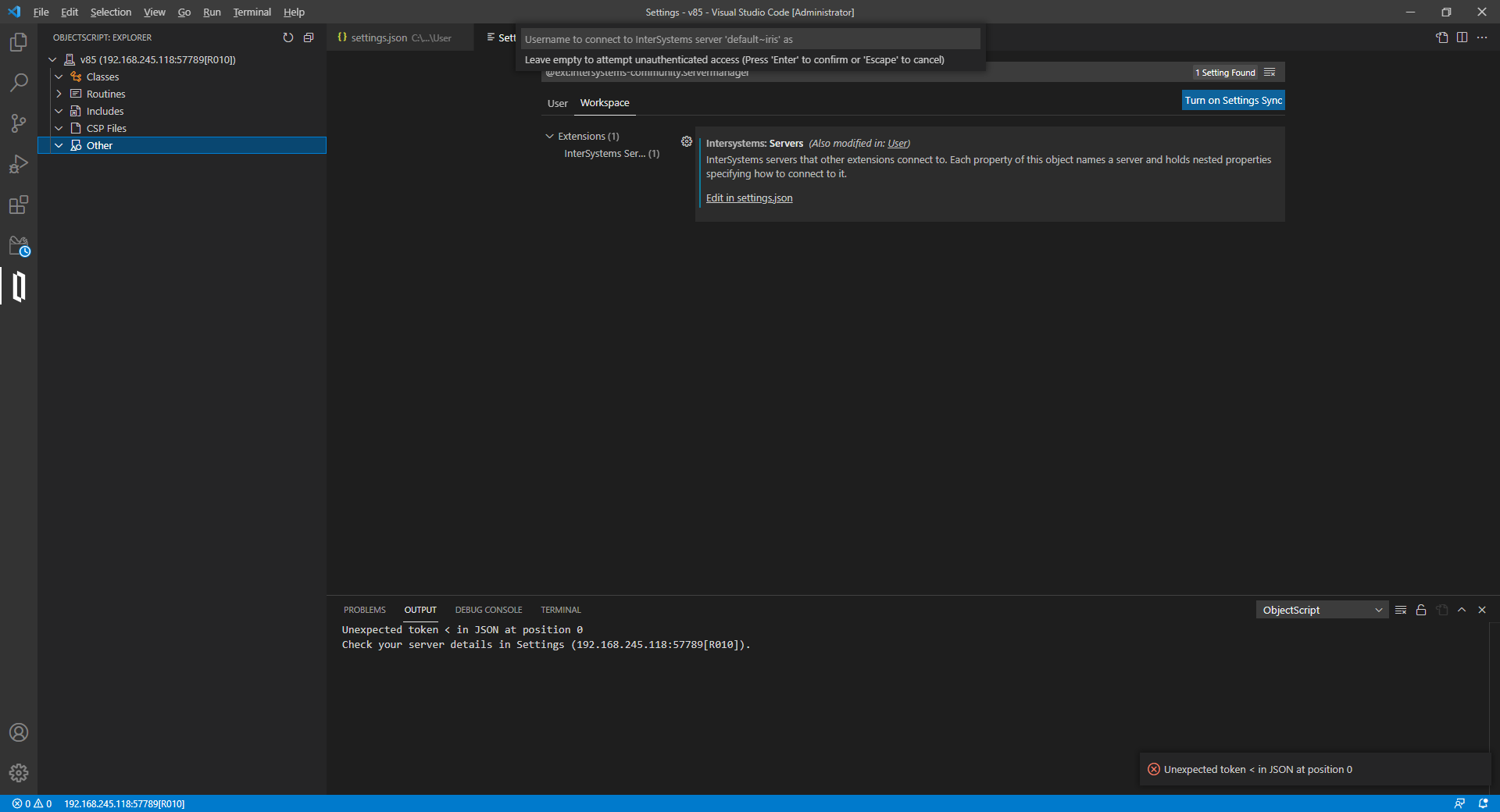
I'm trying to set up VS Code for ObjectScript using the instructions found here. I've got both Cache 2018.1.2.309.0 and IRIS 2020.1.0.215.0. When I try to connect to either one of them the connection fails, and I get a notification in the bottom right corner that says "Unexpected token < in JSON at position 0". I've checked the JSON settings file that VS Code uses, and they're fine and formatted properly. All of the settings I've entered are correct. I suspect that there's a response coming back from the server that VS Code is expecting to be JSON, but isn't. It pops up any time I click on anything under "OBJECTSCRIPT:EXPLORER" or any time I click on a different tab at the top.
I have no idea where to go to even begin troubleshooting this. Has anyone else had this issue come up, or can someone point me where to go to figure out what's going on?
The contents of my settings.json are:
Comments
Could you attach screenshots? It's not clear when you get the error.
Dmitry, I've added one now. It comes up every time I click on anything on the left side or just when I click on a different tab at the top.
I suppose, the issue in your settings.json, which I see you have opened. Could you check if it's really a JSON, and correct? If possible, could you attach the screenshot with it as well?
I've added that too. As far as I can tell, it's fine. It definitely doesn't start with a <.
You may want to open up a WRC case or a GitHub issue to investigate further. To see if this is an error with data returned from the server, you'd want to collect:
- CSP/Web Gateway log at level EV7 (docs here)
- ISCLOG (set ^%ISCLOG=3, reproduce, set ^%ISCLOG=0, in Caché data will be in ^%ISCLOG and in IRIS will be in ^ISCLOG in %SYS).
I'm not sure... but I think, your settings.json does NOT conform to JSON specification. It seems, you like extra commas but JSON does not likes them. Take a look at:
...
    "active":true , <----extra comma
  }, <----------------------- extra comma
}
This produces in IRIS/Cache an <SYNTAX... which starts with an "<"
I tried it without those commas, and it made no difference. Thanks for the suggestion, though.
Could you try to open URL in any Browser.
http://192.168.245.118:57789/api/atelier/
It should offer to enter login and password, in a modal dialog, and after that should some JSON.
In your case, looks like it responses with some HTML, probably with some error, like not found 404.
You were right. The requested URL /api/atelier/ was not found on this server. What do I do about that, though?
Try taking a look at the System Management Portal under System Administration > Security > Applications > Web Applications. Confirm that /api/atelier is enabled. You may also want to look at your web server and CSP/Web Gateway settings. A CSP/Web Gateway log and ISCLOG should provide more information here as well.
Thanks, Nicole! That fixed it.
After a lengthy discussion, you still seem not to be aware of what information you send and what is coming back.
It may help just to watch your communication using TcpTrace or WireShark to find out what ERROR to chase at all.
As I distrust your initial JSON construct I checked my personal opinion with
a public JSON validator. https://jsonformatter.curiousconcept.com/
Info: Remove trailing commas.
But this was pointed out correctly already before me by @Julius Kavay
For the sake of completness, there is one more validator: https://jsonlint.com/ (which shows the above settings.json file as incorrect).
One more problem, it seems IRIS (and Cache) speaks with a forked tongue (but has nothing to do with the above problem) :
set string = "{""Value"":123, }"    // note the extra comma!
set stream=##class(%Stream.TmpCharacter).%New()
do stream.WriteLine(string)
set obj1={"Value":123, }  --> gives a SYNTAX
set obj2={}.%FromJSON(string) --> accepts the incorrect (json)string!I just wonder if WRC would care about those inconsistencies!
FYI, I enabled the /api/atelier web app, and that fixed the issue. Once I did that, I tried it both with and without the extra commas, and it was fine letting me connect either way. They were incorrect JSON, but they weren't the source of this particular problem.
OK! Thanks for resolving the miracle!
And we just learned IRIS does JSON . . . more or less . . . some times . . . somehow . . . fuzzy
A real enlightenment that I was not aware of !
set obj1={"Value":123, } --> gives a SYNTAXSince this is the syntax for a "JSON literal", and only happens in ObjectScript code, it makes sense to me that IRIS would force the developer to do the right thing.
%FromJSON has to deal with JSON that comes from other sources, so it makes sense that it is more forgiving of bad practices.
OK, take a more simple case:
set obj=[1,2,,3]  // again, this is a SYNTAX
set obj=[].%FromJSON("[1,2,,3]") // this is OK
but in both cases, the problem was the bouncing comma-key on my keyboard.
The first was told by compiler the second was "forgiven" by JSON-Reader! BUT the real question is, WHAT IS the third item in the above array? The latter shows obj has a size of 4, so the, and the desired thrid element could be null, 3 or maybe something else!
I wrote my very first program somewhere in 1971 or 1972, I can't remember anymore. But one thing I have learned is, one should accept checked data only.
Imagine, you accept those incorrect (aka forgiven) data and beside processing, store the data in your database, then later, for whatever reason, you send the (original string) data to an external party.... bang! They can't read it, because it's not JSON conform.
[1,2,,3] is arguably more ambiguous than a trailing comma, and there are some precedents for (if and) how to treat trailing commas.
On the other hand, I just tested both cases in Firefox using JSON.parse() and they both fail. Browsers tend to be pretty tolerant of bad stuff, so the fact that Firefox won't accept trailing commas makes a good case for IRIS not allowing trailing commas either.
Strangely, Firefox apparently allows trailing commas in JavaScript, but not in JSON.
[1,2,,3] is equally arguably as [1,2,3,,] or [1,2,3,,,,,] and IRIS/Cache accepts all of them.
Nothing against a system which is input tolerant (forgiving, with your words) but then this tolerance should be obvious and in some way logical. An example, I tolerate trailing comma(s), becuse they could be leftovers of editing. So I would say, all the arrays
[1,2,3]
[1,2,3,]
[1,2,3,,,]
have a size of 3 - there are three elements, no more. But IRIS/Cache says the sizes are 3, 4 and 6. So let check the last one
set obj=[].%FromJSON("[1,2,3,,,]")
write obj.%Size() --> 6
for i=0:1:9 write i,?3,obj.%Get(i),?7,obj.%GetTypeOf(i),!
The output of the FOR-Loop is:
0  1   number
1  2   number
2  3   number
3      unassigned
4      unassigned
5      unassigned
6      unassigned
7      unassigned
8      unassigned
9      unassigned
The elements with index 3, 4 and 5 are unassigned and in some kind, I can understand that. But if the higher indices, like 6, 7, 88 or 1000 etc. are also unassigned then I ask you, why is the size 6 and not, say 12 or 573?
For me the logical size should be 3 because there are three intendeed elements, the others are a result of tolerated delimiters!
Finally, I don't want to start a war, how to interpret JSON strings. It was just my 2cc to a theme, which is out-of-round, according to my opinion.