これは InterSystems FAQ サイトの記事です。
JDBC および ODBC 経由でInterSystemsIRISから外部データベースにアクセスしたい場合、SQLゲートウェイを使用しリンクテーブルを作成して接続できます。
2023.1以降のバージョンでは、リンクテーブルに加えて、外部テーブル/FOREIGN TABLE を使用することが可能となりました(2024.1時点で実験的機能)。
外部テーブルというのは、物理的に別の場所に保存されているデータを IRIS SQL に投影する非常に便利な機能です。
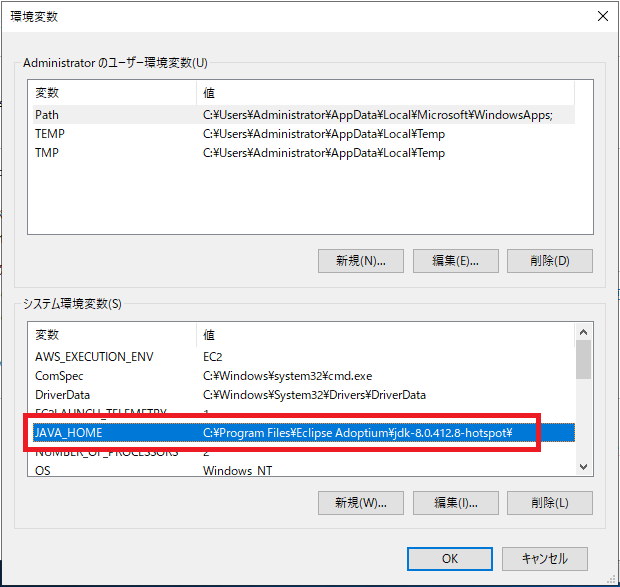
外部テーブルを使用する場合は、Java(2023.1の場合は1.8~)を事前にインストールし、JAVA_HOME環境変数を設定するだけで、簡単に接続することが可能です。
※JAVA_HOME環境変数設定例:
外部テーブルの使用方法については、以下の記事で紹介しております。
レシピデータセットを外部テーブルで読み込み、組み込みPythonでLLMを使って分析する (Langchain + OpenAI)
こちらの記事では、外部テーブルで作成できる2種類のテーブル(「CSVファイル直接接続」と「外部DBへのJDBCゲートウェイ経由での接続」)の簡単なサンプル作成例と、外部テーブルの特徴を紹介しています。
1-1. 簡単なサンプル作成例(CSVファイル編:ファイルから外部テーブル作成)
a. 外部データラッパとする CSVファイルを用意します(例:C:\temp\FT\managers.csv)
※サンプルCSV(managers.csv)
ID,Name,Title,HireDate,CompanyCar
111,"Cornish,Irving",Senior Support Manager,1992-02-10,6
222,"Aquino,Aric","Manager, Technical Account Management",1992-07-15,3
333,"Masterson,Arthur","Director, Customer Support",2002-10-01,9
444,"Deyn,Ernest",Director Customer Support,2000-08-15,4
555,"Lee,Eileen","Manager, Product Support",2002-06-17,3
666,"Knapp,Ashtyn",Senior Support Manager,2002-10-01,11
777,"King,Michael",Senior Support Manager,2003-04-10,2
b. 外部サーバ(WRC.Files)を作成します
CREATE FOREIGN SERVER WRC.Files FOREIGN DATA WRAPPER CSV HOST 'C:\temp\FT\'
c. 外部テーブルを作成します
CREATE FOREIGN TABLE WRC.Managers (
  ID INTEGER,
  Name VARCHAR,
  Title VARCHAR,
  HireDate DATE
) SERVER WRC.Files FILE 'managers.csv' USING
{ "from" : {
       "file" : {
          "header": 1
       }
   }
}
1-2. 簡単なサンプル作成例(JDBCゲートウェイ接続経由編)
a. 外部DBへの JDBCゲートウェイ接続を作成します
管理ポータル:
[システム管理] > [構成] > [接続性] > [SQLゲートウェイ接続] 新規作成:WRC
b. 接続用の外部サービス(例:WRC.Data)を作成します。
CREATE FOREIGN SERVER WRC.Data FOREIGN DATA WRAPPER JDBC CONNECTION 'WRC'
c. 外部サーバ内の任意のテーブルに対して外部テーブルを作成します。
※外部テーブルは CREATE FOREIGN TABLE コマンドで定義する必要があります。
クラス定義を作成して外部テーブルを作成することはできません。
CREATE FOREIGN TABLE Remote.Problems SERVER WRC.Data TABLE 'SQLUser.Problem'
d. 作成後、クエリを実行します。
SELECT ProblemOwner, OpenDate FROM Remote.Problems WHERE OpenDate = '2023-03-09'
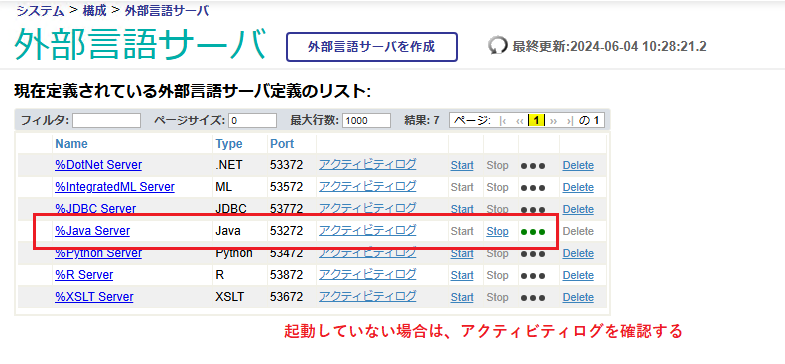
外部言語サーバ(%Java Server)が起動されていない状態でクエリを実行すると、以下のようなエラーが返ります。
SQLCODE: <-230>:<Foreign table query Execute() failed>]
  [%msg: <Foreign Tables - ERROR #5023: Remote Gateway Error: Connection cannot be established>]
2. 外部テーブルの特徴
・外部テーブルとのJoinが可能
・ローカルテーブルとのJoinが可能
・外部テーブル用に作成されるクラスは非表示となる(SQLテーブルとしては表示可能)
・削除する場合は、DROP FOREIGN TABLE コマンドで行う(%MANAGE_FOREIGN_SERVER 管理特権が必要)
例:DROP FOREIGN TABLE WRC.Advisor
・外部テーブルに対してクエリを実行すると、クエリごとにすべてのフィールドが取得される
・ストリーム(Stream)フィールドの取得方法は、リンクテーブルと同様に substring 関数 を使用可能
例:
select substring(clob1,1,50) from linked.newclass1
※うまく動作しない場合は、%Java Server が問題なく起動できているかご確認ください。
[システム管理] > [構成] > [接続性] >[外部言語サーバ]
%Java Server が Start されているか
外部テーブルの詳細については、以下のドキュメントをご覧ください。
外部テーブル
※SQLゲートウェイ/リンクテーブルの使用方法については、以下のような記事をご紹介しております。
(管理ポータルで行う)リンクテーブルをプログラムで行う方法
SQL ゲートウェイを使用した外部データベースへのアクセス方法について
プログラムでSQLゲートウェイ接続設定を作成する方法


.png) In a bit more than half a year, quite a few of Community members have submitted their ideas to the Ideas Portal. We extend our heartfelt thanks to all contributors and want to give a special shout-out to the authors who have shared numerous ideas on the portal this year.
In a bit more than half a year, quite a few of Community members have submitted their ideas to the Ideas Portal. We extend our heartfelt thanks to all contributors and want to give a special shout-out to the authors who have shared numerous ideas on the portal this year..png) You can now vote for ideas that can be implemented by Developer Community members not only on the Ideas Portal but also on the Open Exchange. In the special window (look below for an example screenshot), you can click on the "Vote" button to support the idea. You will see a random Community Opportunity idea whenever you visit Open Exchange.
You can now vote for ideas that can be implemented by Developer Community members not only on the Ideas Portal but also on the Open Exchange. In the special window (look below for an example screenshot), you can click on the "Vote" button to support the idea. You will see a random Community Opportunity idea whenever you visit Open Exchange..png)
.png) To round up this newsletter, please find the recently posted Community Opportunity ideas
To round up this newsletter, please find the recently posted Community Opportunity ideas