OH! Today I learned as well! It never occurred to me that I'd need to double space after the else to make that work. Thanks, Robert!
- Log in to post comments
OH! Today I learned as well! It never occurred to me that I'd need to double space after the else to make that work. Thanks, Robert!
For me personally, I prefer using one-line if statements over post-conditionals as I find they're easier to read (even as someone that has been using ObjectScript for many, many years), and especially for newer developers that aren't used to ObjectScript syntax where post-conditionals could be a bit confusing at first.
if option1 do ##Class(FEatures.Option1).DoSomething()NOTE: The following turns out to not be the case, and has been corrected by Robert below. Leaving this here for context.
The thing to note about this (and this also applies to post-conditionals as well) is you cannot use either if you intend to include an Else along with it (sadly, the one-line else isn't supported in ObjectScript). If you intend to use if/else, then it must be a discrete if block even if there's only a single line of code inside it.
You can also shorthand the ObjectScript call to %FromJSON() by using:
set list = [].%FromJSON(jsonExport)
or
set list = {}.%FromJSON(jsonExport)
When you set an ObjectScript variable equal to either [] (DynamicArray) or {} (DynamicObject), the variable becomes an instance of the respective dynamic entity class automatically, so it saves you having to type out the entire class reference.
Agreed. There's a few things when working with JSON that I feel could be made to bridge the gap between COS and the Javascript nature of them, and that's certainly one of them. The difference in array indexing always throws me off as well, which is why I wish that we could use [] array indexing when working with Dynamic Arrays rather than having to use %Get() as I feel like I'd be able to more naturally make the jump between the 0-indexed Dynamic Arrays that way.
It's definitely situational for me. I generally try to avoid using Quit for situations where I am trying to exit the method or program entirely, and opt for Return in these cases (a habit which took a lot of retraining since I'd been used to using quit for everything coming from a heavy MUMPS-coded software base in the past). I really only use Quit these days for terminating a loop when needed, but it's still a common enough usage for me.
In short, these days I use these rules:
Throwing custom errors is a really handy tool to have!
You can also take this a step further and if you have code that returns a status (either built in functions such as %Save() or custom errors like you have here), you can deconstruct the status object to get into a nice output string using $System.Status.DecomposeError(). This is especially useful because functions like %Save() don't actually throw the errors again to the caller, they just return the status code from the error thrown within %Save(), so a try/catch won't catch these.
Take, for instance, the following test class. Notice the property on the class is of type %Integer, but in the class method I attempt to set the value to a string. This will cause an error when using %Save():
Class ErrorTest extends %Persistent {
    Property TestProp As %Integer;

    ClassMethod ErrorTest()
    {
      set objectReference = ..%New()
      set objectReference.TestProp = "Test"
      set status = objectReference.%Save()
      if status '= 1 {
        do $System.Status.DecomposeStatus(status,.errorlist)
        for errornum = 1:1:errorlist {
          write !,"Error entry ",errornum,":"
          write !,errorlist(errornum)
        }
      }
    }
}
If I were to wrap the %Save() call in a try/catch, it wouldn't catch the error thrown by the invalid property type when %Save is called. Using the method above, when I run the code I get this:
USER> do ##class(Custom.Robbie.ErrDecomposeTest).ErrorTest()

Error entry 1:
ERROR #7207: Datatype value 'Test' is not a valid number
> ERROR #5802: Datatype validation failed on property 'Custom.Robbie.ErrDecomposeTest:TestProp', with value equal to "Test"
So, when you're using any kind of status, whether it be errors statuses returned by built in functions or custom made error statuses, you can use this to decompose them and get at the various pieces within if the error status isn't actually thrown to be caught by a try/catch.
Got it, thanks!
How do you go about turning on the modern view? I've installed a fresh instance of 2025.1 but do not see an option to switch to the new views in the Production Configuration screen.
Presuming that you're trying to script input into a menu-driven routine to generate data or perform some action, the best course of action would be to analyze the code of the legacy menu routine and see what it is calling to actually generate data or perform the action based on the menu input and have your endpoint call that code directly with the proper inputs from your REST endpoint, bypassing the need for the menu and any scripted input.
I'm amazed at how little code is actually required to get a fully operational server application running! Nice work!
Perfect, that's exactly what I needed! Thanks!
I ended up changing over to use the CacheActiveX method for connecting and running the query which works really well. I do have a question, though: Is there any way to use a defined ODBC DSN in the connection string using CacheActiveX?
Thanks! I figured out my issue, I had set up my ODBC connection incorrectly and was referencing the wrong namespace. Thank you for the assistance!
Thank you for the responses so far, I greatly appreciate them!
I found some information online about using ADO and ODBC to make the connection which has gotten me close. Here is what I have in Excel VBA: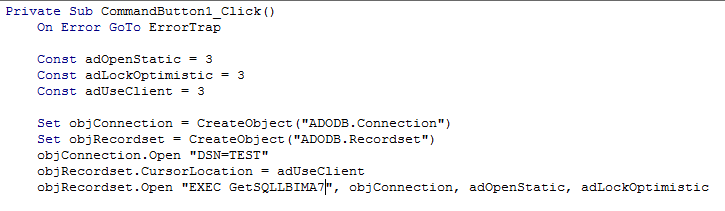
and here is the error I get when I run this code:
The "GETSQLLBIMA7" query exists in the USER namespace under the USER package. I'm not sure where "SQLUSER" is coming from or how to specify a different namespace or package.
Thank you both for your responses, I greatly appreciate the help!
I tried going down the ODBC route using ADO based on some other information I have found and I seem to be getting hung up by something not getting specified in the call to Cache through ODBC. Here's what I have in the Excel VBA:
When I try to run this, I get this error:
The Query "GETSQLLBIMA7" exists in the USER namespace under the USER package. I'm not sure how to specify to look under USER rather than SQLUSER when calling Cache.