Is it possible to execute a custom class query using MS Excel VBA?
Is it possible using MS Excel VBA to execute and retrieve data from a Cache custom class query? If so, how?
Comments
Excel can import data from any ODBC data source.
I ended up changing over to use the CacheActiveX method for connecting and running the query which works really well. I do have a question, though: Is there any way to use a defined ODBC DSN in the connection string using CacheActiveX?
Thanks! I figured out my issue, I had set up my ODBC connection incorrectly and was referencing the wrong namespace. Thank you for the assistance!
If you know how to work with ActiveX from MS Excel VBA, then there is no problem.
E.g. (demo.vbs):
Set f = CreateObject("CacheActiveX.Factory")
Set rs = CreateObject("CacheActiveX.ResultSet")
If Not f.IsConnected() Then

  f.Connect("cn_iptcp:127.0.0.1[1972]:SAMPLES:_SYSTEM:SYS")

  Set rs=f.DynamicSQL("select TOP 3 * from Sample.Person")
  rs.Execute()
  while rs.Next
    WScript.Echo rs.Get("SSN") 'print of field SSN for first three rows from the table Sample.Person
  wend

  rs.Close()
  Set person = f.Static("Sample.Person")
  age=person.CurrentAge(45678) 'call of method of class Sample.Person

  WScript.Echo age
End If
I do have a question, though: Is there any way to use a defined ODBC DSN in the connection string using CacheActiveX?No: Defining a Connection String
Thank you both for your responses, I greatly appreciate the help!
I tried going down the ODBC route using ADO based on some other information I have found and I seem to be getting hung up by something not getting specified in the call to Cache through ODBC. Here's what I have in the Excel VBA:
When I try to run this, I get this error:
The Query "GETSQLLBIMA7" exists in the USER namespace under the USER package. I'm not sure how to specify to look under USER rather than SQLUSER when calling Cache.
Thank you for the responses so far, I greatly appreciate them!
I found some information online about using ADO and ODBC to make the connection which has gotten me close. Here is what I have in Excel VBA: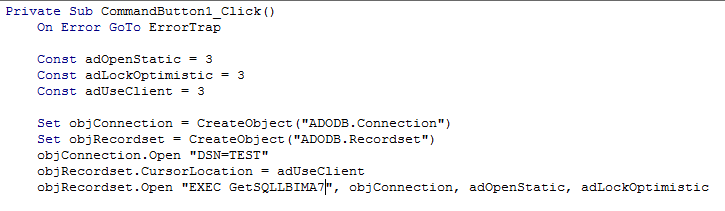
and here is the error I get when I run this code:
The "GETSQLLBIMA7" query exists in the USER namespace under the USER package. I'm not sure where "SQLUSER" is coming from or how to specify a different namespace or package.