First, transfer your schema via $SYSTEM.SQL.Schema.ExportDDL.
After that transfer data via CSV.
- Log in to post comments
First, transfer your schema via $SYSTEM.SQL.Schema.ExportDDL.
After that transfer data via CSV.
A sudden and short delivery date task has come into being
Don't they always.
Is mapi.exchange.msg.Communication persistent?
That said, I'd move JSON parsing to a BS, so mapi.exchange.msg.Communication becomes a request.
Here are some ideas for contestants:
This way then:
<call name='To application Rest' target='To application REST' async='0'>
  <request type='EnsLib.REST.GenericMessage' >
    <assign property="callrequest.Stream" value='##class(%Stream.GlobalCharacter).%New()'/>
    <assign property="status"  value='callrequest.Stream.CopyFrom(request.StreamFC)' action="set" />
    <assign property="status"  value='callrequest.HTTPHeaders.SetAt("application/xml", "Content-Type")' action="set" />
    <assign property="status"  value='callrequest.HTTPHeaders.SetAt(callrequest.Stream.Size, "Content-Length")' action="set" />
    <assign property="status"  value='callrequest.HTTPHeaders.SetAt("POST", "HttpRequest")' action="set" />
  </request>
</call>Try to send it like this:
<call name='To application Rest' target='To application REST' async='0'>
  <request type='EnsLib.REST.GenericMessage' >
    <assign property="status"  value='callrequest.Stream.CopyFrom(request.StreamFC)' action="set" />
    <assign property="status"  value='callrequest.HTTPHeaders.SetAt("application/xml", "Content-Type")' action="set" />
    <assign property="status"  value='callrequest.HTTPHeaders.SetAt(callrequest.Stream.Size, "Content-Length")' action="set" />
    <assign property="status"  value='callrequest.HTTPHeaders.SetAt("POST", "HttpRequest")' action="set" />
  </request>
</call>
Also I think you can skip Content-Length - it's appended to the request automatically.
Please post your <call> block which utilizes context.RESTMessage
I had a similar requirement (only for automatic docs generation).
As each BH setting is also a class property, you can query %Dictionary for them. And build your CSVs from these queries.
Queries
/// Settings common for all Interoperability BH
Query defaultSettings() As %Query
{
SELECT
   prop.name "Setting",
   TRIM('"' FROM MAX(prop.InitialExpression)) "Default value",
   LIST(prop.parent) "Class",
   MAX(prop.Description) "Description"
FROM "%Dictionary".PropertyDefinition prop
JOIN "%Dictionary".CompiledParameter par ON par.parent = prop.parent AND par.Name = 'SETTINGS'
JOIN "%Dictionary".CompiledClass cls ON prop.parent = cls.Name
WHERE (cls.Super LIKE '%Ens.Host%' OR cls.Name = 'Ens.Host' OR cls.Name = 'Ens.BusinessProcessBPL') AND
       par."_Default" LIKE '%' || prop.Name || '%'
GROUP BY prop.Name
ORDER BY 1
}

/// User BH classes
Query productionClasses() As %Query
{
SELECT
   Name "Class",
   Description "Description"
FROM "%Dictionary".CompiledClass cls
WHERE Name LIKE '%'
       AND Super In ('Ens.BusinessProcessBPL', 'Ens.BusinessService', 'Ens.BusinessOperation', 'Ens.BusinessProcess')
ORDER BY 1
}

/// Settings for User BH
Query productionClassesSettings() As %Query
{
SELECT
   prop.parent "Class",
   prop.name "Setting",
   TRIM('"' FROM prop.InitialExpression) "Default value",
   prop.Description "Description"
FROM "%Dictionary".PropertyDefinition prop
JOIN "%Dictionary".CompiledParameter par ON par.parent = prop.parent AND par.Name = 'SETTINGS'
JOIN "%Dictionary".CompiledClass cls ON prop.parent = cls.Name
WHERE cls.Name LIKE '%' AND par."_Default" LIKE '%' || prop.Name || '%'
ORDER BY 1,2
}


/// Production elements
Query productionItems(production) As %Query
{
SELECT
   Name,
   ClassName
   /*,Comment*/
FROM Ens_Config.Item
WHERE Production = :production
}

/// Get settings of production item
Query productionItemsSettingsCall(production) As %Query
{
SELECT *
FROM User_util.productionItemsSettings(:production)
}

/// Custom query - get settings for production items
Query productionItemsSettings(production As %String) As %Query(CONTAINID = 0, ROWSPEC = "Element:%String,Setting:%String,Host:%String,Value:%String") [ SqlName = productionItemsSettings, SqlProc ]
{
}

ClassMethod productionItemsSettingsExecute(ByRef qHandle As %Binary, production As %String) As %Status
{
    set obj = ##class(Ens.Config.Production).%OpenId(production,,.sc)
    quit:$$$ISERR(sc) sc
    do ..clearProductionItems(.obj)
    set qHandle("production") = obj
    set qHandle("item") = 1
    set qHandle("itemCount") = qHandle("production").Items.Count()

    set qHandle("setting") = 1
    set qHandle("settingCount") = qHandle("production").Items.GetAt(qHandle("item")).Settings.Count()
    quit sc
}

ClassMethod productionItemsSettingsFetch(ByRef qHandle As %Binary, ByRef Row As %List, ByRef AtEnd As %Integer = 0) As %Status [ PlaceAfter = productionItemsSettingsExecute ]
{
        #dim sc As %Status = $$$OK
        #dim item As Ens.Config.Item = qHandle("production").Items.GetAt(qHandle("item"))
        #dim setting As Ens.Config.Setting = item.Settings.GetAt(qHandle("setting"))

        set AtEnd = 0
        set Row = $lb(item.Name, setting.Name, setting.Target, setting.Value)

        if qHandle("setting")<qHandle("settingCount") {
                set qHandle("setting") = qHandle("setting") + 1
        } else {
                if qHandle("item")<qHandle("itemCount") {
                        set qHandle("item") = qHandle("item") + 1
                        set qHandle("setting") = 1
                        set qHandle("settingCount") = qHandle("production").Items.GetAt(qHandle("item")).Settings.Count()
                } else {
                        set AtEnd = 1
                }
        }

     quit sc
}

/// Remove production items without settings.
ClassMethod clearProductionItems(ByRef production As Ens.Config.Production)
{
    #dim item As Ens.Config.Item
    for i = production.Items.Count():-1:1 {
        set item = production.Items.GetAt(i)
        do:item.Settings.Count()=0 production.Items.RemoveAt(i)
    }
}It's %request.Content.
Thanks for noticing that, fixed!
Looks like I mixed %CSP.Request:Content with %Net.HttpResponse:Data.
In that case:
Insert Into TableX
values ('Name', 'Address', 'Phone')

UNION

Insert Into TableX
values ('Name2', 'Address2', 'Phone2')
and so on.
How bulky are we talking about?
I'm running:
store/intersystems/iris-ml-community:2021.1.0.215.0And $zv is:
IRIS for UNIX (Ubuntu Server LTS for x86-64 Containers) 2021.1 (Build 215U) Wed Jun 9 2021 12:37:06 EDTAre $zv for ml and non ml builds the same? How can I distinguish if my app is running on ml or non ml build?
Feel free to create a draft here and send the link to @Evgeny Shvarov.
Thank you for the info Guillaume!
I would like to clarify that I'm not an author of Community R Gateway (although I do publish it).
Shiao-Bin Soong is the author of both Community R Gateway and R Gateway.
Thank you Benjamin!
But I see it does not mention R at all and there's no corresponding R method in $system.external:
set javaGate = $system.external.getJavaGateway()
set netGate = $system.external.getDotNetGateway()
set pyGate = $system.external.getPythonGateway()
It should be
http://localhost:52773/user/api/testand not:
http://localhost:52773/user/api/test/Also, do either:
Improved manageability for our External Language Servers, which now also cover R and Python.
Are there any docs for that, especially R and Python?
Do you get Unable to connect or something else?
What's the output of iris list?
Please ask it as a separate question.
There's a standard method for it:
write ##class(%PopulateUtils).Integer(min, max)If you're okay with 0 as a first digit you can use:
write $tr($j($random(10000),4)," ", 0)Note, that $random is preudo-random, if you require strictly random values you should use the GenCryptRand() method of the %SYSTEM.Encryption class.
I would like to know if I can move only user database or default databases as well??
All databases can be moved
what sort of permission do I need to change for new directory path
irisusr should have RW access to the folder. The easiest way is to check what access (owner, group, permissions) is set for existing files/folders and then recreate the same in a new location.
and what all files I need to copy at new location??
IRIS.DAT and stream subfolder if it exist.
Please suggest if modification in iris.cpf file can do this all operation
Absolutely.
It's not IRIS related. %PrimaryRequestHeader is defined in Ens.BusinessProcess and so not available for BO/BS.
Use %RequestHeader property, available in BS and BO.
1. Install InterSystems IRIS.
2. Shut it down.
3. Open <iris>/iris.cpf, there you will find:
[Databases]
USER=C:\InterSystems\IRIS\Mgr\user\

[Journal]
AlternateDirectory=C:\InterSystems\IRIS\Mgr\journal\
CurrentDirectory=C:\InterSystems\IRIS\Mgr\journal\

[config]
wijdir=C:\InterSystems\IRIS\Mgr\WIJ
4. Edit this file as you wish and move the corresponding directories.
5. Start InterSystems IRIS.
Thank you. Looks like exactly what I need.
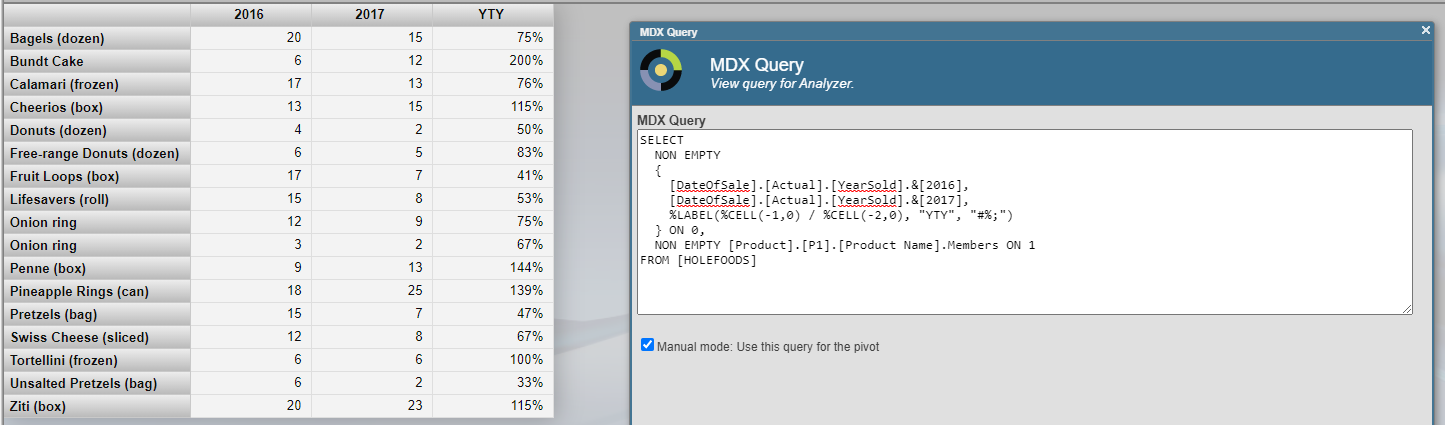
Does DSW3 work with pivot variables?
Check The Python Tutorial - it's a part of Python docs.
It's perfectly fine to have %DynamicObjects properties and they are persisted.
--node-type m6.2xlarge \
m6g.2xlarge probably?
Great article!