When building a Production, should I create separate message classes for each integration flow, or is it acceptable to reuse generic request/response classes across different Business Operations? I'm trying to understand how to keep things organized as the number of integrations grows.
What is the recommended way to handle errors inside a Business Process in IRIS? Should I use Try/Catch within the BPL, return error responses to the caller, or rely on the built-in retry mechanism of the Production? Looking for guidance on what's considered good practice.
For those who learned Caché ObjectScript from scratch: what kind of personal or practice projects did you build to get comfortable with the language? I come from a C# background and I'm looking for project ideas that are small enough to be feasible but meaningful enough to actually teach the core COS concepts.
The recently published tutorial "Introduction to InterSystems Data Studio" inspired me to check out this product. And I think it’s an interesting look at how to manage a data fabric without deep-diving into complex code. It allows you to connect disparate data silos, transform the data through automated pipelines, and load it into a unified environment for analysis. So, I decided to write up an example of how you can use it. Basically, I'll walk you through the tutorial in case you don't have time to do it on your own. Though I would definitely suggest you actually follow the tutorial - it has lots of useful information.
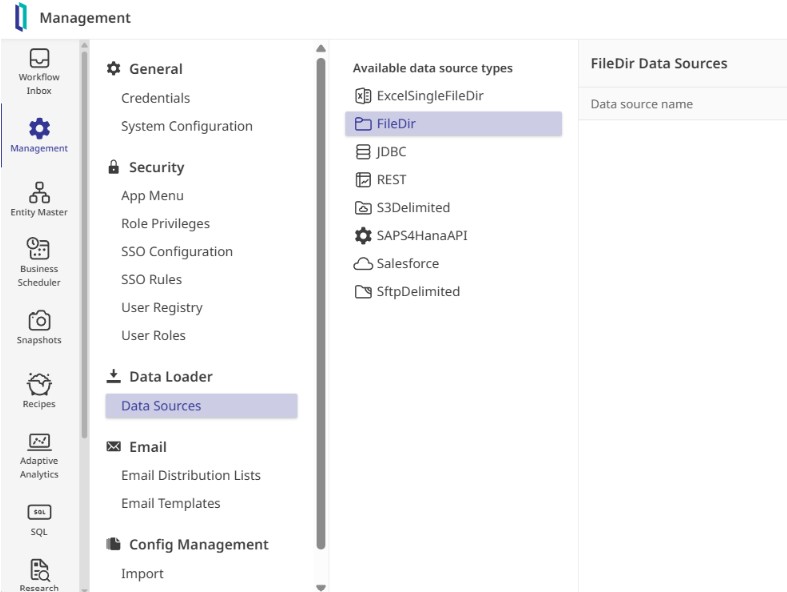
To see how it works, I stepped into the shoes of a system administrator, logging in with the provided credentials to explore the interface. The layout centers on a few core pillars: defining where data comes from, cataloging its structure, and building automated "recipes" to move it into production.
And the very first step is to establish a connection to my data.
If you’re new to InterSystems, check out the InterSystems Developer Hub.
Start working with InterSystems technologies — install InterSystems IRIS, connect to it, run something real, or try products directly in a browser-based interactive environment (no setup required).
If you’re wondering where to begin, here’s what you’ll find there: