Working with a list of Serial Objects over ODBC
Hi all,
I have a non objectscript application connecting to a cache instance via ODBC and one column is a list of serial objects. The output from the query contains a lot of special characters and I'm hoping there's a better way to get this data back so I won't have to perform extensive parsing on the application side.
I've tried using the $ListToString() function, but that didn't help much, probably because the list contains complex objects rather than primitives.
Any help will be greatly appreciated!
Comments
You can project collection property as a child table.
Property MyList as list of Object(STORAGEDEFAULT="array");
Note that it changes class storage, so existing data should be moved to the correct new place.
Several months ago I wrote a small utility class to accomplish exactly that.
Or if you don't have a lot of different classes and data dependencies, you can just export to XML, add STORAGEDEFAULT and import XML.
Then stored sql procedures/custom queries or result sets are the way to go.
You'll need to write a method that returns what you need and expose it to SQL via one of the abovementioned methods.
Thanks for the answer. Unfortunately, modifying this class isn't an option.
As Eduard mentioned there are a couple of different approaches, depending on what your needs are. Here are some simple classes to use as examples:
- PetOwner has a name, state and a list of Pets
- Pets has two properties: type and size
Class Demo.PetOwner extends %Persistent
{
    Property Name As %String;
    Property State As %String;
    Property Pets As list of Pet;
}
Class Demo.Pet extends %SerialObject

{
    Property Type As %String;
    Property Size As %String;
}
Running a simple query produces results with embedded characters and no easy way to parse the list of Pets:
SELECT Name, State, Pets FROM Demo.PetOwner
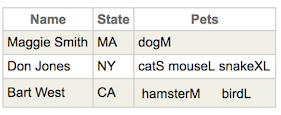
One option is to use a stored function to return a single value when querying a specific PetOwner:
/// SQL Function to get pet info
/// Return each pet info as a comma delimited string where type and size
/// are separated by ^
ClassMethod PetInfo(id As %String = "") As %String [SqlProc]
{
     Try {
         Set sc = $$$OK
         Set petInfo = ""
         // Quit if no id
         Quit:(id="")

         // Open the PetOwner
         #dim owner As Demo.PetOwner
         Set owner = ##class(Demo.PetOwner).%OpenId(id)

         #dim pet As Demo.Pet
         Set petCount = owner.Pets.Count()

         For i=1:1:petCount {
             Set pet = owner.Pets.GetAt(i)
             Set petInfo = petInfo _ pet.Type _ "^" _ pet.Size _ ","
         }

         // Remove trailing ,
         Set petInfo = $Extract(petInfo,1,*-1)
     }
     Catch(ex) {
         Set sc = ex.AsStatus()
     }

     Return petInfo
}
If PetInfo method is in the Demo.Test class, the stored function can be used like this to get a comma-delimited string of pet information where each component of the pet information is separated by a "^":
SELECT Name, State, Demo.Test_PetInfo(ID) from Demo.PetOwner
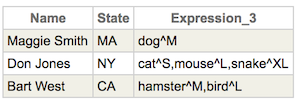
Another option is to write a custom class query that is called as a stored procedure to return the results as a resultset:
CALL Demo.Test_GetOwnersWithPetDetails()

The GetOwnersWithPetDetails method is in the class Demo.Test and information about how to write a custom class query can be found in the Caché documentation.
Class Demo.Test extends %RegisteredObject
{
/// Create a custom query to handle getting all pet info
/// Assume maximum of three pets per PetOwner
Query GetOwnersWithPetDetails() As %Query(CONTAINID=1,ROWSPEC="ID:%Integer,Name:%String,State:%String,PetType1:%String,PetSize1:%String,PetType2:%String,PetSize2:%String,PetType3:%String,PetSize3:%String") [SqlProc]
{
}
/// Query initialization code goes here
ClassMethod GetOwnersWithPetDetailsExecute(ByRef qHandle As %Binary) As %Status
{
Try {
Set sc = $$$OK
// Use a cursor to a query of the PetOwner table to the fetch method
// The cursor is a public variable!
// Declare the cursor
&sql(DECLARE DemoC1 CURSOR FOR
SELECT ID FROM Demo.PetOwner ORDER BY ID)
// Open the cursor
&sql(OPEN DemoC1)
Set qHandle=""
}
Catch (ex) {
Set sc = ex.AsStatus()
}
Return sc
}
ClassMethod GetOwnersWithPetDetailsFetch(ByRef qHandle As %Binary, ByRef Row As %List, ByRef AtEnd As %Integer=0) As %Status [PlaceAfter = GetOwnersWithPetDetailsExecute ]
{
Try {
Set sc = $$$OK
&sql(FETCH DemoC1 INTO :ownerID)
// Assume maximum of three pets per PetOwner
If (SQLCODE = 0) {
// Initialize pet variables in case some are null
Set PetType1 = ""
Set PetSize1 = ""
Set PetType2 = ""
Set PetSize2 = ""
Set PetType3 = ""
Set PetSize3 = ""
// Open the PetOwner with id from the cursor
#dim owner As Demo.PetOwner
Set owner = ##class(Demo.PetOwner).%OpenId(ownerID)
Set Name = owner.Name
Set State = owner.State
Set numPets = owner.Pets.Count()
#dim pet As Demo.Pet
If (numPets>=1) {
Set pet = owner.Pets.GetAt(1)
Set PetType1 = pet.Type
Set PetSize1 = pet.Size
}
If (numPets>=2) {
Set pet = owner.Pets.GetAt(2)
Set PetType2 = pet.Type
Set PetSize2 = pet.Size
}
If (numPets=3) {
Set pet = owner.Pets.GetAt(3)
Set PetType3 = pet.Type
Set PetSize3 = pet.Size
}
Set Row = $ListBuild(ownerID,Name,State,PetType1,PetSize1,PetType2,PetSize2,PetType3,PetSize3)
Set AtEnd = 0
}
ElseIf (SQLCODE = 100) {
Set Row = ""
Set AtEnd = 1
}
Else {
Set sc = $System.Status.Error(5001,"SQL fetch error: "_SQLCODE)
Quit
}
}
Catch (ex) {
Set sc = ex.AsStatus()
}
Return sc
}
ClassMethod GetOwnersWithPetDetailsClose(ByRef qHandle As %Binary) As %Status [PlaceAfter = GetOwnersWithPetDetailsExecute ]
{
Try {
Set sc = $$$OK
&sql(CLOSE DemoC1)
}
Catch (ex) {
Set sc = ex.AsStatus()
}
Return sc
}
}