Numeric Function in Rule Editor
I would like to know if there is a built in function that checks a value in the rule editor to see if it is numeric.
Comments
There's no default function to do it, but you can easily develop your own custom function. There's $IsValidNum ObjectScript function, which could be used to check that variable is a number. So something like this should work:
/// Functions to use in rule definitions.
Class Custom.Functions Extends Ens.Rule.FunctionSet
{

/// Returns 1 if a string is a number, 0 otherwise
ClassMethod IsValidNumber(string As %String) As %Boolean [ CodeMode = expression, Final ]
{
$ISVALIDNUM(string)
}

}It should:
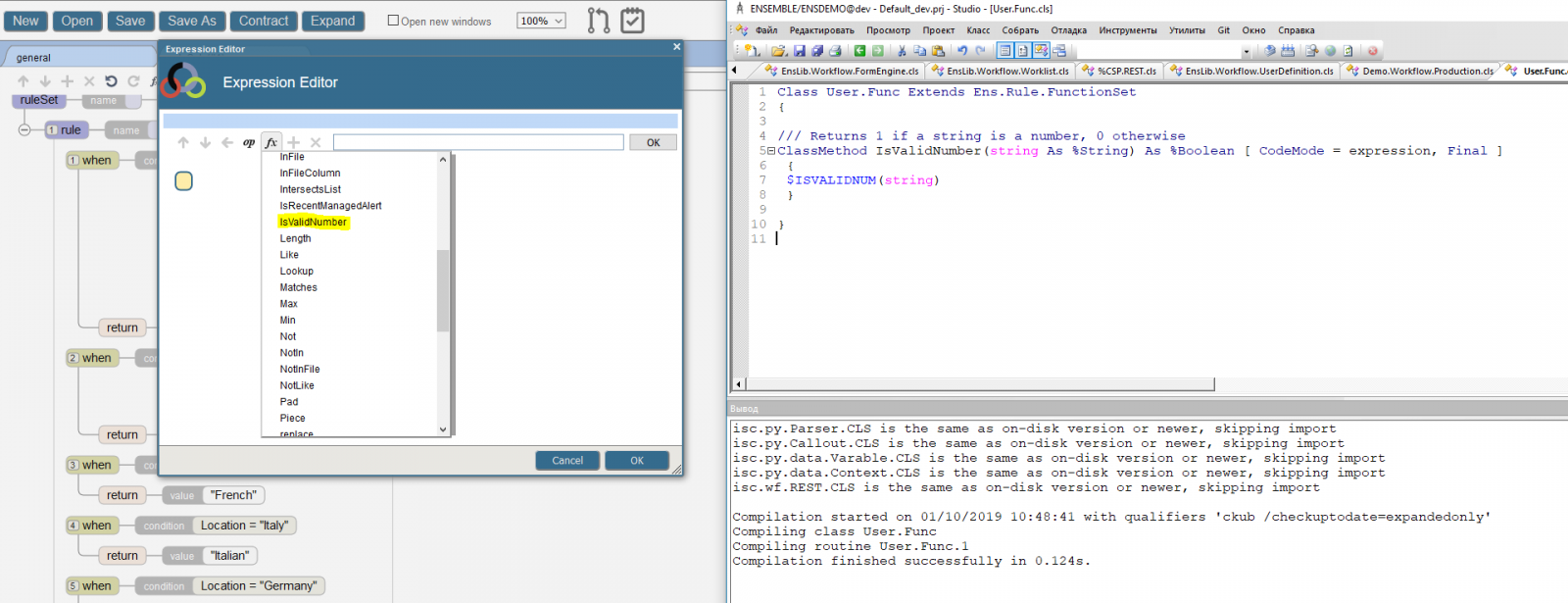
After working with InterSystems I was able to find what I was looking for by using the Matches function. The pattern I'm using is "1.N".
I'm curious about this
set tFullValue = $EXTRACT(tNumber,1,$length(tNumber))in what cases tFullValue is not equal to tNumber?
Also after 2014 you can use * to denote last char like this:
set tFullValue = $EXTRACT(tNumber,1,*)The ClassMethod IsNumeric(...) seems to contain three SET statements that do nothing more than copy data around. The following is equivalent (without data copies)
ClassMethod IsNumeric(value As %String) As %Boolean
{ QUIT $ISVALIDNUM(value) }
And this implementation of IsNumeric is equivalent to the first answer, ClassMethod IsValidNumber(...) by Eduard Lebedyuk except the IsNumeric ClassMethod does not have the [ FINAL ] attribute.
Shouldn't IsValidNumber appear as an option in the drop down list of the Expression Editor?
I didn't originally write the code but it works. My guess is my teammate who wrote it was trying to compensate for partial values, as in decimals.
tFullValue should be always equal to tNumber regardless of tNumber value.
write $l(2.1)

>3Here is a method we built for our use.
ClassMethod IsNumeric(value As %String) As %Boolean
{
//Load value into local var tNumber
set tNumber = value
//Use $extract to get the FULL VALUE into an internal format for $isvalidnum
set tFullValue = $EXTRACT(tNumber,1,$length(tNumber))
//Use $isvalidnum to check if the full value is numeric (ex: 123456789 = true, 123456789x = false)
set tNumberIsValid = $ISVALIDNUM(tFullValue)
//At this point, we simply return tNumberIsValid (it will either be 1, true or 0, false)
quit tNumberIsValid
}