IIS - Not invoking .cls
Hello,
I have problem to get working my web application in IIS. On apache just works fine.
I had an app in wwwroot called test, there is index.html file where is tag
<body onload="document.location='/test/app.start.cls';">When I do localhost/test. Then my application works just fine.
I have created second one in management portal called /mobile
mobile is in wwwroot/test/mobile where is the same index.html with tag
<body onload="document.location='/mobile/app.mobile.start.cls';">When I do localhost/mobile I got HTTP Error 404.0 - Stream Not Found
| Requested URL | http://localhost/mobile/app.mobile.start.cls |
|---|---|
| Physical Path | C:\inetpub\wwwroot\test\mobile\app.mobile.start.cls |
Class app.mobile.start extend app.start and app.start extend %CSP.Page.
When I do localhost/mobile/app.start.cls and then localhost/mobile/app.mobile.start.cls then its works. If I do first localhost/mobile/app.mobile.start.cls then again I got 404.
Comments
Hi
If I had to guess I would say that in iis you have an app defined /test that is tied to the web gateway.
In your example that doesn’t work you are redirecting to a path /mobile/…
I would guess you might not have an app defined under your /mobile path that is tied to the web gateway
Hello,
Basically both WebApplications has same setting. Difference is only path to fysical folder in server.
/test
- Physical Path: C:\inet\wwwroot\test
- Package name: csp
- Auto Compile, Lock CSP Name
- Event Class: test.session.cls
- Type: CSP/ZEN
/mobile
- Physical Path: C:\inet\wwwroot\test\mobile
- Package name: csp
- Recurse, Auto Compile, Lock CSP Name
- Event Class: test.mobile.session.cls
In IIS both are created under Default WWW as an application.
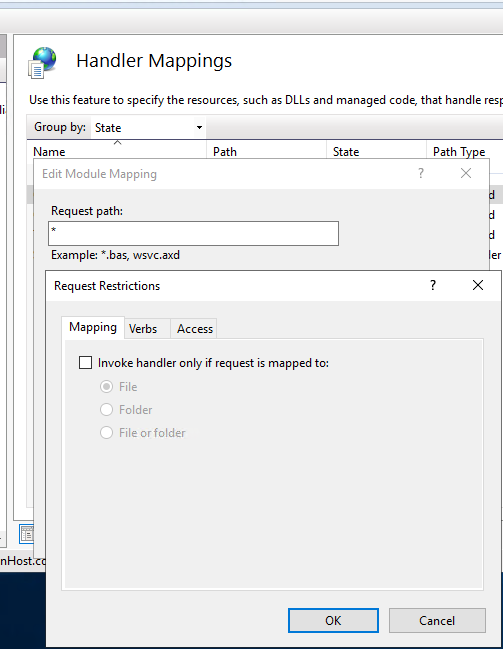
I might be barking up the wrong tree, but do you have your request restrictions for the module mapping in IIS set as you need?
I have found in the past that it defaults to only invoking the handler if mapping to a file which has then stopped things working for me: